❄️ Dominate your CPU temps with style and silence — the Cooler Master V8 GTS is the ultimate cooling flex!
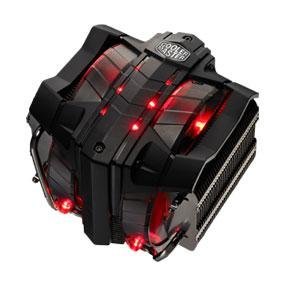
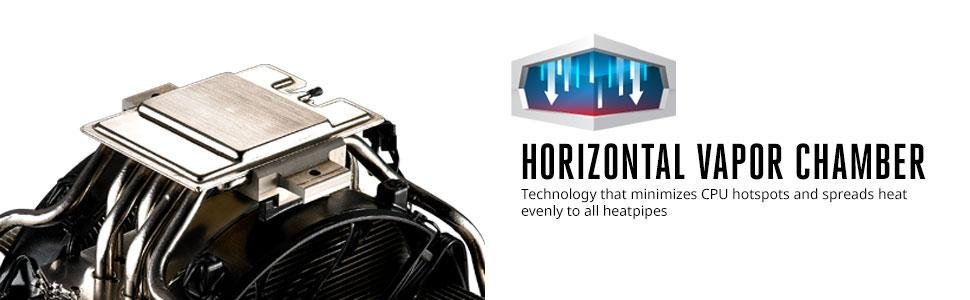
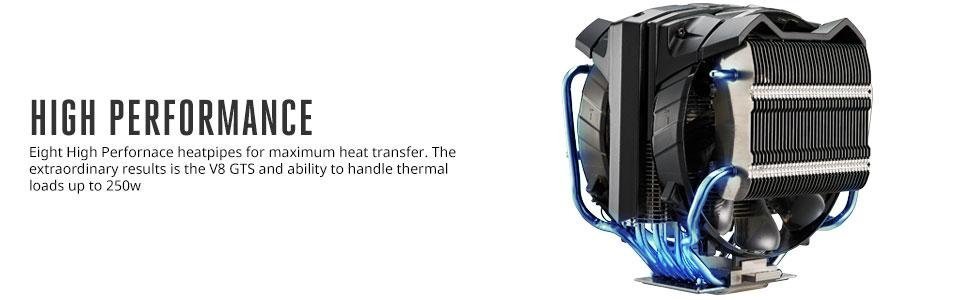
The Cooler Master V8 GTS is a high-performance CPU cooler featuring advanced horizontal vapor chamber technology and 8 heatpipes that evenly spread heat to prevent hotspots. Equipped with dual 120mm PWM fans boasting red LEDs and 4th generation dustproof bearings, it delivers powerful 82 CFM airflow at a whisper-quiet 36 dB noise level. Compatible with a broad range of Intel and AMD sockets, this triple tower cooler combines aggressive aesthetics with reliable, long-lasting cooling performance, making it a top choice for gamers and professionals seeking to keep their CPUs cool under heavy loads.


| ASIN | B00E0EXYDC |
| Air Flow Capacity | 82 Cubic Feet Per Minute |
| Best Sellers Rank | #12,492 in Computer CPU Cooling Fans |
| Brand | Cooler Master |
| Brand Name | Cooler Master |
| Compatible Devices | Desktop, Graphic Cards |
| Cooling Method | Fan |
| Customer Reviews | 4.5 out of 5 stars 523 Reviews |
| Global Trade Identification Number | 00884102021039, 04719512041864 |
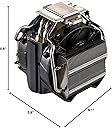
| Item Dimensions L x W x H | 6.6"L x 5.9"W x 6.1"H |
| Item Weight | 2.5 Pounds |
| Manufacturer | Cooler Master |
| Material Type | Plastic |
| Maximum Rotational Speed | 2800 RPM |
| Model | RR-V8VC-16PR-R1 |
| Noise Level | 36 Decibels |
| Number of Items | 1 |
| Part Number | RR-V8VC-16PR-R1 |
| Power Connector Type | 4-Pin |
| Product Dimensions | 6.6"L x 5.9"W x 6.1"H |
| UPC | 012304992790 884102021039 779177168911 |
| Unit Count | 1.0 Count |
| Voltage | 12 Volts |
| Wattage | 3.72 watts |
G**G
Quiet, Effective, Stylish
This is *the* best fan-based CPU cooler you can buy. Look, other coolers work pretty much just as well as this beast for less money like Cooler Master's own Hyper series, but you're not here for a budget cooler that just keeps your CPU a bit colder, are you? You're here because this thing looks incredible. Which it does. If you ARE here for a budget cooler, leave and take a look at the Hyper series. It's much more practical. This thing isn't supposed to be practical, it's supposed to be awesome. But enough rambling without actually saying anything other than "this cooler is awesome". Details! It's huge. Honestly, just ridiculously huge. Fortunately, it is designed so well that most motherboards won't have any issue with it at all. They raised the fans and heatsinks so it doesn't actually block stuff like your RAM. Other coolers that aren't even as big don't fit as well as this thing does. Be wary, though...some mid-tower cases may not fit this due to it's sheer height. I have a full tower case and have a few inches of room left to work with before it hits the side of the case. It's quiet. Honestly, just ridiculously quiet. More quiet than stock Intel coolers due to the massive size of the 2 fans. That was a concern of mine, since my computer tends to be near-silent and I wanted to keep it that way. This will not add noise to your case. Even when going at full speed which, incidentally, isn't that fast because it doesn't need to be, it is still pretty much whisper quiet. Wonderful. It's beautiful. Honestly, just ridiculously beautiful. I love the engine inspired design that doesn't get in the way of functionality. Many CPU coolers lack a nice design style, which is why I did plenty of research before purchasing this. I don't want a lump of shiny metal on top of my nicely painted motherboard! I want something that meshes well with it and doesn't stand out against the rest of the system in terms of lacking quality detail and design. So there you go. This thing is great and works like a champ. Cooler Master's products have always impressed me, and this is no different. If you're looking for something even slightly discrete or just want the same function for a lower price, check out the Hyper series. Otherwise, get this. You won't regret it! The image of the Intel cooler is for a size comparison so you know about what to expect.
K**E
Works great, but proceed with caution.
I built my machine to be able to run most games at max settings while being 100% air-cooled. No issue with that and it runs like a champ. GPU stays at a stable 35-40C under load and the CPU rarely went above 50C. Stock CPU cooler as well and no overclocking. However, I recently undertook a project that required a substantial amount of processing power and the need to convert video files from one format to another. When converting a file, my CPU (FX-8320) started spiking to around 70-72C under load. Not critical, but very hot considering it never got anywhere near that when performing any other tasks. So I started hunting for a new cooling rig. To begin with, when I came across this monster, I fully expected that there was a chance it would not fit. I'm running inside a Rosewill Blackhawk and it's a mid. As it was, it was very manageable. But the V8 is huge, so I'm going to point some things out to prospective buyers. -If you have a mid tower, there is a high probability that this will not fit. -If you have a mid tower, depending on which kind you have, You may be able to get it to fit with some minor modifications to your case. -I managed to get it installed, but the effort required was substantial. I had to cut out the grate on the top of the case and remove 2 fans (no longer necessary) in order to even have a chance at tightening the top bracket screws. -Installing using the AMD bracket is a pain. The screws connect directly to the backplate, so you have to hold the plate while trying to get the screw threads started on the other side, which is only more difficult if you're working with limited space to begin with. -I'm running an Asus 970 Pro Gaming Aura and it is covered in heat-sinks. If your motherboard is also covered in heat sinks, be prepared for a tough time getting to the screws or consider a smaller cooler. Now, with all that said, it works beeeeautifully. Even runs quieter than it did before (probably because of the two fans I removed). Under max load while performing the same tasks that were pushing it over 70C, I now barely touch 40C under load. It also idles around 20C now compared to my previous average of 32C. With roughly a 40% reduction in load temps, I will say the effort was well worth it, but I'll probably be upgrading my case in the near future.
L**S
Awesome cooler!
LOVE this cooler! I have an NZXT Phantom 410 mid tower case and installed it on a Gigabyte 990fx-Gaming motherboard with an AMD 8350FX CPU. The box comes with bracket and installations parts for both AMD and Intel-you just choose which parts you need based on your rig. Like others have pointed out, it is quite large and I'd highly recommend installing this outside of your case. For AMD, it comes with two sets of brackets to choose from. The longer set allows you to orient the cooler to face frontwards. I chose that orientation The install took about 35-40 mins, but I wasn't really rushing. The box comes with a small wrench device for screwing bolts onto the brackets. I was able to squeeze my fingers in to tighten 2 of the 4 bolts, but the wrench was needed to fully secure them all. If you have a small child or spouse with tiny hands, they could prove VERY helpful in this installation. Once I got the cooler on the motherboard and screwed it down into the case, I had to take the board out again because I wasn't able to fit my hands in to connect the 8 pin CPU connector or the front panel connectors (reset, power LED, etc). If you are putting this into a mid tower case, you may run into this issue as well (unless you have tiny hands or a small child you trust). I'd advise plugging in the CPU connector and front panel connectors outside of the case like I had to do. If you are using a Gigabyte 990fx, that board came with an adapter piece allowing you to plug the front panel connectors into it, then plug that directly onto the board. That made things a bit easier. On my mid tower case, the cooler is VERY close to the window, but everything fits. Overall, it looks mean as hell in my case and wasn't too difficult to install.
J**J
It was worth it despite the headaches...
I wanted to give this 5 stars, but I also wanted to give it 3... Pros: -- Keeps i7 7700k at mid to high 20's at idle, and mid 70's to 80ish at load using MX-4 thermal paste...good enough for me! -- Looks like an engine Cons: -- Looks like an engine -- HUGE, make sure you are aware of just how massive this is. I was able to fit a corsair dominator platinum underneath it (barely) but this was in the second RAM slot. I would not be able to use 4 sticks because of this thing. --Believe what people say about the glue. They have it globbed on in certain spots that make it impossible to get the nut on the base to screw it down to the mobo. I had to use a razor and slice half of it off to get the nut to fit. --One of the 'radiators' was bent/crooked...it was making a faint noise/rattle but I think i fixed it by playing around with it --Will cover your first pci x16 slot This was installed on an MSI Titanium z270 mobo, and let me tell you how much a pain in the **** this was. Because of the 'armor' on this mobo, it made it EXTREMELY difficult to get a tool in there to screw it down evenly; I had to do it twice. First boot I was getting 40+ degree idle temps which was way too high. These chips supposedly run hot to begin with but that was too much. So I reapplied thermal paste, got it seated properly, and the rest is history. Just prepare to do some work with this puppy if you decide on it.
J**T
READ THIS before buying!
Ok, I rarely leave reviews, so this is totally a legit review. My setup consists of the ASUS 990FX R2 MB and AMD FX 9370 processor. If you know what that is, it's a beast of a CPU that puts out extreme heat compared to others. I was using an Arctic Freezer cooler only rated at 200W cooling capacity where my current CPU is a 220W so my cooler was under rated. I blame that on the person who recommended it to me. It's important to check your cooler's requirements to make sure it handles the wattage output of your CPU. The Cooler Master V8 GTS is rated for 250W so it is more than enough cooling capacity for my CPU. Now, many will tell you that this CPU requires liquid cooling to keep it cool, even under extreme stress testing using Prime95. That's completely untrue. I did extensive research, and I do mean extensive, before purchasing this Cooler Master, and after swapping out coolers, my CPU went from a previous 35 Celcius at idle to 1 degree Celcius at idle using this Cooler. That's a huge difference! The reason I bought a new cooler was because I was having random shutdown issues, sometimes at night while I was sleeping, I would wake up the next morning and computer would be off and would be hard to reboot, and it was very hot. I ran stress tests and discovered that the previous Arctic Freezer cooler I had was not keeping it cool enough and was causing emergency shutdowns due to overheating CPU. After installing the Cooler Master, not a single issue and runs cooler than most expensive liquid coolers on the market. Please be careful to check your case size before installing this. I purchased the Thermaltake Chaser A41 http://www.amazon.com/gp/product/B00BUX8NVE?psc=1&redirect=true&ref_=oh_aui_detailpage_o04_s00 and it is nearly 10 inches wide, which only leaves an inch or so of space after installing this cooler onto your motherboard. The cooler is rated at 6.6 inches, but after putting it on top of a CPU and motherboard, you are losing a lot of space, so you MUST get a case at least 9.5 inches wide for this to fit and allow some airflow in the case. This cooler is enormous, bigger than you think. The size of a pineapple at the grocery store. It will clear most RAM, I use Corsair Vengeance and still have plenty of room above it to remove the stick. Attached are some photos before and after installation.
H**A
This review is lengthy but worth the read if you like learning. It's a CPU cooler/heat sink and it ...
This product is very impressive so I decided to write a quality review. This review is lengthy but worth the read if you like learning. It's a CPU cooler/heat sink and it does a monster job! Even at peak loads while multitasking and gaming with my rig (GA 990FX Gaming motherboard, AMD FX 8370 overclocked @ 5 Ghz, GTX 970, 32GB DDR4 2133 RAM, 1200W Cooler Master power supply, Samsung M.2 512 960 Pro SSD, Windows 10 Pro) the temp never even gets warm. I will also add some side information and a picture which I hope helps answer questions people may have, enjoy =] PROS: It's the best "air" cooling device I've owned, simply incredible performance for the price. easy 30 minute or less installation if you have patience and competence. Comes with a giant bag of everything needed to mount on many different chip sets/builds. It looks really cool, red lights everywhere and clear-ish dual fans spinning away lit up by the red lights. Surprisingly quite. I had to take off my headset, close all the doors and listen carefully to see just how much noise it makes and I barely hear it even with the tower is right beside me on the top of my desk. Also notable is that the heat sink fins are much thicker, larger and durable than the 1st gen V8 (approximately 2-3 times as thick). This means there is more "thermal mass" to aid in radiation of heat. The fins are also separated MORE than the 1st gen, which means there is more room for thermal resistance between the fins. There are also TWO fans now instead of one. The most notable feature of the two fans is that they have 4th gen bearings which last much longer and are "dust proof". My 1st gen V8 lasted 8 years before the 120 x 120 x 25 cooler master fan seized and I ran it full throttle all 8 years :D pretty impressive.... CONS *some of these are not "bad" but are notable as advisory: IT"S MASSIVE. I replaced my previous V8 first gen. heat sink with this one. You can see in the photo that it is MUCH larger than the 1st gen V8 (bought in 2008). SO, be sure you have a tower that can accommodate this beast if you want your system sealed after install. I HIGHLY recommend that your motherboard be REMOVED from your tower and this device installed AND PLUGGED IN to the "CPU FAN" outlet before reinstalling motherboard. I would also note that on certain motherboards, one of the four corner mounts will be impossibly difficult to fasten down with their "wrench". I had to bend the wrench neck to about '60 to fasten this bolt due to the motherboard's heat pipes/heat sinks in that area. THE INSTRUCTIONS are a joke. If I were a basic user, I would be very frustrated with these instructions and be left with several questions. There are FOUR short sentences and they are poorly written. They also have pictures which are microscopic and don't help at all. Also, there is a thin plastic sticker on the contact surface that needs to be removed before installation so you don't melt it or possibly turn your system into a fireball. The sticker reads "WARNING Please peel off label before you use it" LOL I don't know what they think I'm going to use the label for.... perhaps as a study guide for learning English :D. I hope this information and picture help you make an informed decision on your purchase. I was born and grew up in the Silicon Valley, CA and am well versed in all computer matters. Bought my first computer in 1983 and have come a long way =] As a whole I give this product 10/10 for FUNCTION. I can care less about their mishaps on the instructions, mounting design, "wrench", etc as they are irrelevant to this device's FUNCTION. I rarely give a product 10/10.
R**L
Rivals traditional liquid cooling & looks great!
I built my own computer in June 2015 and I got this to cool the CPU. It's quiet (the GPU fans & stock case fans are louder, so I can't tell if it even makes noise) but I initially intended to keep it until I installed custom liquid cooling (with the tubing and all). However, this (plus the fans in my case) keeps the CPU at temps around 34 C when using low load programs and not much above 40 C on some of the higher stress. Since that rivals liquid cooling, I'm keeping this instead. In the year or so that I've had this, there have been no issues. Performance aside, I have a clear cutout in my case, so I see what looks like the heart of my motherboard. I also have various LED colors that I can use on the case, so not all of the colors "match" but I love having the red chamber. Obviously I purchased this particular model because of the aesthetics, but it turned out to work better than expected. It is a little cozy of a fit in the computer, so depending on your motherboard and case, it may be borderline too big. I may have to remove and reinstall the thing to change out RAM that is next to the CPU. There are slants that allow it to clear just fine, but actually inserting RAM could be challenging.
L**G
Best investment for your CPU!! Works great!
January 1st. - I purchased the Cooler Master V8 GTS CPU cooler for my new gaming computer I recently built and I have to admit is the best choice I could've made as far as CPU coolers. The provided instructions for installation were very easy to follow with a lot of web support as well. The installation to the CPU was not difficult and everything lined up as it was designed. I wanted to get the most out of it so I used it along with ARCTIC MX-4 thermal paste (link below) which is also a great product. ARCTIC MX-4 - Thermal Compound Paste, Carbon Based High Performance, Heatsink Paste, Thermal Compound CPU for All Coolers, Thermal Interface Material - 4 Grams 04/29/2018 - I've had this CPU cooler keeping my Intel I7 - 8700K cool while gaming as if I was simply browsing the internet. It has a very quiet design, even when I'm playing at very high quality settings, it stays quiet while keeping the CPU cooled. This is a great investment if you are planning on a new build, or upgrading. Just make sure you have room in your case to house it. If you care about your CPU, don't go cheap on the cooling and get this high performance cooler, you will love it! Update 9/17/20: I've been gaming an average of 5-6 hours a day since I built my PC with this cooler and I can honestly say that I am more than pleased with the investment and I can assure you that you will love it as much as I do. Luis G.
N**M
So far better than my liquid cooler
First off like all the other reviews, this cooler is huge! About the size of a regular coffee can. Installed this on a I5 9600k and it does a great job and looks great. I ran a couple of stress tests and to my surprise it does a better job than my Corsair H80i liquid cooler. It idles 5c cooler that the h80i and topped out at 56c on my stress tests.
H**I
Can't go wrong with this one!
It was a pain to install it because there wasn't much room in my case to move my hand around in. Once installed, it does wonders; keeps the CPU relatively cool under heavy performance and I have yet to hear any fan noise. Very happy with the purchase!
C**L
Love it
Its an excellent cooler. Beware, its huge and you must take MB out of case to install. All in all install was easy if you have experience. It moves a ton of air and is keeping my Xeon very cool. Nice lights and fairly quiet. Better than water cooled in my opinion.
M**N
not a bad choice at all
rating 4 star because its a pain to install , I was looking for a cpu cooler and we had 3 options , air cool , aio water cooled or custom loop water cooled , its my 14 year old son that is building our rig and he didn't want to do custom made water cooled for his first build and between aio water cooled and air cooled there is a few difference , first most aio water cooled are better than air cooled but not all and this one beats quite a few aio water cooled , in air cooled the only problem you can encounter is the fans not working , in aio water cooled you can have leaks yewww fan can stop working or issues with radiator so more potential problems , second this is not the best air cooled cooler but we decided to make a compromise for having a great look , unless you are planning to do extreme overclocking this can get the job done quite well , the look is great and the price decent
A**T
Schöner Kühler
Der Kühler ist sehr schön an zu sehen und passt gut in ein Gamer Gehäuse. Das verbauen war recht okay, nur die Beschreibung ist wohl als scherz zu sehen? Wär noch schön gewesen wenn mann die Farbe der Beleuchtung hätte ändern können, aber so ist auch okay.
Trustpilot
2 months ago
2 weeks ago