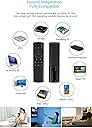
🎮 Elevate your media control game—voice, air mouse, and freedom in one sleek remote!
The Universal Nvidia Shield Remote G20 combines voice control, a gyroscope-powered air mouse, and ultra-low power consumption in a compact, plug-and-play design. Compatible with Android TV boxes and media players, it offers precise cursor control without needing to point directly at the screen, making it perfect for seamless home entertainment or professional presentations.


| ASIN | B07NNWRG3B |
| Additional Features | Due to the built-in gyroscope of the air mouse, it can sense the change of direction and speed. As long as the mouse is waved in the air, it can precisely control the cursor movement of computer, android player and other electronic products. Traditional keyboard and mouse are not needed, which greatly frees the hands and increases the fun of use! With it, you can sit on the sofa can also control t… |
| Battery Type | Alkaline |
| Best Sellers Rank | #1,400 in Computer Keyboard & Mouse Combos |
| Brand | Huafeliz |
| Button Quantity | 5 |
| Color | black |
| Compatible Devices | Television |
| Connectivity Technology | Bluetooth |
| Controller Type | Air Mouse & Voice Control |
| Customer Reviews | 4.0 out of 5 stars 1,855 Reviews |
| Item Height | 0.63 inches |
| Item Weight | 0.06 Kilograms |
| Manufacturer | Huafeliz |
| Maximum Number of Supported Devices | 1 |
| Maximum Range | 10 Meters |
| Model Name | G20 |
| Model Number | G20 |
| Number of Batteries | 2 AAA batteries required. |
| UPC | 730253482369 730253482376 |
L**T
A Fantastic Remote for the NVIDIA SHIELD TV Gaming Edition
I purchased this for my "NVIDIA SHIELD TV Gaming Edition" tv box, which came with an original remote control and a gaming controller. However, the original NVIDIA shield remote control (that came with my shield) is a bad design when it come to volume control because it is TOUCH SENSITIVE. Even though they attempted to reduce the inadvertent touches by receding this volume control into a grove at the bottom of the remote, I found myself inadvertently touching it too often, which would either pause the YouTube video (I was watching) or unintentionally change the volume. When I found out that the newer NVIDIA shields had a different remote control, that doesn't have this flawed volume functionality, I said to myself "Oooh, I want that!", but when it looked it up online, the price for that newer model's remote was ridiculous. So, I bought this remote instead. I love this remote! I puchased the one without the keyboard on the back. I've had just about every tv box made, and out of all of them, I like the Roku's remote control the best, and I liked the Apple TV's remote the least. This remote control is very much like the Roku's to me. I can grab it and do everything I need to do without looking at it; I can feel what I need with my hand alone (no eyes). It is way better than the original NVIDIA shield's remote. Even the microphone works, and it has this additional button where you can toggle onto the screen a mouse-cursor which can be controlled by moving this remote in air. I don't use that much, but I think is pretty cool that you can toggle it off and on using a button that's on this remote. The only thing, that would have been a little nicer, would have been if the remote control operated over bluetooth instead of a low-profile USB dongle. This is exclusively because the NVIDIA Sheild only has two USB ports and I already have one of those dedicated to a 256GB thumb drive that increases the storage capacity of my Shield. Luckily, I had an old USB 2 expansion hub available that I wasn't using for anything else. I was a little apprehensive using it instead of a USB 3 hub, but for me it doesn't matter: the only thing I used my one remaining USB port for is charging the game controller, which doesn't require USB 3 speeds. I may upgrade to a USB3 hub ultimately ( if I ever find myself doing more file transfers, which can use the extra speed). I plugged in this USB 2 hub and then plug this remote control's dongle into it, along with my game controller. When I did this the game controller buzzed like normal, indicating to me that it was charging as usual. So, this isn't a big deal; I wanted additional USB ports anyway. Lastly, setup was as easy as it gets: 1) plug in dongle, 2) install two AAA batteries (not included). After this, it immediately worked. I recommend buying this. Its a good value.
D**E
Updated: Pairing is tricky, but remote now seems great
On my system, I had to hold the OK and Back buttons simultaneously for over 60s to finally get it to pair. It may have also helped that while pairing I had the remote and the dongle less than 4ft from each other. I will say that the functionality so far seems better than the original shield remote (e.g., it's an absolute delight to have actual buttons for the volume now instead of the old gimmicky slider). Voice input, mouse pointer, and all of the buttons seem to work. I am glad I worked through the setup issue. Previous Review: My shield is model number P2897 and I am running version 8.01 of the OS. I also have the version with the dongle, so this isn’t a Bluetooth issue. I am not sure where the issue resides, but the shield does not respond to the remote in any way. I’ve tried both USB ports for the dongle, have rebooted the shield with and without the dongle, and have followed the directions which say that on failure to pair, you may need to press the Ok and Back buttons simultaneously. I’ve also explored the shield’s setting and there is simply no recognition of the remote.
M**Y
This Remote Does Work Well With Nvidia Shield!!...UPDATE JULY 1, 2019
I thought I'd try this solely based on the others reporting it worked well with the Nvidia Shield. I'm pleased to say it's true. I did have to tell the system to forget all about the Shield remote first - it still thought it was running the show, but then this rmote took over all the functions and more. All apps, movies, Kodi etc., work with this remote. Love the pause and volume buttons, return and home work too! The mouse pointer bugged me so I shut it off. This is not a high quality item, all plastic and buttons are a little noisy, but this bad boy works. UPDATE: JULY 1 2019. While the remote does work fine, you have to be sure to point it in a direction the USB dongle can recognize it. Otherwise they dont connect and nothing happens. I can point at the ceiling, off to the left or right but sometimes it's hit and miss. Of course if you are close to your device you can point right at it and it will work, but I'm not that close. It's a bit annoying but is not a deal breaker
A**O
Worst remote I've ever purchased.
The buttons get stuck constantly, so for example if you click "right" or "down" it just keeps repeating instead of moving just once. The same problem happens on ALL buttons. And I'm not talking about just an occasional annoyance, but it makes using the remote impossible to control. I purchased the remote brand new, and the problem started after about a month of occasional use. Update: Seller reached out to me to assist after my review. While I was unhappy with the remote as my review indicated, the seller's desire to resolve the matter is appreciated, especially since return window was expired.
M**O
Great replacement for Nvidia Shield TV remote!
After severe disappointment with the standard remote that ships with the Nvidia Shield TV (Bluetooth issues, battery issues), I ordered this remote and I could not be any more pleased! I love that it takes aaa batteries vs those dumb circle ones. I love that it has an mouse pointer feature which the remote that comes with the Shield does not. It was as simple as plugging in the wireless usb receiver into a usb hub I have connected to my Shield and that was is. Full functionality with additional features beyond the Shield remote with ZERO issues in connectivity or lag. Even then voice function works much better than that of the original remote. Best purchase I've made in a while. Strongly recommend if you need a replacement remote for your Shield TV!
S**H
IR learn only for Power button. Voice not work. Slippery. Cheap, but usable enough for Shield or PC.
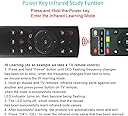
Wanted a better, more practical remote than the OEM remote that comes with the 2017 Nvidia Shield...i can't stand the touch volume on that remote, nor how thin it is. This 3rd party china remote, It says "IR Learning"....yes, for POWER button ONLY. Which is useless for me as, un-programmed, it just sleeps my Nvidia Shield, which, thanks to CEC Power Control, auto turns of/on my older Vizio tv anyway. There is NO way to program this remote for IR Volume control, which is very odd as it has the hardware, the capability for power button, so why not have it do Volume as well???? (for some reason, CEC Volume does not work with my Shield and Vizio tv) Voice control on my Shield does NOT work! I pulls up the GA bar when i press the Mic button, but it can not hear anything...it is using the OEM Shield remote mic only. So, either this 3rd party remote has no mic at all, or, it is broken. The "manual" if u can call it that, is very bad incomplete English... The remote itself, well, for $10 what u expect, not much. It is not quite as cheapy feel as I had expected, but it sure is clear its a China cheapy. The dongle, is fragile. It is quite slippery in the hand...might want to stick some anti slip black tape on it...can get at hardware store. Range appears to be decent. On a Windows 10 PC, it works fine for use as a media remote control with software like Emby or Plex. Wish there was a model just like this style, but with backlight and IR Vol ability.
K**I
Awesome Replacement for Nvidia Shield TV Remote!
I bought this after my kids bent the official Nvidia Shield TV Remote in the couch (gen 1). I was so bummed to find out they cost about 70 bucks to replace. At that price point, I would consider a new Nvidia Shield since I've had since 2015 (2019 now). I gambled on this and won. Dedicated volume buttons. Mute button. Mouse....haven't figured out a use yet....maybe faster typing in Kodi. All the buttons seem to work as desired (microphone too). There is a menu button that indicates it was pressed, but nothing seems to come up. I don't think many apps have a use for it. Distance works good from TV. I even programmed the power button (I think it is the only programmable button) via my TV remote to use the power button for actual TV power. I only need this remote now and not 2 to control things. Satisfied customer, I'd even call it an upgrade. Price is awesome! You lose the aux jack. Buy it if this is your reason. Hope an update doesn't brick it ever.
J**E
This is What the Nvidia Shield should have been shipped with.
We purchased the Nvidia Shield Pro and it is amazing and great. However, it ships with one of the worst remotes I've ever seen. It's impossible to replace the batteries and the buttons are arranged in an illogical manner. This remote is everything I expected the Nvidia remote to have. It also can function as a mouse pointer in the Nvidia system. It's really good. I also like the forward and back buttons that move forward or back in 10 second intervals. The best part... this works perfectly right out of the box. It's an excellent remote and well designed. It is also comfortable to hold in your hand. Love it!
Trustpilot
1 month ago
2 months ago