





TF03XL
Product ID: 150315909
Details
- Battery Capacity3630 Milliamp
- Battery Cell CompositionLithium
- BrandSWEALEER
- Number of Batteries1 Lithium
- Recommended Uses For ProductLaptop
⚡11.55V voltage
🔄Up to 500 recharge cycles
🔋3630mAh capacity
Buy anything from 5,000+ international stores. One checkout price. No surprise fees. Join 2M+ shoppers on Desertcart.
Desertcart purchases this item on your behalf and handles shipping, customs, and support to Philippines.
🔋 Power your productivity, never miss a beat!
The SWEALEER TF03XL is a high-capacity, rechargeable Li-ion Polymer battery (3630mAh, 11.55V) compatible with multiple HP Pavilion 14, 15, and 17 series laptops. Certified for safety and stability, it supports up to 500 recharge cycles and comes with a 12-month warranty and dedicated customer support, making it a reliable upgrade for professionals seeking extended laptop runtime.


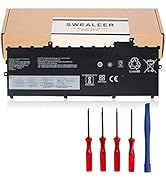
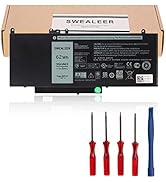


| ASIN | B07VK2YP77 |
| Batteries | 1 Lithium Polymer batteries required. (included) |
| Best Sellers Rank | #469,145 in Electronics ( See Top 100 in Electronics ) #11,025 in Laptop Batteries |
| Customer Reviews | 4.1 4.1 out of 5 stars (390) |
| Date First Available | April 21, 2019 |
| Item Weight | 6.3 ounces |
| Item model number | TF03XL |
| Manufacturer | SWEALEER INC Shenzhen Iselection source electronic technology co.,LTD |
| Package Dimensions | 8.78 x 5 x 1.1 inches |
J**C
Seems to holds a longer charge...
As with any device, the first time it is worked on, all of the secret screws need to be found. Once that is done the install was easy. It appears to hold a charge longer than the original. It is still too soon to evaluate the battery life, but all in all it is working great at this time.
A**Y
Great so far
The battery is great so far, didn't get any errors from the laptop and the included tools made it easy to remove the old one and install the new one. On my hp pavilion laptop 14-bf108ne it works fine. Battery life is around 3 to 4 hours, not as long as the original but the original battery degraded very fast anyway. Of course long term performance still to be tested.
J**.
Less life per charge than oem battery
Battery life don't last as long between charges as the oem battery did. Easy to install if you watch a how to video. Priced fair. John T.
L**H
Easy Install
This battery seems to be working perfectly, but I'm reserving giving stars on the Battery Life section until more time has passed. So far, so good for the battery itself. If you want to read on, I've included some general tips. I was not happy when I realized long ago that I did not have an easily-removable battery in my HP Pavilion. This was even more frustrating when, after only two years, the battery was completely useless. I was glad to find a replacement. This kit comes with minimal tools to get the job done. I suggest anybody who sets out to replace an internal battery like this get a good tool kit with things to pry your case open without damaging things. If you don't have prior experience, it's best to look for instructional videos for your machine. Rule #1 is to always ground yourself when you're working on your machine. Another important thing is, there are often hidden screws. I found mine under the rubber "feet", which I had to re-affix. Another interesting thing I noticed is that the hard drive ribbon/connector runs underneath my battery, to help hold it in place. When I removed my battery, the ribbon popped up, and I had to re-attach the hard drive to the board. So... watch out for the "3D of things" when you start taking things apart so you assemble things properly. One more important thing... Before you screw the case back on, ensure your work is complete. Carefully check to see that your machine boots up properly. Once you shut back down properly, you can put the casing back on.
A**R
Do not buy this battery!
I followed the instructions for the new battery charge and use procedure. The thing never went to 100% charge, but displayed 92-93%. Shortly after that, each recharge cycle completed at a lower capacity. It became useless after multiple iterations of the charging cycle. This was in several months of use. The HP battery that came with my laptop lasted several years...........
P**R
Like new
The battery itself is easy to install. To open the laptop, not so much, but that has nothing to do with the battery. Please check videos online to open the laptop, and be patient. Also follow HP's instructions after changing the battery. With a web browser, look for "testing and calibrating battery HP". You will get instructions from HP to execute these tasks. Best method I found is the one that starts with "turn off and restart your computer and hit F2 until the test screen shows up, then select components, ..." Test showed the battery has 40mWhr actual, rated at 41, and an original HP is 41.9. For the cost difference, well worth it. Actual performance after 24 hours of repeated "on" and "sleep" mode: it's holding charge really well. Time will tell, but so far so good.
P**E
Required a replacement (within warranty period)
First battery only partially charged, and by 4-5 months laptop was not usable without being plugged in. I contacted Swealeer thru Amazon seller messaging assistant, and they were responsive & sent me a new battery promptly, without a hassle, which is working ok so far. My laptop is an older model, HP doesn't make the battery anymore (and they were all made likely in same factory anyway), so I would likely use them again if needed.
K**R
The battery does work in the HP Pavillion 15-CD0xx
The battery was easy to install (once I pried the back off the laptop. Thank goodness for the YouTube video that showed to use a pocket knife. Works fine. Since I just changed it yesterday, I don't know yet about the life of the battery. I did notice that when I installed the battery and did a battery test, the design capacity was 3630 and the full charge capacity was 3664. Now, after running the battery down to 18% and recharging it, the full charge capacity is 3564, 98%. That is a bit troubling. I'll keep an eye on it.
Trustpilot
2 weeks ago
1 day ago