

Buy anything from 5,000+ international stores. One checkout price. No surprise fees. Join 2M+ shoppers on Desertcart.
Desertcart purchases this item on your behalf and handles shipping, customs, and support to Philippines.
๐ Elevate your DIY projects with sleek, smart display power!
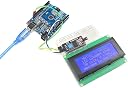
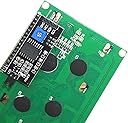
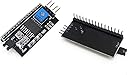
The 20x4 2004 LCD Display Module with built-in I2C interface offers a bright yellow-green backlit screen capable of displaying 80 characters across 4 rows. Designed for Arduino and similar microcontrollers, it uses only four pins (VCC, GND, SDA, SCL) to minimize wiring complexity. Adjustable contrast and backlight settings enhance visibility, making it an ideal choice for professional-grade DIY electronics and prototyping.
| ASIN | B07TXBV8MS |
| Best Sellers Rank | #149 in Serial Adapters |
| Customer Reviews | 4.3 4.3 out of 5 stars (260) |
| Date First Available | July 2, 2019 |
| Item Weight | 2.39 ounces |
| Item model number | WYTP26-2004YG |
| Manufacturer | WayinTop |
| Package Dimensions | 6.25 x 5.25 x 0.7 inches |
J**S
Nice 4x20 character LCD
Using the display without the included I2c interface board. It is compatible with Arduino Libraries. Soldered a female 16 pin SIP header on for using it with jumper wires. The I2c board can also plug into the header. I2c board works good with Arduino LiquidCrystal_PCF8574 library. The display data sheet for a Shenzhen model 2004A is available online. Arrived fast in good condition. Has a bright yellow back light with black characters.
D**E
Nice Display
Works was expected
N**G
Worked as expected. Price was great.
I got this product (WayinTop 20x4 2004 LCD Display Module with IIC/I2C/TWI Serial Interface Adapter for Arduino Uno R3 Mega 2560 (Yellow Green/2004)) Don't forget to adjust the contrast potentiometer on the serial adapter board. When I first ran some test code I thought, why isn't it showing anything. But turning the contrast up quickly showed the text I was expecting.
Z**S
As advertised
Does exactly what it says on the label. Compatible with the Arduino, and there's a bunch of built in demos on how to use it. You do have to solder the pin header in, but that gives you the choice of which side you want the pin header on.
F**D
Great display for embedded applications
Popular LCD display format/configuration but I like this color / contrast much better than the blue/white variety. Crisp characters and color is very easy on the eyes. Nice dimming range with 5k pot in series with the backlight circuit.
H**L
Works fine with Arduino. Nice bright yellow/green backlight.
Worked right out of the box. Came with address 0x27 as advertised. I used Arduino library "LiquidCrystal_PCF8574"
T**R
Clear, brite, and easy to use.
I like these displays. They are very easy to use and seem to hold up over time. I've been using one 24/7 for 6 months now and still looks great.
W**D
You will solder 16 pins
I didnt read the description carefully enough. I missed the words "this kit"...meaning that you will have to solder 16 pins on interface adaptor to connect it to the LCD module. Im not doing that. It's going back to Amazon. The 1 star rating has nothing to do with the performance of the module, it's because I made a mistake and bought a kit. Also, there are absolutely NO instructions of any sort. 2 boards show up in 2 different wrappers. There are no identification markings (on the wrappers). I guess if you need to know which is which or what to do with them, then you ought not buy this product or any like it, soldered together or otherwise.
D**.
Used the parallel connection only on 1 of 2 units ordered. Display is clear, nicely packaged, well labelled. Worked exactly as hoped. Have not tried the serial board.
Y**I
Finally got it working using the SW in .rar files from the link the vendor provides. Google: How-to-Use-I2C-Serial-LCD-20X4-Yellow-Backlight However: 1) When trying to get it working - adjust the contrast each try. Mine was working but I didn't know it until later when I turn the pot. 2) only worked with one example (for me at least so far) "LiquidCrystal_I2C" of the many... 3) Some examples are for 16x2 so you have to change the parameters to 20x4 for this one. Once working it seems bulletproof. My working example: #include "Wire.h" // For I2C #include "LCD.h" // For LCD #include "LiquidCrystal_I2C.h" // Added library* //Set the pins on the I2C chip used for LCD connections //ADDR,EN,R/W,RS,D4,D5,D6,D7 LiquidCrystal_I2C lcd(0x27,2,1,0,4,5,6,7); // 0x27 is the default I2C bus address of the backpack-see article void setup() { // Set off LCD module lcd.begin (20,4,LCD_5x8DOTS); // 16 x 2 LCD module lcd.setBacklightPin(3,POSITIVE); // BL, BL_POL delay (500); lcd.setBacklight(BACKLIGHT_OFF); delay (500); lcd.setBacklight(BACKLIGHT_ON); delay (500); lcd.setBacklight(128); lcd.print("Hello, World!"); lcd.setCursor(0,1); lcd.print("Good Day"); } void loop() { }
A**R
Picture says it all. Love working with this display. Excellent quality.
G**N
A lot of small hobby electronic devices use these 4x20 displays and I figured there was a good chance this would be a direct replacement for mine and it was. At first I could not read the display and thought I had failed until I realized the contrast just needed adjusting. Screen repaired a $500 device so thank you.
B**B
Came quickly, in good shape, and as advertised. Love that the serial interface board is supplied separate from the display. Makes it more useful in different applications. If you want to use it in serial mode, its real easy to solder it to the lcd in a couple of minutes. My only wish to make the package perfect, is to include a 16 pin male header along with the separate board to complete the package. Love the display. ๐๐จ๐ฆ๐
Trustpilot
2 weeks ago
2 months ago