


⚡ Power your Ryzen build with elite speed and style!
The GIGABYTE X570 AORUS Elite Wi-Fi motherboard is a high-performance ATX board designed for AMD Ryzen 2nd and 3rd Gen processors. Featuring dual PCIe 4.0 M.2 slots with thermal guards, a robust 12+2 phase VRM with DrMOS, Intel Dual Band 802.11AC Wi-Fi, and customizable RGB Fusion 2.0 lighting, it delivers reliable power, fast connectivity, and sleek aesthetics. Ideal for gamers and professionals seeking a future-ready platform with easy BIOS updates and advanced cooling.

| ASIN | B07WL5MFXL |
| Best Sellers Rank | #430 in Computer Motherboards |
| Brand | GIGABYTE |
| CPU Socket | Socket AM4 |
| Chipset Type | AMD X570 |
| Compatible Devices | Gaming Console, Personal Computer |
| Compatible Processors | AMD 2nd Gerenration Ryzen , AMD 3rd Generation Ryzen |
| Customer Reviews | 4.6 out of 5 stars 2,715 Reviews |
| Global Trade Identification Number | 00889523018729 |
| Graphics Card Interface | PCI Express |
| Item Dimensions L x W x H | 10.62"L x 3.14"W x 13.18"H |
| Item Height | 13.18 inches |
| Item Weight | 350 Grams |
| Main Power Connector Type | 24-Pin |
| Manufacturer | GIGABYTE |
| Memory Clock Speed | 4400 MHz |
| Memory Slots Available | 2 |
| Memory Storage Capacity | 1000 TB |
| Model Name | X570 AORUS ELITE WIFI |
| Model Number | 889523018729 |
| Number of Ethernet Ports | 1 |
| Number of Ports | 6 |
| Platform | Windows 10, Windows 8, Windows 8.1 |
| Processor Socket | Socket AM4 |
| RAM Memory Technology | DDR4 |
| S/PDIF Connector Type | Optical |
| System Bus Standard Supported | SATA 3 |
| Total Number of HDMI Ports | 1 |
| Total PCIe Ports | 6 |
| Total SATA Ports | 6 |
| Total Usb Ports | 4 |
| UPC | 889523018729 |
| USB 2.0 | 4 |
| Warranty Description | 3 |
D**A
Great motherboard
Model Name X570 AORUS ELITE WIFI(rev.1.0) BIOS Ver. F11 VGA Brand Nvidia VGA Model GTX 1080 CPU Model R5 3600x Memory Brand OLOY Warhawk RGB 3600 Memory Size 16G Power Supply EVGA 850w I've been running this pc for a week now without problems. The first boot took a while because of memory training I guess but it works fine. Updated the bios to the latest version without problems. Overall I recommend this motherboard. PROS -Reliable, works fine. -Great features for a good price -Robust VRM capable of handling Ryzen 9 -Aesthetically pleasing. Integrated IO shield and vrm heatsinks look very nice. The chipset fan doesn't get covered by the GPU and I can't even hear it. CONS -The RGB on this board is underwhelming, barely visible. On top of that, the RGB fusion software is trash. Hardly any effects to choose from. Impossible to sync with GPUs of other brands. -The BIOS is not as good as ASUS bios. -The wifi is not as fast but it has good reception. Tbh I don't expect much from onboard wifis anyway, I just got the Wifi version because it was actually cheaper than the non-Wifi.
C**S
Great, cheap board
Great quality board. I was having some issues with my Asus board, and this replaced it. My system boots up nice and fast, it has a good variety of ports, especially for USB. It has a nice clean design, with orange LEDs, and the onboard Wifi is decent. The price is pretty good for what you get.
S**S
Updating the bios took 2 days.. Otherwise its very nice and high quality.
Q Flash was a nightmare to troubleshoot! Common issue but none of the fixes worked. So many people have trouble with this. Called Gigabyte for tech support. They added my # in line then NEVER called me back? It wasnt the name or format of the usb drive and formating the drive with xp didnt make a difference. My board would NOT flash any firmware until i shorted cmos reset then started with firmware release #2. Once it accepted f2 i updated to the latest firmware currently f36e. Ill probably post a video on youtube since none helped me and this wasted a ton of time but a usb drive with led was helpful. Board looks and feels high end. Heavy Shielding. Bios has every option imaginable. Lots of dedicated usb ports on back. The external wifi antenna perfoms much better than a usb dongle or prebuilt flat antennas. Finally have native 5G for my desktop :) Im 75 feet from the router and still get 80mbps with 2 / 3 bars on 5Ghz or full bars and 50 mbps on 2.4. FYI deafult settings ran the cpu very hot 80s+ even touched 90c during decompression.. I set it to throttle at 70c since this will be running a 80% load 24/7. Probably a better way to optimize performance and temps but this will keep it from cooking until i figure that out.
K**Y
Fantastic Motherboard, kind of weird with space though
This is part of my first from scratch build and it's a great MB, no issues at all. Until I upgraded from my tiny Nvidia 1050 ti to an AMD Radeon 5700XT. I was actually scared the new card wouldn't fit and that I would break the board fan o.o [It didn't but it's still rather sketch] I will say the Bios tends to reset it self from time to time? Could be an issue on my end though? Hard to say Lastly: Be careful of the white usb on the back among the 3 blue, it's for Q-Flash (Bios)! [They are labeled!] So Pros: - Easy to work with and setup - Cheap! - Water-cooling is supported! [Friend does it with theirs] - 4 fans spots [2 for cpu, 2 for case] Cons: - 4 fans spots [The 2nd case fan spot is way to far from the front of the case, extender recommended] - Kind of tight fitting - [Will update if anything else happens ]
D**D
Easy, breezy MOBO girl
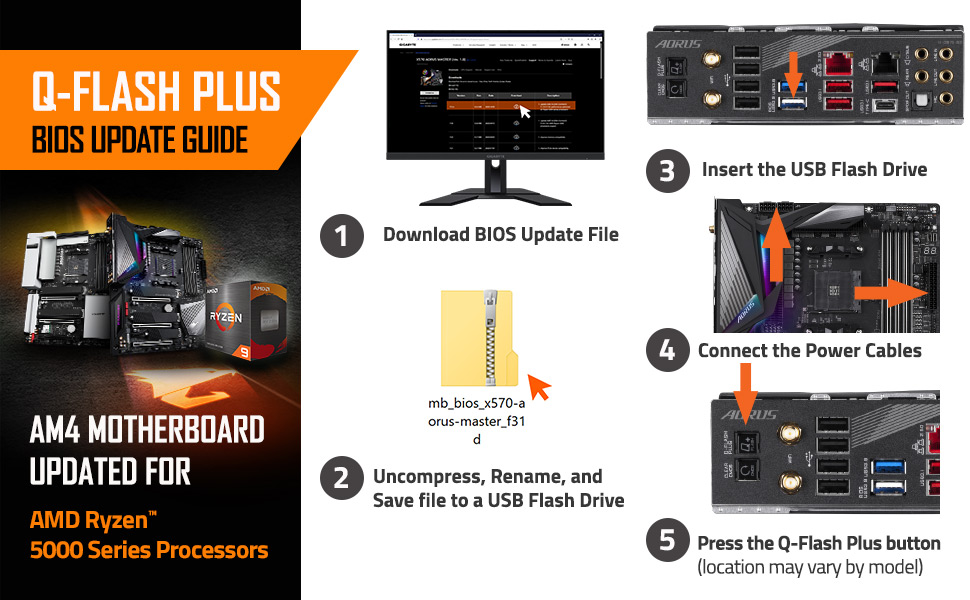
I ordered two of these boards for a 5800X and a 5900X. I put my how-to’s and troubleshooting towards the bottom. The first board I attempted to flash the BIOS, but no luck. USB indicator would flash and go away but the bios flash LED indicator on the board never went off. I ordered a replacement, and the second and third boards flashed without an issue. On the second board, I had some Ethernet issues after a clean Windows install. The Ethernet connection would drop every few seconds and was getting half of my expected speeds. The Wifi was brilliant and was getting more than my Ethernet at that point. It convinced me to keep troubleshooting this board. Speeds: 70 MBs down on bad Ethernet 110 MBs on Wifi 180 MBs on good Ethernet. OVERALL, the quality of the board is superb. It’s easy to use, and most of the issues I ran into were 3rd party issues. The only downside is the limited fan connectors, but I bought splitter cables, and all is well. HOW TO FLASH FOR ZEN 3 RYZEN CPUs: 1) Google “Gigabyte X570 Aorus Elite Wifi” 2) Click the first gigabyte.com link 3) Support > BIOS > download Version F30 (and up) 4) Extract the BIOS into the root directory of the FAT32/16 formatted USB. The BIOS file will have the “version” in the file name. You don’t need anything else in the folder. 5) Rename the BIOS file to “GIGABYTE.bin” 6) Plug in the PSU to the motherboard at the 24 pin motherboard and 8 pin CPU. 7) Plug in the BIOS USB. 8) Hold the Q-Flash BIOS button towards the opposite end of the CPU connector at the bottom of the board 9) the Flash Button has an LED indicator that will flash for 2-5 minutes. I’d let it sit for 10 minutes just to be sure that the bios update was done. ETHERNET SOLUTION: 1) Go to the same Gigabyte link 2) Support > LAN > download driver 3) Install as normal Note: This was an issue when I ran a Windows Update. Windows must’ve installed a bad driver. I’d recommend this board.
J**B
Aorus has the best bang for your buck.
I’ve bought Aorus motherboards for multiple chipsets at this point - and I’ll continue to do so. Their software is horrible - but the hardware is top notch. Even their BIOS UI is nice. I have an Aorus X370 Master for my i9 9900k - and the Aorus X570 Elite WiFi for my Ryzen 3700x. I can’t speak much on CPU OC capabilities for Ryzen - because thus far the 3000 series chips aren’t that great for overclocking. But my i9 is stable at 5.1 GHZ across all cores. The RAM overclocking on both boards is very good however. You can easily see another 300+ MHZ on RAM if you really know what you’re doing, and with good timings. With quality RAM of course. My only issue with it is the lack of fan headers on this specific board. You only get 4 headers. Which for most that isn’t an issue. But just keep that in mind. Go with Aorus. Or gigabyte in general. I’ve never been let down by their hardware. Software is another story though.
A**N
Solid X570 Budget Motherboard
The X570 AORUS Elite Wi-Fi had all the features I was looking for in a X570 board. It has solid solder connections, easy to navigate Bios, Q-flash plus, up to 128 GB memory capacity, and is PCIE 4 ready. XMP works great. I posted a video showing what it looks like while using Q-flash. You need to have only the power connections on the board. Plug in Fat 32 flash drive with most recent files from gigabyte's website in Bios slot. Turn on power then quickly hold Q-flash button on motherboard until it starts to flash. The USB drive will flash and the LED light on the board will flash during the bios update. It will shut down when finished. Most important step after flashing is to unplug power cable and remove CMOS battery for a few minutes. It was not enough to short CMOS. I had intermittent no HDMI display issues until I removed the CMOS battery. My build: Ryzen 5 3600 X570 AORUS Elite Wi-Fi TEAMGROUP Module Memory RAM DDR4 32GB (2X16G) PC3200 Samsung 980 Pro 500gb M.2 running at PCIE 4 Samsung 870 SSD Radeon RX 560 graphics (still need to upgrade) Rosewill TYRFING ATX Mid Tower case Raidmax 730W power supply
C**O
I bought it in 2019.
it’s 2026: I went from a Ryzen 5 3600 to a 3600X, then to a 5600X, and I’m currently using it with a Ryzen 7 5800X3D. A beast in terms of quality, with excellent drivers. I use it with Windows 11 Pro. I hope Gigabyte has improved its RGB software with the newer models.
Trustpilot
2 weeks ago
4 days ago



