


Desertcart purchases this item on your behalf and handles shipping, customs, and support to Philippines.
💡 Light up your life, smartly and stylishly.
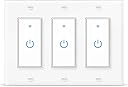
The WiF Smart Light Switch 3 Gang by Lesim combines cutting-edge Wi-Fi connectivity with a sleek, ultra-slim matte glass design. Supporting 15A current and voice control via Alexa and Google Home, it offers fast 40ms touch response, LED backlighting, and customizable schedules through the Smart Life app. UL certified and designed for easy installation with neutral wire, it empowers modern homes with group control and device sharing for seamless smart lighting management.


| ASIN | B07YFMBYX7 |
| Actuator Type | Push Button |
| Best Sellers Rank | #201,771 in Tools & Home Improvement ( See Top 100 in Tools & Home Improvement ) #603 in Electrical Light Switches |
| Brand | Lesim |
| Brand Name | Lesim |
| Circuit Type | 1-way |
| Compatible Devices | Amazon Echo, Google Home devices |
| Connectivity Protocol | Wi-Fi |
| Connector Type | Wireless |
| Contact Material | Metal |
| Contact Type | Normally Open |
| Control Method | Voice |
| Control Type | remote, voice |
| Controller Type | Amazon Alexa, Google Assistant, SmartThings, IFTTT |
| Current Rating | 15 A |
| Customer Reviews | 4.1 out of 5 stars 773 Reviews |
| International Protection Rating | IP82 |
| Manufacturer | Lesim |
| Material Type | Acrylonitrile Butadiene Styrene |
| Model | MNTK-44846 |
| Mounting Type | Wall Mount |
| Number of Items | 3 |
| Number of Positions | 3 |
| Operating Voltage | 125 volts |
| Operation Mode | ON-OFF |
| Part Number | MNTK-44846 |
| Switch Type | Touch Switch |
| Terminal | Spst |
| UPC | 717261145158 |
| Unit Count | 1 Count |
| Upper Temperature Rating | 75 °C |
| Wattage | 1650 watts |
C**A
The best device I've ever bought (so far)
I purchased this to replace the original rocker switches and to eliminate the use of the limited SwitchMate device. SwitchMate is good but you can’t communicate with it outside of your home’s Wi-Fi network. So if I want to turn on the outdoor lights while away I couldn’t. I needed more control. I found this switch set. Do NOT get this unless you are a technician or can get a technician to do the install. This is not for the novice. The included instructions are not enough and the included wires are not of the needed size. I tried to install myself but after 2 days of trial and error I ended up calling an electrician, watching him I realized that it over my head. It required my tech to use additional wires on the ground and the neutral just to connect those, the line (power) was kept on the middle original switch and from there shared to the load on the 2 new switches. You really have to know what you’re doing it not as simple as, take that wire put it here, and take that wire and put it there. Wires had to be added to extend reach, good grade (20g) not the cheap ones in the box (DON’T USE THOSE). I had 2 days of frustration and he installed it in about 2 hours but even he had a time with the wires and getting everything squeezed into the junction box. I also found out that nothing in that particular box was grounded. A layperson would have never seen or rectified that. My future project now will be to check all the other switches in the house to make sure that they have a negative wire attached. Connecting to the existing SmartLife app was simple. Now I can control the outside lights at will. The best part of 2020. See pics (yes, I label everything - helps guests use the correct switch w/o having to guess). Used two in the front and one in the back. 2 week update: still working great, absolutely no problems. They follow the schedule I made for them, turning on and off. Loving these switches. ***Anyone interested in my SwitchMate switches, find me on ebay "TechSis"👍🏽
D**D
Great, but watch dead spots
Had an electrician install this. There were 2 ceiling fan outlets that didn't have neutrals, he worked it out. They are Great but WATCH WIFI DEAD spots. I have two. I found out AFTER the lights were installed. One would not find the wifi the other would then drop when put the cover on. This is a wifi, not product issue. Wifi in both places was good(-). Not bad, just not good. So I put a repeater in. Still had some issues but that generally solved it The good news is, and I've only had to do this once because of Wifi, they are very easy to reset AND the system remembers the name. But you have to re-add them to Alexa (20 seconds). Even with that, I've still bought 2 more. I'll likely install them myself, I'll let you know how that works out.
M**E
You Might Need Some Things Not Provided
Positive: Works great, Looks nice. You will need a tester to determine which of your house black wires are hot (coming from the breaker) an which black wires are load (going to the device to be powered, like a light or an outlet). Don’t depend on the switch you are replacing to have been wired correctly - it may have been wired reversed. Labels are provided to wrap on the wires after you have identified them (before you turn off the breaker). A simple screw driver AC voltage detector that lights on contact with a hot lead will do. Negative: for each switch two short pieces of wire are provided to allow connection at the bottom of the switch for the ground wire (bare or green wire in your house) and the common wire (white wire). The wire provided is stranded (not solid) and is too thin to be properly secured by the screw terminals. You will need some short pieces (6 to 12 inches per switch) of 14 gauge wire (green or bare for the ground and white for the common) to be able to pigtail out the connection. Finding this out after you start is very inconvenient. I happened to have the white wire on hand and was able to connect individual ground wires directly. For the common (white wire) all the wires in my for the three switches were connected in a single bundle with one large connector - 6 wires. Adding the three pigtails made a bigger bundle and I replaced the connector with one that was a little larger (something that’s not in the box). Negative: When setting up the switch to be controlled by wi-fi you have to select the device from a menu within the app. It is a bit of a guessing game to select the right item. Also you have to go through the set up menu within a certain time limit of applying the power to the unit (turning the breaker back on). If you are not fast enough you have to start over.
J**M
Must buy to convert home to smart home
Alexa controls switch, timed by Alexa, If you want to lay in the bed and cut off switch or set lights to come on at a time, you must buy. I control my Nreaded Dragon Ligjts with this switch, and the switch turns lights on and off daily without having to do it manually. This is a go to item for disabled people, elderly people, or lazy people. ALEXA, TIRN OFF (label light future), and it’s off from your voice. Modern day Clap on Clap off but 10 times better
B**N
Not as easy as they say
So I'm not one for writing reviews but I feel like this one's pushing me over the edge. First thing that I would like to say is the customer service returned my email extremely quick when I first had issues with their product. However when I explained to them in detail what my issues were they just sent me the same pictures as the user guide that came in the Box. So let me get down to the nitty-gritty. First the actual manual installation of wires to the switch, I have a very basic knowledge of how to install switches and fans and plugs my house from doing it over the years. I have a 3 switch box that I had to install . This switch had me doing trial and error for 2 hours trying to figure out how to keep my light and fan on two separate switches. But I eventually figured it out with a little time and patience. Because I had three switches to install and 6 extra wires between neutral and grounds that I had to split between all switches the overall size of the switch didn't exactly fit into the original box in the wall. Which made it difficult to make a nice clean flush looking switch as you can see in the picture. Maybe I'm just being nitpicky but I like things to look even but I will concede that that is my own doing with no help from extra wires and extra large boxes that I had to shove in there to make this thing work. Okay moving on number 2 trying to get it connected to your Wi-Fi. Like I said I have a basic knowledge of how electricity works and I'm not exactly super savvy with IT but I'd like to think that I can figure most things out. I watched non-stop YouTube videos and all of them warned me about making sure I had a 2.4 gigahertz band Wi-Fi because that's the only way the smart devices can get connected. My router produces 5 gigahertz and 2.4 gigahertz both bands have separate passwords for reason so that way I can connect smart devices and high speed internet separately. After two days of trying to figure out how to connect the Wi-Fi to the Smart Switch I was done. I tried everything the customer service email told me even turning off my 5 gigahertz band and redoing the entire connection process with no luck. And finally number three the straw that broke the camel's back when you turn the light switch on the blue light comes on and stays on and likewise when you turn it off. If you're one of those people like me who likes the fan on at night but has to be Pitch Black in the room you're not going to like this switch. That blue light it's just bright enough to wear if you just crack an eye open in the middle of night you can see everything in my master bedroom. Even my wife said that the blue light pisses her off and she can sleep through a tornado. Upon using it over the past 3 days you are natural muscle memory makes you want to flip a switch and this one is just a touch screen type switch which is a little weird to get used to. You walk in the room automatically wanting to flip a switch and you have to stand there and physically press it for a second. I know that there are versions of smart switches that have an actual physical switch that clicks which might be a little bit better for those of you wanting that manual confirmation. And I'm sure this wouldn't even be a problem if I could get it to connect to my Alexa anyway because I would just say "Alexa turn on the light" without even stopping but unfortunately that's not the case. I hope this helps all your future buyers.
A**N
Don't Hesitate
I've had 12 of these for 10 months. I wanted to wait before I wrote a review. In summary it's fantastic. Intially some did not allow the wifi but I contacted customer care and they told me how to reset it. Just place your finger over the power button until the wifi signal lights up. It syncs well and I used Alexa to turn off lights in rooms we forgot. Had a few power outages and they still work.
B**Y
Simply amazing
This smart switch bank was super easy to install, even for a guy who is colorblind. It connected quickly to my home wifi and linked to our Amaxon Echo. So now I can program when porch lights turn on and off, and my kids can turn living room lights on just by asking Alexa!! It works so well that we are thinking of installing these switches on all our communal lighting.
L**I
Frustrating Product
I will start by saying it is working now, after hours of install and set-up. The wires provided with this are absolute crap, they don't work with the switches, as they are too thin and will pull right out (even with the screws tightened) and if you try to scrunch them up to fit in the hole, they just break apart. Luckily we had wire of our own to use. After getting it set up the right switch would not connect. We shut off power and reset it, which fixed the right switch, but then the left switch wouldn't connect to the internet or light up, although it did work manually (which at this point was fine, because I had had enough). About two hours later, the left switch lit up and we were able to get everything programmed through the manufactures app. It is working now, but be prepared to be frustrated and have extra wire on hand.
I**.
just a bit pricey…
The product’s good and pretty easy to install — just a bit pricey.
Trustpilot
2 weeks ago
1 week ago