


Desertcart purchases this item on your behalf and handles shipping, customs, and support to Philippines.
⚡ Power your home network like a pro—fast, stable, and wired for success!
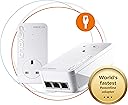
The devolo Magic 2-2400 LAN Triple Starter Kit leverages advanced G.hn technology to deliver up to 2400 Mbps over your home’s electrical wiring. Featuring one triple-port and one single-port adapter, it provides stable gigabit Ethernet connections ideal for gaming, UHD streaming, and remote work. Designed for easy plug-and-play setup, it ensures reliable wired networking without WiFi interference, compatible with all standard routers and backed by a 3-year warranty.


| ASIN | B07ZZDWVGN |
| Best Sellers Rank | 2,433 in Computers & Accessories ( See Top 100 in Computers & Accessories ) 18 in Powerline Network Adapters |
| Box Contents | Starter Kit : 1 x Magic 2 Lan Adapter , 1 x Magic 2 Lan Triple Adapter, 1 x 2 m Ethernet cable, 1 installation guide |
| Brand | devolo |
| Brand Name | devolo |
| Color | White |
| Colour | White |
| Compatible Devices | Compatible with all wi-fi routers, devolo MAGIC and G.hn adapters and wi-fi-capable devices |
| Compatible Operating System Family | Android, Windows |
| Compatible devices | Compatible with all wi-fi routers, devolo MAGIC and G.hn adapters and wi-fi-capable devices |
| Country of Origin | China |
| Customer Reviews | 3.9 out of 5 stars 371 Reviews |
| Data Link Protocol | Gigabit Ethernet |
| Data Transfer Rate | 2400 Megabits Per Second |
| Data link protocol | Gigabit Ethernet |
| Data transfer rate | 2400 Megabits Per Second |
| Hardware Interface | Ethernet |
| Hardware interface | Ethernet |
| Item Weight | 0.86 Kilograms |
| Manufacturer | Devolo |
| Manufacturer Part Number | 8512 |
| Minimum Required Operating System Version | Android 5.0 Lollipop |
| Model Number | 8512 |
| Number of Items | 2 |
| Number of Packs | 1 |
| Product Warranty | 3 Year Manufacturer |
| Unit Count | 1.00 count |
J**D
DONT LISTEN TO THE BAD REVIEWS > THEY ARE GREAT BUT.....
Upgraded from develo 1200 and they are literally twice as fast. Setting them up is more of a pain there is no longer a manual add facility using the code off the back of them you have to press the button on one then on the others. If you buy the WIFI ones TURN OFF YOUR MAIN WIFI, it conflicts with the MESH , the 1200's did exactly the same thing and it degrades the WIFI massively. Our conservatory which is a mega long cable run used to get 30MB and now gets 60-80MB which is plugged into our sky box films now download twice as fast. If you DONT use the wifi version anywhere IE are LAN only > the app doesn't work on IOS or Anroid > Only deverlop Cockpit desktop for PC or MAC> its been waiting for a firmware update from develo since September > appears it needs at least 1 wifi point for the management app to function on mobile device> seems they didn't expect anyone to not want there "crappy" wifi > and it is crappy. I initially bought the wifi version but the "mesh" wasn't very good, lots of signal loss , bad handover, no WIFI 6 / AX > so sent them back and bought the LAN version (which is brilliant) and then replaced my router with a Netgear RAX200 WIFI 6 router and hung another RAX200 Netgear WIFI 6 router (set in AP access point mode) off a LAN MAGIC 2 the other end of my house - Net result is rock solid Ethernet Everywhere I need it in the house and mad fast WIFI 6 AX covering the whole house. What I'd like to see for Magic 3 1- is a 1/2.5GB port on the ethernet LAN port and on the triple - as although the LAN triple can do 2400MB's it can only do 1GB per port > with routers / Access points now supporting 2.5GB this would save me having run a cat 7 cable in my house to the secondary Access point - which defeats the object that Magic 2 is supposed to avoid 2 - On the WIFI version Wifi 6 / AX with ideally triple band and 6 or 12 streams and work on the "mesh" handover between wifi points and automation around channels 3 - more speed you can never have enough speed :) 4 - A less flakey cockpit 5.1.3 it crashes lots on windows 10 , 5.1.2 runs fine > no idea why or the difference Summary is LAN MAGIC 2 ones are brilliant , WIFI ones are "OK". You'd probably be better of buying the 1200's if you just want wifi as I couldn't see any difference between magic and 1200's but if you want rock solid LAN performance then Magic 2 is the way to go use your existing wifi and hang a "matching Access point / AP or router in running in AP mode" off the other end and you'll get amazing matched mesh wifi (assuming your router and AP are decent)
J**N
Better than AV2 600
So nearly decade later and AV2 Homeplug Powerline has moved over for the ITU G.hn standard. I decided to buy the wired version (too many reviews of pain with the WiFi) and give them a go. They worked out of the box, and I had no issues during set-up. They did require a firmware update, but that was about it. To be clear, I bought a Devolo Magic2 LAN Triple. This contains ONE triple port, and ONE single port adapter. I think the box art on this is very deceptive. The triple port adapter is slightly bigger than the single port, both are bigger than AV2 and both run much hotter - for better or worse. Also, I ordered an Amazon Warehouse deal, and the first one Amazon sent didn't actually have any triple port Magic2 in the box (just two single port ones) , so I had to return and re-order. I've discovered they're happy to run in parallel to AV2 adapters without any noticeable loss, and bizarrely the Devolo Cockpit software even spots AV2 and Magic2 adapters. There's also web-page access to the adapters via their ip address, and the ability a set password if you don't trust people on your network. The iPhone Home Network app is okay - but it doesn't display any link speed information despite telling you it will. In tests at range I discovered a few surprises. AV2 is in the same location for reference, tests using iperf3: - TP-Link AV2 600 Two-Port ~16Mb/s (appears to split bandwidth across both ports rather than share it) - TP-Link AV2 600 Single-Port ~32Mb/s - Magic2 Single and Triple Port ~80Mb/s If range is reduced, speeds jump quite quickly up to 200Mb/s and then on to about 350Mb/s if distances are close. As a rule, expect 150 to 200Mb/s in a new-build four bedroom, but be prepared for slower. You'll still beat an AV2, but it might only be on range, or a factor of two. And in some cases, I suspect AV2 1300 will beat the Magic2, but not necessarily if you have older AV2 kit mixed with new stuff, which is why I was testing the Magic2. Will I keep them? Well that depends on whether they're stable. They solved my problem and increased my setup by speeds by about 7 or 8 times. I'm concerned about the temperature they run at (50C on the back, 35C on the front, 0.3A@240V = 7W), but they do have a three year warranty in case they melt down though. Note - if you're looking for adding WiFi Access Points to parts of your house, I wouldn't recommend the Magic2, simply because you'll be crippling any broadband gains you may be looking for, go for WiFi Mesh and Access Points with a dedicated third back-channel, or run Cat6 cabling (budget vs effort). The Magic2 is about easy of use, and getting the best out of something while doing very little. It does achieve this very well. Better than AV2 600 for sure, but it's not a "magic" bullet (sorry - groan now).
J**N
Good, Solid, Quick.... expensive
I bought these to replace some Netgear 1200 poweplugs that were driving me up the wall. Namely the Netgear models would occasionally drop connection and "go to sleep" now and then. An issue which I just couldn't fix as they didn't have the function to turn of this power saving feature. Anyway concerning the Devolo Magic 2-4000. What can I say... a bit like a well oiled machine they've not missed a beat in 2 months (and counting). The install software wasn't "Apple level" friendly but after a few clicks and attempts I managed to set them up to my preferences with no issue (turned off power saver mode), and once done you don't need to ever really go back. So solid stable connection.. tick! Speed wise in fairness they're not much quicker than the old Netgear 1200 models. I am getting about 140-150MB so quicker yes than the Netgear which did actually give me 120MB. However the Devolo connection is solid and stable so I'm as pleased as punch. So speed... tick! Additionally this model has three outputs on the "output" plug which is incredibly useful in this new age of home working as it means I can have multiple devises plugged in at once without having to resort to the dreaded Wi-Fi or having to purchase additional expansion units. Perfect for a small home office! So in conclusion if you are after a solid stable powerplug solution then they come really recommended, night and day compared to the old Netgear ones I had. No they probably wont give you a 240MB connection and yes they are a tad expensive but I guess you get what you pay for.
F**D
Waste of time
I have had Devolo powerline adapters in the past and they worked well. Nice and compact and they just worked. I wanted to use one with my TV/Sky box as the wifi signal is poor in that part of the house. The promise of fast speeds and 3 ethernet ports seemed too good to be true. It was too good to be true. The units are huge and cumbersome. They have clearly been re-hashed for the UK market, who wants cables sticking out of the top of the unit?...the continental version has them coming out of the bottom. Had the promised speed materialised I could have lived with the gargantuan unit and cables snaking out of the top...but they just don't work for me. I couldn't get them to pair...I had every combination of light colour available but no joy. I put them aside for a while thinking I would send them back. I gave them one last try, placing them in sockets very close to each other. After continually resetting and trying again and again they eventually paired. Great. So I moved the one unit to the socket by my TV and could only get a very weak signal and then the light show started again. Enough was enough. Nowhere near good enough for the money paid so back you go.
A**R
Devolo Magic 2-2400 Lan Triple Starter Kit
My house isn’t very big—just a terrace house. For my setup, a fully wired connection is ideal so I can directly connect my PC, NAS, and CCTV camera. This kit is perfect for me. I love it—it works like a dream. I have it already for a month I previously had an older TP-Link model, and after buying this one, the difference is like day and night. The setup is very easy, there is nothing even to talk about - more or less plug and play. It’s also nice to know that this high-quality product is made in Europe.
C**O
Dont' expect high speed, just stable connectivity
This review is for the "Devolo Magic 2-2400 Lan Triple Starter Kit". I have had this since the start of February. Before I had tried several types of TP-LINK powerlines (last being TP-Link G.hn2400 Powerline Kit, same price band). The house is a new build, less than 4 years old. Electric system is brand new, nothing wrong with it. Between the router and the studio, the electric cables don't pass near any big appliance (Only a small TV that is turned off 95% of the time). There seems to be no way to go over 100Mbps. The connection is stable (no packet loss, no jitter) and with good low latency but no matter what, the bandwidth is just bad. I end up having more bandwidth when in WiFi (but suffer from less stable connection) so I simply accepted that I will have to stay in WiFi for most of the time and switch to ethernet when I want to play online as you need more of a stable connection than bandwidth. Still, not a great deal if you ask me. I don't even think it's just this model as TP Link powerlines have the same issue. I think it's just a limit of the technology at this point.
C**W
Good enough…
Having just got full fibre broadband, I had to put the new router in a different location due to where the fibre cable enters the house. I like my fixed devices like consoles, TV box and my work PC to use wired network for reliable connection and use Wi-Fi only for mobile devices, so I needed something to share the internet connection with the existing cables. The fibre gives me 150Mbps, so I first tried a fairly cheap AV2 1000 powerline kit. This connected at a claimed 400Mbps, which was reducing the actual broadband to about 80Mbps - seems these kits are actually much slower than the connection speed suggests. They suggest to try different power sockets, but thats just not an option for my setup. I wanted to get the full speed I’m paying for, so that kit went back and I decided to suck it up and buy the Devolo Magic which seems to have the fastest available speed, although at twice the price of the 1000 kit. This one connects at about 800Mbps, which is way lower than the rated 2400Mbps, but does seem to be just barely good enough to share the 150Mbps internet with a real life bandwidth of about 200Mbps. If I was relying on this to replace a gigabit Ethernet, or had paid for faster fibre, I’d be very disappointed, but I guess this is adequate for my situation. To be fair, it is ridiculously easy to setup, literally “plug and play”, the devices seem solid and well made and the software to manage them is good and simple. So if you need to use a powerline kit, this seems to be as good as it gets, but don’t expect spectacular performance.
K**H
Massive improvement on other powerline units
Purchased the LAN only version to avoid ny WiFi mesh issues. It replaces an existing BT powerline with WiFi setup that flaked out (constant drop out, intermittent network connection, unable to use screen mirroring or maintain connection to thr HiFi media storage drive located in my office) all after upgrade to new sky broadband router and Q box. The nee unit is used to connect my network to smartTV, Sky Q box and HiFi system. It connected in seconds of installation and now everything works brilliantly. All systems function at full capability, football can be cast to 55 inch screen with no judder or loss of quality. One of the reasons for select the LAN only version is that the router gives satisfactory coverage around the house as I have supplemented it with a Ubiquiti UniFi AP to reach the garden and top floors with ease. Over 12 years in 2 homes have used powerline to support connectivity. This LAN version is by far the best, yes you have to pay for it but in my opinion it is value for money. In context the house is circa 1995 with existing wiring, and solid internal wall construction. The master unit is also plugged into an 4 way extension lead (adding to potential issues it has over come)
Trustpilot
4 days ago
1 week ago