Buy anything from 5,000+ international stores. One checkout price. No surprise fees. Join 2M+ shoppers on Desertcart.
Desertcart purchases this item on your behalf and handles shipping, customs, and support to Philippines.
🚀 Elevate your storage game with RocketRAID 640L — speed, flexibility, and reliability in one sleek card!
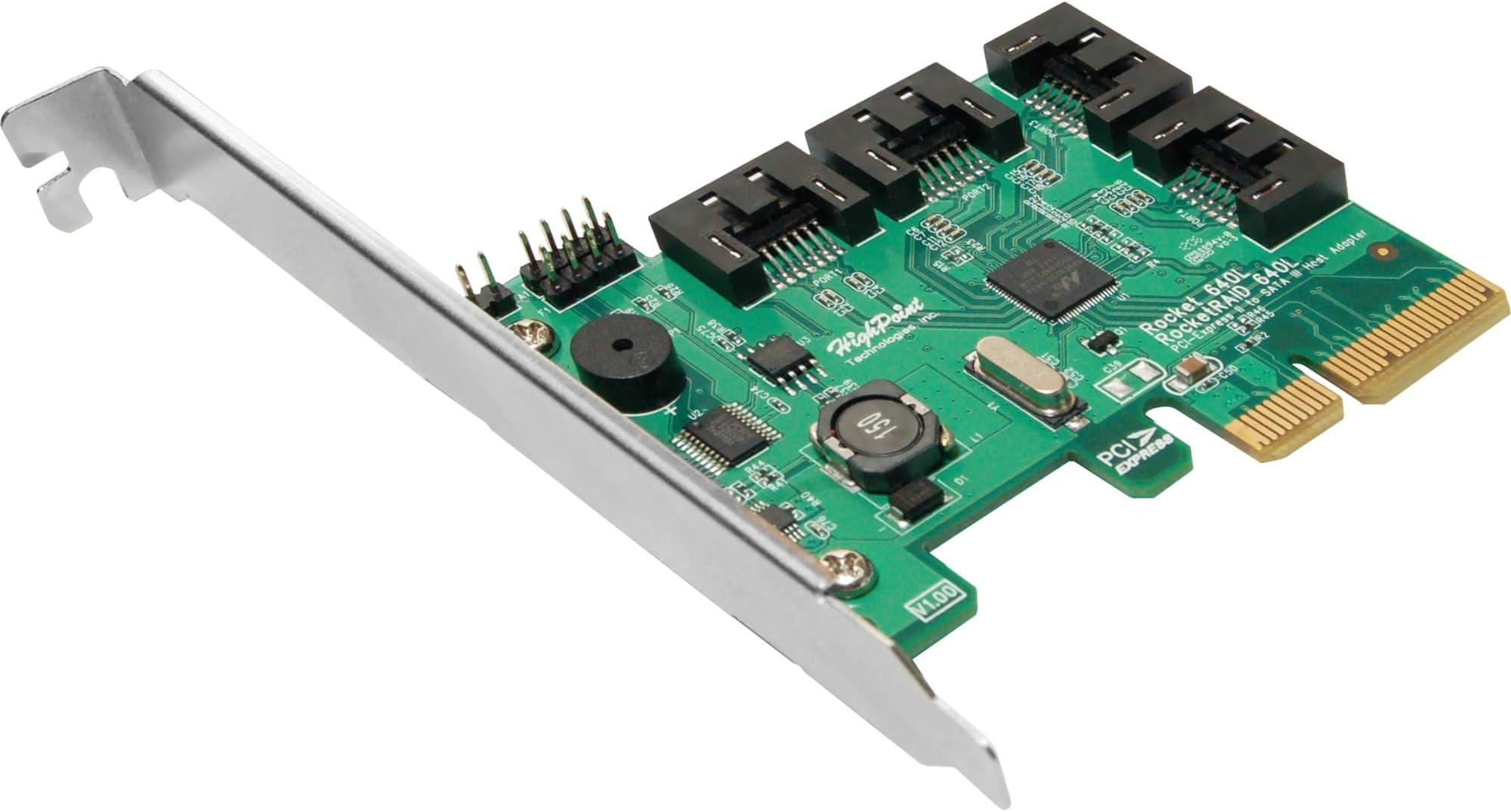
The HighPoint RocketRAID 640L is a compact, high-performance internal RAID controller featuring PCI-Express 2.0 x4 connectivity and 4 SATA 6Gb/s ports. Supporting multiple RAID levels (0,1,5,10, JBOD), it offers hot-swap capability and broad OS compatibility, making it an ideal upgrade for professionals seeking fast, reliable, and scalable storage solutions.
| ASIN | B007P77WAW |
| Best Sellers Rank | #75 in RAID Controllers |
| Brand | HighPoint |
| Built-In Media | Storage controller (RAID) - plug-in card - low profile |
| Compatible Devices | [Personal Computer, Workstation, Server] |
| Customer Reviews | 4.0 out of 5 stars 90 Reviews |
| Global Trade Identification Number | 00643653640034 |
| Hardware Interface | PCI |
| Item Weight | 7.04 ounces |
| Manufacturer | HighPoint |
| Mfr Part Number | RR640L |
| Model Number | RR640L |
| Operating System | Linux: RedHat/Ubuntu/Fedora; Arch Linux (kernel 5.17.5 and above), Mac Intel Platform: Driver embedded into macOS 10.12x and later, Mac M1 platform: The driver needs to be downloaded and installed from the official website., Windows: Windows 7 & later, Windows Server 2008 & later, Microsoft Hyper-V; Only supports 64-bit operating system., macOS: macOS 10.9 - macOS Monterey 12.x |
| Style | 4x SATA Port |
| Style Name | 4x SATA Port |
| UPC | 643653640034 |
| Warranty Description | 1 year |
J**M
Easy to use RAID card that works in a lot of systems
This is a cost effective card for adding RAID capabilities to almost any system. Pros: Super easy to setup Multiple RAID modes supported Works with pretty much any SATA drive available Cons: Drivers can be a pain to find on the website Special Notes: If you are using a consumer grade computer, this RAID card may not work. I recently tried installing it in a XPS 8940 and windows could not see the card. I tried the different RAID BIOS firmwares by installing the card in another computer (Precision T1700) and flashing it. Eventually I could get the XPS BIOS to see the card but it would still not show up as an available device in Windows.
G**Z
Excellent
Installation and configuration is very easy. This card works well in PCIe x16, my motherboard does not have x4, performance is good and very similar to the review I've seen of my Intel 330 180GB. The manual shows how to install the driver for Windows 7 during the installation process. Everything is faster now. La instalación y configuración es muy fácil. Esta tarjeta funciona bien en x16 PCIe, mi placa base no tiene x4, el rendimiento es bueno y muy similar a la revisión que he visto de mi Intel 330 180GB. El manual muestra cómo instalar el controlador para Windows 7 durante el proceso de instalación. Todo es más rápido ahora. Intel Core 2 Quad Q8300 Asus P5N-D Kingston HyperX 1066MHz DDR2 4GB EVGA GeForce GTX 550 Ti 2x Intel 330 180GB SSD before AS SSD Benchmark 1.5.3784 Seq: 129.99 MB / s Read, 104.07 MB / s Write 4K: 18.95 MB / s Read, 48.88 MB / s Write 4K-64Thrd: 62.75 MB / s Read, 57.30 MB / s Write Acc.Time: 0086 ms, 0238 ms Score: 95, 117 Total: 267 after AS SSD Benchmark 1.5.3784 Seq: 447.53 MB / s Read, 206.98 MB / s Write 4K: 22.19 MB / s Read, 81.73 MB / s Write 4K-64Thrd: 167.05 MB / s Read, 162.19 MB / s Write Acc.Time: 0054 ms, 0222 ms Score: 234, 265 Total: 615 RAID 0 2x Intel 330 180GB SSD AS SSD Benchmark 1.5.3784 Seq: 721.17 MB / s Read, 408.62 MB / s Write 4K: 25.12 MB / s Read, 79.88 MB / s Write 4K-64Thrd: 327.09 MB / s Read, 274.42 MB / s Write Acc.Time: 0050 ms, 0209 ms Score: 424, 395 Total: 1029
P**G
Simple and quick install
Short version : Quick install, fast card, great product. : Other Version : Installing this card was as painless as it gets. It's small and includes 4 SATA cables. After installing the card and powering up I installed the driver disc and rebooted. The config screen was easy to walk through. I set up my 4 3TB drives as RAID 5, saved and rebooted. The new drive was recognized by Win 7. After formatting I was ready to go. I had my original 4 drive SW RAID still attached to the motherboard (ASUS Ramgage Gene IV) with the new drives attached to RocketRaid. I started copying close to 5.5TB of data from old to new. I watched peaks over 130/mb but it ran steady between 40-70 /mb. In all it took about 28 hours to move all the data (with some delays in interaction by me rearranging some things on the new drives). Once the data transfer was complete, I detatched the old drives, installed the new ones in the case and closed it up. When I rebooted, all things we right where they should be (except for a small issue of drive letters). I didn't do a benchmark but it did seem these drives ran faster than the previous set (all drives were SATA III 3TB drives). This was especially noticable when writing data to the drives and copying data from other networked computers. HW RAID vs. SW RAID might have something to do with this impression too. Cons: None that I have found. Maybe that I paid for overnight shipping but didn't get it overnight. No reflection on the product in any case. In summary, this is a very good card, at a very good price and it just plain does what it says.
A**R
Works as expected, with a minor [correctable] glitch...
I would have given this five stars, but due to the lack of support from the website/company, I dinged the product one star. First - installed without issues. The cables were long enough to reach across my case, and having four drives connected, it picked up the various makes, manufacturers, models and speeds. I was able to create the array without issues... so I thought. I began my installation of Windows Server 2012 R2 and I was able to pick up the new R10 array after loading the driver. Setup then appeared to go all the way through, and out of the blue, at the very end of the copy/configs, I got the following error message: "Windows could not prepare the computer to boot into the next phase of installation. To install Windows, restart the installation" I wasn't able to find any solutions related to the error message. On a whim, I decided to destroy the array and rebuild it with a sector size of 512B, as opposed to the 4KB sectors it was previously set to. The install succeeded. Otherwise, after the initial installation, the card works great. I'm also using a 622 in another system and it works great as well. For the price, it's a good product.
L**N
This is probably the word RAID controller I've ever used
I wished I had listened to the other negative reviews about this controller. The driver the comes with the card is so out of date that it will not even load in a Windows 7 x64 environment. The array management software that comes with it also does not work with Windows 7 X64. I had to download an updated version of both from the web before I was able to use the controller. Probably the most disappointing feature of this controller was the BIOS. You can't use the BIOS to set up the controller! You have to use the management software from the web to configure the controller. I'm guessing that this shortcoming in the BIOS is also what kept me from being able to load Windows in my configured RAID5 array on the card. I tried two different editions of Windows 7, neither would load on this card, even after loading the driver for the controller at the setup screen. Another negative of this card, is that it will nearly double the boot time of your machine while your computer POSTs. You get what you pay for, and I'm returning it.
O**7
Gets the job done but disappointing bugs
I guess you get what you pay for. The price is right for a bottom-end RAID controller for a home server and it does work - but it has a startup conflict problem that's reasonably well documented (I wish I had researched before I bought) that you can manually escape through every time you startup your computer. I thought startup conflicts were so 1995! Oh well. It works well and does it's job after you get the correct drivers installed and if you can deal with this possible inconvenience aspect. I suggest downloading the latest driver and control software rather than using the bundled software.
A**H
Very Satisfied!
I was skeptical about this working/improving performance, but decided to give it a try. I just installed it on my XFX MB-750i-72P9 motherboard. I am running Windows 7 and have a 128 GB Samsung 840 Pro SSD and 2 TB Seagate Barracuda HDD. I took benchmarks before and after of both drives to see if there was performance improvement. SSD Benchmark Before/After: Seq Read: 135.5 to 507.1 Seq Write: 111.4 to 375.7 512K Read: 133.5 to 420.8 512K Write: 111.0 to 376.4 4K QD32 Read: 27.92 to 294.5 4K QD32 Write: 46.21 to 241.6 HDD Benchmarks didn't improve, they stayed at about 200 for Seq, 60/100 for 512K, and 1.5 for 4KQD32. Maybe because it isn't my boot device? I also just installed Windows 8 and everything works so I think it's safe to assume it's compatible with this OS. ONLY CON: If you are booting from a drive on this card, there is a bios screen for the controller that displays for about 20 seconds while it scans for all your attached drives.
A**S
Fast and reliable
I have used various versions of Highpoint Technologies RAID controllers for over a decade now, and they have *never* let me down. I normally only buy new controllers when I want to upgrade storage technology, like moving from mechanical hard drives to SSD’s. I bought this one to replace the same model that got overheated and died suddenly (my own fault). I had 1.5 TB of data plus a Windows boot image on a (4) SSD drive array, and it was still all good after dropping in this card. I can highly recommend any Highpoint product.
R**I
Installation issue
There is a lot of compatibility issue
T**D
Dead cheap if you want to offload RAID 5 overheads ...
Dead cheap if you want to offload RAID 5 overheads off of your CPU. Had one time where it lost a drive but it rebuilt in the background without any issues.
N**Z
Can't go wrong...Excellent cards!
These things are solid, Highpoint cards in general. We've been using them for a very long time. (Probably over 15 years) Not a single card has ever failed or lost any data. (We've had other manufactures fail, even Adaptec, we dumped them all and stuck with Highpoint) Easy to install and easy to use. One of its best features is the GUI interface. Its clean and gives you a lot of info and options. You can configure RAID options on the fly, even while the server is in use, like: RAID1 to RAID5, Expanding RAID, Replacing failed drives, and more. For RAID rebuilds you can even set the priority level (low, med, high), so you don't disrupt live server access (Intel Rapid Raid could take some pointers on this one) It has email notification, and a built in buzzer for failed drives. You can set health monitoring to repair bad sectors, or test drives. In our latest experiment... We bought this 640L card to upgrade an older RocketRAID 2220 card. Thought it would be a good test to just swap the cards in the server, and plug in the existing hard drives as is. Amazing they all came up as if the older card was still hosting them. So we can say that at least upgrading to a newer card, will retain all your data. (still backup first, just in case). That in itself is amazing. You can' do this with lot of other manufactures, without rebuilding the data. As for the naysayers, complaining about UEFI. So what if it won't boot in this mode. You can create multiple logical RAID drives. Just make a small MBR 250GB RAID drive for your C, or boot drive. And make a second GPT RAID drive from the rest of the space. Best of both worlds! And this card is plenty fast. At 2x PCIe that's still 2.5GT/s (or 500MB/s) On this 640L card we installed 3 x 6TB WD RED PLUS (thats FRX not FAX) drives in RAID5 (12TB usable). CrystalMarkv3-64 test: (Read 211MB/s, Write 175MB/s) - that is max output for these drives. You want UEFI, and ever faster speeds. How much does this card cost? Sure go spend 10x the price of this card. To get LSI or whatever you think is great. Bottom line, you get way more than what you pay for with this card!
か**ず
導入には少し苦労したけど
マザーボード P7P55DE-EVO HDD 500GB 4台 で、RAID1/0 を構築、Windows8.1。 マザーボードのRADIコントローラーでRAID1/0を構築していたが、不調になってきたため導入。 マザーボードのSATAコントローラとぶつかると予測していたが、マザーボードに3つのコントローラーがあり、どれとぶつかっているのかがわからず、切り分けをしながら、5回ほどやり直しをし、OSのインストールもできた。 導入後は、BIOSのチェック分だけ起動に時間はかかるが、特に問題なく安定して動作してくれている。 導入マニュアルも丁寧な作りではないので、自作経験の少ない人は手を出さない方がいいかも。 勉強するつもりなら、いい商品。
P**K
Ottimo, consigliato
Ottimo prodotto, l'ho comprato per espandere le porte SATA di un PC datato in cui ho installato Win 2012 server essential R2. Una volta caricati i drive aggiornati dal sito funziona perfettamente. Ho risparmiato così un aggiornamento completo di motherboard, processore e RAM. Come utilizzo principale per storage la configurazione così fatta va benissimo. Molto consigliato
Trustpilot
5 days ago
3 weeks ago