

Desertcart purchases this item on your behalf and handles shipping, customs, and support to Philippines.
📡 Own your space with unstoppable WiFi power and smart control!
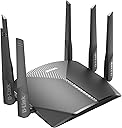
The D-Link DIR-3040-US is a high-performance AC3000 tri-band WiFi router featuring MU-MIMO technology, four external high-gain antennas, and AC SmartBeam for superior whole-home coverage. It supports the latest WPA3 encryption for enhanced security and offers voice control via Alexa and Google Assistant. Designed for gamers and streaming enthusiasts, it enables buffer-free 4K video and low-latency gaming across multiple devices. Expandable with D-Link Mesh extenders, it ensures seamless connectivity throughout your home.


| ASIN | B084H5SC9G |
| Antenna Location | Security |
| Antenna Type | Fixed |
| Best Sellers Rank | #18,258 in Computers & Accessories ( See Top 100 in Computers & Accessories ) #549 in Computer Routers |
| Brand | D-Link |
| Built-In Media | 1x Router, 1x Power Adapter, 1x Cat 5E Cable, 1x QIG, 1x QIC, 1x Voice Assistant Guide |
| Color | Gray |
| Compatible Devices | Smartphone |
| Connectivity Protocol | ethernet, wi-fi |
| Connectivity Technology | Ethernet, Wi-Fi |
| Control Method | Voice |
| Controller Type | amazon_alexa, google_assistant |
| Coverage | Entire home coverage |
| Customer Reviews | 4.1 out of 5 stars 440 Reviews |
| Data Transfer Rate | 3000 megabits_per_second |
| Frequency | 5 GHz |
| Frequency Band Class | Tri-Band |
| Global Trade Identification Number | 00790069450846 |
| Item Type Name | D-Link WiFi Router AC3000 Mesh Smart Internet Network Works with Alexa Google Assistant, MU-MIMO Tri Band Gigabit Gaming Mesh (DIR-3040-US) |
| Item Weight | 1.5 pounds |
| LAN Port Bandwidth | 1000 Mbps |
| Manufacturer | D-Link Systems, Inc. |
| Maximum Upstream Data Transfer Rate | 3000 megabits_per_second |
| Mfr Part Number | DIR-3040-US |
| Model Name | DIR-3040-US |
| Model Number | DIR-3040-US |
| Number of Antennas | 4 |
| Number of Items | 1 |
| Number of Ports | 7 |
| Operating System | RouterOS |
| Other Special Features of the Product | WPS |
| Router Firewall Security Level | Moderate |
| Router Network Type | Tri-Band Wireless |
| Security Protocol | WPA2-PSK, WPA3 |
| Special Feature | WPS |
| UPC | 790069450846 |
| Unit Count | 1 Count |
| Warranty Description | Limited Warranty |
| Wi-Fi Generation | Wi-Fi 5 |
| Wireless Communication Standard | 802.11ac, 802.11b, 802.11g, 802.11n |
| Wireless Compability | 802.11ac, 802.11b, 802.11g, 802.11n |
T**W
Goes through two walls No trouble !
Good WiFi, goes through two walls or from one end of the house to the other @ 50ft. Gets an excellent signal rating on my Roku device. Added bonus, doubled my WiFi speed from my old WiFi. Only operates my one device, do not know how well it works with multiple devices. Very pleased with it so far. Added note power supply is @ 46 inches.
E**E
Much Better than your Internet Company's Router
After MUCH research, I finally chose this and the AC2600 as replacements for my aging 10/100 routers. I hooked this up to my Spectrum modem (sending their proprietary carp packing) and haven't had any issues since. The main reason I chose these two routers is that they both support OpenWRT. I haven't tried that yet, but it's well documented as working on these models, so...
A**N
It works, don’t love the firmware
It works. I am not using this router in a mesh and my current living space is only 450 sqft so I’m not maxing out the range of this router. Tried out the NAS and the drive was spinning all the time and I found it annoying so I’ve disabled for now. May get an SSD and try again. Overall I’m happy enough with it that I won’t return. I’m not thrilled with the firmware or the web interface. Security options are limited. Out of the box my iPhone gave a warning about the type of wifi security. I had to go to the manufacturer’s website to download a beta version with a fix. Download speed was over 100 Mbps, but I immediately noticed issues with videos getting stuck on various websites. I did a power cycle and it has been working great since. One feature that I really like is the ability to turn off the status indicators. If I had tried a bunch of wifi routers I might not have chosen this one, but I haven’t had any issues with it since the couple hours of struggling while setting it up (it has been running about a month now) and it looks fancy with the 6 antennas.
J**O
Muy buena calidad y velocidad por el precio
Excelente velocidad y buena calidad, antenas unn poco frágiles si tienes que transportarlo. Lo uso para transmision de audio en eventos en vivo .
M**O
The worst router I'V EVER purchased. DON'T BUY.
Not only is it the worst router, but also the most expensive as I believe this is a quite high end router for a home. It's been giving issues since day 1. The "Smart Connect" feature kept kicking me out of the network every 10 or 15 minutes (from all my devices: phone, laptop, etc). If I was a bit far away from the router it happened more frequently, making it unusable. I turned off "Smart Connect" and it improved a little bit. But not enough. I live in a building so there are many wifi networks around. I guess it was still suffering from some interference so I set up the wifi channels of each network manually. After this, it improved (it was decent enough). Then hell broke loose when I turned on the guests network. Suddenly, I couldn't see one of the 5GHz networks. The other two became super unstable. I couldn't even configure them from the Admin page (http://192.168.0.1/) as there was an error in that page that wouldn't let me see the wireless options! I contacted Amazon (after D-LINK simply ghosted me on Twitter), had to hard-reset the router and then was able to configure it again, and see all 3 networks back. I decided to never turn on the "guests network" again. Too unreliable. And then I tried to reproduce some files using an Apple TV, via VLC and a USB drive that I connected to this router. The router doesn't show all the files via UPnP (for some reason, the SMB option doesn't appear). A way cheaper router (from another brand) that I have, does it perfectly. I didn't see any easy way around this, so I decided to connect back my old router (AC1750), which is way more reliable in all aspects. This router is now paperweight, unless I'm able to get a refund from Amazon.
C**5
If you are having wireless problems such as 5Ghz signals vanishing etc. DIR-3040.
This router has unstable 5Ghz wireless connections. The 5Ghz signal is very strong when it works, which is good, but I've had the entire 5Ghz network simply vanish from the firmware page which required a hard reset to fix. Other times the 5Ghz networks will just stop functioning, not showing up at all. The Firmware for this router needs more work. To perform a hard reset, keep the router turned on, use a paper clip and insert the end into the reset hole 'small hole on the back of router', hold reset button down for thirty seconds, holding button down, unplug from power and turn off with switch on back of router, release reset button, plug power back in after another minute or so and turn back on. This should fix most issues with 5Ghz wireless signal disappearing or vanishing.
L**N
DIR-3040 Router pushing out my 433mbps that I pay for.
Nice upgrade from stock unit from charter. I have a 2 story, 2,400 sqft house. I tried to go with a mesh router before this and it was a horrible mess and couldn't get over 100 speed. After talking to tech support I returned it and got this hoping for better. And I feel like I got way way better. Sadly my phone is the only tech I have that gets the fastest wifi speed. So I used that for the speed tests. I had one night that I was getting horrible speed. But I think it was more my phone then the router. Other then that I'm getting between 150-200 speed tests. But the router is pushing out 433. The 2 pictures of the single strength is right in front of the router, and at the furthest point of the house which is also the furthest away from router. While the single strength of the wife still shows pretty good at a distance it does cut out some. And my daughters old galaxy E tablet likes to buffer some while in the same room at router. But I know it's pretty old. I did call tech support once because I felt the single was meh. I don't like sitting on the phone so used the chat. And when got to someone you could tell they were also chatting with multiple multiple people so that was a little frustrating.
G**R
Excellent WiFi Router!
This WiFi Router solved a nagging unstable WiFi problem quickly and completely. It was easy to install using the instructions provided has been flawless in operation since installation. I am no longer experiencing periodic (every 2 or 3 minutes) signal drops and I am able to conduct business from my home without having to reestablish links when I have customers on the phone.
N**I
انتبه هذا ليس مودم
الجهاز زرساله جيد لكن هذا الجهاز فقط راوتر وليس مودم
S**M
Good performance
Good performance
F**Z
Performance increíble
El equipo es robusto y da una velocidad óptima tengo contratado 600 megas de internet por 100 de subida y me los entrega sin problemas ya había probado con otros equipos no me daban ni la mitad. 💯 Porciento lo recomiendo
J**Z
Bueno pero!!
En función es Excelente pero no sé si sea mi región no me servía la segunda red 5g y aparte me desconectaba y a veces tardaba mucho en conectar a la red pero solo me paso con este modelo ya que tengo un tenda y un redmi y nos los quería sustituir por este pero la verdad me quedo mal espero y les sirva mi reseña
C**R
Coverage not strong and signal breaks easily
Coverage does not reach till other rooms. Signals break and slow down. 6 antenna but not strong signal.
Trustpilot
1 week ago
1 day ago