Buy anything from 5,000+ international stores. One checkout price. No surprise fees. Join 2M+ shoppers on Desertcart.
Desertcart purchases this item on your behalf and handles shipping, customs, and support to Philippines.
๐ญ Elevate Your Stargazing Game!
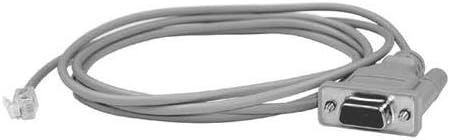
The Celestron NexStar RS-232 Cable is a 62-inch interface cable designed to connect your NexStar telescope to a laptop or PC, allowing for easy control and data updates. With an RS-232 jack on one end and a standard serial connector on the other, this cable enhances your astronomical experience by enabling seamless interaction with digital sky maps.

| ASIN | B0000665UZ |
| Best Sellers Rank | #253 in Serial Cables |
| Brand | Celestron |
| Brand Name | Celestron |
| Cable Type | USB |
| Color | Grey |
| Compatible Devices | Laptop, Monitor, PC |
| Compatible Phone Models | pc |
| Connectivity Technology | USB |
| Connector Gender | Male-to-Male |
| Connector Type | Rs-232 |
| Customer Package Type | coiled in protective tubing |
| Customer Reviews | 4.5 out of 5 stars 587 Reviews |
| Ethernet Cable Category | Cat 5 |
| Global Trade Identification Number | 00050234939201 |
| Included Components | NexStar RS-232 Cable |
| Indoor Outdoor Usage | Indoor, Outdoor |
| Item Length | 62 Inches |
| Item Shape | Round |
| Item Weight | 0.11 Pounds |
| Manufacturer | Celestron |
| Model | 93920 |
| Model Name | 93920 |
| Number of Items | 1 |
| Number of Pins | 9 |
| Other Special Features of the Product | Data Transfer, Downloadable Data |
| Outer Material | Plastic |
| Part Number | 93920 |
| Recommended Uses For Product | Connecting computerized telescopes for control, navigation, and firmware updates |
| Special Feature | Data Transfer, Downloadable Data |
| Specification Met | Electrical Safety, Connectivity, Cable Length Standards |
| UPC | 050234939201 |
| Unit Count | 1.0 Count |
| Warranty Description | 1 Year Parts and Labor |
E**P
great product
What can I say? This product does it's job well. I can now control my CG5-GT from my laptop via ascom. the celestron nexcontroller program allows you to do your entire polar alignment routine from you laptop, and you have PHD connection with your autoguider whihc allows you to record PEC data from your favorite pec program. I can now go out and balance my mount in the evening before it gets cold and operate everything from inside to do astrophotography without going out in the cold. I use an rs232 serial connection with a 3/4 express card adapter with my laptop, and an extension cable to reach my mount out in the yard. All I need now is a motofocus contorller and I will be staying alot warmer this winter!
S**E
Works as expected
Not much to say other than it seems to be well made. It is a simple RS232 adapter cable that adapts from the RJ22 plug on the bottom of the hand controller and converts to a standard DB9 plug. One thing to note, if you are ordered an Advanced VX mount or telescope, you do NOT need to order this cable. I was under the impression that it did not come with one, so I ordered this. When I received the AVX, there was one in the box. So now, I have a spare :)
C**T
The cable worked just fine. After the hand controller firmware failed
The cable worked just fine. After the hand controller firmware failed, updating the hand controller for the Evolution telescope was problematic because instructions were sketchy and confusing. The Evolution has an Az-El mount, and the firmware kept updating for an equatorial mount. I received a shipper from Celestron and returned the hand controller, which they reprogrammed and returned to me. Now it works correctly. In the process, I discovered I may have been doing one step incorrectly, which they did differently to get the desired result. In the interim, I used a WiFi Tab 2 with SkyPortal to operate the telescope. Once operational, the Evolution telescope is great.
L**N
Does what it needs to
Purchased this product for my son's Celestron 80LCM Nexstar+ Telescope. Some things I learned. 1. Also pick up the USB to Serial Adapter if you don't have one or your PC/Laptop does not have a Serial Port. 2. once you connect the USB to Serial Adapter go to Device Manager and check to make sure the USB to Serial installs correctly, I had to select the device and download/install the drivers to use the USB to Serial Device. 3. Download the CFM (firmware Updater) from Celestron's Website, and extract the files to your desktop (I tried putting them in a folder on a drive but the program did not like it and recommended running from the desktop) 4. Run the CFM to update the hand Controller, if it has issues there is a help file that will open to assist with connection 5. once you start the CFM it downloads the files it needs and once it sees the hand controller you can click the option to update the firm ware, a few minutes wait and it is done. 6. open your night sky software, in my case I used Celestron's CPWI, once started I selected connection and hand controller, now the telescope can be aligned and run through the software. I hope this helps. Good Luck
R**.
It does the trick ! Worth the investment !
I used this with a TRENDnet TU-S9 (USB to Serial adapter from Amazon http://www.amazon.com/TRENDnet-TU-S9-USB-Serial-Converter/dp/B0007T27H8) and was able to connect to my Celestron C8i SE scope via the hand controller. After downloading the controlling software from Celestron and upgrading the hand controller's firmware I am now able to use Celestron's NexRemote software to direct the scope from my laptop ! And after downloading the ASCOM drivers and the star program Cartes du Ciel I am now able to direct the scope to any object in the night sky from that star program. AWESOME !
P**H
The 1990s Called ... They Want their Interface Back
The cable does what it claims: It provides a 5' long link from the Celestron Nexstar hand controller to the RS-232 port of your computer. That few, if any laptops (or desktops) have an RS-232 port doesn't seem to matter to Celestron. You will need a serial port to USB adapter, meaning more expense and complication. If you want a lot of expense, Celestron will be happy to sell you one. I got this one . Another comment. Five feet is quite short for use in the field. Some USB adapters add length, but you may also want to budget for another extension cable. Finally, I control my mount with a Linux powered netbook running Debian Linux, and the program Cartes du Ciel. In addition I installed the package Indi-bin. The USB device that pops up on the computer is usually /dev/ttyUSB0. You will need to ensure your user is in the "dialout" group. Even then you may run into trouble "writing" to the USB device. The simplest workaround is to make /dev/ttyUSB0 universally writable by issuing the following command as root, or by prefacing the following command with "sudo": chmod 666 /dev/ttyUSB0
A**S
works
reliably worked.
M**E
Does everything it is supposed to and more
These cables while easy to make are still cheap enough that it would barely be worth my time. Since they are just about what I'd pay in parts and time I ordered it on Amazon and got it within a few days. With this cable you can upgrade the firmware(s) in your CG5 and likely other mounts using the same controller technology. It literally took minutes to upgrade the Controller, and the firmwares for each motor. Another added benefit of owning this cable is you can now use programs like Stellarium to control your mount.
I**O
Es lo que es
Necesario para conectar el portรกtil a un telescopio motorizado y usarlo por ejemplo con software de tipo planetario como Stellarium. Lo comprรฉ a buen precio, si no, es un accesorio un poco caro para lo que es. Lo uso con un Celestron SLT 127 y va perfecto.
K**R
Five Stars
Saved me having to return my telescope to the store to fix the corrupted handset software. Fast postage too.
K**.
Alles OK
Passt und funktioniert einwandfrei
A**S
Celetron
Mami k celestreon no diga k. No se puede usar el El telescopio nexstar 8
S**.
Cavo Celestron RS232
Il cavo funziona perfettamente, l'ho usato per aggiornare telescopio Celestron. Si collega alla tastiera del telescopio via rj11 da 4 pin ( tipo presa telefono ) e alla presa seriale RS232 del pc. Se vi manca la presa rs232 sul pc ( molto probabile ), ci vuole un adattatore per collegarlo alla porta USB.
Trustpilot
3 weeks ago
1 month ago