


Desertcart purchases this item on your behalf and handles shipping, customs, and support to Philippines.
โก Power your productivity with the ultimate triple-display docking station!
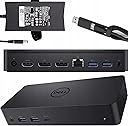
The Dell D6000 USB-C Triple Docking Station is a versatile, high-performance hub that supports up to three 4K or one 5K UHD displays, offers universal compatibility with USB-C and USB 3.0 laptops, and delivers up to 65W charging through a single cable. Featuring multiple USB 3.0 ports, Gigabit Ethernet, and audio outputs, it streamlines your workspace while boosting connectivity and productivity. Professionally inspected and renewed, it combines premium performance with sustainable value.
| Asin | B08BLRH22B |
| Best Sellers Rank | 13 in Amazon Renewed (See Top 100 in Amazon Renewed) 4 in Renewed Computers & Accessories 12 in Docking Stations |
| Brand Name | Dell |
| Colour | Black |
| Compatible Devices | Laptops, Speakers |
| Customer Reviews | 3.9 3.9 out of 5 stars (285) 3.9 out of 5 stars |
| Hardware Interface | Ethernet, USB, USB 3.0, USB Type C |
| Item Weight | 1.09 Kilograms |
| Manufacturer | Dell Computers |
| Manufacturer Part Number | 8F89T-cr |
| Number Of Items | 1 |
| Number Of Ports | 4 |
| Product Warranty | 1 year limited warranty |
| Total Usb Ports | 3 |
| Unit Count | 1.0 count |
| Upc | 753575617332 |
| Wattage | 65 watts |
User
Absolutely perfect - Rock steady video and peripherals
First my set up. Modern Thinkpad laptop. Two hi-res (2560x1440) 32 inch monitors at 60Hz, wired mouse & keyboardThis is a solid and very boring Docking station. You wire in your displays and peripherals, then put one USB-C connector into the normal power socket of your laptop - and everything works, all day, every day.It provides power and drives everything through the one port so the laptop is amazingly almost cable-free. I almost enjoy plugging my laptop back in after a trip.I've had a few docking stations before, my previous one needed resetting every few weeks, random failures to sync the displays, mouse not working on some USB ports, ...It's a bit pricey but I bought this one from Amazon Warehouse at half price - but would recommend it at full price.I've had this now for a few months and it's the most boring docking station ever. I've no idea if there's an app or settings - it just works which is all anyone wants.
User
Universal! Works with older and newer laptops - even with my Samsung tablet!
Previously I had a Wavlink USB3 docking station. It worked reasonably well. I could connect everything to my old laptops or even to my desktop PC with a single USB cord plus connected the charger for the laptop.I connected two screens to this setup and it was alright. Until I upgraded one of the screen to a QHD one (between full HD and 4k resolution). This extra was too much for that docking station. The new screen could not operate on its full resolution. I started to think maybe I reached the max of the USB3 bandwidth.We use two type of docking stations at work: the HP G5 and this. The G5 only compatible with laptops with Thunderbolt USB C connectors (modern laptops). Even if you convert the USB C to A, it will not work on older stuff. Sad.However, this one works as DisplayLink on older devices with USB A and work on high resolution on 3 screens on USB C Thunderbolt connection. This way, I can still use my old tech but not limiting myself with my modern laptops either. Perfect. I only connected two screen to it, but at work, we have three high resolution screens on them and they work fine over Thunderbolt. I think if you use only they type A connection, you still need to make some compromise with three screens. Two work fine.It has four USB3 type A ports, two display ports and one HDMI and an Ethernet and a 3.5mm headphone jack. All recognised. (I already had the DisplayLink drivers installed from Synaptec).I tried with my Microsoft Surface Pro 3 (old tech) over USB3 type A: all good, two screens on full resolution.Checked on the infamous ยฃ99 Geo laptop over the USB C connection. All worked and the device was also charging.On my precious HP Spectre, it was all good over USB C, Thunderbolt. The laptop uses 100W over USB C charging and this dock provides only 65W, so maybe over heavy loads I would still need my original charger, but for office work, it keeps my battery fully charged.Bonus: for a laugh, I connected the USB C plug into my Samsung S7 tablet and it recognised it as external screen and both mouse and the keyboard was working. Dex started and I had a desktop like experience on my tablet.Another observation: the sound worked on the speakers on my screen over HDMI. (The previous docking station had 3.5mm audio ports and the sound was diverted there by default. This one has a headphone connection on its front but luckily the screen speakers worked by default if no headphones connected to the dock)People said that it runs quite warm. It does. I will try to balance my coffee cup on it to keep it warm.Long story short: I am very satisfied with the versatility of the product. I will recommend this to my friends who uses many different devices on the same desk.It was a refurbished product and it was just as good as if I would pick one up from the office. It nicely sit on the stand of the screen.
User
Wouldn't pass a PAT test
If your idea of refurbished is wipe it with a cloth hide any damaged cables by wrapping the up and then adding a new clover leaf power lead, then this product is perfect for you.Out of the box it looks good, clean and tidy until you undo the band around the USB cable and find the cable is damaged beyond what would pass a PAT test, so if your plan is to use this in a work environment, it will fail the "physical damage" check.The dock itself has never been updated, so even Firmware from 2018 hasn't been applied to it, so there has been no maintenance at all on them.Everything works fine, just damaged cables for me are an instant failure, so shouldn't be sold as "refurbished" as that would suggest repairs have been done and there should be no more than superficial damage.I've included an image of the cable, which sends 65w of power to a laptop and isn't replaceable.For me it shouldn't be sold as it does not pass an electrical safety check, so I'd advise people to stay clear. Looking at some of the other reviews, this seems to be a recurring theme.
User
Solid performance and versatility, though design could be sleeker
I bought the Dell D6000 docking station to simplify my desk setup and connect multiple displays through a single USB-C cable โ and it performs reliably. It supports up to three 4K monitors or a single 5K display, and handles USB peripherals and Ethernet connections smoothly without noticeable lag or dropouts.Weight & Fit: The dock is compact enough to fit neatly behind my monitors, but itโs slightly bulkier and heavier than I expected for its price range. It feels solid and well-built, but I wish Dell had gone for a slimmer, lighter design to make it easier to move between home and office setups.Setup was quick on Windows, though MacBook users should note that it requires the DisplayLink driver for full multi-display functionality. Dell could make this clearer by including a short leaflet inside the box โ itโs an essential step thatโs easy to overlook.Overall, this dock delivers excellent connectivity and reliability. A few extra ports or a more streamlined body would make it perfect, but it remains one of the best all-round docking solutions for mixed monitor setups.
User
Works with two display cables going from monitors to dock.
At first I thought it wouldn't work as it came with one display cable. The only other cable it had was usb C to C. It didn't work when I used only these cables. I had to get another display cable and it worked brilliantly. Great value for money and does the job.
User
Dock
This item works well, bought to connect to Microsoft Surface,, powers laptop and dives monitors better than the Microsoft Product
User
The best
.
User
Defective unit
Cosmetically substandard, sticky residue from an asset tag on the top had to be removed with rubbing alcohol. There was significant fraying near the USB C connector that I had to reinforce with electrical tape to avoid potential shocks.The unit I received has a defect where the USB ports do not function. It also has a defect in that, while the Displayport and Dell Gig Ethernet devices are registered in device manager, every version of the Dell Firmware update utility for the D6000 fails to recognise the device as being connected.There are others who have posted in online forums about this kind of fault. I tried every troubleshooting variation under the sun (reboots, uninstalls, reinstalls, cold starts, USB-A, USB-C) and nothing showed promise.The model is sometimes recoverable but the particular unit I received is clearly not, and I will be returning it. Buy at your own risk.
User
Good
great
User
Not working
Product was used, scratches near ports and is not operational.
User
Used and non operational
Product was used, scratches near ports and is not operational.
User
Good product
This is a good product. It is exactly what I wanted. It came on time and intact. The packaging was good as well. It fit perfectly and the packaging was top-notch
User
Coming with high power cable
USB and USC options available with this. So really good
Trustpilot
1 month ago
2 months ago