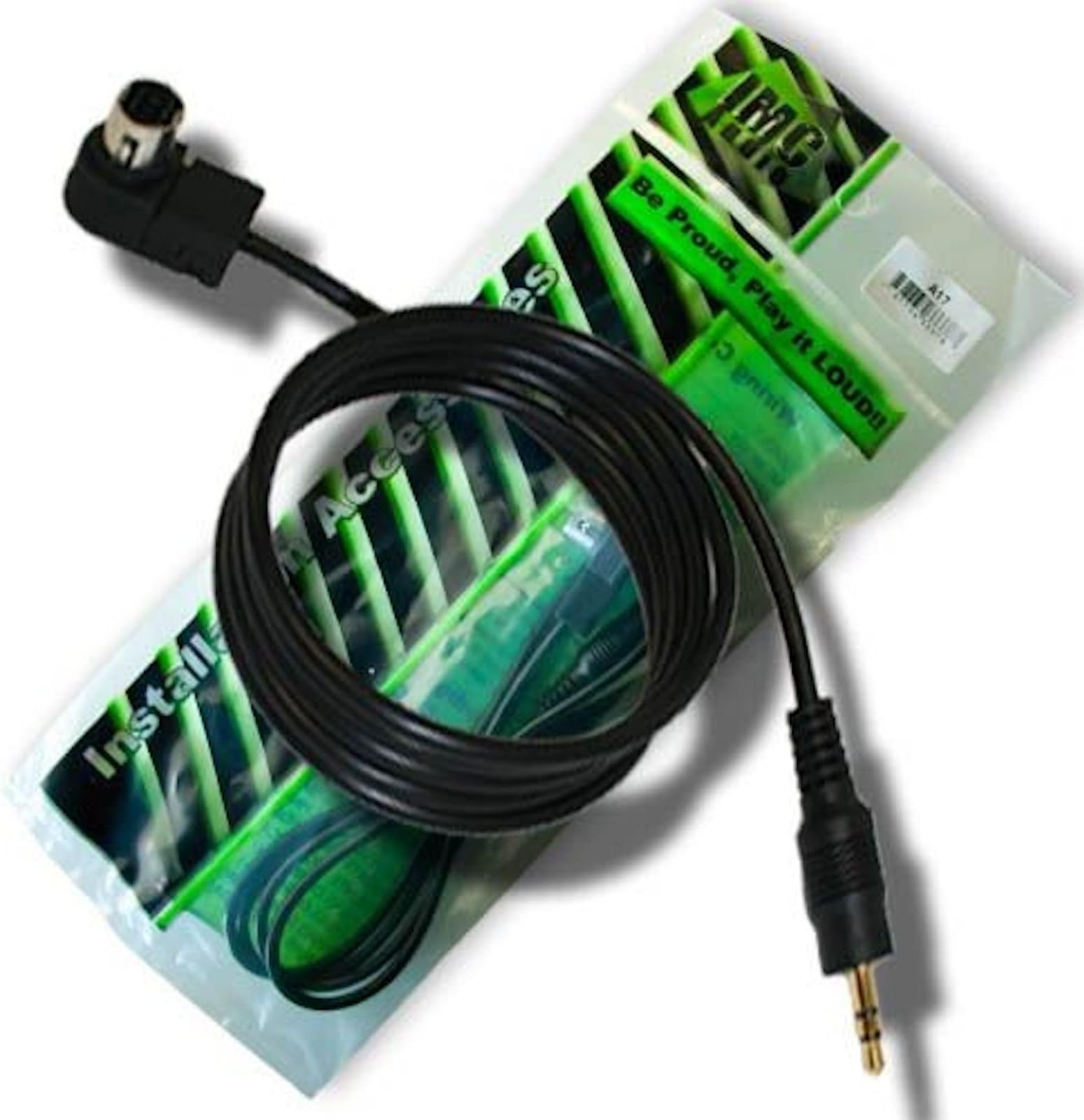
IMC Audio Alpine CDA-7845 CDA-7850 CDA-9805 CDA-9827 CDA-D852 CDA-D853 CDA-D855 CDA-D857 MDA-7755 MDA-W7850 MDA-W890 Ai-net to 3.5mm Aux Input Cable Headphone Jack Ainet
Product ID: 24565484
AUXILIARY ADAPTER for Alpine Ai-Net Radio Approximately 4 Feet Long 3.5mm conection to aux device Review: Doesn't work the way it should - MY, old Alpine hase the connection for this,,,,, But the stereo just can't read what's plugged in.. It was worth the try and effort Review: Product is fine, service not so much... - I was able to get this to work on an old Alpine CDA-D852 after a bunch of research on the internet. There was nothing with the product that told me what I needed to do to make it work, so I sent a message to the seller through desertcart. The seller told me to "Go to your initial settings and turn on all sources.". I went through all the settings and could not find anything regarding turning on or off Sources. I sent another email to the seller explaining that I had checked and there was nothing anywhere for turning Sources on or off on my head unit and asked for further guidance. I received the exact same response back from the seller. I tried switching the Alpine Ai-Net switch from NORM to EQ/DIV and I was able to hear my music, but just barely, and over top of anything playing through the radio at that time. I tried to unplug the head unit to see if it would recognize the phone after plugging it back in. I tried plugging the cable in after music was already playing on my phone, at both ends of the cable. Nothing was doing the trick. After much research on the internet, the following is what I ended up having to do to make the product work so that I could play something from any device with a 3.5mm plug in. 1. Hooked up the A17 Ai-Net to 3.5mm cable to the back of my CDA-D852 2. Connected a wire to an existing ground location in the vehicle 3. Connected the other end of that wire to one post on a Single Post Single Throw (SPST) Toggle Switch 4. Connected a longer wire to the Pink/Black Wire (Audio Interrupt In per my manual) on the back of my Alpine CDA-D852 5. Connected the other end of the wire connected to the Pink/Black wire to the other post on the SPST Toggle Switch 6. Turned vehicle on with Stereo Faceplate attached 7. Held Power button down until it said "Mute On" on the screen 8. Pressed Preset #2 to turn Mute Off 9. Pressed the Power button again 10. Flipped the Toggle Switch to the On position 11. CDA-D852 screen showed "Interrupt" 12. Plugged A17 Ai-Net to 3.5mm cable 3.5mm end into my phone 13. Played music on my phone 14. Music played through all speakers in my vehicle 15. Flipped Toggle Switch to Off position and CDA-D852 showed Radio as Source and Radio music played through all speakers Hopefully this helps someone else down the line so they do not have to deal with the sellers customer service.
| ASIN | B00L9ES58K |
| Best Sellers Rank | #4,544 in Car Audio & Video Input Adapters |
| Brand | IMC Audio |
| Brand Name | IMC Audio |
| Cable Type | AUX |
| Color | Black |
| Compatible Devices | Headphone |
| Compatible Phone Models | Compatible with smartphones, specific models not listed |
| Connector Gender | Male-to-Male |
| Connector Type | Auxiliary |
| Customer Reviews | 3.2 out of 5 stars 14 Reviews |
| Indoor Outdoor Usage | Indoor, Outdoor |
| Item Shape | Round |
| Item Weight | 3 Ounces |
| Manufacturer | IMC Audio |
| Number of Pins | 3 |
| Other Special Features of the Product | Tangle Free |
| Recommended Uses For Product | Connecting Alpine Ai-Net radio to auxiliary input devices in vehicles or other settings |
| Special Feature | Tangle Free |
| UPC | 700604540697 |
| Unit Count | 1.0 Count |
B**Y
Doesn't work the way it should
MY, old Alpine hase the connection for this,,,,, But the stereo just can't read what's plugged in.. It was worth the try and effort
D**D
Product is fine, service not so much...
I was able to get this to work on an old Alpine CDA-D852 after a bunch of research on the internet. There was nothing with the product that told me what I needed to do to make it work, so I sent a message to the seller through Amazon. The seller told me to "Go to your initial settings and turn on all sources.". I went through all the settings and could not find anything regarding turning on or off Sources. I sent another email to the seller explaining that I had checked and there was nothing anywhere for turning Sources on or off on my head unit and asked for further guidance. I received the exact same response back from the seller. I tried switching the Alpine Ai-Net switch from NORM to EQ/DIV and I was able to hear my music, but just barely, and over top of anything playing through the radio at that time. I tried to unplug the head unit to see if it would recognize the phone after plugging it back in. I tried plugging the cable in after music was already playing on my phone, at both ends of the cable. Nothing was doing the trick. After much research on the internet, the following is what I ended up having to do to make the product work so that I could play something from any device with a 3.5mm plug in. 1. Hooked up the A17 Ai-Net to 3.5mm cable to the back of my CDA-D852 2. Connected a wire to an existing ground location in the vehicle 3. Connected the other end of that wire to one post on a Single Post Single Throw (SPST) Toggle Switch 4. Connected a longer wire to the Pink/Black Wire (Audio Interrupt In per my manual) on the back of my Alpine CDA-D852 5. Connected the other end of the wire connected to the Pink/Black wire to the other post on the SPST Toggle Switch 6. Turned vehicle on with Stereo Faceplate attached 7. Held Power button down until it said "Mute On" on the screen 8. Pressed Preset #2 to turn Mute Off 9. Pressed the Power button again 10. Flipped the Toggle Switch to the On position 11. CDA-D852 screen showed "Interrupt" 12. Plugged A17 Ai-Net to 3.5mm cable 3.5mm end into my phone 13. Played music on my phone 14. Music played through all speakers in my vehicle 15. Flipped Toggle Switch to Off position and CDA-D852 showed Radio as Source and Radio music played through all speakers Hopefully this helps someone else down the line so they do not have to deal with the sellers customer service.
B**E
Two Stars
Nice but doesn't work with my model as I had hoped.
A**L
OLD Alpine now has Aux. In...
Worked great, adds Aux. in on a very old but good quality Alpine Radio.
C**E
Does the job
Worked well for allowing me to Supply an audio input signal to the rear port of my Alpine CDA D852 head unit.
J**N
One Star
It got here on time everything was good till it didn't even work
Trustpilot
3 weeks ago
4 days ago