Desertcart purchases this item on your behalf and handles shipping, customs, and support to Philippines.
🔒 Stay ahead with smart, scalable surveillance that never sleeps.
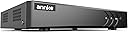
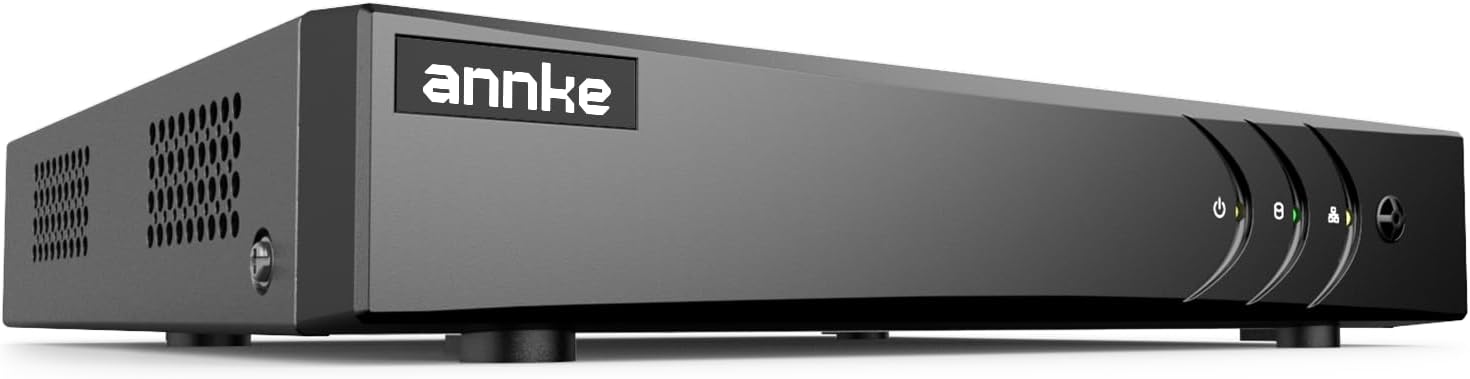
The ANNKE 8 Channel 3K Lite H.265+ Security DVR is a versatile hybrid 5-in-1 recorder supporting up to 8 analog and 2 IP cameras. It leverages advanced H.265+ compression to save up to 80% storage space and features AI-powered human and vehicle detection to minimize false alerts. With remote access via the ANNKE Vision app and robust certifications including UL, CE, and GDPR compliance, this DVR offers professional-grade security with scalable storage up to 10TB (HDD not included).


| ASIN | B00GB1IHSY |
| Audio Input | RCA |
| Best Sellers Rank | #5 in Surveillance DVR Kits |
| Brand | ANNKE |
| Built-In Media | 1X 3.2 ft/1 m Ethernet Cable, 1X 3K Lite DVR with NO Hard Drive, 1X 5.9 ft/1.8 m HDMI Cable, 1X Power Adapter, 1X USB Mouse & 1X User Manual |
| Compatible Devices | Camera, Desktop, Smartphone, Tablet |
| Connectivity Technology | HDMI, USB, VGA |
| Customer Reviews | 4.2 out of 5 stars 3,437 Reviews |
| Hard Disk Size | 10 TB |
| Hard-Drive Size | 10 TB |
| Item Dimensions L x W x H | 8.66"L x 8.38"W x 1.73"H |
| Item Weight | 3.3 pounds |
| Manufacturer | ANNKE |
| Media Format Digital Video | H.265+, H.264 |
| Memory Storage Capacity | 10 TB |
| Mfr Part Number | N81R |
| Model Number | AU-DW81KD000-V3-OP |
| Number of Channels | 8 |
| Number of Items | 1 |
| Number of Packs | 1 |
| Product Dimensions | 8.66"L x 8.38"W x 1.73"H |
| UPC | 786471557068 |
| Unit Count | 1 Count |
| Video Input | AHD, CVI, CVBS, IP Input |
| Warranty Description | 2 year |
A**R
Guardian of the Future: ANNKE 3K Lite Security DVR – Unleash the Power of AI
If you’ve been searching for a next-level security system that combines cutting-edge technology with bulletproof reliability, the ANNKE 3K Lite H.265+ Security DVR Recorder is the fortress you need to protect your home or business. This 8-channel hybrid powerhouse isn’t just any security recorder—it’s a technological masterpiece, offering AI-powered human and vehicle detection, crystal-clear 3K resolution, and a compression system that delivers efficiency without compromising quality. Whether you’re a tech enthusiast or someone simply seeking peace of mind, this DVR delivers a flawless, future-proof solution to all your security needs. Let’s start with the 3K Lite resolution—it’s nothing short of amazing. The clarity and sharpness of the footage are next-level, offering a resolution higher than standard 1080p, meaning you catch every detail, day or night. Whether you need to capture faces, license plates, or subtle movements, this DVR ensures that nothing escapes your watchful eye. It's like having eyes in ultra-high-definition, ensuring you miss absolutely nothing. But the real magic? AI-powered human and vehicle detection. This isn’t your average motion detection that triggers every time a leaf blows by—this is intelligent detection that differentiates between people, vehicles, and irrelevant motion. It focuses on the things that matter most, drastically reducing false alarms and ensuring you're only alerted when there's a legitimate reason. Whether it's identifying an unfamiliar face near your property or monitoring vehicles coming and going, this feature provides precision-level security, eliminating the hassle of constant, unnecessary notifications. The 8-channel hybrid capability is another standout feature, allowing you to connect a wide variety of cameras—both digital and analog—giving you incredible flexibility to expand and customize your security network. With ANNKE, you’re not locked into one system; instead, you have the freedom to build the perfect surveillance setup tailored to your needs. This hybrid nature also makes the system future-proof, so you can upgrade cameras over time without needing to overhaul the entire system. Now, let’s talk about the H.265+ compression technology. This wizardry allows you to record high-quality video while saving up to 80% of your storage space. With H.265+, your hard drive won’t fill up quickly, meaning you can store weeks or even months of footage without needing to constantly delete or back up files. This kind of efficiency means less hassle for you and more focus on what really matters—your security. The user-friendly interface of the ANNKE system is the cherry on top. The setup is incredibly intuitive, even for those who aren't tech-savvy. Connecting your cameras, managing footage, and configuring alerts is as easy as 1-2-3, whether you're accessing it via your smartphone, tablet, or computer. Plus, the remote viewing feature allows you to check in on your property from anywhere in the world, giving you 24/7 peace of mind, no matter where life takes you. In conclusion, the ANNKE 3K Lite H.265+ Security DVR Recorder is an absolute game-changer in the world of home and business security. Combining AI-powered detection, crystal-clear 3K resolution, hybrid flexibility, and unmatched storage efficiency, this system doesn’t just watch—it protects. Whether you’re safeguarding your home, office, or commercial property, this is the security solution that leads with intelligence and precision. With ANNKE, you’re not just installing cameras—you’re building an impenetrable shield of security around everything you value. Welcome to the future of protection!
E**9
Great NVR for the money!!!
This NVR is not the most sophisticated or most powerful but for the money it is great. Awesome price with simple and easy to use GUI. You cannot go wrong with this NVR. The app is easy to use and it allows you to view in real-time and playback with fast forward, date/time selection, camera and speed. Great NVR
R**N
5MP Lite is 1280x1944 (2.49MP) and only in HD-TVI, all others are 4MP Lite 1280Wx1440 (1.84MP)
Updated Review: OK so first 5MP Lite refers to resolution which is: 1280Wx1944H (2.49MP Actual); this DVR also has a 4MP Lite which is 1280Wx1440H (1.84MP Actual) and a 1080P Lite which is 960Wx1080H (1.04MP Actual). So basically “Lite” means 1/2 the horizontal pixels. As a reference 1080P is a standard at 1920Wx1080H in a 16:9 aspect ratio and 2.07MP. These are the standards and the expectations and dressing up 5MP Lite as though it’s 5MP is so,e gate and switch. Now this is fine with 1080P cameras as they’re actually 1080P and not light but anything over those 2MP cameras becomes a “Lite” making this DVR 1/2 as valuable over 1080P. I had issues getting my cameras to work with this 5MP DVR though I use 5MP loosely as this DVR cannot record over 2.5 MPs; I have 7 5MP cameras all that function on another 5MP “Lite” DVR @ 5MP and 12FPS as well as 1 1080P (2MP) camera. One of the 7 5MP cameras did manage yo work at 5MP Lite and 20FPS though no others did though they all worked at 4MP Lite (1.84MP Actual) at 30FPS. So I contacted Annke support which after running through some possible issues they recommended I return the 5MP and purchase the 8MP as it will actually view and record 5MP. I went back and forth on the emails as I couldn’t see buying an 8MP DVR to get 5MPs when they sell a 5MP DVR. Eventually, after about 2-3 weeks, they sent an 8MP DVR. And I must say I’d definitely recommend that DVR over this one as it actually views and records in 5MP has gigabit Ethernet, this one only has 10/100 which of you decide to convert it to NVR mode isn’t a lot bandwidth, the 8MP also has 4 instead of 2 IP cameras though the IP cams are capped at 6MP in both models. The big downside of the 8MP is the OLD GUI which just makes setup feel so much harder after using the 5MP, the 8MP also seemed sluggish compared Rotherham 5MP which seemed to respond better/faster. Another issue with both is the UPnP which pushed through port forwards to my router, which while good for some can really mess up people that have already set things up, the 8MP is actually much easier to turn options off, whereas the 5MP is targeted at the less tech savvy and hides some higher features. The customer service while annoying some times in repetition was actually quite good, they responded promptly each time I emailed them, and while not always to the point we eventually got to a amicable resolution. If it wasn’t for the customer service the review would be one star. All that said I would still recommend this DVR and especially the 8MP DVR as they have the best apps of any DVR I’ve used and stack up to some of the better NVR options like Blue Iris and Synology allowing easy pairing of multiple DVRs at different locations into one security stream where you can pick and choose cameras from each DVR. I run 3 DVRs and 2 NVRs between home and business locations and like the unified view; I especially liked the old app Annke View as it didn’t require a sign in and functioned exclusively at the device level, given security concerns I prefer this over the easier to use P2P setups; that said the Annke Vision app allows for local setup and both DVRs allow for disabling P2P, while setup is more complex it’s easy with either a static IP or DDNS service and a simple port forward. My recommendation would be the 8MP DVR is you have or plan on having any analog cameras over 2MP as it’s the only DVR which can actually provide 3, 4, 5, and 8MPs and not some “Lite” knock off; that said though if you only need/want 1080P then the 5MP is great, it actually displays at 1080P as well as records at it, though only at 12FPS, though it will pass-through display up to 30FPS. The 8MP can record to 15FPS @ 5MP, I’m including the specs for both as Amazon doesn’t gave them. The 5MP has the better interface and is definitely targeted at and functional for anyone. I’m waiting on the return info for the 5MP DCR I have but will probably buy another as only one of the analog systems we have is 5MP the older ones are all 1080P or even 720P so the 5MP would work OK for them and would bring the older systems into a modern app system Previous Review: I bought this despite already owning a 5MP Security DVR, exclusively because it allows the addition of 2 IP cameras, something which my previous DVR offered but which my current one did not. I pulled out my 5MP DVR, unhooked all 8 cameras and hooked them into this Annke DVR and 1/2 didn’t work; so I stopped them back and all cameras worked. It isn’t a compatibility issue because some of my 5MP HD-TVI cameras worked and some didn’t, all but one were the same manufacturer and another was a selectable off brand, one worked and the rest didn’t. The selectable wouldn’t work in TVI mode, which is the only way to get 5MP resolution, it did work in AHD but that maxes out at 4MP. Maybe 5MP “Lite” doesn’t mean 5MP, I thought it just meant without a hard drive. I then checked 1 camera at a time to see if it was a bandwidth issue, it was not, one particular 5MP TVI worked and the rest of the same brand did not; when I checked them against my viewer/decoder and on the old DVR all were recognized as 5MP TVI, unfortunately there is no way to verify camera specs on the analog side or even resolution on the IP side. This is just sad, even at this price point. The remote viewing is also horrible, the “New” app requires a user account creation even for local, or VPN monitoring, while the old program works, once set up with some tech knowledge, but constantly reports low bandwidth and stops. Today this shouldn’t be an issue to have phone and tablet apps that allow for easy viewing either a single camera or a multiplexed stream. I contacted their tech support phone number, and received no contemporaneous support, instead receiving an e-mail link for “real time chat”; upon clicking the link I made some choices and didn’t get to chat at all instead my info was taken and a case was opened and referred for support who would ‘email’ me within 72 hours - THIS IS NOT CHAT or ‘real time’. This is crappy service, though we’ll see what their email says. What’s sad is I actually like the DVR for local viewing of 1analog 1080P cameras, which all worked irrespective of type, including TVI, as it allows for easy customization of layout and has simultaneous VGA and HDMI; I run 3 analog DVRs between the house, garage, and business as well as a number of IP cameras recorded to the server, I like the customization but don’t like the 1 admin account limit. I’m going to try Annke again as I’m replacing another of the aging DVRs but if these aren’t future proof to 5MP they aren’t worth it as we’re switching to 5MP from 720/1080P cameras on the analog side with IP cameras all being 4MP-8MP. Unlike the page for the 8MP DVR, which shows specs on MP and Frame Rates for each video encoding mode, this doesn’t tell anything, it also doesn’t include FPS recording speeds, at least not that I’ve found in the settings. I have talked with their tech support via e-mail which is actually been quite good with prompt responses and they recommended the 8MP; I don’t need 8MP just 5MP on all channels. I reset my cameras and can only get 4MP@25/30FPS to work on the 5MP cameras in TVI/CVI modes but am not sure what is actually recording at. The 8MP establishes a viewing rate of 12FPS for 5MP but not a recording rate; I’m looking for at least 15-20FPS for recording at 5MP as below 15 things just get too jumpy for fast/faster motion. If they send the 8MP we’ll see. I do like the easy IP camera integration though it displays at D1 not 5MP, hopefully it records at the 5MP stream 1 level as D1 isn’t even 1080P. I run a number of IP cams and record most directly to the server but not all as for some local recording is enough but having the cam displayed with the analog cams is great and the whole reason I bought this DVR as I have already have functioning DVRs able to record 5MP. The other downside of this DVR is the app viewing as it only supports 1080P video output and 5MP is pointless when there is no way to differentiate the pixel improvement at 1080P on a monitor when there is no better way to view the video at the actual native resolution, at least at not real time.
E**R
Great DVR! Better than expected.
I've been using a DVR and some CVI cameras from Amcrest for a number of years now. One of the input channels on that DVR failed recently, so I was shopping around for a low cost replacement, just hopping to get something "good enough" and spend a minimal amount of money to get it. I decided to give this one a try after reading reviews here and watching a few videos on YouTube. I'm glad I did! It's so much better than I expected... lol In fact it's quite the upgrade from my old Amcrest unit. The interface is so much better, modern and faster. My old DVR only had 4 inputs, and I have 4 cameras. So I have 4 more empty inputs that I can use to expand later if needed. What's really nice though, is that it can handle two IP cameras in addition to the 8 coaxial inputs. I have one pan/tilt IP camera that I've added successfully. It's quite nice having all the cameras in one device, and also able to check them all in the one app on my phone or PC. Speaking of PC, I used a piece of software called Guarding Vision, which is recommended on Ankke's site. It works well! Having h.265 compression means I can store a lot more video on the same drive I was using, compared to h.264 with the old DVR. I took the 1TB Seagate Video drive out of my old DVR to put into this one. The AI motion detection works surprisingly well. On every camera/DVR I've had in the past, I end up turning off motion detection because I usually get just as many false positives as missed actual motion... lol This one works good though. I've seen very few "false" positives triggered by insects flying by, etc, but it's actually been able to properly detect people and vehicles, and tell the difference between then. I have it set up so it records 24/7, but with motion detection on, it still marks motion on the timeline in the playback which is perfect! I can also have it send emails or notifications too, but chose to turn those off for now. Definitely consider this if you're looking for a nice security DVR at a nice price!
W**G
Best bang for the buck in Home Security Surveillance DVRs
I have tried other brands (won’t name them here) that were simply useless (unable to stop hundreds of false alarms, detection failures, etc.). With this DVR I was able to eliminate nearly all possible false alarms and still get 100% detection, real-time email/text notifications and event recording. The DVR records 30 seconds prior to and 30 seconds after an event and can send real-time email/text with multiple pics from the most pertinent images from that time range; which pretty much perfectly catches what you need to see to determine exactly what happened (i.e. who came to your door, etc.). You can remote live view any one or several cameras simultaneously from the mobile and PC app. Reviewing event history is straight-forward by simply jumping to tick marks on the timeline or searching for specific events on specific cameras. You can even view events with up to 2 cameras synchronized side-by-side (which is really handy for seeing people/vehicles entering one camera’s view and then moving through to another). The UI appears better than most (nice graphics and easy to navigate). However, setting up the system takes an inordinate amount of time due to lack of useful common defaults (i.e. you spend a lot of clicks setting options for each day of the week for each camera—so lots of repeat this for 7 days x 8 cameras = 56 windows to click through to set the most common “do this always” setting). Several things (like configuring event triggering/recording and configuring event scheduling) are confusingly in separate places and easily missed. For example, you set up a bunch of event/alarm triggers but forget to also go to a separate menu section and set up the recording schedule and then nothing happens—leaving you confused and frustrated. The manual is better than most but there is still some poorly worded and badly documented features (like pretty much all of the Recording Schedule section of the interface). Making this worse, some of the features in this section simply don’t work (I worked with their support (which was very responsive) on these issues so hopefully they will fix this). Perhaps the most useful feature of this DVR is its ability to detect what they call “VCA Events”. This allows you to set up things like “line crossing” where you can draw a line and then specify that an alarm should trigger when something crosses the line in one direction, the other direction, or either direction. You can also trigger on “people gathering”, “loitering”, “object removal”, “parking”, “unattended baggage”, “facial recognition”, etc. I find that the “Line Crossing” feature is the ultimate way of eliminating false positives associated with the more common block-area motion detection. When you block out an area for motion detection (most DVRs support this), you can never really eliminate false positives from shadows, bugs flying near the camera, sprinklers, clouds, car lights, etc. Detecting “line crossing” means that something has to actually move across a line (like your front door step) as opposed to just set off a square somewhere in front of the camera. This eliminates 90% of the false positives. I set my system up to record on both motion and VCA events but only send emails/texts and audible alarms on VCA events (so I over record for historical info but only alarm when something really happens). Alas, you can only set up one VCA event (fixing this would make this a truly stand-out DVR). So I end up using the VCA event for the most important camera (e.g. the front door) and then limit the motion area and turn down the sensitivity for the other cameras to limit the false alarms there. When setting up block-area motion detection, like all other DVRs, you will have to play with the motion sensitivity to get it right. For me, setting the sensitivity to 1 works for detecting motion that is within 5-10 feet of the camera. Try 2 to detect motion within 15-20 feet and 3 or more for further out. The higher you have to set the sensitivity the more false alarms you should expect. Also, when setting the motion area, limit it to as few squares as you can. Try setting them all on then watch what actually triggers with different sensitivities set (you will likely be surprised). Then remove any areas you really don’t need. This will greatly reduce your false alarms. Bottom line, the hardware works. There are some bugs with the software and there are some UI issues (hopefully they will fix these in an update). Still this is the best security DVR I have tried. It has more features than most and it works. For what it costs, you can’t beat it. ** UPDATE (2019) ** While this is still the best low-cost security CCTV DVR system, analog security systems are all but obsolete now. Unless you have analog CCTV (i.e. coax) cabling/systems already in place, you are much better off investing in a digital NVR system. Your best bet is to go with wired POE cameras and a quality NVR like Reolink or Amcrest. The low-cost NVR systems tend NOT to have all the triggering features (line crossing, loitering, etc.) and will still cost you more than a CCTV DVR system. But, the ease of use, higher resolution, app independence and future proofing is worth the extra cost.
W**.
With or without internet claim is a bold face lie! Required email and password to create account
This is the claim of this product---> ~With or Without the Internet The local recording & live view function once you connect the DVR to a monitor/TV—even without Internet. Internet access is required only when you need remote control & motion push alerts.~ I installed the HDD and hooked everything up, started through the onscreen settings and bam, I cannot proceed without creating an account, that required both an email address and a password. I didn't need remote access or push alerts so I am looking everywhere for an x to close out the registration box to use the device. There is no way to close it, rebooted the DVR it popped back up blocking the screen. I had to connect an Ethernet cable to the box, in order to even use it. Then to make matters worse, there is a persistent menu on the left side of the camera grid that won't collapse so the cameras fill the entire screen like on every other DVR I Have ever used. This creates a bright white light in the room with the DVR vs a subtle light when the camera feeds fill the screen. This might seem frivolous, but the DVR monitor is in a bedroom. Next after creating an account I tried to login to the app and couldn't login...still working on the problem and considering returning the DVR for something better.
S**N
Works really well, needs more instructions
This unit works really well once you figure it all out. The instructions are not very clear and if you are not pretty knowledgeable in the computer part it's going to be rough. But it really does work well once you get it figured out I like the fast forward feature and the way that you can go right to the motion that you're looking for and find it and play it. I did see some reviews that said you needed a pair of needle nose pliers to hook the connectors for the cameras up and that is true I hooked two up and I thought this was easy but when I got to the 3rd and the 4th there's not enough room for my fat fingers in there to twist the connectors. It's not the end of the world because once you get them on they're on and you don't have to fool with them but they are very close as far as connections go. The phone app is really good and it sends alerts every time there's any kind of motion on any one of the cameras. That's all controllable depending on how much you want to see. I got a 2 TB hard drive installed in it with no problems at all. I had an amcrest unit before this and it was good also but it didn't have the fast forward feature or a way to find the particular motion event easily like this one does I haven't quite figured out the AI recognition for cars and people yet but I'm working on it like I said it needs better instructions.
J**S
Somethings you should know before buying
First, this is a ok product. It works, it does what they claimed it would. But, they most certainly left some important details out. You will not be able to configure the dVR or view your cameras in any modern browser. The only browser that works is an old version of Internet Explorer. Firefox, Edge, Chrome, no others work. This is due to the fact that they're using straight RTSP streaming, and no modern browsers support that. You can use their app, I won't, but it probably works. I have no desire to install their app on my phone. If you do want to view this in a modern browser, the best way I found to do it was through a Raspberry Pi 4 running Buster Lite and ReStreamer. You can effectively take the RTSP stream from the DVR feed it through Restreamer and then embed the video stream into another webpage via an Iframe. You will still need IE, or their software to view any recorded video or make any changes to the DVR settings. Other than those major issues, everything else went well. I tossed aside the engrish Quick Install Guide and just winged it. The harddrive went in with no problems. The setup was fairly straight forward. The motion detection seems to work well. I'm seeing 30fps across 4 analog cameras. It's also a shame that the ethernet port is 100mb only, in this day, everything should be on Gigabit. So many things that could be improved and this would be a great product.
F**Y
Does the job and more..
I have tried many "cheap" dvr units, and they ALL fell short, this unit does the job and then some, has not let me down and worked straight out of the box, setup mobile viewing easily and the app is very nice and simple. I had multiple different brand cameras and i plugged them all in and this Annke dvr unit picked them all up instantly. Dont hesitate to buy this like i did, dont buy the other rubbish brands, just save your self the time and money and buy this unit. Excellent product and price. *Also to note, another reviewer said there was no on/off power button, this is by design as most dvr units don't have an on/off power button incase the power goes out or cuts off at home/work, when the power comes back on or resumes, the dvr unit also turns back on and resumes recording without having to wait for someone to "remember" to turn it back on. You could have lost all that footage in that time, this will just pickup where it left off.*
R**N
Very good product. Simple design, but effective. Does the job it was built to do.
Easy to work with the product. The initial setup was fast, straight-forward and the 2TB HDD that I used in it, was recognised straight away. Also, the user interface is very friendly with the new software version. I bought this DVR of Amazon after initially buying a 4Cameras Annke CCTV system of eBay that has proven to have a faulty DVR. Or at least I couldn't make it to recognise the HDD in the kit or any other HDD I have tested. All in all, I am happy with the product. It does the job and the app connectivity is more than useful, especially if you need remote access on a daily basis.
R**N
Great
For the low price this unit is superb. Way cheaper then the older unit it replaced and it works much better. Would not hesitate to buy again. Very easy unit to operate.
D**N
You get what you pay for, not actually HD!
I own a 4 channel DVR which is getting on for 10 years old so decided to replace it and at the same time upgrade to 8 channels and benefit from some new features. Several other customers have purchased CCTV equipment from hong kong and china and I must agree that the instructions are of no help. Having said this the DVR is straight forward to set up once you have purchased the hard drive you require for the unit. I went with the 2TB hard drive to allow for more than enough memory and to record at a higher fps. Once the hard drive is installed and you've connected all of your cables simply switch on the unit and it sets itself up apart from the basic time and date information. I purchased the Sannce DVR fully aware that I wasn't going to get the best on the market for my money and wasn't expecting the best. The resolution is adequate but almost impossible to see faces unless they are directly in front of the camera. My previous DVR produced much clearer images than this newer model. This DVR is excellent for home or small office use but don't expect crystal clear images. Although I use D1 cameras this unit will only produce 300X275 images (CIF quality) This model includes a lot of features but please be aware that although it has an HDMI connection it does not provide HD quality pictures, I was aware of this when making the purchase but just wanted other to know they won't get HD quality. Now, the unit takes a little while to get used to and does have a lot of features. There is a handy QR code to connect your mobile but you will need to provided 'port' to access the DVR from outside your home network. You will also require you own IP address provided by your ISP. There are several videos on YouTube which will show you how to set all of this up. Additional features such as USB back-up and PTZ cruise control are very handy. I have only had the unit for two days so will update if there are any changes. Overall this is a very cheap basic unit with a lot of features and ideal for anyone starting out on the road to CCTV for their home or office. Please be aware that if you're spending out on high quality CCTV cameras you won't benefit from the quality using this DVR!
J**R
Great for the price
I bought this after my previous CCTV recorder failed - I'd tried a new HDD in it, but no luck so I bought the SANNCE® 8CH Full 960H HDMI Output P2P & QR Code Scan Standalone DVR with Phone View for Home Security Surveillance Cameras System (NO HDD) and popped the new HDD in that. Everything works fine. Picture quality and ease-of-use is better than my previous unit. Had to buy a power-supply unit for my cameras ( QVIS 12v CCTV Power Supply PSU 4-Way 5A (5amp) for 4 Cameras Professional Use UK Main Plug for £13.99) because my previous DVR had its own power output socket, which the SANNCE doesn't, but that was no big deal. For £59.99, I can't fault it except that it's about time there was a Windows Phone app for remote access as well as iOS & Android.
Trustpilot
1 month ago
1 month ago