Some deliveries may take a little longer than usual due to regional shipping conditions.

DOWNLOAD THE APP


Customer Services
Copyright © 2025 Desertcart Holdings Limited
DOWNLOAD THE APP

🌡️ Take control of your comfort—smart, simple, and always on point.
The Honeywell Home RTH221B1039 is a sleek, white programmable thermostat designed for effortless one-week scheduling with four daily periods. It offers precise temperature control within ±1°F, an easy-to-read digital display, and user-friendly DIY installation. Battery change reminders and flexible display options enhance reliability and convenience, making it an ideal energy-saving upgrade for heating and cooling systems without auxiliary heat.


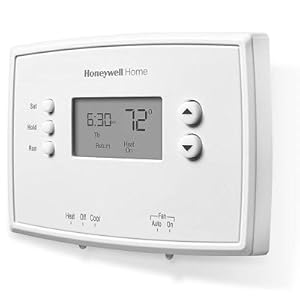

| ASIN | B018A3DHJY |
| Assembled Diameter | 1.1 Inches |
| Backlight | Yes |
| Batteries | 2 AA batteries required. |
| Batteries Included? | No |
| Batteries Required? | Yes |
| Battery Cell Type | Alkaline |
| Best Sellers Rank | #25,437 in Tools & Home Improvement ( See Top 100 in Tools & Home Improvement ) #53 in Home Programmable Thermostats |
| Brand | Honeywell Home |
| Color | White |
| Connectivity Technology | Non-connected |
| Control Method | Touch |
| Control Type | Button Control |
| Controller Type | Hand Control |
| Customer Reviews | 4.3 4.3 out of 5 stars (7,712) |
| Cutting Diameter | 1.1 Inches |
| Date First Available | August 17, 2005 |
| Display Type | Digital |
| Finish | White |
| Finish Type | White |
| Global Trade Identification Number | 00085267348553 |
| Included Components | Mounting Hardware, Thermostat, User Manual |
| Is Discontinued By Manufacturer | No |
| Item Package Quantity | 1 |
| Item Weight | 10.5 ounces |
| Item model number | RTH221B1039 |
| Manufacturer | Honeywell |
| Material | Plastic |
| Model Name | RTH221B |
| Mounting Type | Wall Mount |
| Number of Batteries | 2 AA batteries required. |
| Part Number | RTH221B |
| Pattern | Thermostat |
| Power Source | Battery Powered |
| Product Dimensions | 1"D x 4.75"W x 3.5"H |
| Shape | Curved |
| Size | 3.5H x 4.75W x 1D (in.) |
| Special Feature | Clock Display, Low Battery Indicator, Low Voltage, Programmable |
| Special Features | Clock Display, Low Battery Indicator, Low Voltage, Programmable |
| Specific Uses For Product | Air Conditioner, Furnace |
| Specification Met | energy |
| Style | Contemporary |
| Temperature Control Type | Heating and Cooling |
| UPC | 085267348553 |
| Voltage | 24 Volts |
| Warranty Description | 1 year limited. |
I**E
Excellent Basic Programmable Thermostat
I can't believe I waited so long to replace the old mercury bubble thermostat on my hot water heat system. I noticed a friend had a new one, so I decided it was time to do some research here at Amazon. I wanted a vertical style to match the placement of the old one which narrowed the field considerably. I wanted a simple day/night setback and didn't need separate settings for weekends. I wanted simple controls and ease of temporary adjustment. This one fit the bill perfectly. Installation was a breeze. The instructions are clear and easy to follow. My two-wire system connected to the Rh (Red - heat) and W (White) terminals. The wires weren't that color (probably the original 90 year old wires!) so I either guessed right or, more likely, it would have worked if they were reversed since it's simply an open/close switch to activate the heater. I even reused the mounting screws from the old unit - sweet! Stop by your local Dollar Store and pick up a mini screwdriver set if you don't have one. Programming is straightforward, and again the instructions are clear. It comes preprogrammed with four periods - Wake, Leave, Return, and Sleep. It's easy to adjust these to your desired time/temp. I skipped two of them completely by simply pressing the Hold button for four seconds while that period was displayed during setup. Believe me, you'll be tweaking your settings with abandon after the first run-through... it's that easy. I love the simplicity of the display. What's the current temp? Look at the screen. You're a bit cold? Tap the up arrow once and read the setpoint; tap it again to temporarily raise the setpoint one degree, again for two degrees, etc. The unit will retain your temporary setting until the next programed change (e.g. night setback) or until you press the Run button. Going away for a couple of days? Tap in the desired setpoint and press Hold. Simply press Run again when you get home. As noted in other reviews, there is no backlight in the display. You can download the installation and user's manual at the Honeywell website to get a peek at how it works. Be sure to note the Configuration Menu in the installation instructions. I had to change the "Heating Cycles per Hour" setting to "3" (for my hot water system) from the default "5" setting. What is Heating Cycles per Hour, you ask? It's a means to fine-tune the efficiency of the system's attempts to maintain your desired temperature. It's ONLY active when you're within a degree or so of the setpoint temperature. Here's how it works: Say, your setpoint temperature is 70°. As the heater brings the room air temp up towards the setpoint, an anticipator circuit cuts off the heat at a predetermined value, say 69° to keep from overshooting your requested 70°. Ideally, the residual heat from your burner/blower/fan/radiator will gently nudge the air temp up to 70°, and all is right with the world. So far we have: temp below 69°, run heater; temp above 70°, stop heater. But what happens between 69° and 70°? What if there wasn't enough residual heat to get to 70°? Or what if your furnace isn't sized properly, or your insulation is weak, or the kids left a window open? Where's that 70° you requested? This is where you heater starts cycling. My "Cycles per Hour" is set to 3, which means 3 twenty minute cycles each hour consisting of 10 minutes OFF, 10 minutes ON. When the air temp hit 69° the heater stopped for 10 minutes, hoping the air temp will reach the magic 70°. 10 minutes later it takes a peek at the temp... 70° or above? Great! Job done. No cycling involved. Oops - only 69.3°? - start up again for 10 minutes, shut down, wait 10 minutes and check again. 69.8° this time? Start up again for 10 minutes and another cycle. This time, let's say the temp hit 70° after 8 minutes of heat. Great! - job done, shut off heat and stop cycling. It might overshoot to about 70.3° this time - well within your comfort zone. Now, sit warm and cozy in front of the TV as the temp slowly falls from 70.3° to 69° and listen for the cycling to begin again. If you're well insulated, it's a fairly mild night, and your heater is sized properly, it might go through a cycle every couple of hours. If there's a blizzard blowing outside your poorly insulated shack, it might cycle on and off every 10 minutes, or even stay on constantly if it can't get you above 69°. To recap: Temp below setpoint minus one: heater ON. Temp above setpoint: heater OFF. In between: cycle ON and OFF in attempt to efficiently get to setpoint without too much overshoot. Why? A heater is more efficient running longer cycles rather than rapid On/Off cycles. A heater with a lot of "thermal inertia" - like my hot water system, takes a while for those warm radiators to gently get the air temperature to the desired setpoint... it needs cycles a bit longer to be efficient and effective. A rapid heat system, like an electric wall heater, will get that air temp up quickly - it needs a higher cycle rate / shorter 'burn' time to stay efficient and avoid overshoots. In fact, the cycle rate for electric heat is 9: that's 9 cycles of 6.7 minutes per hour. Air conditioning cycle/hour is fixed at 3. One more thing: if you want the fancier model, the Honeywell TH2110D1009 is the same unit, but with backlight, 5/2 day programming, and something called "Adaptive Intelligent Recovery" which learns how fast your heater gets you to your desired temperature so that you can program it to BE at a given temperature at a given time... handy for those early morning middle-of-winter wake ups! Be sure to properly dispose of that mercury! Enjoy!
I**A
A great value for your buck!
Super easy to self install! Very durable and easy to program and use! Very good replacement thermostat option! It is programmable, it doesn’t have a back light on it but are able to program wake, leave, return, and sleep times/settings for both cooling and heating settings!
D**R
Simple to Use and Reliable — Perfect for Basic Temperature Control
This thermostat does exactly what it’s meant to, keeps your home at a comfortable temperature without any complicated setup. Installation was quick and straightforward, even for someone who’s not super handy. The instructions were clear, and it powered right up once connected. The display is easy to read, and the programmable feature is great for setting different temps during the day and night. It’s not fancy or smart-home compatible, but that’s also what I like about it, fewer buttons, fewer issues. Once set, it keeps the temperature steady and accurate, and it’s easy to adjust when needed. If you’re looking for a no-frills, dependable thermostat that just works, this one’s a solid choice. Pro tip: double-check your wiring before installing, it makes the whole process even smoother.
E**N
Inexpensive upgrade from old mercury switch thermostats
I purchased this programmable thermostat to install in the portion of my two-family home that I live in. I also purchased the similar Honeywell RTH111B Vertical Digital Manual Thermostat NON-programmable model for the portion of my home that I rent out. Installation of both models is identical, and the main difference between the two is just the ability to set up a program of varying temperature changes based on your schedule. The non-programmable RTH111B has no clock feature. Just simple buttons to change the temperature up or down, and switches for a system fan (if applicable) and the HEAT-OFF-COOL selection. The programmable RTH221B gives you these same features, PLUS a 7-day, 4-event schedule to work with. In other words, every day of the week is treated the same and you can program in a time and temperature change for waking, leaving, returning, and sleeping. For people who desire to have a different schedule for the weekend, a 5/2 day programmable model would be a wiser choice. The apartment that received the RTH221B is a simple heat-only, oil-fired steam radiator system. The installation instructions were generally easy to follow, but I also found additional information on the Honeywell website explaining what each terminal actually was. It would have been useful for Honeywell to print this in the instructions. Summarized: Rh : Heating power supply Rc : Cooling power supply W : Heating signal Y : Cooling signal G : Fan Both of the two environmental systems in my home are ONLY heat, and have a two-wire connection. The wiring looked about a hundred years old, but still worked perfectly once I connected the wires to the Rh and W terminals. Interesting to note that in both installations it did not seem to make a difference which of the two wires went to what terminal, so long as it was Rh and W. However in a more complicated system that includes more wires for cooling or a fan, I'd use the included labels to mark each wire and be certain it was connected properly. Following the instructions, setting up a schedule for temperature changes was a simple process. Even if you ONLY wished to alter the temperature at night (rather than during the day while at work), it's a breeze because you'll just set the temperature the same for the "leave" and "return" events. Overall, setting the clock and programming took only a couple of minutes. I don't have any dollar amount savings to offer, but I can say that the temperature was MUCH more consistent in my apartment than it had been with the old round-style mercury switch which was prone to large temperature swings. There is no question in my mind that less fuel was used, and it's very likely that the two thermostats I purchased have already paid for themselves one month later.
Y**J
The Honeywell Home RTH221B1039 is a solid, no-frills thermostat that does exactly what it’s supposed to do. It’s easy to install, user-friendly, and provides accurate temperature control. The display is clear, and the buttons are intuitive to use. Perfect for anyone looking for a budget-friendly option that gets the job done without unnecessary features. Highly recommend for basic heating and cooling needs!
B**T
the installation instructions are useless, terminals W & R for 2wire gas central heating systems.
J**O
Estoy seguro que el termostato funciona perfectamente, pero yo no lo he conseguido. Además las instrucciones están en español y la programación cierto es que es muy sencilla. Mi aparato es Carrier, consulte las configuraciones tanto en Carrier como en Honeywell, pensando que era compatible con Carrier. He probado todas las combinaciones de cables posibles y no lo he conseguido. Probablemente sea culpa mía, solamente quiero decir a otros compradores que se aseguren de la compatibilidad antes de comprarlo. Muchas gracias.
R**.
Todo muy bien clima central funciona excelente
M**A
Works much better than the old thermostat I had - very happy & easy to install
Trustpilot
2 weeks ago
2 weeks ago