Desertcart purchases this item on your behalf and handles shipping, customs, and support to Philippines.
🚀 Elevate your 3D workflow — because precision waits for no one!
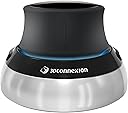
The 3Dconnexion SpaceMouse Compact 3DX-700059 is a sleek, professional-grade 3D navigation device designed for engineers, architects, and designers. Featuring patented 6 degrees of freedom sensor technology, two programmable buttons, and a durable brushed stainless steel base, it delivers precise, intuitive control in CAD applications. Its compact design fits limited desk space, and a 3-year warranty ensures reliable performance for demanding workflows.
| ASIN | B079Z3T2XC |
| Additional Features | Programmable Buttons |
| Antenna Location | Office |
| Best Sellers Rank | #5,655 in Computers ( See Top 100 in Computers ) #185 in Computer Mice |
| Brand | 3Dconnexion |
| Built-In Media | 3Dconnexion SpaceMouse Compact |
| Button Quantity | 2 |
| Color | black / black |
| Compatible Amazon Tablet Models | Amazon Fire 7 9th Generation |
| Compatible Devices | PC |
| Compatible Operating System Family | Windows |
| Compatible Tablet Computer Models | AAUB P30 |
| Compatible devices | PC |
| Connectivity Technology | USB |
| Connectivity technology | USB |
| Customer Reviews | 4.7 out of 5 stars 1,073 Reviews |
| EU Spare Part Availability Duration | 3 Years |
| Enclosure Material | Stainless Steel |
| External Testing Certification | Não aplicável |
| Global Trade Identification Number | 04260016340880 |
| Hand Orientation | Ambidextrous |
| Item Highlight | 3D mouse, precise 3D navigation in six degrees of freedom, special CAD functions, integrated in 300 software + slicer |
| Item Type Name | Spacemause for advanced 3D navigation |
| Item Weight | 0.48 Kilograms |
| Keyboard Description | German keyboard layout |
| Keyboard Layout | QWERTY |
| Keyboard Plate Material | Stainless steel |
| Keyboard description | German keyboard layout |
| Language | English, English, English |
| Manufacturer | 3DConnexion |
| Mfr Part Number | 3DX-700059 |
| Model Name | 3Dconnexion |
| Model Number | 3DX-700059 |
| Number of Items | 1 |
| Number of Keys | 2 |
| Number of Packs | 1 |
| Power Source | Battery Operated |
| Processor Count | 1 |
| Recommended uses for product | Office |
| Special features | Programmable Buttons |
| Style Name | Modern |
| Switch Type | Mechanical |
| Theme | Technology" or "Computer Aided Design |
| Unit Count | 1 Count |
A**I
ottimo prodotto
ottimo prodotto
C**R
Muito útil para modelagem 3D
Perfeito para uso no meu modelador 3D preferido (Plasticity).
J**V
Effizientes 3D-Navigieren leicht gemacht!
Die 3Dconnexion SpaceMouse Compact hat meinen Workflow revolutioniert. Hier sind meine Eindrücke: Innovative Sensortechnologie: Die patentierte Sensortechnologie mit 6 Freiheitsgraden ermöglicht ein beeindruckendes 3D-Navigieren. Das Anfängliche Lernen der Funktionen gestaltet sich simpel und macht die spätere Nutzung äußerst intuitiv. Praktische Tastenkonfiguration: Mit zwei programmierbaren Tasten lassen sich individuelle Funktionen leicht zugänglich machen. Die Möglichkeit, diese nach eigenen Bedürfnissen anzupassen, erleichtert die Anpassung an unterschiedliche Aufgaben. Platzsparendes Design: Das kompakte Design der SpaceMouse Compact ist perfekt für begrenzte Raumverhältnisse. Trotz der kompakten Größe geht sie keinerlei Kompromisse bei der Leistung ein. Stabile Basis für präzises Arbeiten: Die Standfläche aus gebürstetem Edelstahl sorgt für eine solide Basis, die die Stabilität des Geräts während der Nutzung gewährleistet. Das ist besonders wichtig, um präzise 3D-Bewegungen auszuführen. Fazit: Die 3Dconnexion SpaceMouse Compact ist ein unverzichtbares Werkzeug für alle, die regelmäßig mit 3D-Anwendungen arbeiten. Das anfängliche Lernen der Funktionen ist schnell und einfach, und die kompakten Abmessungen machen sie zu einer idealen Ergänzung für jeden Arbeitsplatz mit begrenztem Raum. Präzises 3D-Navigieren war nie einfacher!
L**S
3Dconnexion SpaceMouse Compact (3D-muis, bedraad, zwart)
supper
M**.
Surprisingly good!
Thought I'd give this a try as I'm using Fusion 360 quite a bit now, I was going to send it back if I didn't like it. This actually exceeded my expectations in how useful it is. I will be keeping it. It only requires very subtle movements and learning to do one movement at a time is a little bit tricky at first, but it comes with training guide and some demo games which are very useful (wish there were more though as they were fun!). I was pushing it round my desk at first as I was being too forceful, but it's fine once you learn to tone things down a bit. Was surprised that it's supported in non-CAD packages such as Word where you can navigate the document using it. Also it allows you to scroll a browser window. It works in OpenSCAD and Prusa Slicer too. It definitely doesn't replace a mouse though, it adds navigation capabilities in addition to the mouse rather than acting as a replacement. Not really using the buttons yet, but they do seem to be very configurable (I'm using Windows). Had a glaring blue LED in it, but fortunately there's an option to turn it off in the advanced settings. It does feel good quality, but think it could be £40 cheaper really. I don't suppose they sell many because of the niche market. I'd definitely recommend this if you are a heavy CAD / 3D Graphics user.
Trustpilot
2 weeks ago
1 day ago