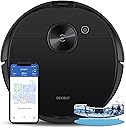


🚀 Elevate your clean game with smart power and precision navigation!
The ECOVACS Deebot N8 Pro is a premium robot vacuum and mop combo featuring a robust 2600Pa suction motor, advanced aerospace-grade LiDAR navigation with multi-floor mapping, and TrueDetect 3D obstacle avoidance technology. It intelligently switches between vacuuming and mopping, automatically avoids carpets during mopping, and supports customizable cleaning zones via an intuitive app. With up to 110 minutes runtime and compatibility with a self-empty station, it offers a hands-free, efficient cleaning experience designed for modern smart homes.


| ASIN | B08S6TLQN5 |
| Batteries are Included | Yes |
| Battery Life | 110 minutes |
| Battery Type | Lithium Ion |
| Brand Name | ECOVACS |
| Capacity | 2.5 Liters |
| Color | Black |
| Compatible Devices | Amazon Echo |
| Control Method | App |
| Controller Type | App Control |
| Customer Reviews | 3.7 3.7 out of 5 stars (15,197) |
| Filter Type | Disk |
| Form Factor | Robotic |
| Included Components | Cable Tie, Dusting Brush, Filter, Instruction Guide, Mop Pad, Side Brush |
| Indoor Outdoor Usage | Indoor |
| Item Dimensions L x W x H | 163"L x 18.6"W x 6"H |
| Item Type Name | robot vacuum cleaner |
| Item Weight | 13 Pounds |
| Manufacturer | ECOVACS |
| Model Name | N8 Pro |
| Model Number | OZMON8P |
| Number of Items | 1 |
| Number of Wheels | 2 |
| Other Special Features of the Product | Editable Cleaning Home Map Including Area Cleaning, No-go Zone, No-mop Zone and Selective Room Cleaning ; Auto-clean Scheduling ; Auto Avoid Carpet When Mopping ; Resumes cleaning where it left off after Auto-recharge; Alexa and Google Home Supported; Auto-empty Station Compatible, Vacuum and Mop 2-in-1; 2600pa Super Vacuum Power; Smart Mapping with dTOF Laser Navigation; Precise Object Detection … |
| Portable | Yes |
| Power Source | Battery Powered |
| Recommended Uses For Product | home cleaning, pet care, multi-floor cleaning |
| Style Name | N8 Pro |
| Surface Recommendation | Carpet, Hard Floor |
| UPC | 850016242563 |
| Unit Count | 1.0 Count |
| Voltage | 14.4 Volts |
A**A
Better than most reviewers have indicated, a great value considering the total package.
I have owned a few robot vacuums, most of them from Ecovacs and have been mostly happy with those purchases. Before this unit, my main floor Deebot was the 900, which has been retired to upstairs area. The main thing that drew me to the 900 was one of the first lidar based robots which did a pretty good job over the last few years avoiding obstacles, but it was never perfect even after years of updates. I was very reluctant to trust that the new models have come much further, but I can say I was happily wrong. Initial unboxing and setup was straight forward, especially if you have ever used any robot vacuums. It was interesting to see the auto empty unit was already loaded with a vacuum bag, but others have noted the same thing. It is very possible they quality test the unit in the factory and load the first bag for this test. Not an issue. I placed the auto empty station next to the older 900 unit and its dock, and docked the N8 Pro+ robot after attaching the 2 side sweeping brushes and removing the protection sleeves with the pull tabs. Powered on the toggle switch and the unit indicated it was charging. I used the QR code found under the top cover to download the app (different from the old Ecovacs Deebot app, the Ecovacs Deebot 2017 app, and now called Ecovacs Home). The newer UI on the most recent app is more intuitive and better tools for map managing than the older 2 apps were. This was a welcome finding that they have updated this. The app setup is a bit annoying it that it wants to map the house before any other options are available, so just note setting up no go "walls", rooms, new names, etc are not shown on the UI until the completion of the first cleaning run. Also to note, make sure you have the auto empty station dock flat against a wall that is somehow perpendicular to your house design. This was a major headache if you don't do this. What I mean is if your house is mostly a rectangle or square layout, make sure the wall you start with is 90 degrees to your home layout and not against a wall that is diagonal or circular to your house layout, otherwise, your home map will be weirdly placed on the map it generates forever and all time. You cannot (under the latest version as of 5-28-21) rotate the map once it is generated and the robot/app situates the map of the home based off the angles it detects on first undocking. So if the wall behind the dock isnt flat and perpendicular to the other walls, it may layout your map diagonally. This may not seem like any particular issue until you go to edit your map, generate zones, place no go walls, etc, because the map only uses rectangles to set zones and no mop areas and if you map is off on a diagonal direction, you will have no way to easily set these areas other than virtual no go "walls" which can be diagonal. This seems like a very big oversight and something that could easily be fixed, but there is no current provision for this and will force you to reset the entire map and start all over again. Not the end of the world, but quite an annoyance if you are not aware of what is going on. Hopefully this saves someone that pain. Now for my first cleaning. That main reason I wanted to get this unit is the improved obstacle detection. I hate having to prepare the house for a run so that it doesnt get stuck anywhere only to come find it got stuck and a large reason my last vac didnt just run on a constant schedule. In a large home (4000 sqft) with 2 kids and a dog, it was really awful to assume it would run nonstop without issue. The old unit had horrible times with anything dangling from any possible reach. It was also bad about getting hung up on low pass areas under coffee tables, end tables, etc. This unit happily is not having those issues. The front sensors seem a lot more capable of sensing things it cant fit under perfectly and the map allowed to easily prevent any future (investigations) of those areas where it would only find it couldnt fit. Be very aware, it is known that the first mapping pass takes MUCH longer for the unit to finish and will almost always not happen in the first go and require a recharge and resume. This is as designed as the unit takes extra time to map the area more closely. Once a map exists, the unit will traverse a lot more efficiently and take less time to investigate areas. I did notice this unit struggled slightly more than the 900 with tall rugs, at least at first, but then somehow it seemed to "learn" something and employ a turn around backup maneuver to get up on the rug in reverse since it has more clearance, turn around, and proceed to clean the rest of the rug (a tall pile rug on hard wood floor). I thought at first this would be a fluke, and it just happened to get up on the carpet this way, but multiple cleanings and it still does this to get over the lip of the tall pile rug. I really like the new mapping feature that detects carpet versus hardwood/tile and puts this on the map, even door mats that are carpet. This causes the vacuum to increase suction while over these areas which is a very welcomed feature. My family has already noted, this one if much quieter than the 900 and any other vacuum we have ever used while running. Slight increase over carpet, but being that it is now over carpet, not that audible since it is dampened by the carpet itself. Battery life, many indicate how this has less battery capacity then the last unit, and this is true, but I feel this is a cost cutting measure and not something that is a real issue with the unit. In my opinion, this unit is used differently from before as you can let it run more constant scheduling since it is more capable and can auto empty. When you free your mind to this concept and use it that way, battery life is much less an issue. On the initial run, it needed another charge to finish the entire 1st floor, but subsequent runs can finish on 1 run as it takes 84 minutes to complete the whole floor with some room to spare. If you schedule rooms alternating, etc, you should never run into an issue. The do not disturb times allow you to set this and sort of forget it. Just check the vac bag in the unit from time to time for fullness. One thing I want to mention from the old unit, the old unit was HORRIBLE at returning to the dock to charge, the N8 Pro+ is a lot better at finding the way back to the dock. The old unit would sometimes go in the opposite direction to get home first and sometimes run out of power while trying to find its way back. This unit generally drives right to it. Much better.
D**.
Almost perfect robot vacuum with mopping feature
I had previously written a negative review on this vacuum due to the inability of the machine to reliably drain the dirty water from the "sink" at the bottom of the docking station. I'm happy to report that the replacement machine has fixed this issue and has been reliable for about a month. The machine continuously and reliably cleans my home, avoids most obstacles, and "cleans itself" for the most part. I'm pretty happy with it and I've done a side-by-side comparison with my old iRobot. Pros: * The Ecovac does a great job at navigation, avoiding most obstacles (still gets confused by some pieces of furniture) and returning back to base at the end of its work. It's significantly better than the bump-and-run iRobot. * The mopping function has turned out to be a great feature and saves a lot of time. I wouldn't say the floors sparkle, but the amount of crud in the dirty water bin is astounding. * The mobile app does provide a good benefit once your house is properly mapped (it took a few tries here). You can set zones and schedules and fine-tune your ecovacs setting. * You can see the progress of the machine and the stats on the mobile app. Needs improvement * The water tanks are a bit small. I need to refill/drain them almost every day. YMMV but this is on default setting on about 1800sf of hard floors. If you're expecting to set it and forget it for weeks/months, that's not going to happen. * There are a few software glitches. The machine "forgets" to continue cleaning if it returns to base to recharge. That means that some areas of the home get cleaned more than others. It doesn't understand time zones or daylight savings time correctly so your schedules will not adjust properly on those dates. The mobile app could use some usability fit/finish improvements. * I feel that the vacuum power is a bit lacking. It doesn't pick up as much dust/dirt as my old iRobot, but it does often complain the dust bag in the dock needs to be replaced (it's almost empty). That said, I don't see debris or dust on the floor after it runs. * The voice response "OK YIKO" is a good idea, but it doesn't work all that well. Sometimes it doesn't hear the trigger word or fails to understand me. It also seems silly to talk to a vacuum on the floor (just my opinion) especially needing to be right above it. I feel like I'm scolding a pet :) * I don't need it (and actually don't want it), but the video chat feature of the vacuum doesn't work for me. Overall, for the last month this has turned out to be a great device and the customer service team at Ecovacs seems to have improved a lot in answering questions/concerns.
A**O
not charging after 1 st use - i want return !
C**.
Es un robot excelente que te ayuda mucho en la barrida de la casa, aunque el modo de trapera no es muy bueno, aún así lo recomiendo
O**P
The N8 Pro+ robot works well. It navigates autonomously throughout the house, has covered all areas and cleans remarkably well on both carpet and tiles. It has only become stuck once when it unexpectedly ingested a piece of rope under a bed. It's great that the robot refuses to go on carpet if it has a mop attached. The mop works though it is a little odd, in that it's hard to remove if you want to use the robot as a vacuum - unless you remove the whole water container. The auto empty bin works, but only if the robot isn't too full, otherwise 50% of dirt stays inside the robot. Increasing vacuum runs improves the situation somewhat. It seems that both sides of the bin are being equally sucked which causes a dead space in the middle. Perhaps blocking one outlet somewhat might alleviate this issue. The supplied auto empty bin was for the wrong voltage (120 V, not 240 V) and Ecovacs Australia support claims that the unit is not purchased from them (even though it was purchased by clicking on the link on their site), is not supported, does not have global warranty and does not have a universal power supply. Their only solution was to purchase another auto empty bin locally. To all appearances both units are identical. The Remote Control App is rubbish. It's unstable, the user interface is horrible, inconsistent, continually fails to connect, makes it impossible to divide rooms. It is impossible to overstate how bad the App is. You should know that unless you push the "auto" button on the robot itself, this device requires an internet connection to operate.
D**A
I thought this was going to an absurd and expensive purchase and I’d have buyer’s remorse by the time I got the confirmation email, but wow was I wrong ! This thing picks up so much, the mopping isn’t perfect but it’s better than the zero mopping I do ! It’s quiet and fit my space perfectly. It does have a hard time with thin and flat to the ground chair legs but that’s ok.
D**Z
El Robot esta genial, es mi primer equipo de este tipo de categoría y me quede sorprendido por lo bien que hace su trabajo. Cabe recalcar que apenas llevo un par de semanas con el equipo. Altamente recomendable con pisos cerámicos, los deja súper limpios. Aspira y trapea al mismo tiempo, tiene sistema de auto limpieza lo cual ayuda a no estar atrás del robot para descarga de polvo o cambio de agua, lo hace en automático directamente a la estación de servicio. (No tengo alfombra, así que No puedo dar mi opinión en este rubro). (El equipo tardo en llegar 4 semanas pero valió la pena esperar).
Trustpilot
3 days ago
2 weeks ago