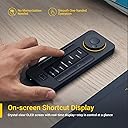
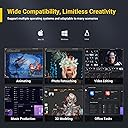
🎨 Elevate your creative command center—because shortcuts should work as fast as your ideas.
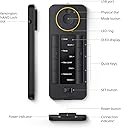
The XENCELABS Quick Keys is a premium shortcut keypad featuring 40 programmable keys with an OLED display for instant shortcut recognition, a multi-mode rotary dial for precise control, and seamless compatibility with Windows, macOS, and Linux. Designed for digital artists, video editors, and creative professionals, it offers wireless Bluetooth 5.0 connectivity with a dedicated dongle and wired options, delivering a reliable, customizable, and efficient workflow enhancer.


| ASIN | B08VNCLDTK |
| Batteries | 1 Lithium Polymer batteries required. (included) |
| Best Sellers Rank | #653 in Computer Keyboards |
| Customer Reviews | 4.4 4.4 out of 5 stars (1,209) |
| Date First Available | February 3, 2021 |
| Item Weight | 10.6 ounces |
| Item model number | K02-A |
| Language | Multiple Languages |
| Manufacturer | XENCELABS |
| Product Dimensions | 6.2 x 2.46 x 0.47 inches |
O**L
Reliable, Customizable, and Easy to Set Up
The Xencelabs Quick Keys device is extremely well designed and works seamlessly across my setup. The buttons are responsive, the dial is smooth, and the overall build quality feels premium. It adds a lot of efficiency to my workflow, especially for creative software where shortcuts matter. Setup is simple, installation is quick, and the software is intuitive to customize. Connectivity is stable whether using it wired or wireless, with no lag or dropouts. The device is lightweight but still solid enough to stay in place during use. The display is clear, the customization options are excellent, and the available color themes for the UI are a nice touch. Overall, this is a professional-level shortcut controller that performs reliably and feels great to use.
G**L
Phenomenal
I'm apparently not the target market for this, since all the talk is about compatibility with drawing tablets and usefulness to an artist.. but this thing is great for anyone who needs configurable smartkeys and/or a scroll wheel. I mean, the stupid little one-handed wired keyboards and whatever else you can get cost orders of magnitude more for devices that lack half of these features. To be honest, I only found it looking for something to save my mouse-scrollwheel finger from an early death, and it's not quite a perfect replacement for that (for some reason this wheel's "scroll" function is unable to scroll some things that the mouse wheel can, but it generally works the same in most places.) But it's great for tons of other purposes beyond that. It's wireless. Instead of M1, M2 etc macro buttons, it has an OLED display that has customizable labels for each button, and it lasts about a week on a charge despite that. There can be 6 different sets of buttons with different shortcuts/macros.. for each application you configure settings for. The actions/scroll rate and profile colors of the jog wheel can be customized for each application as well, with 4 different modes available to each different set. So, for example, it can be a forward/rewind, volume up/down, switch captions, and previous/next in playlist selector for your media player, with self-labeled buttons for 36 different other functions like play/pause, and can do all that from on the desk next to the book you're reading, across the room from the computer. Or your most important but easily-automated spreadsheet tasks from handy reach of your outstretched thumb from the mouse hand. - Exceptional versatility and priced in the range of a 6-button mouse. Can't go wrong with that.
B**N
Streamline your work functions
It can be a bit of a pain to set macros, as the software doesn’t stop the operating system from performing functions when entering macro keys. You can get around this using sticky keys, but its a pain. Beyond that, this is a very handy gadget for office use. It helps me streamline processes at work. Connecting is fast and easy. It has good battery life and a nice screen. The dial is nice as well. $100 was a little pricey but overall if you do a lot of the same functions repeatedly, this is a god send
I**L
Quality build, highly flexible application
This review is for the Quick Keys, which I am using in a photography-related workflow on a Mac Studio setup. I am using this in conjunction with Narrative (an application for culling photos), Lightroom Classic, Photoshop, and a Huion tablet. Quick Keys is probably the best shortcut pad I've used. What drew me to the Quick Keys is the wireless operation, for the modern "clean" workspace, and the OLED, which allows for quick identification of what keys do what, and also quickly stating what mode the wheel is in when shifting between states. A much better way to work considering the high level of programmability this device has, rather than, for example, putting labels on keys. What really surprised me was the build quality. It's hefty and made from metal. The wheel is solidly mounted, and the turning very smooth. Compared to competitor products, I'd say Quick Keys was designed by a team who have an intimate understanding of how creatives work, and know the value of a great user experience for something that would be used every day. By far my favourite experience is using this with Narrative for culling photos. Sitting back and scrolling through the photos on the wheel, tagging and untagging my selections, is a much more satisfying (and faster) experience than hunching over the keyboard, tapping the arrow keys. I also use this in Lightroom in conjunction with my mouse. I mouse over the adjustment sliders and use the wheel to make the adjustments. Again, the entire Lightroom grading process can be executed without laying a hand on the keyboard. Finally, I use this with Photoshop. Some shortcuts are better suited for the buttons on the tablet itself, but the remote on the side gives access to additional tools and adjustments. For example, I set the wheel to adjust brush size by default on Photoshop, while the touch bar on the tablet is used for zooming. The OLED labelling of the buttons is also invaluable when adjusting workflows.
A**R
I’m using this as a macro keypad and it’s amazing, works on both my Mac and windows. Software would auto switch to my custom shortcut depending of the software. The text makes it super easy to remember what the keys are. After a year the bottom rubber is falling. Which is annoying but a little bit a glue hopefully should fix it
B**N
macOS işletim sisteminde kullanıyorum. En çok kullandığım programların kısayollarını, çeşitli web sitelerini ve sistem araçlarını kısayol olarak tanımladım. Çalışma mantığını anladığınızda kolaylıkla programlayabiliyorsunuz. Ayrıca bilgisayardan video ya da film izlerken de uzaktan kumanda olarak programladım, ileri, geri, dur ve başla butonları ile ses ayarı ataması yaptım. Hem işte hem de evde vazgeçilmez bir araç oldu. Uzaktan kontrol işlerinin hepsini yapabiliyor. Sunumları oynatma ve durdurma, video oynatma ve durdurma, programları ve web sitelerini açma, ses ayarı ve daha birçok iş için kullanıyorum. Dilerseniz bilgisayarda yazdığınız betik ya da kestirmeleri de çalıştırıyor. Benzer ürünler içinde en iyisi bu, araştırmalarım ve deneyimim bunu gösteriyor. Almayı düşünenler için tavsiye ederim.
A**R
ممتاز كما في الوصف
D**Y
Overall a good product but I didnt like the buttons. Hard to press and not responsive as I’d like.
T**S
Excelente como macro keypad
Trustpilot
1 month ago
2 months ago