We remain fully operational. Our teams are working around the clock to ensure your deliveries continue safely.

DOWNLOAD THE APP


Copyright © 2025 Desertcart Holdings Limited
DOWNLOAD THE APP




❄️ Stay cool, save smart — control your comfort like a pro!
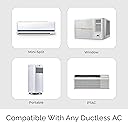
The Cielo Breez Eco is a smart AC controller compatible with mini split, window, and portable AC units featuring IR remotes. It connects via Wi-Fi and integrates with Alexa, Google Home, and SmartThings, enabling remote control and automation. Equipped with precise temperature and humidity sensors, it offers real-time air filter status and detailed energy usage analytics through its free app—empowering users to optimize comfort and reduce energy costs effortlessly. The device includes all necessary accessories for flexible installation and boasts a user-friendly setup with dedicated customer support.


| ASIN | B08RB2Q88Y |
| Best Sellers Rank | #138,029 in Kitchen ( See Top 100 in Kitchen ) #310 in Air Conditioner Remote Controls |
| Brand Name | Cielo Breez |
| Color | White |
| Customer Reviews | 4.5 4.5 out of 5 stars (537) |
| Display Type | LCD or LED |
| Global Trade Identification Number | 00853937007051 |
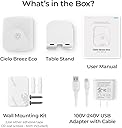
| Included Components | Breez Eco, Manual, USB Adapter with cable, Table stand, Wall mounting kit |
| Item Weight | 286 g |
| Manufacturer | Cielo WiGle |
| Material Type | Plastic |
| Operating Temperature | 18 Degrees Celsius |
| Warranty Description | Manufacturer warranty for one year |
R**N
Excellent customer service
I couldn’t find the model while configuring the device and the support team helped me over the phone to configure the devices with few simple steps. Highly recommended product.
M**E
Good product and customer support
It’s a very good and handy product, works right away and makes controlling a split unit easy. Very quick customer support when/if issues happen and they manage to help you immediately.
M**D
Outstanding Support and a Perfect Device!
I’ve had an amazing experience with the Cielo Support Team — truly one of the best support teams I’ve ever interacted with. They were incredibly responsive and helped me fix my problem as fast as possible. Their team is knowledgeable, friendly, and genuinely cares about customer satisfaction. As for the device — it’s absolutely perfect. The setup was smooth, the app is user-friendly, and it works exactly as promised. It’s rare to find a product that delivers great performance and comes with such excellent support. Highly recommended!
J**R
Waited a couple of weeks to review. I have a Mitsubishi mini split, multiple zones. Bought for my first floor which has 2 air handlers, thought it would just turn on 1 unit, but gets both which is great. Have an open floor, one unit close to the island the other above the window. Remote is to the left of the window. Bought it just for the remote, control from anywhere function, so can’t speak to people complaining about other functions. I have 2 thermometers on the floor and temp on the app is very accurate. Easy to program for auto on/off schedule. App lets me know when it is on or off. The remote that comes with units are in a drawer. Only needed them for initial programming, which took 5 minutes. No issues at all, hopefully they go on sale for Black Friday, I will be purchasing more. Update 12/27 So ended up purchasing several more units for additional zones and am very pleased with them. Have not had any connectivity issues with WiFi. Has only been a month or so, but for all the applications that are available with the app, it’s hard to beat for the price. I use the “comfy” setting in e saver, and that will turn the unit on and off when it reaches the set points. Easy to set up and it sends notifications to my phone when a setting is executed and can see the room temp in the app as well. My only concern which is not major, but not sure if the eco breeze has a thermostat which senses the room temperature or if it’s being read at the air handler, which would not be as accurate a measurement of room temperature. I will investigate this further. Update: 8/2025 Units are still functioning perfectly. Maybe once or twice a unit lost connection, I have 5, but reconnected easily. Also the vane adjustment allows the swing door to move up and down automatically, allowing better circulation of the air. I have ceiling cassettes. Haven’t used the Mitsubishi remote in almost a year. Very happy with this purchase
A**R
Hi, Usually, universal IR remote like this one is a hit and miss and I was under impression that I will have a similar experience with this one. Boy was I wrong!! This is a superb product and works beyond my expectations. PROS: 1. Easy to set up. 2. Easy to operate 3. Customer Service 4. Relatively good App 5. Nothing else to add, it just works!! CONS: - not really a CON but more of a suggestion 1. They could add the following function in the App - Sleep mode. The way this works on my AC is that when set in sleep mode, the AC will keep the current set temperature for 2hrs, then raise the temp by 2 degrees and finally bring the temp down to the initial temp after 4 (I believe it was after 4 or maybe 5hrs). With this setup you fall asleep nice and comfortable and wake up nice and comfortable while the temp goes up a bit in the middle of your sleep. Going back to their Customer Service, I couldn't believe that they called me back (twice) the next day after I send them email about an issue I had. Not just called me back but resolved both my issues on the spot! 1. One of my AC’s is an older model and has a screenless remote controller. I like my temp. showing in Celsius (don't ask me why) and my AC was not listed in the APP (but I could still operate it with the app by using the generic one) so I send them an email. The next day they called me and had me point my remote controller to the device and run through all the commands so they can capture them on their side. It took about 10-15 min. I was told that my AC will be available in the app in the next 24-48 hrs. Lo and behold, he called me the next day and voila, my AC was in the app with the ability to change btw F & C and had almost all the functions that the orriginal remote has. 2. Few days later, I noticed that whenever I used my Harmony 665 (Universal remote for my TV, Sub, cable box etc) it was sending "double" commands to my TV. Then I noticed that whenever I used my Harmony, the Cielo box would light up! Again, I emailed Cielo and the next day I received a phone call where he asked me what is the problem and in few minutes he said "ok, I've disabled your Harmony from connecting with the Cielo and that was it!! No more issues. I've only used this device (I bought 2) for about a month now but so far beyond my expectations and to have a Customer Service that actually responds back withing 24hrs with a solution is a gem in nowadays! I'm a happy customer, I can tell you that!
E**W
I have several Cielo controllers installed in my home with Fujitsu mini-splits. They are easy to install and much less expensive than the similar controllers you can buy from Fujitsu. Most of the reasons I purchased and installed the Cielo controllers are mentioned in other reviews so I will not list them all again here. I will say they are easy to use at home or while away home and all satisfy most owners requirements for an A/C controller. The Comfy mode and program scheduling may not be obvious when you first set them up, but take time to understand how they work if you want to take full advantage of the controllers' functionality. The Alexa integration works as advertised, but be aware than sometimes Alexa misunderstands a request as a Cielo request when you meant to turn on/off something else. That's actually an Alexa issue and not a Cielo issue. Also, note that the controller does not sync with your Fujitsu remote. So if you change a setting using the Fujitsu remote then that change will not be reflected in the Cielo app or the Cielo controller. My advice is that once you install the Cielo controllers, put away the original remotes, although that might not be workable if you have someone in your home who prefers using the Fujitsu handheld remote versus the app. The app is relatively easy to use and it is your only option if you are not using a controller with controls physically on the controller. I have both types, but use the app for all of my controllers, but it is helpful to be able to glance at the controller and see the current status without opening the app. Finally, you can place the controller wherever you like as long as the transmitters on the controller can reach the mini-split unit. There are several transmitters on each controller. However, the room temperature will reflect the temperature where the until is located which may be hotter or colder than the actual temperature where you are sitting if it is a large room. However, the same is true for temperature sensors in the mini-split which usually are not located where most room occupants are in the room. So you may have to set the set point up or down to get the actual room temperature you want. For most of the Fujitsu mini-splits you can set the thermostat in each mini-split to actually set the temperature low or higher than the actual room temperature. For example if you need to set the mini-split to 78 to get a room temperature of 75, you can set the mini-split to automatically do this so that when you set the temperature to 75, the mini-split actually is set to 78. This may be true for other mini-splits as well. I highly recommend the Cielo controllers. The only real decision is which controller best meets your requirements.
S**A
Fácil à programmer et utliser
C**O
We got this to control our RCA mini split AC unit. The set up is fairly simple. It reads the remote, (sort of) and puts it in the app to control remotely (with wifi connection). The problem is, the remote has the ability to turn off the bright light on the AC unit and this app will not let me turn off the light through the app and if I try with the remote, it will not work because this unit overrides it. I will have to remove the app, reprogram everything after I set up the unit to have the light off when in use (it's VERY bright at night). Also, the app has a "comfy" setting and a "schedule" which is awesome, EXCEPT the app will run the comfy setting even though it's on a schedule. I have set a reminder on my phone every morning to turn off the "comfy" setting so it doesn't come back on through the day. This shouldn't be a struggle but if you don't do it, the AC unit will be on all day. I've tried everything to bypass that and nothing works except to open the app and turn off the comfy setting. The setting comes back on at night with the schedule so I don't know why it won't turn off with the schedule. Lastly, the temp setting is unstable. Some nights it works great and other times it feels a degree or 2 hotter than it should be so I have to manually turn on the AC. I had to adjust the comfy setting with only a 1 degree difference between readings of off and on. Those are just a few of the problems I really take issue with. The system seems like a good concept and it's better than having to turn on and off the AC all night. It just needs a good tweaking to fix those issues.
Trustpilot
1 month ago
3 days ago