Desertcart purchases this item on your behalf and handles shipping, customs, and support to Philippines.
🚀 Elevate your network game with 10Gbps power and pro-grade Intel tech!
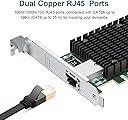
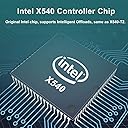
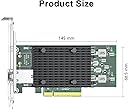
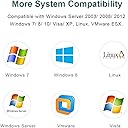
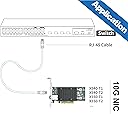
The ipolex 10Gb Network Card features a single RJ45 copper port powered by the Intel X540-BT2 controller, delivering up to 10Gbps data transfer via PCIe 2.1 x8 interface. Compatible with a wide range of operating systems including Windows Server, Linux, and VMware, it supports SR-IOV virtualization for enhanced network performance. Designed for both desktops and servers, it offers flexible installation with full and low-profile brackets and supports Cat6a cabling up to 100 meters.


| Asin | B01N3YS9CI |
| Best Sellers Rank | #76 in Internal Computer Networking Cards |
| Brand | ipolex |
| Color | 1pc |
| Compatible Devices | Desktop |
| Compatible Operating System Family | Linux, Windows |
| Customer Reviews | 4.4 4.4 out of 5 stars (255) 4.4 out of 5 stars |
| Data Link Protocol | Ethernet |
| Data Transfer Rate | 10 gigabytes_per_second |
| Hardware Interface | PCIE x 8 |
| Item Type Name | 10g nic |
| Manufacturer | ipolex |
| Mfr Part Number | X540-T1-Intel |
| Model Number | X540-T1-Intel |
| Number Of Items | 1 |
| Upc | 603149414983 |
User
With this, all of your wildest dreams will come true.
I mean it’s a 10gbps network card. Chances are your computer isn’t even man enough to serve 10gbps from its hard drives. Does your switch even lift 10gbps, bro? Does your Ethernet cabling have the testicular fortitude to handle all this Heman glow shine?When a NIC eats up an 8 channel PCI Express port and has a fan on it, you know it doesn’t duck around. You’re probably going to need a multi device raid to even deliver all that data. What’s nice is even if you can’t max the stream out, you have a bit of overhead so the network speed doesn’t grind to a crawl during a file transfer. Or if your network is saturated by large data traffic from multiple devices like IP cameras.If you have a solid capable NAS array, these cards really have a purpose for serving data at blistering speeds. Moving large raw movie files and such.The card itself is easy to install and the drivers were easy to find and get working.
User
Great performance, awkward fit in a desktop case
This card does what it is supposed to do. It negotiates at full speed and easily maxes out my connection without any drops or instability. Once it is set up, it just works and stays consistent.Setup was not completely plug and play for me. Windows did not install the driver automatically. I had to go into Device Manager, find the unknown network device, and manually point it to the driver I downloaded from the manufacturer. After that, the card came online and has been solid.The bigger issue was the physical fit. The metal port shield around the Ethernet connector is clearly designed with a server chassis in mind. In my standard RGB desktop case, the top of that shield hit the edge of the case and kept the bracket from seating properly. To make it work, I had to carefully trim the top of the metal shield down to roughly the height of the PCB so the card could sit flush in the slot. After that little bit of handiwork, it fit fine and has been working with no problems.Overall, performance is great and it fully saturates my line, but be aware that you need to install drivers manually and, depending on your case, you might have to do a bit of physical work to get it to fit right.
User
Worked as advertised for my Ubuntu Server
Bought this for my Ubuntu server. Installed and has worked as advertised and was a value for the cost. As I upgrade my home network, I will buy more for my other servers.
User
It does work well on Windows 11 with a windows 10 driver follow the video in the image.
I had trouble getting it working on windows 11 even trying some other tutorials I found on the internet. The seller sent me the above image with a note and the card comes up very well on both ports now. For the price this is the best value I have found even through it is using a "old" driver. It works well connected to my Ubiquiti set up. I am glad they responded with a note, I had figured I would have to use it on a server platform instead of a workstation. Follow the video from the link above and it will come right up in windows 11. It will warn you about driver signing but it is an Intel driver it is just that they are not keeping up with windows 11. Beyond that the card works well on my mother board. It has a well designed heat sink and where it is located in system it has a case fan directly cooling it. For the price you are not going to beat the card.
User
Pro: Cheap, 10Gb, Dual Ethernet, 8x PCIe, Easy(BSD), Stable. Con: No 2.5Gb/5Gb, Runs hot, PCI v2.1
This card is a good fit for my specific use case but it won't work for everyone. It has no 2.5Gb or 5Gb support. It's an 8x PCIe; that's good for speed but won't fit in a 1x or 4x slot.--This listing says the X540-AT2 "support 100Mb to 10Gb" but the X540 is an older controller.It does not support 2.5Gb or 5Gb.This card connects at 100Mb/1Gb/10Gb only.--The card is 8x PCIe. I needed this for my older PCIe v3 mainboard (my 1x can't do 10Gb/s).The Intel spec sheet for the X540 says it's PCI 2.1 (32Gb/s@8x).The X540 is discontinued. The chips or cards might be NOS, which is fine.--It was plug and play for my pfSense 2.7.2 (FreeBSD).--The X540 chipset runs hot. Reviews say it is stable under heavy use with passive cooling and good airflow.This card has a fan but reports are some fans died early. I have a 2nd fan blowing on mine.The X540-AT2 draws 12.5 watts at 10Gb. This is comparable to other Intel Ethernet controllers.--My use case: Old ASUS PCIe v3.0 mainboard, pfSense 2.7.2RJ45 connected to 10Gb ONT, 10Gb SPF+ module in my budget 2.5Gb switch.--This is the cheapest I could connect 2.5Gb internet to my LAN:This card ($44 used)Sodola 2.5Gb (x8) switch with a 10Gb SPF+ expansion port ($60)Fibergaga 10Gb SPF+ module ($40)
User
Cards work great and don't cost too much.
These things have been amazing in my home lab upgrade. They popped right into my VMware box and were detected without any need for manual driver updates. Each of my VM boxes are not getting 20gbs aggregated... It's been such a game changer for my lab.
User
Win 11 computer wouldn’t stay in Sleep Mode
I installed this NIC adapter and installed drivers without problems. The card functioned as advertised in all ways except one: when I tried to put my Win 11 Pro PC in sleep mode, it would shut everything down, but then within seconds my computer would restart. I worked for several hours trying every trick I knew in BIOS settings, advanced PC power settings, and adapter settings. Since my computer has been working fine for years using sleep mode daily, I strongly suspected that my card was either a one-off defective unit or there could be a design flaw for all circuit boards from this manufacturer. I suspect the former since no one else has reported this problem. A replacement dual port 2.5G PCIe card of the same chipset and specs from a different manufacturer is now working fine in my PC - particularly regarding sleep mode.Update: to the manufacturer's credit, they have been working with me diligently to resolve my issue. They sent me a new card. Unfortunately, my particular Asustek motherboard with an Intel Z590 chipset seems to be incompatible. This could be just an issue with a particular motherboard chipset. When I have time, I will install the card in another computer I have to see if the problem is still there. I will update this review if the problem goes away.Update 2: I tried this adapter in a different computer I have running Windows 10 Pro and having an AMD B550 chipset in an Asustek TUF Gaming B550-Pro motherboard. This motherboard comes with an onboard 1 x Realtek RTL-8125B 2.5Gbe port. This is the same ethernet chipset family as this adapter. Unfortunately the problem of not staying in sleep mode is still there. If a prospective buyer does not utilize or have a need for sleep mode, then this card should work just fine for them.
User
pfSense Nightly; works just fine with the default FreeBSD driver
Haven't done a speed test yet, but so far it is detected and configured just fine.Edit May 2024: I have been using a few of these for a while, and I just wanted to update on something that I didn't really notice until it was a problem; the card(s) I received were not passive as the picture shows, but rather they have a fan/heatsink combo. I only realized this because the fan on my oldest one of these cards just started with a loud Death Rattle. I unplugged the fan power header from the card, and all is well. So I believe the fan is not needed for actual cooling in a normal (decent) PC case.This does not change my 5-star rating in the slightest, as I believe the fan to be both a cost-cutting measure (one heatsink part across their product line) and overkill (card cools just fine without it) at the expense of simply needing to unplug the fan header before installation.
User
Cheap price, great performance.
Upgraded my internet to bell's fibre plan. Needed a 2.5GB nic card to be able to us all the internet i am paying for. Installation was easy, drivers were automatic, and that was it. 2.5GB speeds on my main desktop now. Will be buying another to outfit my plex server.
User
Excelente opción para ampliar tus rj45
Excelente para ampliar los puertos, llegó en tiempo, sin necesidad de buscar driver, la detectó de inmediato proxmox 9.
User
Works great, using as a network bridge between two home PCs.
Cheaper than a network switch so decided to use this to bridge two home PCs together. Worked great after installing drivers.For installing drivers, what worked for me was downloading the X540-10G-2T-X8 (JLX540-AT2) chip package from the QR code on the back of the network card.This takes you to an intel site where you should download "Intel® Ethernet Adapter Complete Driver Pack" after clicking "Show All". Unzip the downloaded file and go to your windows Device Manager. Here you will see some unidentified devices. Right-click each of them and click on "Update Driver".Next, select the option to look for drivers locally. Then, point it to the extracted intel drivers folder. Windows will automatically look for the correct drivers recursively. I had to do this process for both network interfaces on the card.And viola, it works perfect.
User
No issues.
Works as it should. No issues.
User
まずは問題なく使用できました。
R8127を試したもののUbuntuにドライバを入れた辺りから不調になってしまい、泣く泣くこちらに交換しました。とりあえず挿しただけで、サーバ間で9.6Gbpsで転送できています。安定性などはこれからですが、ドライバでどうこうしなくて良いというのは精神衛生上素晴らしいです。純正ボードということですが、10Gtek製のようです。---現状、特に支障なく(サーバが落ちることなく)運用できています。100GB程度のやり取りでは問題ありません。大量データの移動はまだ試していませんが、さすがの安定性かと思います。
Trustpilot
2 months ago
3 weeks ago