Buy anything from 5,000+ international stores. One checkout price. No surprise fees. Join 2M+ shoppers on Desertcart.
Desertcart purchases this item on your behalf and handles shipping, customs, and support to Philippines.
🚪 Unlock the future of convenience—your garage, smarter and safer than ever!
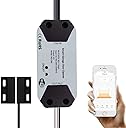
The EVERSECU Tuya Smart WiFi Switch Garage Door Opener Controller upgrades most garage door openers to smart control via 2.4GHz Wi-Fi, compatible with Alexa, Google Home, and the SmartLife/Tuya app. It requires no hub, offers multi-user access with PIN security, provides real-time door status and alerts, and installs easily with included hardware—all without monthly fees.


| ASIN | B09PBM7JNY |
| Actuator Type | motor |
| Best Sellers Rank | #273,627 in Tools & Home Improvement ( See Top 100 in Tools & Home Improvement ) #1,039 in Garage Door Keypads & Remotes #1,503 in Electric Outlets & Accessories |
| Brand | EVERSECU |
| Brand Name | EVERSECU |
| Circuit Type | 1-way |
| Color | Black |
| Compatible Devices | Alexa/Echo, Google Home, SmartLife/Tuya APP, Most garage door opener models |
| Connectivity Protocol | Wi-Fi |
| Connector Type | Micro Usb |
| Contact Material | Stainless Steel |
| Contact Type | |
| Control Method | App, Remote |
| Controller Type | Android, iOS |
| Current Rating | 10 Amps |
| Customer Reviews | 4.2 out of 5 stars 380 Reviews |
| Manufacturer | EVERSECU |
| Material Type | Plastic |
| Mounting Type | Wall Mount |
| Number of Items | 1 |
| Number of Positions | 2 |
| Operation Mode | ON-ON-ON |
| Part Number | B09PBM7JNY |
| Smart Home Compatibility | Smart Home Compatible |
| Specification Met | CE, ETL, RoHS, cULus |
| Switch Type | Electronic Switch |
| Terminal | Virtual |
| UPC | 778299333139 |
| Unit Count | 1.0 Count |
J**N
Simple, clean, efficient remote opener
This was very easy to set up. It worked the first time. I used the Smart Life app. It is nice that it has covers for the cables. The LED that lights up when sending the command to the opener is a plus. I also like that I could just plug it in vs usb cables and power bricks. Just having a power plug is one less thing to get loose and it has a clean look when everything is installed. In the Smart Life app it has a nice graphic showing opening or closing. It also has a reminder that the door is open. Also it integrates (smart life app) with google very well. One thing that is interesting is telling google to open or close the door. It has a PIN to do such which is a nice feature.
D**D
Keep it simple for the install
The instructions could be more clear. Connect to the internet before taking it to the garage. Install at motor and route it to the sensor point. Set up the sensor on the door first, then the wall mounted sensor. They don’t need to touch each other. Just close enough to trigger the magnetic field change. Have zip ties on hand to hold the extra wire not needed. Make sure the wire is secure and the sensors are secure. I used thread lock on the door mounted sensor with a nut and bolt I had on hand due to the vibrations. App works even using voice commands but only after I changed the name to “Garage”. So, on the app you can say “open Garage” and it should work. I will set it up for Siri with my Apple Watch next. I would recommend it to anyone who has received a text from the neighbor saying the garage door is open and no cars are in the driveway. I liked this version especially because it has plug in power and not batteries.
C**S
Easy install
I followed the instructions by first connecting the wires to my garage door opener to test functionality. The most difficult part was getting the wires to stay inserted to the push pins with the thicker gauge wire coming from the wall. I finally got them to stick after a half dozen attempts. Use of the double sided tape made installation fast and easy. I needed twice as many zip ties than what were included. I appreciated the wiring guide options for the open/closed sensor. The instructions showed double sided tape could be used with mounting the L shaped mount, but I could not find one in the packaging. I had spare double sided tape from a cell phone mount and used it successfully. I installed SmartLife. I set the app to detect a new garage door device, plugged the power in for the controller, and in about 20 seconds the device was discovered on the first try. I first integrated SmartLife with Alexa. I programmed a security code and for some reason, it kept saying my code was incorrect. I never solved it (didn't really try more than 2 min) and abandoned the Alexa integration because I wanted more home automation control with my SmartThings controller. In SmartThings, if the garage door is opened, then it turns on the garage lights. Integration between SmartThings and SmartLife was easy and works great through the SmartThings app. The weird thing is, my SmartThings integrates to my Alexa and to open the garage door, I have to say, "Turn on garage door" and "Turn off garage door" to close it. Using off/on as the commands is awkward, but it works.
M**N
Easy to Install, Works Great with Smart Life App
I recently purchased the Ever Secu Tuya S-Mart garage opener and I’m very satisfied with it. The package includes everything you need for installation, including screws and brackets. It was easy to set up and connected quickly with the Smart Life app. The installation process was straightforward, and for the price, I think it’s a great value. I definitely recommend it.
E**Z
Find something else.
i've had this garage door opener for a bit over 5 or 6 months, and constantly had connection issues with my wifi. After close to 8 hours, it would disconnect, and the only way to have it connect again was to power cycle the device. The garage is separate from the house, so i figure it was just an issue with just bad wifi signal... until this week. I had a little project to utilize the mesh option on my fancy unifi system with a spare AP I had lying around in order to bring wifi and ethernet to my garage. Connection and reception was great! I had a POE camera attached, a smart light, and the garage opener synced to the new access point in the garage... even went as far as locking the garage door opener to the access point, just in case it decided to connect to my home's ap for whatever reason. Things were good for a day and a half... until this morning. the connection issue reared its head yet again, but this time it didn't have the excuse of being too far from the access point, as the AP shows a steady connection between the meshed network... but a creeping connectivity retry percentage *just* for the garage opener. I've also noticed that the latency while it's connected starts off extremely high, until i run latency tests, at which point it goes from 200+ ms, to just under 40 ms response time, with a signal strength of -44 dbm right before it disconnects. I think this might be an erroneous power save setting that makes zero sense.
P**D
Works great - even better if you setup LocalTuya
I installed this for my mom in her garage after her Z-wave solution just wasn't cutting it unfortunately (had to exclude and include it every 6 months or so). This was easy to physically install, and the software (anything Tuya related) will control it nicely. I set it up as a local device with Home Assistant and have it so it doesn't require the cloud to function. Now, if the internet is down but the power is on, my mom can easily power her garage door.
A**R
Works great to open and close by app
Had a hard time getting it to sync into my wifi. Fifth time worked for some reason. After that it works perfectly. Follow instructions PRECISELY. Give a few seconds (maybe a minute) for each thing to sync when setting up the WiFi. I have a GeniePro Max opener. Gives me a notice (set in Settings), when it goes up or down. Set it to close at a specific time each night. Gives me notice of that. Tells me when door is open for a set amount of time (I set that to 5 hours in settings). Works great. Can open or close it by app from anywhere, I guess. I know it works when 100 miles away by app. Works by Alexa voice also. The only thing I don’t like but DO understand is when I open the door by Alexa voice, I have to say a 4 digit code (I assigned). That is for security. I do not have to enter the same code when using the app. Wish I could tell Alexa what the code is that is stored in the app. Getting another for second door.
J**V
Depends on one's needs, but I would pass on this model
First of all, it does work - follow instructions, download the app, add the device and (if your garage door is compatible) connect to operate your garage door opener. The issue that really concerned me was that it has 120-to-5 V converter installed - sure it makes it easier to operate since you need just a regular 120V outlet, but I am questioning long term reliability of the internal voltage regulator. Electricity spikes/fluctuations do happen and if the voltage regulator goes blank, then the whole smart opener will need to be replaced. I really prefer these type of controllers be powered via USB charger. If USB charger goes bad, then it is very easy replacement to make it work again.
N**E
Todo muy bien
Precio aceptable, calidad buen y fácil de instalar. Compatible con un code no sé que, simplemente hice la prueba de comparibilidad y listo, confirguré wifi y smart, conecté cables, puse sensor y funciona. No he probado la opción de comandos por voz con los asistentes.1
J**Z
Bueno
Muy practico, y útil. Se puede poter a cualquier tipo de puerta automática. Da seguridad saber cuando se abre la puerta.
A**A
Muy buen producto
Lo use para abrir una puerta electrica y fue muy facil la colocacion e instalación lo hice yo mismo y soy odontologo
F**L
Excelente compra
Facil instalacion y mejorar todo en casa
J**G
Fácil de instalar pero no funciona con comandos de voz con Alexa
No responde a comandos de voz en Alexa
Trustpilot
1 month ago
1 month ago