🔌 Power your productivity with confidence—never get caught powerless again!
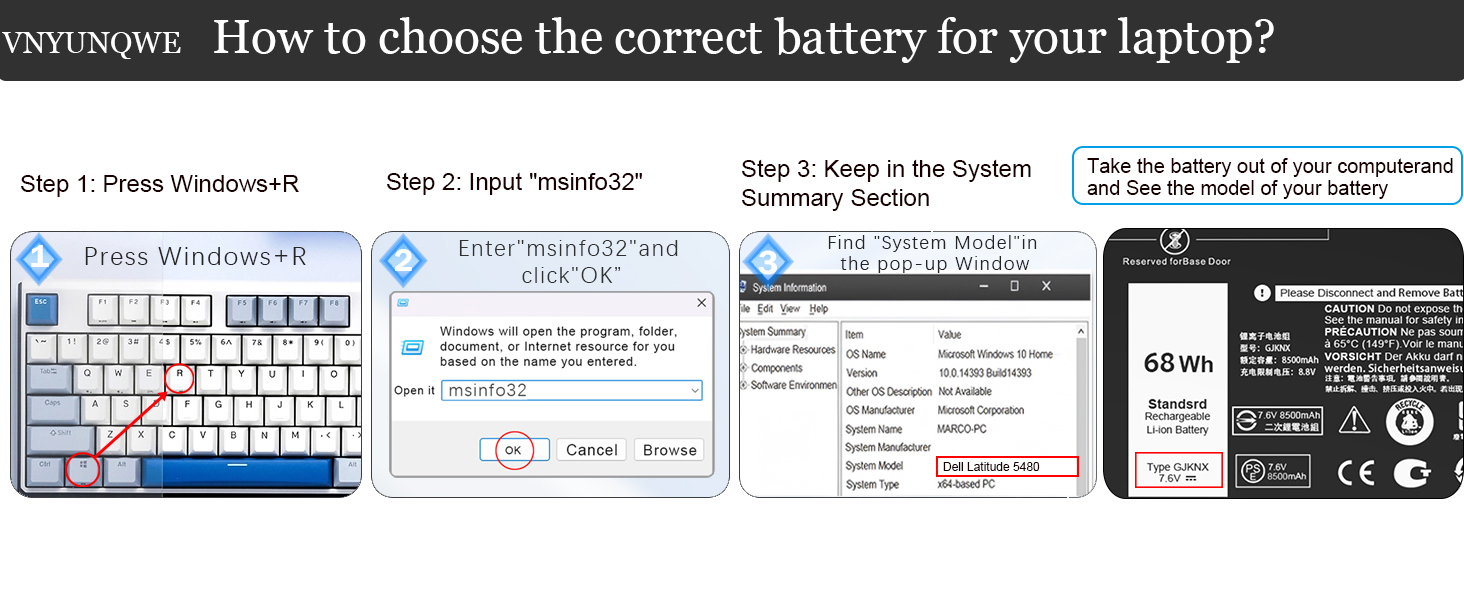
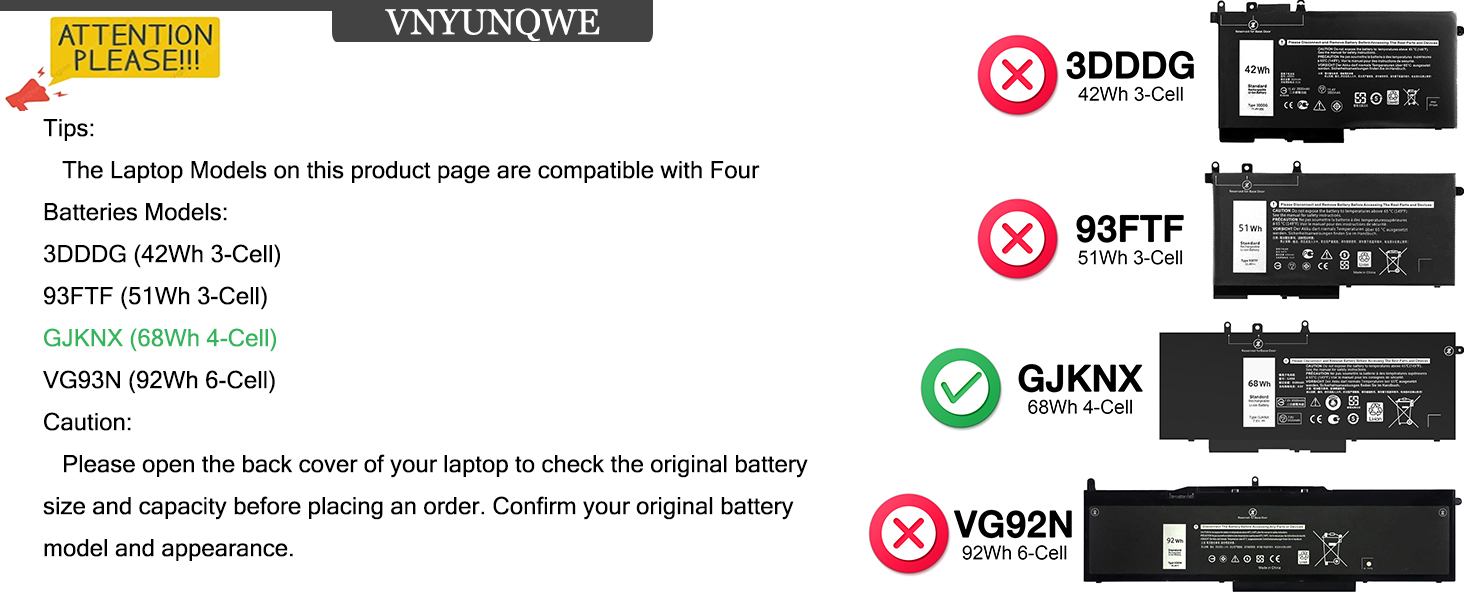
This 68Wh GJKNX replacement battery for Dell Latitude and Precision 15 series offers a robust 7.6V output with 4-cell lithium-ion technology. Engineered for longevity with over 1000 recharge cycles and comprehensive safety features, it ensures reliable, fast charging and stable performance. The package includes essential tools for a hassle-free installation, making it the perfect upgrade for professionals seeking dependable mobile power.


| ASIN | B0B3M8HK74 |
| Batteries | 1 Lithium Ion batteries required. |
| Best Sellers Rank | #4,459 in Electronics ( See Top 100 in Electronics ) #12 in Laptop Batteries |
| Customer Reviews | 4.5 4.5 out of 5 stars (1,304) |
| Date First Available | June 9, 2022 |
| Item Weight | 14.9 ounces |
| Item model number | GJKNX |
| Manufacturer | DongGuan Simer Electronics Co LTD |
| Product Dimensions | 9.37 x 4.05 x 0.27 inches |
T**T
A doable job if you're somewhat handy with tools.
The user manual did not cover installation, but then that's really dependent on the model of the laptop, so no points off. I googled my hp laptop's model number and came up with an excellent YouTube on how to install the battery. The only hard part was separating the bottom of the computer from the main part. But the battery came with the right Phillips screwdriver (which I needed) and torx driver (not needed on my model). Also included were two guitar picks which helped greatly with separating the bottom from the main part. The project is very doable by anybody somewhat handy with tools. The new battery lasts many hours before needing to be charged.
J**E
Perfect fit, worked w/out issues after installed in Dell. BUT 7 month failure.
This battery replacement for my Dell Inspiron 15 7000 2-in-1 laptop worked perfectly after installation. Installing it was easy, just the tedious removing all the screws on the back of the case and swapping the battery old-for-new. No stickies to pry loose, just remove three screws and disconnect the cable and then reverse for install. After sealing the case up I booted the laptop and had no issues. It charged quickly and acts like a new laptop battery, holding power for over 5-6 hours (the same as the original one when I am using the laptop unplugged). 6/5/25UPDATE: Well, here I am 7 months later and the battery turned into a dead brick. And I think I know why: I was running my laptop, with the power charger plugged in, but also with a personal USB face-fan plugged in and running off the power from the laptop battery. I set the laptop aside (but still running) and took a nap and when I awoke the fan was off, the laptop was off, and the laptop refused to boot. Removing the USB fan and letting the laptop "charge" for four hours produced nothing, so the battery is a deader. I'll bet the USB fan overdrew its capacity and fried it. Otherwise the battery has performed great, so its hard to blame the battery for this failure. I will order another, because they are cheap and see if I make it to 2026, but without USB fans from now on.
C**N
Good buy and works well.
Replacement for the Dell Battery. Works well and is less expensive than Dell's.
M**T
Generic battery that fits Dell Latitude 5410
Battery was well packaged. Included two screwdrivers (Phillips and torx) and a pick/shim. I didn’t use any of the tools. Was about a 5 minute install. You will have to reuse the battery cable and mounting screw. Battery arrived charged to 46% and bios shows health as excellent. I use this with a dell latitude 5410. Longevity is unknown, but if something bad does happen I’ll update the review.
R**S
Product is a good, sound, and inexpensive replacement. Recommended. 4.5 Stars I give it.
My laptop is a Dell Latitude E5570. The product works fine if you know what you are doing, have the manual, and pay attention to detail. I now have a working battery in my laptop again. Installation takes 15-20 minutes. My original battery was no longer charging and I found out why. The original battery had almost exploded. It was probably pretty close. One cell had expanded to the point where the heat shields had popped off. It was ballooning. Anyway, step one for battery removal and installation is download the Owners Manual for the Latitude E5570 Laptop from Dell if you don't have it already. My laptop is refurbished and didn't come with a manual. It gives explicit instructions on how to remove the old battery and install a new one. The instructions are really good. This battery comes with NO INSTRUCTIONS. Use the Dell instructions. You won't need the star screwdriver, just the small Phillips head. The kit comes with a white guitar pick thing. Discharge the old battery down to 5% by disconnecting the a/c and letting it discharge to almost nothing. Flipping the laptop over so the top is facing down and with the back facing you, after unscrewing all the back plate screws, use that guitar pick thing to pry between the cover groove starting at the back right corner, where it's easiest. The cover snaps on, so you have to break it out off the back. Just do it slowly with even pressure. Then once you've got the back cover off, simply follow the Manual instructions to remove the old battery. Once you remove the old battery, I recommend doing a hard reset by pressing the power button for 45 seconds to remove all static electricity in the laptop and it does other things that will let your laptop recognize the new battery. Install the new battery per the manual and put it back together. Make sure you take the green film off of the battery heat shields before installing. Also make sure that the battery cable is fit into the battery connector fully, and also the end of the battery cable that goes to the circuit board connector. I failed to properly seat the cable into the circuit board connector the first time and thought I had a bad replacement battery. Snake the cable between the cells. Hook up the a/c and charge to 100%. Then disconnect a/c and let it discharge to 5%. You might want to do that at least twice. It's sets the battery and increases battery life, just like a phone battery (same thing actually). My battery is charging to 100% as I write this. It had 46% charge when installed. So for the product, I recommend it. I only gave it four stars because there were no instructions of any kind. They could have at least provided a link to a video on YouTube or something. Not everyone is an electronics technician. I recommend this product. There IS some information you should read in the product information on Amazon. One last thing, it might not be a bad idea to take off the back cover before you order to make sure that the replacement battery is exactly the same specification's as the original. They vary. The replacement battery should have all the same specs as the original (as written on the battery). Update: After charging to 100% the battery life is showing as just under 11 hours at current power settings. The old battery before it started taking a dump would only give me two hours at best. I'm happy. Now I need to let the battery run down to 5% and fully charge it again.
A**R
Fits and works fine
Seems new batteries dont come with power cords So use the old one. Other than that it fits and works great. Easy install
B**B
Bad battery
This must be a defective battery. I have installed a good bit of pc batteries and never had a problem like this. It does not hold a decent charge. It runs down very quickly and when fully charged it will not hold the charge. I didn’t install it till it was too late to send it back. (A couple days past the date). Ugh. So I’m not very happy about the situation. I wasn’t in a hurry to install it because I didn’t expect it to be a bad product. Correct battery. Just not any good
W**G
Battery works great, and easy to install.
I didn't bother with the included instructions. Just watched online video, which is a step per instructions. The included tools made installation fast and easy. I'm getting over 5hrs with the new battery. Yea!
J**W
Blijft goed op pijl
V**O
Perfetta, totalmente compatibile
C**N
Conforme et livraison rapide Facile à changer sur pc hp Pour la qualité, on verra dans le temps…
V**S
Easy to replace and very good quality.
T**M
Ich habe den HT03XL Ersatzakku für meinen HP Pavilion Laptop gekauft, nachdem der Originalakku meines Laptops merklich an Kapazität verloren hatte. Der Wechsel zu diesem Akku war eine großartige Entscheidung, und ich bin absolut zufrieden mit der Leistung und Qualität. Passform und Kompatibilität Der Akku passt perfekt in meinen HP Pavilion 15-CS und ist kompatibel mit vielen weiteren HP-Modellen wie der Pavilion 15-DA, 15-DB und 15-DW Serie. Die Installation war kinderleicht und hat nur wenige Minuten gedauert – einfach den alten Akku herausnehmen und den neuen einsetzen. Alles funktioniert einwandfrei, ohne dass ich irgendwelche Anpassungen vornehmen musste. Laufzeit und Leistung Was mich besonders beeindruckt hat, ist die Akkulaufzeit. Im Vergleich zu meinem alten Akku, der gerade noch eine Stunde durchgehalten hat, liefert der HT03XL Akku eine deutlich längere Betriebszeit. Bei normaler Nutzung (Office, Surfen, ein paar Videos) hält der Akku locker 5 bis 6 Stunden durch, was für einen Ersatzakku wirklich super ist. Auch bei intensiverer Nutzung, wie beim Streamen oder bei Videokonferenzen, lässt die Leistung nicht spürbar nach. Ladezeit und Haltbarkeit Die Ladezeit ist ebenfalls zufriedenstellend – der Akku lädt relativ schnell wieder auf und erreicht seine volle Kapazität in etwa 2-3 Stunden. Die Haltbarkeit des Akkus wirkt sehr robust, und bisher zeigt er nach mehreren Ladezyklen keinerlei Verschleißerscheinungen. Ich habe das Gefühl, dass dieser Akku mein Laptop noch einige Jahre am Leben halten wird. Preis-Leistungs-Verhältnis Für einen Ersatzakku in dieser Qualität ist der Preis absolut fair. Im Vergleich zu anderen Akkus auf dem Markt, die oft deutlich teurer sind, bietet der HT03XL Akku ein hervorragendes Preis-Leistungs-Verhältnis. Die Tatsache, dass er mit so vielen verschiedenen HP-Modellen kompatibel ist, macht ihn zu einer sehr vielseitigen und kostengünstigen Wahl. Fazit Alles in allem bin ich extrem zufrieden mit dem HT03XL Ersatzakku. Er bietet eine lange Akkulaufzeit, passt perfekt in meinen Laptop und war einfach zu installieren. Wer nach einem hochwertigen Ersatzakku für seinen HP Laptop sucht, der zuverlässig und erschwinglich ist, liegt mit diesem Modell genau richtig. Positives: - Perfekte Passform für viele HP Laptop-Modelle - Lange Akkulaufzeit (5-6 Stunden bei normaler Nutzung) - Schnelle Ladezeit - Gutes Preis-Leistungs-Verhältnis - Einfache Installation Fazit: Ein hochwertiger und zuverlässiger Ersatzakku, der mein HP Laptop wieder voll funktionsfähig gemacht hat. Absolut empfehlenswert!
Trustpilot
1 month ago
1 week ago