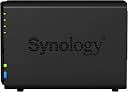
๐ Elevate your digital workspace with Synology DS218+ โ where speed meets security and scalability.
The Synology DS218+ is a premium 2-bay NAS designed for professionals seeking high-speed encrypted file transfers, robust data protection with Btrfs snapshots, and smooth 4K media streaming. Featuring a dual-core processor with AES-NI encryption, 2GB DDR3L RAM expandable to 6GB, and advanced file system capabilities, it offers a reliable, scalable solution for secure, multi-platform file sharing and backup.


| Asin | B075N1BYWX |
| Best Sellers Rank | #625 in Network Attached Storage (NAS) Enclosures |
| Brand | Synology |
| Built In Media | AC power adapter x 1, Accessory pack x 1, DS218+ main unit x 1, Quick Installation Guide x 1, RJ-45 LAN cable x 1 |
| Color | Black |
| Compatible Devices | Server |
| Customer Reviews | 4.6 4.6 out of 5 stars (1,408) 4.6 out of 5 stars |
| Enclosure Material | Alloy Steel, Aluminum |
| Global Trade Identification Number | 00846504002580 |
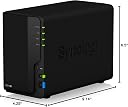
| Item Dimensions D X W X H | 9.14"D x 4.25"W x 6.5"H |
| Item Type Name | Synology DS218+ NAS DiskStation, Diskless, 2-bay; 2GB DDR3L |
| Item Weight | 2.9 pounds |
| Manufacturer | Synology America Corp |
| Mfr Part Number | DS218+ |
| Model Number | DS218+ |
| Mounting Type | Tabletop |
| Number Of Items | 1 |
| Size | 2-bay; 2GB DDR3L |
| Upc | 846504002580 |
| Warranty Description | 2 year |
User
Easy Setup, Reliable Personal Cloud Storage
When I became A+ certified, my eyes were opened to new areas of technology like networking. While studying, I purchased this Synology NAS so I could build my own home server and create personal cloud storage without paying ongoing subscription fees. This is a 2-bay NAS that uses NAS hard drives designed for continuous operation in network storage systems. Installing the drives was simple, and Synology provides a step-by-step setup process that guides you through formatting the drives and selecting the RAID configuration you want to use for data storage and redundancy. Once connected to my router via Ethernet, the NAS becomes part of your home network and acts as centralized network storage. Computers on the network can connect through the wireless router and access the files wirelessly. I like being able to save files in one location so every computer in the house can access the same data without transferring files between machines. The unit itself is lightweight and reliable. I upgraded the RAM to improve system performance and also added a battery backup to protect the NAS during power interruptions. It works very well as backup storage and for managing files across multiple computers on my network. With a basic understanding of networking, this NAS is simple to configure and has been very dependable over the years. If you want a reliable home server or backup storage solution for your home network, I would recommend it.
User
DS218+: Why didn't I buy this one first!?!
I don't give 5 stars easily. But this product deserves it. After a disaster of purchasing a WD My Cloud Home Duo, I returned it and purchased the DS218+. I have been VERY happy. Leaving the Amazon order-to-delivery latency aside, the product came well packaged and complete.Installation - which required that I install two HDDs - was very easy and literally took me 10 minutes and that is because I don't like to read the manual. Once installed, setup was very straightforward once you understand the web-based tool used to configure and manage the device. The DS218+ connected to my home network hub (we use Comcast). I was able to connect to the device from multiple PCs (Win10, Win8, Win7) as well as devices (Android phone and tablet, I haven't tried our iPhone or iPad yet). Once you get the understanding of the user management and permissions approach, it is simple to set up multiple users for the family.Management - the management interface via their own UI turns out to be excellent. I was put off of yet another UI that I had to learn at first. But I have quickly gotten used to it and the learning curve was pretty quick for the basics. But I have also noticed there is a lot of power in the UI as well to really tailor your system to your needs. That will take some time to digest. Best thing about the UI are the "Stations". They have them for videos, photos and music. Get tools to manage the huge libraries of each that I have collected over the years. The Video Station is really nice in that it ties to the web to get add'l info on the movies along with graphics, etc. It effectively looks like Netflix for your movie library.Usage - I am primarily doing two things with this device: 1) accessing my photos/videos/music remotely and 2) syncing my business files from my work and from my personal company. As for the remote file access - works really well. There are DS apps available for Android (and I assume iStuff). Each of the apps are clean and pretty easy to use. the DS Video app gives you that same Netflix look and feel I mentioned earlier. The music and photo apps work very nice - they could have a few more features for sorting, but I assume those will come with time. As for the file sync, that works VERY nicely. I have installed the Cloud Drive app on my PCs. Once I figured out how the software worked I have been able to get very detailed about which files to sync. It is now working like a charm and does not seem to impact performance of my PCs. I haven't set up any backup arrangement yet - we will see how that goes.Overall, I am VERY high on this product. Looks great. Very quiet (unlike the WD product). Easy to manage.
User
Fast, easy to use, lots of great apps
I have been using a Synology DS213j for the last few years, and was relatively happy with it, but disappointed with how slow it was. My primary reason for upgrading was for user interface speed. This drive did not disappoint, there is no lag at all, unless the drives are in hibernation mode, which is understandable, and you can turn that off if you want. I also upgraded to 6GB RAM, and chose to go with Crucial memory, since I used to be a test engineer at Micron and can personally vouch for the quality of their memory. I think upgrading the RAM contributed to the speed increase as well, because it uses that extra 4GB for Cache most of the time, which is several orders of magnitude faster than accessing the hard drives. Also, it has a USB 3.0 port on the FRONT of the NAS, which makes performing external backups WAY easier. There is also a button on the front that gives you the option of performing rapid file transfers without needing to log in to the NAS from a computer.I also upgraded the ext4 file system on my drives to Btrfs, which should provide increased data protection and substantially reduced data size for versioning. Overall highly recommended!Pros:Easy to use User InterfaceFast processorUpgradable memoryLots of great appsBtrfs file systemFront panel USB 3.0Front panel file transfer buttonCons:None so far!Here is the RAM I used:Crucial 4GB Single DDR3/DDR3L 1866 MT/s (PC3-14900) Unbuffered SODIMM 204-Pin Memory - CT51264BF186DJhttps://www.amazon.com/dp/B00KSLPNN0/ref=cm_sw_em_r_mt_dp_U_HvjLEbH4YF29XHere are the hard drives I am running:Seagate IronWolf Pro 4TB NAS Internal Hard Drive HDD โ 3.5 Inch SATA 6GB/S 7200 RPM 128MB Cache for Raid Network Attached Storage, Data Recovery Rescue Service (ST4000NE0025)https://www.amazon.com/dp/B01N98UJSD/ref=cm_sw_em_r_mt_dp_U_PEjLEbYX3Y3KJ
User
Simple to Use, but there are some hidden charges with some capabilities
I purchased this and used it with two Seagate 8TB โBarracudaโ drives in a raid setup (they are not listed on the Synology website as compatible, but booted with no issues on the first try). There are probably cheaper/easier ways to build it myself, but I kind of wanted a turn-key, low-โfiddlyโ solution and so far the Diskstation is exactly that. Lots of built in functionality, and not a ton of work to get it set up and working how I want. That said - one of the big features for me was photo backup (I use my camera excessively on my young kids and have had the trauma of losing picture due to hardware failure). The photo backup is fine, BUT - it only works on local WiFi AND it is a $6.99 purchase. Neither of those is a hard โoutโ even if I knew it going in, but having to pay for a phone app after shelling out to โownโ my own cloud was an unpleasant surprise, and the (sort of shocking) lack of remote backup capability when Iโm traveling was enough to drive my score down a star. I was hoping to replace Amazon/Dropbox/Google as cloud storage services I use regularly, but right now it looks like itโs more like Iโm supplementing them.Iโm sure I will come up with more complaints as I explore the intricacies of the Diskstationโs capabilities, but the ease of setup and use is exactly what I was willing to pay for, and so far Iโm deeply impressed.It is totally functional as a Plexbox/NAS backup right out of the box, though, and that deserves credit. Quite fast and powerful, and relatively easy to setup (only fiddling so far has been permissions management, which is more of a complaint about Windows networking standards than anything, I think).Pros: fast and easy setupSimple setup (even a caveman can do it!)Fairly simple user interface, and hard to โscrew upโCons: Some capabilities (photo backup, IP camera management) are gimped and/or paywalled out of the box.Not a โpersonal cloudโ out of the box, more of a supplemental addition to other cloud services so farPermissions, permissions, permissions
User
The Most Amazing and Useful Home Backup Device Ever
This is my second Synology Diskstation. I have used them for years. My original DS215J with twin 4GB Western Digital Red Caviar drives stopped keeping up when I had put a serious amount of demand on it. It always still ran, but was getting slow. This new drive cost me $300 and allowed me to simply take the old drives out of the 215 and insert them into this DS218J+ and migrate them logically using a very user-friendly wizard. I use this drive mainly as a Time Machine backup for 3 Macs in my home, as well as individual folder backups, a backup to Dropbox and Google Drive, both of which are synced to the Synology Diskstation. I then have the Synology back all of this up to Amazon S3 effortlessly using programs built right into the DS218J+. My data is bulletproof, and as a Cloud Engineer I don't say that lightly. Essentially, this four-way setup provides so much protection for my data that I honestly believe it could survive a nuclear war without affecting anything but maybe the Synology unit itself. Hopefully that never happens because if the Synology is toast, then so am I.The things you can do with this unit are astounding and there are options that are far beyond why I purchased it. After owning two Synology devices I can tell you that these little mini servers have the best of both worlds: I can use a simple wizard to configure it when I want to, and for more technical users, I can also SSH into the machine if I want to add a cron job or script or something. This is something I had to do with the old DS215J when the indexing service rendered the unit too slow for my tastes.What about connecting to it remotely? I can connect to my Diskstation from anywhere. Synology gives you a customizable URL that you can use to connect to your device that is smart enough to get you around your router, which is normally a painful process. It's all done for you.My Synology Diskstations are easily the best investment I have ever made in technology. If you don't have your data, you have nothing. Buy with confidence and the knowledge that it is made for any level user but also made for those that like to tinker. Kind of like a nice Macbook Pro. A phenomenal investment.
User
A truly great home or small business NAS
I purchased this NAS to replace a 10+ year old iomega storCenter (before they went out of business) which had been holding up okay, but was showing its age and slowing down, even with new drives.I have been extremely satisfied with the DS218+. The web-based interface is like a mini-OS you run in your browser, and you can even install additional "apps" to add features.So far, it has done everything I want it to do (Windows file share with ACLs and File Snapshots / "Previous Versions", and RAID), and man is it FAST. I also like that it has support for Time Machine and various other protocols like NFS.With my old NAS, I was getting maybe 5-10 MB/s transfer rate on a Gigabit network.With this one, and a pair of Seagate IronWolf NAS 6 TB drives, I can easily get close to 100 MB/s transfer rate. Very impressive!I was not thrilled that it performed auto-setup of "Synology Hybrid RAID", I would have preferred to set up my own storage volume and chosen RAID 1 (often times I don't trust these proprietary RAID schemes), but SHR and RAID1 are essentially the same thing when you only have 2 drives.I like that it can handle drive sizes up to 12 TB each - very impressive for an entry level NAS.Physically speaking, it's a bit bigger than some other 2-bay enclosures, but has a nice design and is both QUIET and COOL, which is a lot more than I can say for my previous NAS!Overall, this is a great entry-level NAS and I would recommend this along with a pair of NAS-tier disks (like the Seagate IronWolf or WD Red series) to add some storage or backup capacity to the computers in your home or small business!
User
A Great Investment
This is perhaps one of the greatest investments I have made to ensure the safety and integrity of my files. My computer crashed two years ago, and I didn't have a complete backup of all my files. I lost almost everything. Thankfully, Google kept most of my pictures; however, I lost all of my important documents, home movies, music library, and so many other files that could not be replaced. I was kicking myself for it.I bought a Netgear NAS which was decent, but the user interface was terrible. Perhaps it was user error. Perhaps it was a flaw in the UI, but I was unable to back up files in folders outside of the default locations. My C: Drive contains Windows on an SSD. All my other files are on separate hard drives. I Googled and Googled, but I could not find out how to back up these files that weren't on the C: drive. If Netgear made it that difficult to find the answer, then I blame the company for making their software and customer support not user friendly.I decided to get rid of the Netgear NAS and pick up this Synology. Synology is famous for their NAS devices, so I was confident in making this purchase. I am glad I did. The software is intuitive. The device has been working great. There is a wide range of apps you can install. It works flawlessly when streaming from Plex. I would highly recommend this NAS, but with the announcement of the newer models, perhaps it's worth waiting until they hit the market. If you need a NAS now, you can't go wrong with this one.
User
Migrated from WD EX2 to Synology, love it.
I migrated all my NAS data from a Western Digital EX2 to the Synology DS218+. I love the DS218+. It's a lot faster. It's easy to create user accounts and shares. It was fairly quick and easy to set up. Biggest thing is it's fast compared to the EX2.Something I like about the DS218+ is that by using DS File on my cellphone I can automatically back up all my own photos to my own NAS (either when I connect to WiFi or not). Setup is fairly straight forward and if you struggle there's a lot of information online to help you out.With the ability to load programs into the disk station you can customize the options you have with this NAS. Unlike WD EX2 it seems like you have a lot more options.There only downside, which in my opinion is still a strong positive, because you can do so much more with this NAS sometimes it takes a little reading to customize some of the advanced features.Some other things I like. 2FA on accounts means higher security. You can reset passwords via email. You can create expiring shares either with a public open link, just password, or user account. Comes with an antivirus option or two. When you use Seagate Ironwolf drives the NAS takes advantage of the additional drive firmware to give you advanced health statistics. It allows the drives to stand by without shutting the NAS off or you can power the NAS down to wake on lan.It's a well thought out powerful little box.
Trustpilot
2 weeks ago
3 days ago