Buy anything from 5,000+ international stores. One checkout price. No surprise fees. Join 2M+ shoppers on Desertcart.
Desertcart purchases this item on your behalf and handles shipping, customs, and support to Philippines.
🚀 Boost Your Wi-Fi, Boost Your Life — Never Miss a Beat!
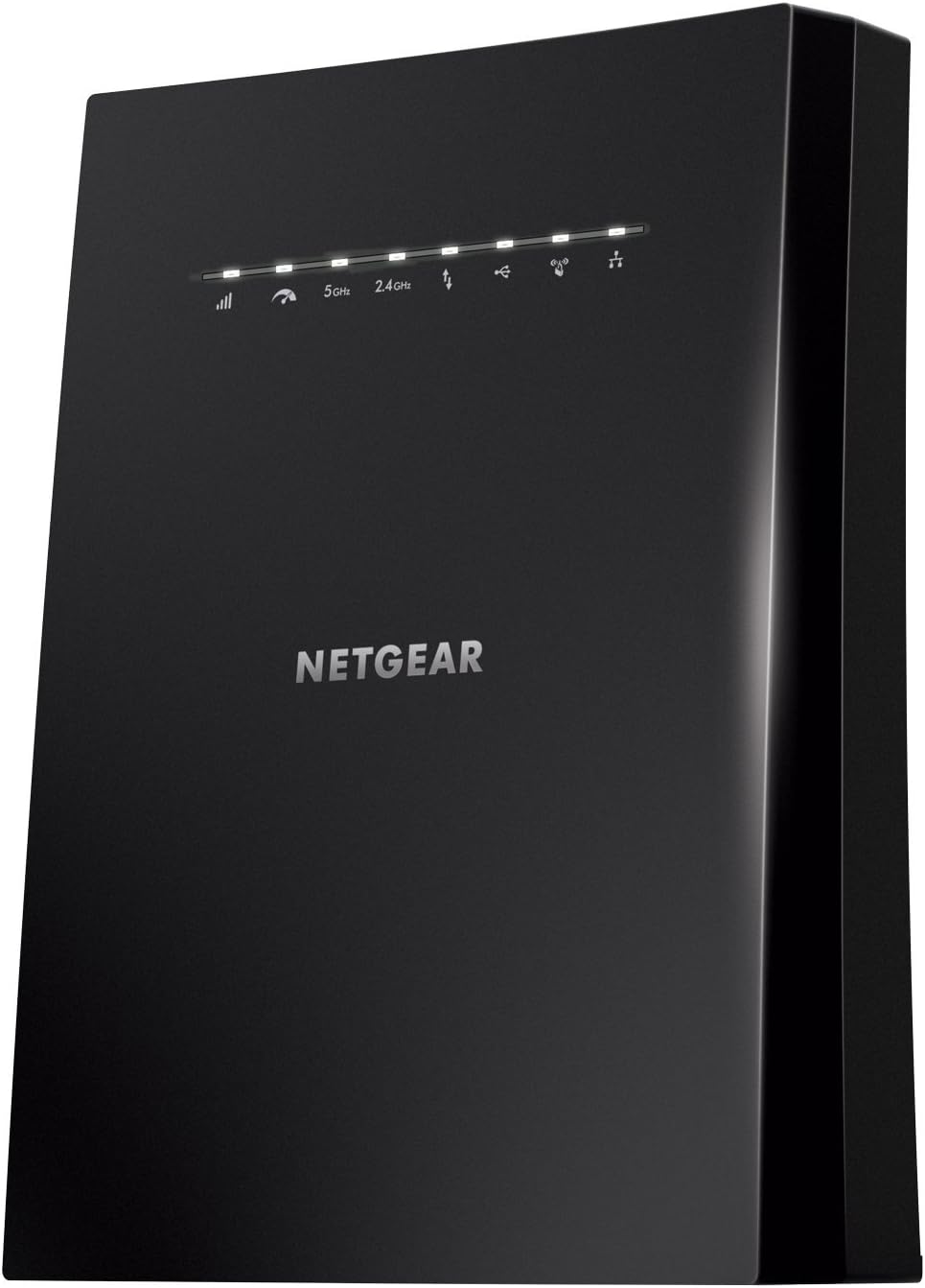
The NETGEAR EX8000 Nighthawk X6S is a powerful AC3000 tri-band Wi-Fi mesh extender that expands your wireless coverage up to 2500 sq.ft. and supports up to 50 devices simultaneously. Featuring smart roaming technology, it uses your existing network name for seamless connectivity as you move around. With speeds up to 3000 Mbps, four Gigabit Ethernet ports, and universal compatibility, it’s designed to deliver lag-free 4K streaming, gaming, and reliable connections throughout your home or office.


| ASIN | B074F3M2W8 |
| Best Sellers Rank | #382 in Repeaters |
| Brand | NETGEAR |
| Built-In Media | Nighthawk X6S AC3000 Tri-Band WiFi Range Extender (EX8000), Quick start guide |
| Color | Black |
| Compatible Devices | Router |
| Connector Type | RJ45 |
| Customer Reviews | 4.0 out of 5 stars 5,453 Reviews |
| Data Transfer Rate | 1733 Megabits Per Second |
| Frequency Band Class | Tri-Band |
| Frequency Bands Supported | Tri-Band |
| Global Trade Identification Number | 00606449119190 |
| Included Components | Nighthawk X6S AC3000 Tri-Band WiFi Range Extender (EX8000), Quick start guide |
| Item Dimensions D x W x H | 5.2"D x 8.08"W x 10.01"H |
| Item Type Name | Netgear EX8000-100NAS Nighthawk X6S AC3000 Tri-Band Wi-Fi Range Extender with Smart Roaming, One Wi-Fi Name with Any Wi-Fi Router |
| Item Weight | 0.86 Kilograms |
| Manufacturer | Netgear |
| Mfr Part Number | EX8000-100NAS |
| Model Number | EX8000-100NAS |
| Range | 2500 Square Feet |
| UPC | 606449119190 |
| Unit Count | 1.0 Count |
| Warranty Description | 1 year warranty |
| Wireless Communication Standard | 802.11ac |
| Wireless Compability | 802.11ac |
L**E
AWESOME, INCREDIBLE PERFORMANCE
This WiFi Mesh Extender increased Internet speeds 70% with no signal dropping or slowing down. No more slow circles when streaming! The problem: My modem & router (Spectrum) located in my office and computer gets 116-118 Mbps download and 11-12 Mbps upload. Single story home with 1,500 sq. ft. I couldn't get any more than 20-28 Mbps download and 8-9 Mbps upload on any of my devices in my living room or bedroom (farthest from Router) using a plug-in extenders and would drop signal sort of ruining the streaming experience. Extreme frustration!!!! With the NETGEAR Nighthawk Mesh X6S Tri-Band WiFi Mesh Extender I now get an average 117 Mbps download and 12 Mbps upload on ALL my devices even in the farthest "dead zone". I even went outside to the farthest corner of my lot (about 80 feet from the Netgear extender) and still got 112 Mbps download on my Samsung Note 8. The unit was easy to install (even for this 75-year old), and being able to use the same access point name a real plus. I installed it eight days ago and the speed and performance have been flawless. It looks sleek and modern and I like that the antennae are inside the unit. While it seemed a bit pricey at first, it's sure less expensive than the other mesh systems I looked at. For me it is worth every penny! I did download the User Manual from the Netgear website before I ordered - be sure to use the model number shown above (the one here on the Amazon site is for a different model-??) There is a wealth of information and help onsite as well. I couldn't be happier with this amazing extender. Highly recommend!
A**R
Awesome product! It solved my slow speed issues!!!
UPDATE: I've been using this for almost two weeks now with absolutely no issues. It continues to do exactly what it claims to be able to do. Awesome! I have a Nighthawk X4S AC2600 Smart WiFi Router Model R7800 that I've had for awhile now and it's connected to AT&T's provided ARRIS BGW210-700 modem. My 2500 SqFt two story home was built back in 2007 with a sort of central box where all the wires come in and go from which happens to be located upstairs at the very front of the house in our walk in closet. This has not been the greatest place to have a wireless router, in fact it's been terrible! Recently AT&T was finally able to send greater speeds through our fiber optic lines in our area so we went back to them and bumped our speed up to 300Mbps. Well almost immediately we were suffering with very low speeds down stairs, on the sides and the back of our home. We were consistently only getting speeds from 1 to 28Mbps...seriously. Everything was lagging or not connecting at all. I'm fairly good when it comes to getting everything hooked up but I fall short when it comes to solving these problems. Several times I almost called out a service tech to try and troubleshoot it but I didn't want to spend the money to find out it was something simple. My research led to trying a whole house mesh type product but I didn't want to fork out the dough for a bunch of extenders all over the house just in case it wasn't needed. Finally I came across this device here on amazon and it's was on sale and had great reviews. I liked that it's a Netgear product and should connect seamlessly to and truly become an extension of my existing router. I wouldn't even have to manually reconnect everything to it or change passwords, etc. Well no lie, I took it out of the box, walked it upstairs and plugged it in to power next to my Nighthawk router. The quick start instructions were very simple explaining to hit the WPS button on the extender and then on the router...within minutes it connected to the 2.4Ghz signal. Then I repeated the same process to connect it to the 5Ghz signal which again only took a couple of minutes. After that was done and all the lights were lit properly I walked it downstairs and plugged it in to a central location in the living room on a faux fireplace mantle. Within a couple of minutes all the lights came on and showed all was connected properly. I then sat down and ran my usual test Googleing 'speed test' from my favorite chair in the living room where I have been consistently getting those awful slow speeds. WHAT?! See the attached image with the white background of the test results. I almost wanted to cry tears of joy! I am finally getting pretty darn close to the speeds that my router is getting from the modem (see black background speed test from the router)! And this is with having 25-35 devices being connected...outdoor and indoor security cameras, multiple iphones, ipads, a few video game consoles, 3 apple tv devices, a couple of smart tvs, 5 computers, a couple of Amazon Alexa devices, multiple guest devices and so on and so on. Now I know this is my set up and my experience. A lot of people have different modems and routers from different manufacturer's even and I can't speak to how this will work with them, but I can honestly say this was worth every penny and the slow speed/terrible signal thing is a thing of the past! Woohoo!!
G**J
It became an expensive paperweight after less than two months.
When I received my Netgear EX8000 I set it up. Setting up wireless network devices has become very easy so, it only took a few minutes. It did just what you'd expect a range extender should. The range was better than I expected and covered a wider area than other extenders I've used or setup for clients. Just shy of 2 months I noticed a massive drop in signal strength. When I went to look at the EX8000 I noticed that every light was flashing green simultaneously. I then tried connecting a computer up to it via a wired connection to reboot it through the interface. The page wouldn't load up. I then tried pressing the reset button which did nothing (not even a single change in how the lights flashed). As a last resort, I unplugged it for over a minute and plugged it back in. I came back 5 minutes later and all the lights were still flashing green. I then left it unplugged overnight and plugged it back in. This time I watched the lights for a good 7 minutes. Not once did the lights change from their flashing pattern. After trying various things over the next few days it was apparent that the EX8000 was "bricked". It seems very odd for a device that has been on the market as long as the EX8000 has to go out after less than 2 months. It was kept in an area that maintained a 78 degree (Fahrenheit) temperature with plenty of room around it. This experience has left me reconsidering recommending Netgear to even my client's home networking needs. One should get years, not months of use out of any equipment. In all my years of working on computers, upgrades have only been required for faster more capable equipment. I have a lot of old equipment that is 10 to 20 years old that still work for many clients who have less demanding needs. I've heard of disposable equipment, but this is ridiculous!
R**B
Pleasantly Surprised - It worked for me
I recently moved into a new three-story house. I have Xfinity gigabit internet. The gateway is located on the middle floor on one end of the home. I have a Netgear R8000 tri-band wireless router connected to the Xfinity gateway. The R8000 has a very strong signal. however, the signal is greatly reduced on the lower floor opposite end of where the router is located. And, there is some weak coverage in areas of the top floor. I needed better coverage in those areas. The way the house is built, running CAT6 network cable is next to impossible without opening up some walls and ceilings. I tried several other WiFi extenders and even tried the Xpods provided by Xfinity. However, none provided me with any significant gains in signal and speed. As a last resort, I thought I would give EX8000 a shot. I wasn't expecting much. Boy, I was pleasantly surprised. I placed the EX8000 in a room located on the bottom floor and on the opposite end of the house where the R8000 sits, the WiFi I am going to extend. Without the EX8000 extender, I was getting one bar and about 60Mbps down and 12Mbs up. Not bad for just one bar of signal. But not reliable. After setting up the EX8000 extender I am now getting all bars, which I should since the EX8000 is only sitting a few feet from my PC. Then I ran a data speed test. I was shocked at the results. 220Mbps down and 41Mbs up! My upload speed is capped at 40Mbs from Xfinity. This device rocks! At least it does in my situation. I even purchased a second one to take care of the dead spots on the top floor. My entire hone is now bathed in string and fast WiFi. And since it is a mesh network, it stays on the same SSID. Setup took about 10 minutes, most of the time is waiting on the device to program and reboot itself. But with the Netgear app it is pretty much a plug and play setup.
J**N
Mesh extender X6S
This review is for the Netgear Tri -Band Mesh X6S. I bought this extender to improve the range of my existing router. The guide to set up the extender is pretty easy to follow. However when i turned it on to set it up, my router had all its lights blinking rather than just the single WPS light like the guide said. I had to turn it off and on to see if only the WPS light would turn on. Nope, you just have to wait for it and let it do its configuration. It took a while to connect (around 5 min). The 2.4 Ghz band connected first. It worked. I had to press the WPS light one more time to set up the 5Ghz since it didnt get it the first time. It worked. However when i checked the wireless dead spots in my house to see if had seen an improvement, i noticed the extender was not connecting my second band of 5Ghz, which is disappointing since the mesh extender is tri-band. I pressed the WPS light one more time to see if it would connect. Nothing. Tried once more. Nada. Tried it once more for luck. Zip,zero,nothing. So i guess this more of dual band mesh system and not a tri-band. All have to say is if your router does not have 3 bands then you will be fine with this mesh system but your going to be paying more unfortunately. Now let talk about performance and range. The range of this router is great. I can walk outside my home using the 5Ghz band with no problem at all. Inside the house i now have ZERO dead spots. I get 4/5 or 5/5 bars (mostly 5 bars) on my signal depending on the number of walls the signal has to get through. On the 2.4 Ghz band i get 5/5 bars through out the house. One thing i love about this extender is it utilizes just one ssid on both bands instead of multiple ones which is great since you dont have to connect multiple times each time to you use your phone or tablet in different spots of your home. Performance. So i have spectrum gig internet. I get 950 Down and 43 up WIRED. Before using the mesh system, my netgear router would give my phone,tablets,laptop roughly between 200-600 down and 40 up depending on the devices bandwidth capability. When i set up the mesh system on the same devices i would average out 100-500. Not bad at all. I did expect some loss of speed. The stability of the mesh is system is strong so far. Overall i would give it an 7.9/10.
A**Y
Two of these in AP mode paired with Nighthawk X10 router awesome throughput and range on 5G in 3000 sq ranch with 60 devices.
Better than Orbi. Two months ago I switched out a Nighthawk X8 Router for Orbi AC2200 with 3rd additional RBS40 Satellite. The Nighthawk worked great and rock solid Router. My issue was limited 5G range. My router was placed in basement of a 3000 sq ft Ranch in middle of house. 2.4 covered the whole house and perimeter outside. 5G covered 40% of the middle. After I set up the Orbi and Upgraded my modem to N1000 and Upgrade Xfinity to Xtreme 300 the 5G range and throughput was insane. Most wireless connected 200-360 on 5G. 2.4 speed were the same 40-90. After two months lots of drops due the wireless backhaul from router to satellites. I had to reboot daily to get it the work intermittently. I did all the firmware upgrades, etc I did process of elimination of removing Satellites to determine if defective units and did not find any. I had spotty connection especially with IOS and Mac OS devices which is like 70% of what I use. After one of my kids sleepovers and lots of complaining Youtube would not load I returned my Orbi back to big box store. I ate the Satellite I bought from Amazon. I then swapped in newer Nighthawk X10 from big box store. My old X8 already was up-cycled to friend. The new X10 worked just as well as old X8 with same limits on 5G, but no drops and rock solid connections. I then bought two of the Mesh X6s extenders to created in essence a wired Orbi. 5G coverage is great again with no drops like the Orbi. The wired backhaul makes all the difference. My house has lots of interference and prolly why the Orbi failed. I have multiple routers running (xfinity security, Netgear Arlo, etc) and everything is basically smart in my house (Garage, Lutron Lighting, XMAS lights, Water Sensors, Phlips HUE, Universal Remote Control Mrx-10 automation for AV, etc). The 4K streaming devices all wired up through cat6 through 3 netgear prosafe switches. Main wireless devices include ipads, iphones, samsung tablets, imac, macbooks, chromebooks, URC remotes. I cannot comment on extender mode since I am running them in AP mode using same SSID as router with smart connect turned off. The extenders have two 5G bands and my X10 only has one 5G since 3rd band is worthless Ad band. I named both 5G bands same ssid as router. Originally I thought smart connect combined only the 5G but was wrong. In extender it combines all bands into one ssid like an Orbi yuck!!! My old X8 router let me combine the two 5G bands into one that’s how I got confused with the X6s.
B**Y
Good, Overpriced and Limited Functionality.
This wireless extender does what it's intended to do and does that well. I'm using it as an access point with a wired connection to the router. It has good range and is very easy to set up. Read the instructions first. I took away one star because of the inadequate documentation and misleading advertising and one star because it is way overpriced for what you get. I bought this unit specifically because it offered FTP server and SMB (File Sharing) capabilities. Well, it does have those capabilities, barely, but they are so elemental as to be essentially useless. It's easy to attach a USB drive to it, but when you share it, all files and folders on it are created with a single User ID so that everyone owns all the the content. You can't have multiple User ID's - likewise the FTP server, *AND* if you want to connect to the shared files and password protect the shares, you *must* use the Extender's root/admin password. That means that anyone with the FileShare password can reconfigure and mess up the extender. Tech support was great; they got back to me quickly and confirmed what I had discovered. I'm disappointed that they added those FTP/FileShare features but they're not useable by me/my family certainly, and I'd wager that most people find that worthless too. The Genie software embedded in the Extender is good and I dare say that they even have some password recovery/reset features for people who are prone to forget them (I'm not one of those people).So, in summary, good Extender, Overpriced, useless file share and FTP server. No, I wouldn't recommend it to a friend. Oh yeah, when I received the email from NETGEAR to review the product on their web site, I did so, and repeated got this error: "An error has occurred and has been logged by our system. Thank you." So maybe they only accept good reviews or maybe their software is broken.
R**R
Has a strong signal, with no speed loss
This extender did exactly as advertised. The signal was much stronger than my AT&T router, and then I had a good signal throughout the entire house, and even out to the sidewalk and backyard fence. I love how it allowed you to rename it, or keep the original router name if you desire. I keep the original router downstairs where the signal comes in, so the router doesn't extend well throughout the entire house. The extender is upstairs in the middle of the house, about 50 feet away, so then I had a great wifi signal everywhere. I set my devices to forget the original router, so they latched on to the mesh extender only. I was able to wire four devices in the room where the extender is with gigabit speeds, as well as the router downstairs. There is no apparent loss in speed. I loved this product, but then, a little over a year later........ We had a power outage that lasted 5 seconds. It resulted in the factory programming of this extender being erased. It no longer worked. All the lights constantly flashed. It was apparently downloading updates during the outage, so it bricked when the power came back on. All the lights on the front flashed every second or two, and the power light in back came on green initially, but after several seconds, became red permanently. So, I looked into the possibility of reprogramming it. Netgear gives us instructions on their website about how to do it, and since I have a decent knowledge of computers, I was successful! It works better than new now, with the latest updates. I am able to use wifi up to a hundred feet from the extender.
R**S
Muy bueno y confiable.
Tan bueno como el EX6200 que puse en uso en otro lugar. Aún no me acostumbro a que esta nueva unidad escoge la banda de comunicación or mi, pero funciona excelentemente bien.
Y**W
Excelente solución
Muy bueno y extremadamente sencillo de configurar
L**A
Red inestable
No me gusta el producto, después de mucho tiempo de tenerlo presenta muchas fallas con internet, es inestable, tuve que comprar otro dispositivo que sí funciona. La aplicación de soporte en el celular es muy mala. Calidad precio no es buena.
I**A
A veces se desconecta
No he logrado identificar la razon, pero de vez en vez sin razon aparente se desconecta y pierde señal
A**U
Difícil de configurar, caro e inestable
No es un producto "plug and play" como indica, requiere ajustes en la configuracion del módem y del extensor para mantener una conexión estable. La applicacion es practicamente inútil en la configuration inicial, todo lo tuve que hacer por cable para completar el proceso. La conexión es veloz y tiene buen alcance pero occasionalmente se desconecta del módem principal y hay que reiniciar. Muy decepcionado por que es un equipo caro y resultó bastante inestable, esperaba más de esta marca, pero hasta los equipos más sencillos de TP-Link o inclusive Steren son más funcionales y estables.
Trustpilot
2 weeks ago
4 days ago