Desertcart purchases this item on your behalf and handles shipping, customs, and support to Philippines.
๐ฏ Elevate your game with pinpoint precision and pro-level customization!
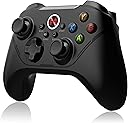
The BEITONG Asura 2 Pro is a versatile wireless PC game controller featuring 2.4 GHz connectivity with up to 30 ft range, esports-grade Hall Effect triggers with 0.1 mm accuracy, and fully programmable M buttons supporting up to 30 actions per profile. Designed for Windows 7-11, Android TV, Steam Deck (OTG adapter required), and Tesla, it offers dual wired/wireless modes, ergonomic laser-textured grips, dual vibration motors, and advanced customization software for an immersive, professional gaming experience.


| ASIN | B0B1D17M3W |
| Additional Features | Ergonomic, Multiuse, Rumble, Wireless |
| Best Sellers Rank | #7,240 in Video Games ( See Top 100 in Video Games ) #133 in PC Gamepads & Standard Controllers |
| Brand Name | BEITONG |
| Button Quantity | 1 |
| Color | Black |
| Compatible Devices | Android, PC, Windows |
| Compatible Video Game Console Models | Sony PlayStation 4 |
| Connectivity Technology | 2.4Gh wireless,USB wired |
| Controller Type | Gamepad |
| Customer Reviews | 3.8 3.8 out of 5 stars (178) |
| Hardware Platform | PC |
| Item Dimensions | 6.3 x 4.3 x 1.97 inches |
| Manufacturer | BEITONG |
| Model Name | BEITONG Asura 2 pro |
| Model Number | BTP-A1T2 |
| Package Quantity | 1 |
| Power Source | Battery Powered |
| Warranty Description | 12 months |
J**N
Don't throw away manual!
I like the controller but please refer to other reviews about driver issues. You should plug in the controller and setup the controls before plugging in the wireless dongle. Also I threw away the manual without thinking and had to go through a process of finding out how to turn off things like the trigger button and turn off the controller manually (Back + B-button). Also note for games like genshin it will register as a PlayStation controller with a messed up button setup (buttons overwritten no matter how many times you set them up on the controller program), I forgot how I fixed it but if your controls are messed up then it'll be good to look into that issue first. Overall a good controller but tricky to get setup the first time so wouldn't recommend if you expect plug and play right out of the box.
B**0
Pretty solid for the price
Its not perfect but for the price its pretty impressive. The syncing isnt awesome, it likes to cut out on you sometimes which is annoying. Battery is fine, buttons are pretty good still after almost 3 years of use. Of course this may be an inferior version after this much time but the one I have is worth the price. If you need perfection this is not for you. But if you want a perfectly serviceable gaming controller for a low price, I'd recommend this. Even if I have to replace it this year its still cheaper than many alternatives
P**E
Small
Made for small hands, but after you use it a while you can get used to it. I had to put hockey tape grips on the handles to keep from dropping it though. Overall great quality, strong feedback and good stick and button feel. Plug and play no issues on Win 10. Has analog triggers which are great for driving, i.e. GTA.
I**S
Defective motor, but great otherwise
The controller is very good overall, however one of the vibration motors is noticably weaker than the other. It does not affect the gameplay, but can be annoying at times. I bought this controller when it was on a discount so it was a good deal - if I had paid the full price, I would probably return it and ask for a refund.
M**K
Garbage, do not buy
Worked on one pc, then totally crashed another one. Don't waste your money, please buy a decent controller and don't give yourself the same headache i am going through. Tried to go to the beitong website to look for new drivers and now it looks like I'm going to have to reinstall widows because I can't do anything other than put my cc# into a shady Chinese website. Please don't buy this garbage.
M**R
Good controller but information hard to find
I bought this to replace an old USB Xbox 360 controller I was using. After some initial problems it's working well. The software for this controller can be found by going to the manufacturer's website, but other information I had to learn from random posts online. If you want to use this controller for a game that only recognizes Xbox controllers, you are going to need 3rd part software such as X360ce. Certain games don't recognize off brand controllers like this one and need an emulator. Features you should know: 1) Pressing Shift on the controller swaps the left analog stick with the Dpad. I was very confused until I figured that out (no information in the official software, but you can see that the joystick registers as the Dpad and vice versa. 2) Pressing and holding the center logo button toggles between controller mode and "mouse mode." 3) The software only lets you map buttons when wired to the PC. 4) The controller works wirelessly or direct connection but you should know that each mode is considered a different device, such as for emulator mappings. I've only had it a few days but I did notice that the wireless connection seemed to drop once while I was playing. I plugged it in and it worked instantly again but it could be an issue to be aware of when wirelessly playing.
J**E
Perfect for gaming on PC
Works great and a really good price
J**R
Great until it is not
I loved this controller until the battery went dead from use. I charged it and suddenly it started having small, annoying little issues like it disconnecting for half a second and reconnecting to the PC. I used the charge down and needed to charge it again. It wouldn't charge. I tried several different things to get it to charge...nothing. Only 2 wireless charge uses and it is now a wired controller. After a few months, the cable will not keep the controller connected and I am in the market for another new controller. I do not recommend it unless you are looking for a 1-2 time use controller.
Trustpilot
1 month ago
2 weeks ago