Buy anything from 5,000+ international stores. One checkout price. No surprise fees. Join 2M+ shoppers on Desertcart.
Desertcart purchases this item on your behalf and handles shipping, customs, and support to Philippines.
🚀 Upgrade your network, silence the noise, and save the planet—effortlessly.
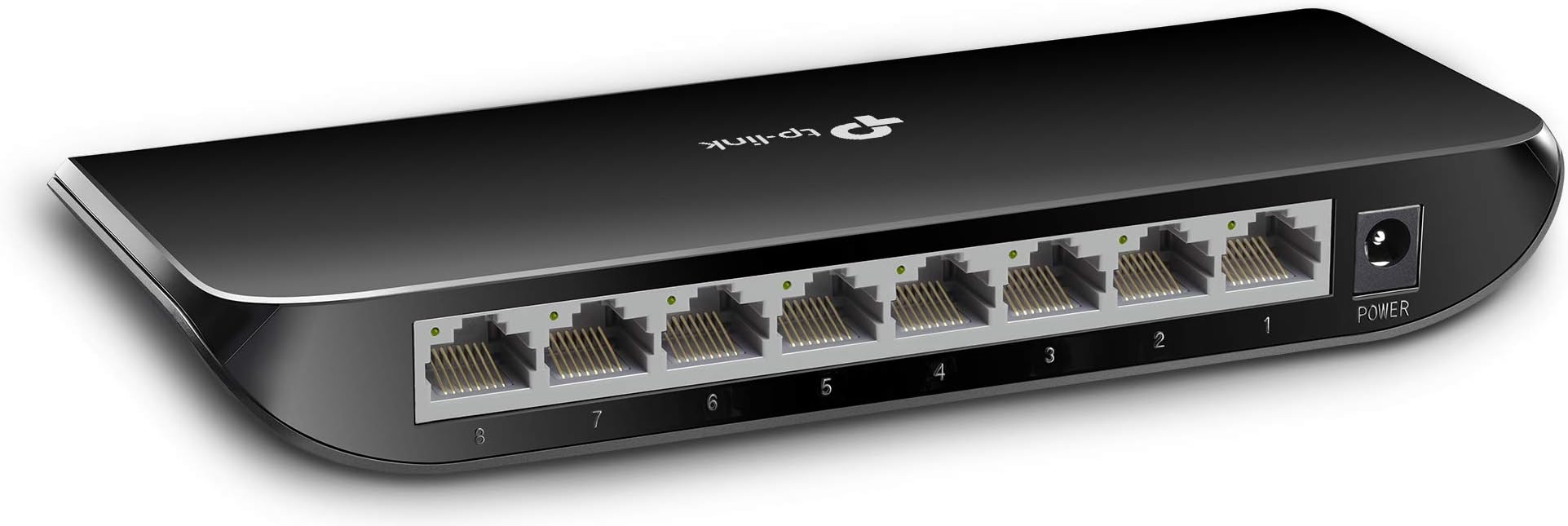
The TP-Link TL-SG1008D is an 8-port Gigabit Ethernet switch designed for professionals seeking fast, reliable, and silent network expansion. Featuring plug-and-play setup, fanless operation, and energy-efficient technology that adjusts power based on usage, it supports versatile desktop or wall mounting. Ideal for home offices and creative workgroups, it ensures seamless data transfer with minimal environmental impact, backed by a limited lifetime warranty.


| ASIN | B001EVGIYG |
| Best Sellers Rank | 2,009 in Computers & Accessories ( See Top 100 in Computers & Accessories ) 17 in Network Switches |
| Box Contents | 8-Port Gigabit Desktop Switch TL-SG1008D, Power Adapter, Installation Guide |
| Brand | TP-Link |
| Brand Name | TP-Link |
| Case Material Type | Plastic |
| Color | black |
| Colour | black |
| Compatible Devices | Desktop, Camera, Router, Printer |
| Compatible devices | Desktop, Camera, Router, Printer |
| Country of Origin | China |
| Current Rating | 0.6 Amps |
| Customer Reviews | 4.7 out of 5 stars 8,942 Reviews |
| Data Transfer Rate | 1000 Megabits Per Second |
| EU Spare Part Availability Duration | 2 Years |
| Interface | RJ45 |
| Item Dimensions L x W x H | 18L x 9W x 2.5H centimetres |
| Item Weight | 0.66 Pounds |
| Manufacturer | TP-Link |
| Manufacturer Part Number | TL-SG1008D V6 |
| Model Number | TL-SG1008D |
| Number of Ports | 1 |
| Number of ports | 1 |
| Platform | Windows 7 |
| Product dimensions | 18L x 9W x 2.5H centimetres |
| Switch Type | Gigabit Network Switch |
| UPC | 781491505044 791963173091 854432534240 172302747041 230494831778 682851706678 088021291492 845973020262 168141531835 132018279465 778890698644 809185807639 191120081052 069353640202 840460606714 |
| Unit Count | 1.0 count |
| Upper Temperature Rating | 40 Degrees Celsius |
| Voltage | 9 Volts |
C**R
Nice little Hub
This was to connect the Ethernet cables I have installed round the house to the main incoming hub. Was quick and easy to install and is working as expected. Good little product.
L**A
Great switch at a competetive price
Bought back in March this year after my previous Netgear switch failed suddenly after around 15 years of service. I have a very annoying habit of convincing myself against a purchase based on a minority of reviews highlighting negative points, so I did spend about a week going back and forth through my shortlist consisting of this, another TP-Link model, and a Netgear one while having a mess of smaller switches running my network temporarily. Eventually I settled on this one, the TL-SG1016PE - and glad I did. It has served me well since installing 10 months ago, and think it has pretty much 10 months uptime at this point - never had to restart it for any reason. The PoE+ capability is a plus... Luckily I never needed that extra power before with my previous switch, but since getting this one, a new PoE device I have required PoE+ power, and this switch can run it flawlessly. Currently, the switch is only powering 3 IP phones and an access point, plus the occasional extra device or two while I'm configuring or testing other devices. The 3 phones and AP are reported to total about 12w of power - meaning there is around 90% PoE budget left for remaining 4 PoE ports - so plenty of PoE budget for most homes or small offices across the 8 PoE ports for the usual devices (phones / APs / Cameras etc.). Rack mountable was a must for me, as my network ports all come into a patch panel in a small rack. The switch comes with included rack ears which screw to the switch and mount in the rack in the usual way, however without the rack ears, the switch is no wider than necessary for its ports and indicators - the extra width to fit in the rack is provided by extended ears. If I recall correctly, it came with little rubber feet to stick on the bottom if using in a desktop configuration. Setup is easy - essentially plug and play. You can power it up and connect your devices and be using it immediately, however while not a fully managed switch, it has a web based management interface for configuring basic options and viewing information about the switch. The interface is self explanatory and can configure all the essentials for a small network such as VLAN options, PoE options such as power limits, priorities etc and QoS. It also has loop prevention which while unlikely to be necessary on a small home network, is a useful feature for office networks where users may inadvertently cause a loop. One of the things I was looking in reviews for was feedback on the sound level. It is quite uncommon for a PoE switch with this many ports to be cooled passively, so it was more a question of how loud the fan is going to be on the model I chose. My last switch was far from the loudest I've ever used, but while tolerable it most certainly wasn't quiet, but I've used switches in the past that literally sound like a jumbo jet warming up in the corner of the room during normal operation. Fine for in a server room but not at home. I note some of the reviews on this model do make a point of mentioning the sound level and making this switch sound particularly loud - but as someone who has worked with many switches, this is easily the quietest one I have ever used with active cooling. It is whisper quiet - quieter than even my laptop, so while maybe not suitable for a bedroom if you like to sleep in absolute silence, it is perfectly acceptable in an office, computer room, sitting room etc. as any other noise in the room easily drowns out the noise of the switch in normal use. I have included a video taken early morning from right after installing it in my rack and powering it up. It really is whisper quiet, and you can very clearly hear the birds through the closed window over the minimal noise of the switch. Sitting here writing this review now with it in the rack behind me, I can only hear the fan of my PC, I cannot hear the switch at all - at least not to pick out as being the sound of the switch. I certainly wouldn't hesitate to purchase another one of these if I needed one and budget allowed - so if the specs of this switch meet your need and it is within your budget, then I would say go for it!
V**S
Excellent build quality, functionality and features.......
This managed switch impressed me from the start. When it arrived I was most pleased with both the weight of the unit, with built in power supply, and the all metal casing. It just oozed quality. This review will be focussed on the POE aspect of the switch, it providing a maximum of a 150w via POE. Please see my photos. The array of lights that are on the front of the switch are useful, they can be disabled within the UI, but are wasted for myself as the switch will be managed remotely. You might need to install the Easy Smart Configuration Utility v1.3.19.0, available from TP-Link, to discover the switch on you LAN, see photo. Or, since it is set to use DHCP at the start, just look for it within your connected network devices. When accessing the UI I noted the hardware revision, 5.2, and I'm using the latest firmware. As mentioned I am using this unit principally for the POE function and have six 4k / HD CCTV IP cameras connected. The fan on the unit seems to run continuously, regardless of load. Sad really, as during light power loading it could have been much quieter if the fans use would have been load related in its use. It is not loud at all, but it is noticeable. There are options to ping your POE attached devices, if they do not respond then the port can be rebooted automatically. The cable length can be measured and extended up to 250m, but at a reduced throughput. Individual power usage across each port can be seen, and overall power usage across them all. Limiting power and setting priorities is possible. The UI is easy to navigate and use. The functions are well presented and easily accessible. I have looked at the VLAN options and they seem well enabled. I have contacted their customer service, TP-Link, with both live chat and email, they responded very quickly and were most helpful with my firmware query. Overall I would very much recommend this product, based on my own POE needs. Two minor quibbles.......The fan, as noted, is not loud but to have it working on load rather than constant would have been nice. Secondly, the cluster of Ethernet ports are very tightly compacted together. Not a major issue, but one where it can be tight to access and plug in your devices. Very happy with the switch and pleased with its functions and cost. Very much recommended. I hope this has been helpful.
N**C
Does what it says
The item is great works perfect rather than buying an expensive router that might be a lack of security or to have a huge buffering at all the time fact which wasn’t happening with your provider router this would do just fine with a straight Ethernet cable. The only thing for which I haven’t given all stars is that the wlan port isn’t really noted as wlan so I’ve chose the first slot and the book that comes with is not much helpful. Anyway cheap and good hopefully would last not like a gaming router from a well known brand that didn’t last neither meet my expectations even with their quite expensive subscription was failing to keep a connection alive.
T**L
Superb switch
TP-Link TL-SG1016PE: It is easy to see how TP-link has gained such a star reputation recently with its networking products. It is not just well made and reliable, it is also the correct estimation of functionality and price that people really want. You can just plug it in and go, and no configuration is needed, it jsut works well. I like the lights on the front showing operation, speed and PoE status of each port, or perhaps I just like flashing lights :) This is known as a smart switch. It is midway between an unmanaged switch and a managed switch. The half way is that it gives you a web interface allowing traffic monitoring, ip setting, LED control, config backup, firmware update, port speed/duplex, link and flow control. It also allows IGMP snooping, LAG groups, stats monitoring, port mirror, cable tests, loop; prevention, vlan control (MTU, Port based, 802.1Q VLAN and PVID), Qos bandwidth, basic and storm control and of course it is PoE. 8 of the 16 ports can be used for power over ethernet up to a total of 150w. A tip for those who are plugging it into a router (e.g. a sky router you have for your broadband). The TP-link switch defaults as 192.168.0.1, so this will conflict with pretty much all routers, and you wont be able to use the web interface. To make mine work, I changed the sky router to an IP address of 192.168.0.254 and set 1-253 as DHCP controlled. Now here is the last but important bit, you need to reserve the address 192.168.0.1 on the router (using address reservation) and make sure you know the mac address (can be found under the case). Once this has all been done and the router has rebooted a few times, you will now be able to see the web interface but only from any PC plugged into the switch directly, by typing 192.168.0.1. Note that you will not be able to see the web interface from any PC plugged into the router's ethernet sockets. Lastly, remember to turn on the MLD querier option in the router, to make sure the switch connections are seamless with the routers own connections. Of course, you dont need to bother with this paragraph if you cant be bothered seeing the web interface ;)
R**L
Definitely one of TP-Link's better items.
I cannot flaw this item, so it is fully worthy of 5 stars. Honestly! I could not find a single fault with it. It's just perfect, and at the price, has no competition at all. The design is attractive and sleek. When I opened the box, I was surprised by how small the product was, much smaller and thinner than some ethernet switches. The lights on the front do what they are meant to do - you can see them perfectly well when you look straight-on, but they can't be seen out of the corner of the eye where they would be annoying. Perfect. I have had items from TP-Link before, and whilst I do like them for being reliable ("The reliable choice", am I right?!), the speed of their products has been lackluster. This is different, there were no slowdowns and I could transfer files between multiple clients simultaneously at near-gigabit speeds (to those who aren't aware, 1 gigabit does not equal 1 gigabyte per second, it's more like 128.5 megabytes per second). I really see no reason for people not to buy this switch. It's small and hides away nicely, it looks great and works perfectly well. Also, over the 3 months I've had it so far it hasn't broken, and I'll update this review if it does.
K**X
Fool Proof way to expand your ethernet network
Literally anyone can use this to expand their wired network at home. A great way to get round the limitations of wifi. Plug in the power, plug in your devices using network cables. Plug the switch into your router. In my case the 4 ports on my BT Homehub were all full. I replaced one with the cable to the switch and plugged all my other devices in to the switch. The switch immediately works. Nothing to configure. The difficult bit for some people might be getting the cables around their house, but if you have the devices in the same room as your router it is child's play. I used mine to connect far more devices to my BT homehub than it has ports for. Currently we have 2 PS4s, 2 smart TVs, a desktop PC, a humax tv recorder, a CCTV DVR and a Hive home control, and I still have a couple of spare ports. My sons who like to be gaming on their PS4s particularly appreciate the stability and speed of their connection.
W**N
Does what it says, Perfect.
Perfect POE switch.
F**D
ممتاز
يعمل بشكل جيد
A**R
Excellent product
We are able extended internet to workstations with one single internet connection. It is easly to use. Just give power and use it.
J**Z
Excelente producto
Excelente producto, muy recomendable
L**O
Excelente produto
Facil instalação e bom funcionamento, TP-Link nunca decepciona.
D**W
kamm mit US-Stecker
Der Switch tut soweit was er soll, aber leider kam das Netzteil nicht mit einem EU-Stecker, sondern mit einem US-Stecker. Ich habe das Netzteil jetzt erst mal über Laborkabel mit 4mm Büschelstecker an der Schuko-Steckdose angeschlossen. Das Netzteil liefert laut Aufschrift 9V DC bei 0,6A. Der Eingangsbereich ist 100V bis 240V AC. Der Hohl-Stecker vom Netzteil der in den Switch kommt hat einen Aussendurchmesser von 5,5mm und einen Innendurchmesser von 1,9mm. Masse liegt am Aussenkontakt des Hohlsteckers. Der Pluspol am Innenkontakt. Diese Informationen gehöhren eigendlich zur Produktbeschreibung dazu.
Trustpilot
1 day ago
1 month ago