
DOWNLOAD THE APP


Customer Services
Copyright © 2025 Desertcart Holdings Limited
DOWNLOAD THE APP
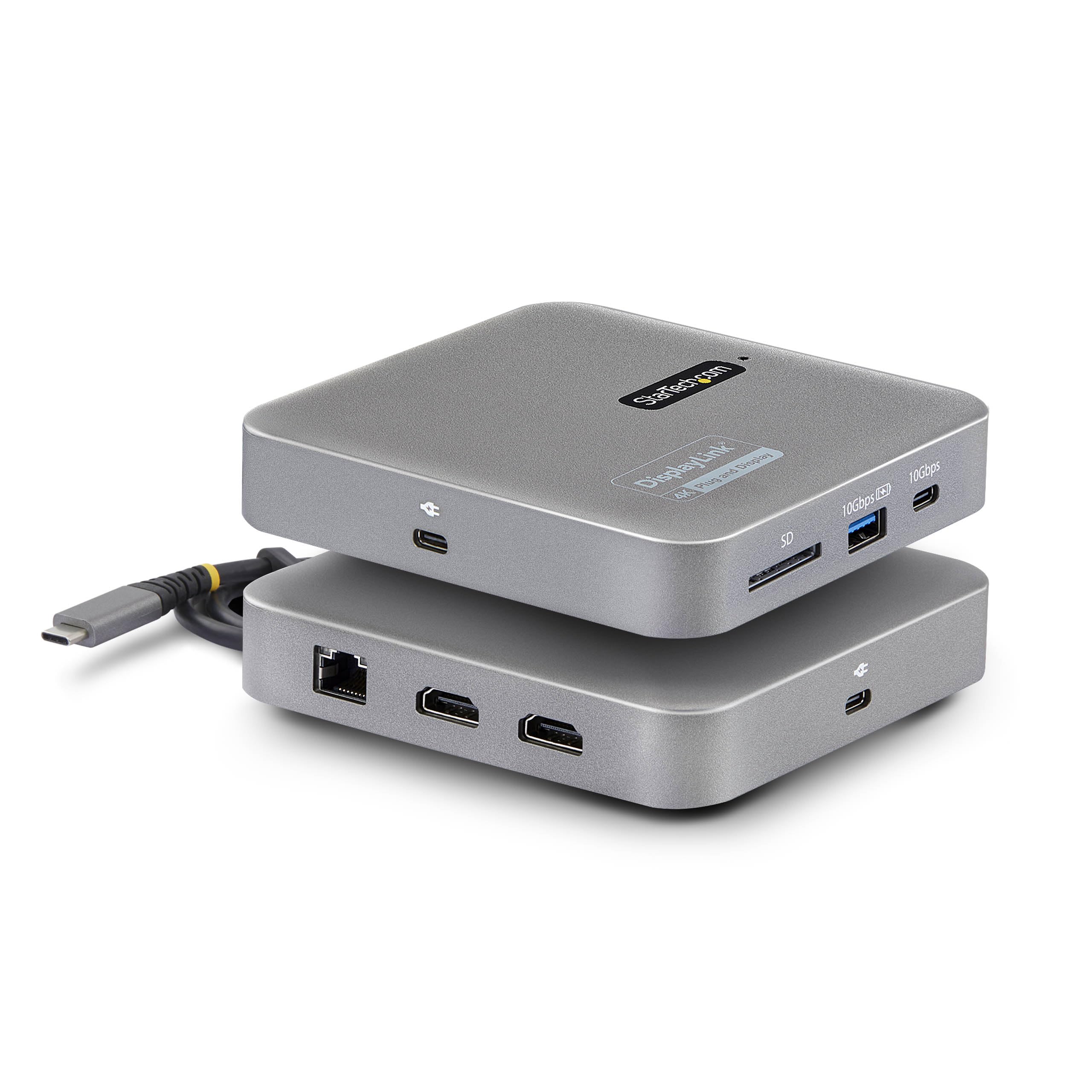
🚀 Elevate your desk game with the ultimate dual-monitor powerhouse!
The StarTech.com 7-in-1 USB C DisplayLink Docking Station is a compact, portable hub designed for professionals who demand dual 4K 60Hz HDMI output, ultra-fast 10Gbps USB data transfer, and up to 100W laptop charging. Compatible across MacBook M1-M4, Windows, Linux, and ChromeOS, it features an SD card reader, Gigabit Ethernet, and a 22-inch cable for flexible setups. Backed by a 3-year warranty and enterprise-grade reliability, it’s the perfect dock for seamless multi-monitor productivity anywhere.


























| ASIN | B0B6PW6VG7 |
| Batteries | 1 AAAA batteries required. |
| Best Sellers Rank | #16,957 in Electronics ( See Top 100 in Electronics ) #256 in Laptop Docking Stations |
| Customer Reviews | 4.3 4.3 out of 5 stars (78) |
| Date First Available | July 15, 2022 |
| Item Weight | 8.8 ounces |
| Item model number | 102B-USBC-MULTIPORT |
| Manufacturer | StarTech.com |
| Product Dimensions | 4.7 x 4.7 x 1 inches |
S**T
Your M1 MacBook Air will thank you!
PERFECTION! My current work laptop is an M1 MacBook Air. Our hoteling cubes at the office are outfitted for our standard Dell Latitude laptops, so they have Dell USB-C docks (WD19) and they don't support DisplayLink, thus relegating me to one HDMI monitor (ranging from 21-27", depending on the workstation) and the 13" MacBook screen. So I went hunting for portable alternatives that I could take with my own gear (a Logitech webcam and MacAlly bluetooth keyboard and mouse) that would give me access to dual extended monitors. I've used StarTech before for my home setup and been very happy, but that's a full size dock (USB3DOCKH2DP). I found this one and thought it was worth trying out. It's brilliant. Setup is easy, it recognizes the dual monitors no matter what hoteling station I choose. It's not especially generous on USB A ports, but I have several other USB-C dongles that can accommodate that. But when I've got my own Bluetooth keyboard/mouse and SD card, it's really a non-issue. So glad I found this and at a reasonable price. It fits in my "go bag" with my other personal tech. The build is solid, so it doesn't feel like it's going to come apart. Very happy with this. StarTech for the win!
P**S
Startech is always Awesome
Works perfectly with my Mac Book Pro and also my work Win 11 HP when I work from home
J**G
Works as Advertised
Dock operates as advertised - a little expensive but the only way to support dual monitors on an M1 mac I have found - happy to recommend.
M**R
Works as advertised
I had ordered a Plugable unit that required an alternative driver install. This Startech unit with the DisplayLink Manager Driver has worked flawlessly unlike the Plugable unit which constantly disconnected the displays and caused havoc while am working.
E**.
It works flawlessly for MacBook Air M2
MacBook Air M2 only supports one external monitor natively. This adapter - after necessary software installation, mind you, this is not plug-n-play à la Windows - enables the same model to have two external monitors (as extended, not mirroring, although the latter is an option) It works flawlessly. Buying this MacBook model and this adapter is still cheaper than buying a MacBook model that natively supports multiple external monitors (as of 7/2024).
T**E
Works great to set up dual monitors on new MacBook Air
I couldn’t figure out why my MacBook Air wouldn’t connect to my new second monitor. It turns out that the new MacBook Air only supports connecting to one monitor UNLESS you have an external hard drive like this! I was hesitant to spend much money on this, but I’m so glad I did. I’m not super tech savvy, and this made hooking up to my external monitors so easy. The instruction booklet is also great and easy to understand, which is rare.
D**A
Doesn't work on Mac. You're left on hold for 45mins w/o answer for trouble shooting.
Doesn't work with Mac (Intel Version). They require you to download all kinds of drivers, and then windows started popping up on my screen-I thought I got a virus. I called the company, StartTech.com, and no one picked up. They boast of being an American company, they do provide a phone number for tech support, but no one picks up. I was on hold for almost 45mins and hung up.
G**S
Macbook Air (M2 chip) now allows dual monitors
I have the latest Macbook Air 15in w/M2 chip and was disappointed to hear it did not natively support dual monitors. With this adapter I now have 3, if you count the Macbook screen as well. It's pricey but it works perfectly. Don't forget to follow the in product packaging instructions, Mac users will need to download the driver first.
L**S
Ce produit fonctionne parfaitement avec ma configuration : Mac Book Air 2024 (M3). Du coup, je peux connecter 2 moniteurs extérieurs et bénéficier du moniteur de mon Mac. Conseil : il faut se rendre sur le site du fabricant pour récupérer le pilote et surtout bien suivre les explications fournies dans le document PDF fourni lors du téléchargement du pilote.
Y**L
funcionou como esperado, bom produto
M**.
top é da tempo che cercavo una docking station per il mio portatile dova la porta usb c non ha la funzione video. con questa funziona ache il viedeo
C**T
Works great!
E**.
Conforme à la description fonctionne parfaitement avec un Mac Book puce M2
Trustpilot
1 month ago
1 day ago