Desert Online General Trading LLC
Dubai, United Arab Emirates
Desert Online General Trading LLC
Dubai, United Arab Emirates

🚗 Unlock the Future of Driving!
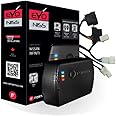
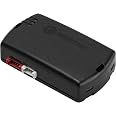
The FortinEVO-NIST1 Stand-Alone Add-On Remote Start Car Starter System is designed specifically for select Infiniti and Nissan push-to-start vehicles. It includes the EVO-ALL module and THAR-NIS1 t-harness, ensuring a seamless integration for remote start functionality. With a lightweight design and user-friendly setup, this system enhances your driving experience while prioritizing security.
| Manufacturer | Fortin |
| Brand | Fortin |
| Model | EVO-NIST1 |
| Product Dimensions | 15.24 x 15.24 x 6.35 cm; 362.87 g |
| Item model number | EVO-NIST1 |
| Manufacturer part number | EVO-NIST1 |
| Voltage | 12 Volts |
| Item Weight | 363 g |
C**1
Remote car starter
Already installed and it works awesome great value and great service thanks for everything
J**Y
Reasonable price, fairly easy to install.
There are plenty of videos on YouTube for guides, but make sure you properly program it using the Flash Link programming tool. The default settings that go with your vehicle may not be exactly correct, so don't just assume that choosing your model and then flashing the module. I had to go in and disable the hood safety pin feature, and enable the Lock 3x to start feature. Once I did that it works like a champ.Follow-up: I installed two of these, one in an Infiniti G37 and the other in a Nissan Murano. They worked fine for a while but eventually in each vehicle they ended up draining the starter battery down. It I assume they were the culprit. Once I disconnected them the issue hasn't recurred. So I cannot recommend this unit. Changing rating to 1 star.
D**S
Not a good experience
My opinion would be to continue shopping, I would not recommend this product.
H**S
Works as expected, Lock 3x to start your car. Installation is as easy as possible considering how many systems this device uses
I bought this item mainly because it made use of the original remote control, I did not want my daughter to have to carry another remote.BEFORE YOU START, YOU MUST ALSO BUY THE PROGRAMMER! I updated the EVO with the latest firmware and configured it to be used as a remote start by pressing the lock 3 times. I'm not sure why they don't just ship them like this from the factory, but mine did not come configured this way. If I did not change the configuration, then I do not think it would have worked. So buy the programmer, like others have said.I used the following web page that clearly describes how to install it into a 2010 Nissan Altima:[...]Key notes include:1) You will have to remove the instruments cluster from the dash (pretty easy) to gain access to the BCM.2) 2 of the wires connections to the BCM are simple push in to an empty slot of the green connector.3) 1 of the wire connections to the BCM must be made using a T-Connector or Soldered (I stripped and soldered mine)4) 1 wire must be soldered to the Push-to-Start button5) 1 wire must be soldered to the Fusebox connector6) Everything else is a simple unplug-plug and requires no cutting or solderingIn general there was only about 10 screws that needed to be removed to gain access to everything which is all under the drivers dash. Once we had all the wires connected (except the brown wire to the fuse box for the parking lights) we programmed the unit using the instructions from the Fortin web site. We also watched the following video which is for a Maxima, but works the same way:[...]There are a few different PDFs instructions to use, but I found the following PDF was the most accurate for the installation into an 2010 Altima:[...]After we proved the car started as expected, we finished the job by making the connection to the fusebox for the parking lights and wire tied the lose wires and the unit to the metal support under the steering wheel (so nothing is banging around or hanging by our feet).I'm not sure if the standard remote will reach the car from my daughters dorm room, but we can just add a Fortin RF-KIT that has an extended range (some 3500 feet).Overall, the installation took about 2 hours, but we went slow, soldered the connections (instead of using the push-on taps), and double checked everything before cutting or stripping a wire. We are pretty experienced working around cars, so it might take a little longer if you are not, just take your time, and read the directions from the first link (many times).
C**R
Doesnt work on Infiniti with radar braking
Didnt work on my 2012 Infiniti Fx35. After reading the troubleshooting guide it mentions that the T-harness does not work properly with the infiniti brake Sense. No other instructions provided. Ill follow up with Tech support.Also I had to buy a new car battery cause this killed it. I cant fully fault it as I cant prove they are related. Just a side note.Tags: fx35 fx 35 infiniti infinity
Trustpilot
1 week ago
2 months ago
1 month ago
1 month ago