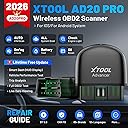
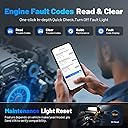
🚗 Diagnose Smarter, Drive Confidently — Your Car’s Best Kept Secret!
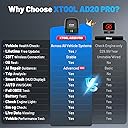
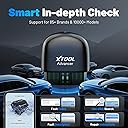
The XTOOL Advancer AD20 Pro is a compact, wireless OBD2 scanner compatible with iOS and Android devices, offering dealer-level diagnostics across all vehicle systems. Featuring Bluetooth 5.0 connectivity, automatic VIN detection, live data streaming, and oil reset functions, it provides DIYers and professionals with fast, accurate fault code reading and repair guidance. With lifetime free software updates and broad vehicle compatibility, it’s a cost-effective tool designed to empower car owners to maintain peak vehicle performance and avoid costly repairs.


| ASIN | B0BRKQRS2P |
| Best Sellers Rank | #31,152 in Automotive ( See Top 100 in Automotive ) #230 in Code Readers & Scan Tools |
| Brand | XTOOL |
| Brand Name | XTOOL |
| Customer Reviews | 4.3 out of 5 stars 647 Reviews |
| Included Components | AD20 Pro OBD2 Scan Tool *1, User Manual *1 |
| Item Height | 2.68 inches |
| Item Type Name | XTOOL AD20 PRO OBD2 Scanner Diagnostic Tool |
| Manufacturer | XTOOL |
| Manufacturer Warranty Description | No Subscription Fee 2-Year US Warranty |
| Native Resolution | Read Live Data |
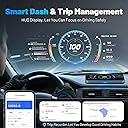
| Operating System | Auto VIN & Auto Scan, All System Scan, Oil Reset, Battery Test, Check Engine Light, Sm og Check, Full OBD2 Test, Live Data Viewing, Smart Dash, Performance Test, Trip Analysis, Fits for iOS & Android Operating System Auto VIN & Auto Scan, All System Scan, Oil Reset, Battery Test, Check Engine Light, Sm og Check, Full OBD2 Test, Live Data Viewing, Smart Dash, Performance Test, Trip Analysis, Fits for iOS & Android See more |
| Power Source | BT 5.0 |
| UPC | 763679429175 758987845595 |
K**A
Great little tool!
The AD20 is impressive for its price! Very easy to use, and the amount of information it can tell you is amazing. I downloaded the app using the QR code on the box and followed the instructions, which were very simple and clear. The app automatically downloaded the software needed to scan my 2013 Silverado, which was nice. It also automatically filled in the vehicle information. I appreciated not needing to enter my VIN! I included some screenshots of the information I looked at. I had to set my location so the measurement units were correct for me, so there are different units shown here. If you are looking for a scan tool that reads and erases codes, shows live data, checks your battery life, and gives you performance values, this is the tool for you! Definitely a good tool to help with troubleshooting issues you may have. If you are looking for something to run relearn procedures, you will have to step your price point up because this will not do that. Overall, it is very user-friendly and gives a surprising amount of information. You can also set it up to look like a dashboard of sorts, and provide you with some basic information. There are several different styles of those. The dongle is nice and small, and could be kept in your toolbox or glovebox. I absolutely recommend the AD20 Pro over a tool that you would pick up at the auto parts store that just reads codes. If you are shopping for your first code reader, I definitely recommend checking this one out! The one thing I discovered that wasn't 100% was that I could not use the "back" button. I have a Google Pixel 10, and I don't know if it is just the shape of the screen or what, but I had to swipe to the left in order to go back to a previous menu. Not a big deal, but something to note. Also, the customer service was fantastic. They are very helpful, friendly, and clear!
B**O
XTOOL scanners are the Best!! Quality, price, fast shipping, and works well!
XTOOL scanners will save you time and money! It is almost impossible live without one with all the electronics in today's cars. I now have the XTOOL D8BT, AD10, and the AD20 pro and love them all! Just yesterday while leaving work, my son's battery light came on in his Camry, so he took out the D8BT scanner from his trunk and quickly learned his alternator was not working. He had enough time to get to a parts store, repair the car, and return the core. Earlier in the day, I received my AD20 pro and decided to check it out on my 2007 Toyota Sienna Van. It worked flawlessly! It scanned my entire vehicle and cleared my TPS light in the dashboard. You must scan a QR code on the instruction sheet to get started. It will take you about 10 minutes to follow the easy to understand steps. Between each step is a little slow, I have a new 5G phone and the highest speed internet Spectrum offers. Once you plug the dongle in the OBDII port under the dash and your vehicle communicates with your phone via Bluetooth, you will see a big difference between the AD10 and the AD20 pro. I was hoping the AD10 app would work on the AD20 pro, but you will see that there are so much more parameters and sensors that are tested with the AD20 pro, that it needs a whole new app. When the AD20 pro tests your vehicle, it is very fast! What is new and amazing and where Wi-Fi comes into play is that the AD20 pro will not just give you the trouble code, it will take you to a website that explains the code and even recommend videos that you can watch on your phone to solve your problem. There is live data where you can select all or only the sensors you want to watch. Most times you will look at fuel trims, rpm, MAF, O2 Sensors, and voltage. So you can monitor what you prefer. You can leave the dongle in the OBDII port to monitor your driving habits. This scanner can tell you if you are driving well. Going back to my D8BT, my son self inherited it from day one! But I did not mind because I knew that he would make more use out of it than I would. Then XTOOLS gave me the AD10 which I keep in my truck at all times so that is the reason my son can keep the other scanner. As soon as I found out this AD20 pro scanner was available, I jumped on my computer to order one. The only times I have problems with my XTOOL scanners is deciding which one to buy. It wasn't long after the XTOOL D7 scanner came out that the XTOOL D8 scanner came available. It was hard enough deciding between the D7 and the D8 because now the XTOOL D8BT came out. I decided to buy the D8BT and that was the best decision I made. My friend bought the other brand that I was considering, I tried it and I would have been disappointed. Getting back to my XTOOL AD20 pro, again I had a little problem deciding between the AD20 or the AD20 pro. I chose this AD20 pro, but I am confident that either or would be a good choice! I know I went off track a little, but if you need a scanner to help you find out what is wrong with your car, you cannot go wrong buying the XTOOL AD20 pro scanner. I used to take my 1994 supercharged Previa Van to the dealership and pay $200.00 just for them to hook up a scanner to tell me the problem. If only I had my phone and the AD20 pro which both can fit in one pocket, I would have saved a lot of money. It is amazing how small the AD20 pro is. It is a small dongle that you plug into your OBDII port under your dash. I really do not have anything bad to say about this AD20 pro. I only have one suggestion to the XTOOL company, is that maybe they could make the dongle come in a bright color like yellow, orange, or lime green to help you locate it when you take it out of the box or OBDII port because being black, it blends in with the black consoles. If you are in the market for a scanner, you can not go wrong buying this XTOOL AD20 PRO!! With gasoline prices nowadays, you need this to keep your car in tiptop shape and even if you cannot fix or repair your own car or truck, you can prevent shops, mechanics, and others from ripping you off or trying to upsell you on things you do not need. This XTOOL company will go through great lengths to ensure your happiness and are quick to respond to your questions. They will let you know about any new products that they develop. It is such a good feeling to do business with such a great company that really and truly stand behind their products and who really and truly care about their customers!! Hard to find companies like this nowadays!
A**N
Great Product For Saving Money On Car Repairs
The XTool AD20Pro is a necessity for people who don’t want to buy another vehicle right away. With this product you can decide whether it’s worth keeping your current vehicle a little while longer. For example, I used this product for three weeks on a Cadillac 2011 DTS Platinum, with 159,000 miles; I purchased the XTool AD20 for the sole purpose of finding out how far gone my vehicle was; with this product I know it’s best to hold on to my car, at least another year. I recommend this product (AD20Pro) for those who aren’t ready to purchase a new vehicle; this product diagnoses all the problems with a car. Can your vehicle hold up a while longer; this product itemizes the problems with your vehicle; you’ll know right away if the problems are minor or major; this product will do justice for every car in your household. Many problems can be corrected early, thereby extending the life of your vehicle. This product will help you make an intelligent decision, keep or trade it in a car. Use the AD20Pro to keep up the maintenance on an older car. All the problems codes will be explained and additional information is available online. More than likely, this product will compel you to learn more about your car. Just about everything you would want to know about your vehicle, this product will teach you some vital things. Mechanics can charge upwards to $75 dollars to diagnose your vehicle (the AD20Pro eliminates that cost upfront); wouldn’t it be better if you knew the health of your vehicle before talking with a mechanic that might take advantage of a clueless customer? Most mechanics I’ve encountered are honest experts ready to help you and money, if possible; still, you’re better off knowing the specific problems in your vehicle, so you can talk intelligently with your mechanic. Let’s say you decide to purchase another vehicle; don’t dare do so without using the AD20Pro on any potential car purchases; you’ll want to know if a potential purchase will pass a smog test; you’ll want to know if the history of serious problems in a vehicle; for example, the AD20Pro will tell you if there are any cylinder misfiring; you’ll want to know if the suspension is problematic; you’ll want to know if any circuitry is malfunctioning; you’ll want to know if there has been a history of overheating issues; you’ll want to know if there are battery and charging issues, and the list goes on. The AD20Pro will help you make a wise purchase, and help avoid bad purchases. I’ve used the AD20Pro for 3 weeks; I’ve learned a few things about my vehicle. First, my vehicle has some problems, but they don’t warrant me purchasing another car. Second, I have a misfire on cylinder 5; right off the bat, I’m saving $75 on diagnosing fee by the mechanic (some mechanics waive the diagnosis fee when they do the work!); Third, I have issues with my cruise control, but not cruise control itself; with this product, I know it’s a circuitry problem with a sensor; Fourth, with this product, I know the error messages on my dash are not direct problems with transmission, suspension, traction control, but the problem is a sensor. If I took my car for checking, it would have cost me a couple hundred bucks just to check. Anyways, my analysis with the AD20Pro, it’s a great product for upkeeping the older cars; maintenance of the older car is much easier; all the information needed is provided; use this product to checkout a potential vehicle purchase. The analysis report is great! One point however needs to be made. While you can search on the internet more info on problem codes, currently the report can’t be emailed, stored, transferred to the computer for further checking. For sure, this feature is probably being looked at. It would be nice to go out to the car, do a full check, store it on the phone, and come back inside to go over the diagnostic report on a computer. Besides that, this is a great product and a wise purchase for me! TJ
J**H
Great value for the money
I tested this on three different vehicles. I had no problems using it on any of the three vehicles. It had to be paired with each vehicle which required scanning the code on the dongle with my phone. Scanning worked on all three vehicles with no issues. The scan results were simply to interpret and appeared to be accurate. The detailed scan is flashy with some nice graphics. They don't have anything to do with the actual functionality of the scan but help make the tool look more professional IMHO. I couldn't find a way to save the report or to view previous scan results. They are lost once you disconnect from the scanner. If that capability is indeed missing that would be a terrific addition. It is not that slow but still inconvenient to rescan each time when trying to diagnose and fix an issue. That lack of capability is the primary reason for keeping back one star. The pairing process and UI in general were intuitive to me. I had no problems with any of the other features other than the previously mentioned one on prior scan results. I also liked the fact that the performance was great as well. Running scans and clearing codes were both very quick. Some of the scanners I've used could be quite slow, but I never observed that with the AD20 Pro. Overall, I found it very functional and consider it something I will keep in my toolbox handy for quick diagnostics in the future.
J**P
XTool Advancer A20 Pro...Outstanding Tool and Great Customer Service at a Great Price
I recently put the Advancer A20 Pro to the test, and it stands out not only for its impressive features, lifetime free updates, and ease of use but also for its exceptional customer service, making it an even more commendable choice for vehicle diagnostics. I used the A20 Pro on a several cars, including a 2009 Dodge Ram 1500, 2008 Mazda CX9, 2010 Honda Civic, 2011 Hyundai Sonata, 2003 Toyota Matrix, and a 2001 BMW 530i. This allowed me to assess its performance across various makes and models. Diagnostic Insights: The A20 Pro effectively scanned the cars with and without check engine lights, providing valuable insights into each vehicle's health. Some of the codes that the A20 Pro was able to find were: • Emission Codes: I was able to identified common emission codes on the Toyota Matrix, shedding light on potential issues with the emission control systems. • ABS and SRS Codes: Pinpointed an ABS code on the Mazda. On the Honda it pulled up several SRS codes related to the seatbelt restraint system. • TPMS Codes: The Mazda had some TPMS codes, offering detailed information about the tire pressure monitoring system. • Despite no check engine light, my 2009 Dodge Ram 1500 revealed codes related to the recirculation/ventilation door on the A/C system. This discovery explained the issue with heat not coming out of the lower vents, demonstrating the A20 Pro's capability to identify non-obvious problems. Pros: • Bluetooth Connectivity: The A20 Pro's Bluetooth capability is a game-changer. Being cordless enhances the overall user experience, allowing for greater flexibility and ease of movement during the diagnostic process. • Exceptional Customer Service: XTool customer service second to none. I also have the D8 and had many questions when I first received it. I have consistently experienced prompt responses to emails, and what sets them apart is the proactive approach — I've even received follow-up emails just to check if I resolved my issue. This level of customer care is truly commendable. • Ease of Use: The A20 Pro stands out for its user-friendly design, making vehicle diagnostics straightforward even for those less experienced in automotive technology. • Great Value: Considering its price point, the A20 Pro provides impressive value, delivering great performance without breaking the bank. • Live Data Analysis: A standout feature is the A20 Pro's ability to provide live data, enabling real-time diagnosis of potential issues. This feature allows users to address problems promptly, enhancing the overall utility of the device. • Continuous Monitoring: Another notable advantage is the ability to keep the A20 Pro plugged in, allowing for continuous monitoring of live data as soon as you start your car and while you drive. This real-time feedback enhances the user's ability to detect and address issues on the go. I’ve kept mine plugged into my truck for a couple of weeks now and as soon as pull up the Advancer app it shows the live data. • Free Lifetime Updates: No costly updates each year. The A20 Pro has free lifetime updates. Cons: • Switching Between Vehicles: One minor drawback is the initial challenge in switching between vehicles. However, after using it for a while, I found it to be a minor inconvenience. Hopefully they will streamline the process with future updates. If you are in the market for a scanner and want to get some valuable information for a DIY repair or just want to get a leg up on the mechanic before you take to them for repairs…I would not hesitate to go with the A20 Pro.
J**Y
Astonishingly bad. Expected great, received awful.
I expected this scanner to be at the very least an improvement over the elm327 BAFX unit I was using with Torque Pro. Wrong. In order for this to be more useless it would have to actually decrease my knowledge of what my engine is doing! There is nothing, and I cannot stress this strongly enough, absolutely nothing this thing can do that a cheap elm327 unit coupled with Torque won't do faster and better. This thing is garbage. An anti-product of no value to any normal person, perhaps even less than no value since if this was the first scan-tool you ever had you might be tempted to imagine it was telling you something you couldn't know without it. Edit: XTOOL contacted me to make a bad situation even worse, asking if I'd downloaded the app. Now, of course without the app you couldn't get any results at all, which might actually be an improvement, considering you'd probably quit trying to get something useful out of it It's sad that "Lisa" was obviously trying to be helpful without realizing that if my issue was with being unable to download the app I'd have complained I couldn't download the app rather than complaining about how badly the device performed. While unintentional, that's just insulting. That said, I suppose I should give a few words about the app itself. Unlike Torque, it's badly designed, intended for people who have no idea what information you'd need to work on a car. The custom dashboards seem like a great idea until you find out you'd need a phone twice the size of mine before they'd actually be useful to drive with. By contrast, Torque allows you to set up custom displays of whatever live data you want, however you want to display it, whether in graph, metric, dial gauge. And, while we're updating the review, let's spend a moment talking about the design of the obd2 unit itself. It's small and rounded, which is fine if you intend to plug it in and never remove it. But if you'd like to remove it it's extremely difficult to get enough grip on it to pull it out.
J**F
Impressive Entry-Level Scanner with Advanced Features – Great Value
This review is for the Xtool AD20 Pro, a compact, wireless, dongle-style OBD2 scanner that transforms your smartphone into a full-featured diagnostic tool. At around $55, this is an exceptional entry-level scanner that punches well above its weight class in terms of features and functionality. I own several Xtool products, including the A30M (a more advanced wireless scanner priced around $160 with no subscription required) and the D7S, a professional-grade wired scanner that does require an annual subscription. The AD20 Pro sits at the entry point of their lineup, but don’t let that fool you, this tool delivers surprisingly advanced diagnostics for its price. The AD20 Pro supports a wide range of vehicles. I have successfully used it on a 2014 Jeep and a 2011 Suburban. When connected to a new vehicle, the app will prompt you to download the specific diagnostics for that make and model, simple and efficient. Once connected, it performs an All-System Scan, reading and clearing fault codes across systems including Engine, Powertrain, SRS, ABS, TPMS, and more. It easily handles diagnostics that most cheaper tools miss. Additionally, it includes valuable features like Oil Light Reset and Battery Check, which are frequently used maintenance functions. A good convenience is its built-in DTC Lookup, which pulls up definitions online for any fault codes, helpful for understanding and addressing issues quickly. Other features include: Live data streaming, Freeze frame data, ECU info, O2 sensor, component testing, engine load, RPM, fuel trims, MAF, misfire counters, voltage, and more. What you will not get at this level are the bi-directional controls and advanced reporting features (like saving and printing diagnostic histories), which are available on models like the A30M and D7S. But that is a fair trade-off considering the ease of use and price point. Bottom line: The Xtool AD20 Pro is a very good value for beginners or DIYers who want more than just basic code reading. It is a great starting point with plenty of features typically found only in more expensive models. Highly recommended for anyone looking for a reliable, feature-rich OBD2 scanner at an entry-level price.
W**Y
Works perfectly on my 2004 350Z!
Tried this on my 2004 Nissan 350Z and it worked flawlessly. Setup was super easy, just plug it into the OBD port, connect through Bluetooth, and the app picked up my car right away. I was able to read and clear a check engine light, see live data like temps and O2 sensors, and even do an oil reset. The connection stayed solid and the app is simple to use. It’s nice being able to check codes and monitor stuff right from my phone instead of paying a shop. Definitely worth it if you like doing your own diagnostics.
Trustpilot
2 weeks ago
2 months ago