🚀 Elevate your storage game with speed, security, and seamless expansion!
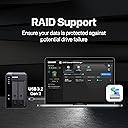
The QNAP TR-002-A-US is a diskless 2-bay external RAID enclosure featuring USB 3.2 Gen 2 Type-C connectivity, supporting up to two 2.5" or 3.5" SATA drives. Compatible with Windows, macOS, and Linux, it offers hardware RAID modes (0, 1, JBOD) and lockable drive bays for secure, high-speed (7200 MB/s) direct-attached storage or NAS expansion.


| ASIN | B0BVCXFMDH |
| Additional Features | LED Light |
| Best Sellers Rank | #271 in External Hard Drives |
| Brand | QNAP |
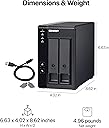
| Built-In Media | Drive tray keys x 2, Power Adapter, Power Cord x 1, Screws for 2.5-inch drives x 6, Screws for 3.5-inch drives x 8, TR-002 external RAID enclosure, USB Cable, USB cable clip x 1 |
| Color | Diskless |
| Compatible Devices | Desktop, Laptop |
| Connectivity Technology | USB |
| Customer Reviews | 4.0 out of 5 stars 53 Reviews |
| Data Transfer Rate | 7200 megabytes_per_second |
| Digital Storage Capacity | 2000 GB |
| Form Factor | 3.5-inch |
| Hard Disk Description | Diskless |
| Hard Disk Form Factor | 3.5 inches |
| Hard Disk Interface | Serial ATA |
| Hard Disk Rotational Speed | 7200 |
| Hardware Connectivity | USB 3.2 Gen 2 |
| Hardware Platform | Mac |
| Installation Type | External Hard Drive |
| Manufacturer | QNAP |
| Media Speed | 937.5 to 1000 MB/s |
| Mfr Part Number | TR-002-A-US |
| Model Name | TR-002-A-US |
| Model Number | TR-002-A-US |
| Number of Items | 1 |
| Special Feature | LED Light |
| UPC | 885022025749 |
| Unit Count | 2 Count |
| Warranty Description | 2 year warranty |
R**N
Hardware Based RAID 1
This enclosure worked for WD16tb drives in raid 1 array. Easy to setup, flip dip switches to raid 1, insert drives power up format for OS. tested removing a single drive putting in a toaster and it was read just fine with all data there. Erased drive and reinserted in enclosure it automatically started rebuilding array. The only negative I have is when the array is degraded the enclosure beeps very loudly 3 times every 5 minutes, there is no control to shut it off or silence it. Even tho their raid software is not necessary I highly recommend installing it for more visibility (for instance will give you % complete while rebuilding array). It also allows you to upgrade firmware on the enclosure, read logs, etc... The enclosure also has hardware raid support chips onboard so it offloads some of the work from the CPU. I previously used a major mfg pre-built raid DAS units, but this is better because the disks can be read directly without enclosure encrypting disks limiting them to only being used in that specific enclosure. it was also cheaper to buy disks and this enclosure than their pre-built models. 👍
R**.
Works well with Linux
Reviewing QNAP TR-002 for Linux/Ubuntu (Kubuntu) Setup: Installed two 4TB drives, preset mode to raid1, followed instructions, and two beeps after Set button, it was ready for setup. Ran partitionmanager, formatted it as ext4, with mount-point /backup, which took only a few minutes Test: Copied a few hundred MB files. Removed first harddrive, copy/pasted some more files, read/write was fine with only one drive in bay. Re-inserted the drive (after a few minutes (recommended)), and raid started rebuilding. That took several hours, was completed sometime overnight. Issues: Unmounts randomly after some time, even though computer is not suspended/sleeping. Fix: google GRUB_CMDLINE_LINUX_DEFAULT usbcore.autosuspend=-1 Nice to have: Would be nice to have some basic software for Linux, which provides status information, such as raid rebuild time.
B**M
Dead on arrival
Dead on arrival. I originally bought the 4-bay TR-004, and it arrived completely dead. I returned it and ordered the 2-bay TR-002, only to experience the exact same failure right out of the box. The enclosure simply refuses to establish a USB connection. The USB light stays completely unlit, and it is not recognized by any computer. I extensively tested this across 4 different machines, including my HP EliteDesk, 2 laptops, and a Mac, using multiple cables. The computers never even register a handshake. To make sure I was not crazy, I pulled my hard drives out and plugged them into a basic Sabrent docking station, and they work perfectly fine. I even tried a hardware master reset on the QNAP unit, but the internal controller would not even boot up to register the command. Running into the exact same hardware lockout across two completely different models points to a serious quality control issue. Save yourself the time and look at a different brand, because I am sending this straight back for a refund.
A**B
Great empty 2-bay RAID enclosure
I had a hell of a time trying to find an empty 2-bay RAID enclosure that wasn’t already pre-loaded with hard drives (I already had two hard drives, just needed an enclosure), or a NAS. This one fit the bill. It’s reasonably priced and doesn’t come with hard drives (if you have your own drives). The software is pretty easy to use, and setup was quick. Once you set it up, it pretty much runs seamlessly in the background. Couple reasons to knock it a star: 1) It’s not the fastest. I’ve found it to be a little slow when it has to read/write continuously. B) It’s got these little easy-mount rails, but they’re these flimsy plastic things, and I’m not sure if I fully trust them to be sturdy
J**E
Excellent DAS Solution!
Easy to set up, using as individual drives (not RAID or JBOD) for redundant backup to external 4TB Crucial X8 SSD drives. Used two 8TB Western Digital white label drives (WD80EMZZ and WD80EDAZ) I had shucked from WD Elements enclosures. Transfers are not impacted in any negative way, averaging 200MB/s within Windows and on Mac. 70mm fan keeps drives nice and cool, only reaching 38C max when transferring over 2TB of data. There is fan noise though as you can see in the video. You can hear it slightly more so from the rear of the unit than from the front. The TR-002 is hollow inside and the shell is plastic so any serious drive activity (seeking, random writes, etc) will echo internally. When going into standby the drives and fan shut off so no issue with constant noise - only during use. Didn't test hardware RAID features but haven't read about any issues with that.
A**O
NO issues
After one year, no issues, no complains
C**.
Fantastic!
I have bought several QNAP devices, and each one I love. QNAP is just reliable, I have never had issues with anything they have made. The 2-bay drive is super easy to set up. Just download the software, plug it in, and it automatically recognizes it. There are sometimes it doesn't; if that is the case, you might need to go into disk management and format the drives. This is a great DAS for anyone who just needs a little extra drive space for their computer but doesn't want to go through the hassle of setting up a NAS.
C**N
Most unreliable enclosure I've ever used
Do not waste your time or money buying this enclosure. I'm on my second one after an RMA and it's filled with problems. USB connectivity is extremely finnicky, the included USB cable would refuse to connect the device to any PC I tried. I had to go through a number of cables before I found one that it liked. The first unit I had prior to requesting the RMA would constantly disconnect and reconnect when USB was connected, and it would trigger a RAID array rebuild each time. The replacement unit I got just started showing both drives failed even though they both fully pass all extended health tests from the manufacturers tools (Seatools). The first unit also did this and said a drive was bad when it wasn't. Just today the enclosure said both drives were now randomly unformatted. I panicked thinking it wiped out all my data, but upon restarting, fortunately everything is still there and they started showing up again. Initially as normal, then after about an hour started showing bad drives (again, drives are not bad per the manufacturers diagnostic tools). I'm past the return period, so I'm probably just going to throw it in the trashcan. Complete waste of nearly $200 which is upsetting. You would be better off just buying a cheap Western Digital Passport. At least those work.
F**N
Muito bom
Muito bom, fácil configuração, atendeu expectativas.
G**R
Working Well But Challenging to Get Set Up
Setup in software RAID1 and has been performing fine with a pair of 6TB WD Red Pro HDD's. Getting this set up on my M4 Mac Mini took some effort, but with the help of Google Assistant we eventually got things up and running and also downloading and getting the QNAP App onto the MacOS was again challenging due to Mac security settings not openly allowing the app to be downloaded and installed but we go there in the end.
Trustpilot
1 month ago
1 month ago