Desertcart purchases this item on your behalf and handles shipping, customs, and support to Philippines.
💾 Unlock the past with a sleek USB twist!
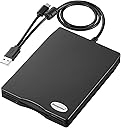
The Chuanganzhuo 3.5-inch USB Floppy Disk Reader is a portable, ultra-slim external drive designed to read and write classic 1.44MB floppy disks. Compatible with Windows 11/10/8.1 and earlier, it features a frosted textured shell, dual USB Type A and C connectivity, and plug-and-play ease—perfect for professionals seeking to preserve and access legacy data effortlessly. Backed by a 24-month warranty and US-based support, it’s the ultimate bridge between vintage storage and modern computing.


| ASIN | B0C33XQYQ8 |
| Additional Features | Portable |
| Best Sellers Rank | #17 in Floppy & Tape Drives |
| Brand | Chuanganzhuo |
| Built-In Media | Floppy Disk Drive |
| Cache Memory Installed Size | 1.44 MB |
| Color | Black |
| Compatible Devices | Desktop |
| Connectivity Technology | USB |
| Customer Package Type | FFP |
| Customer Reviews | 4.3 out of 5 stars 395 Reviews |
| Data Transfer Rate | 1.44 megabits_per_second |
| Digital Storage Capacity | 1.44 MB |
| Enclosure Material | Polycarbonate |
| Form Factor | 3.5-inch, 5.25 inches |
| Hard Disk Description | Hybrid Drive |
| Hard Disk Form Factor | 3.5 inches |
| Hard Disk Interface | USB 2.0 |
| Hard Disk Rotational Speed | 300 rpm |
| Hard-Drive Size | 1.44 MB |
| Hardware Connectivity | USB |
| Installation Type | External Hard Drive |
| Item Dimensions L x W x Thickness | 0.63"L x 0.63"W x 0.63"Th |
| Manufacturer | Chuanganzhuo |
| Media Speed | 1 MB/s |
| Mfr Part Number | CAZED-006U |
| Model Number | ACM-006C |
| Number of Items | 1 |
| Read Speed | 0.35 megabytes_per_second |
| Special Feature | Portable |
| UPC | 889269579355 |
| Unit Count | 1 Count |
| Warranty Description | 2 Year |
J**F
Good product. Able to store and read data off the floppy disk. Make sure you use the refresh button
EDIT: seller explained to me that you must right click the windows 11 explorer and click "refresh" in order to update the contents of the device and read the data off the newly inserted floppy disk. Its also described in troubleshooting section 3 page 9 of the manual. Thanks! Does not work as expected. Here is how this works: If you insert a floppy disk ( lets call it A1 ) with data on it, read the data, then close the file explorer and remove the floppy disk, and re-enter the floppy disk drive on your computer ( windows 11 ) you will still see the data even though the floppy disk was taken out. In tech speak, I think the drive ( adapter ) stores a cache of the data of the previous floppy disk that was inserted. Furthermore, if you insert any further floppy disks ( B1, C1, D1, etc., etc. ,) - let's say B1 for this example, this disk will read the same data as A1 UNTIL you unplug the device, and plug it back in using the B1 floppy disk. Meaning, if you want accurate readings of multiple disks ( let's say you have a stack of floppy disks to go through ) - if you want to read all the disks, you have to unplug and plug it in each time, other wise when you are reading one floppy disk it will always read the data on the previous floppy disk inserted. Bad design. Doesn't work as expected but it is one of the only floppy disk readers on the market and once I figured out how to use it I was able to get the job done with a lot of time and effort. I feel sorry for the usb-c port on my windows 11 computer. EDIT: seller explained to me that you must right click the windows 11 explorer and click "refresh" in order to update the contents of the device and read the data off the newly inserted floppy disk. Its also described in troubleshooting section 3 page 9 of the manual. Thanks!
B**Z
Its Time To Easily Review, Sort, Transfer and Dispose My Old Floppy Disks Collection
The last built-in 3.5 floppy disk reader I had (have) is in an old Windows XP PC tower I built. This USB reader solves the problem to have 3.5 floppy read capability at my newly built Windows 11 PC to take on the project to review, sort, and download any important information I have on about 200 floppy disks. It worked plug-and-play compatibility right out of the box as long as you follow the instruction to plug it into a USB socket directly sticking out from the motherboard. Even trying a high quality USB extension cable compromised the ability to actually transfer the files. Because it is USB powered, it will continue to spin, even without a disk inserted, so only plug it in when needed. Device Manager reveals it is actually a TEAC drive inside with good read speed. Attractively encased. At the bargain price under $20 it is a value.
T**M
If the data is still good, this drive works great! See steps to Format from Windows
This product works great and product support was excellent! Keep in mind that not all old floppy disks will be readable due to age, but if a file is readable it will load. I had trouble Formatting a floppy from Windows 11. I wrote an email to their support line and got the following answer the next day. And I was able to format the High Density, Double Sided floppys to 1.44 MBy. [my additions are inside brackets] - - - - - - Thank you for your feedback regarding formatting issues on Windows 11. This is a well-known compatibility issue between modern Windows 11 laptops (USB 3.0 power management) and legacy 1.44MB floppy drives. The unstable USB power or incorrect initialization prevents the drive from formatting disks properly. Please follow these proven steps to fix it: Step 1: Correct Connection (Critical) 1. Insert the blank floppy first, then plug in the USB drive. 2. Use a USB 2.0 port (or powered USB 2.0 hub with external power) — avoid USB 3.0/3.1 ports. The inside plastic of USB 2.0 ports is usually black or white. [Works with the USB ports on my HP laptop, which might be 3.0] [To find the floppy drive: Open File Explorer Find ‘This PC’ and click on it To the right, both the C: internal drive and A: floppy should appear Now click on the Floppy drive icon and a directory of the disk should appear If the Floppy drive does not appear, try unplugging and plugging in the drive again And if still a problem, Restart the computer and try again] Step 2: Format via Command Prompt (Admin) 1. Press Win+X → Select Windows Terminal (Admin) or Command Prompt (Admin). 2. Run these commands (replace A: with your floppy drive letter): format A: /FS:FAT /Q /T:80 /N:18 [/FS:FAT = FAT file system (required for 1.44MB) /Q = Quick Format /T:80 /N:18 = Standard 1.44MB geometry] [most of my older beige floppy disks are actually 720Kby. This command won’t format them] [Other DOS commands: A: = change to drive A dir = directory of current drive exit = exit command mode Up Arrow scrolls back through the keyboard buffer The Windows key plus the x key brings up the command line] [I did not need to do this step] Step 3: Disable USB Power Saving 1. Device Manager → Universal Serial Bus controllers 2. For every USB Root Hub: Properties → Power Management → Uncheck: "Allow the computer to turn off this device to save power" - - - - - - -
J**S
Inexpensive alternative for those 3.5" floppies
It filled a purpose; I had over 300 3.5" floppies that hadn't seen a computer in almost 20 years, so I needed to scope them for data. I pulled hundreds of old photos and correspondences off those floppies - there were 5 or 6 floppies that refused to be read, understandable because of the age. It has a USB-2 connector with a small USB-C cable on it. It was compatible with Windows 11 connecting effortlessly, no software needed. Small instruction pamphlet is included, but my main takeaway is to eject the drive (in File Explorer) before removing the floppy from the drive - it then reads the next floppy effortlessly. Good value for the price if you have a stack of floppies. Somehow through all those floppies I never thought to check (for the helluva it) if this disk will write to a floppy...but it works!
I**.
Easy to use
Did everything I needed without issue. Easy to use with no problems,
J**.
Don't trust this device.
The good - It is "plug-n-play". The bad - It is only able to read 1/4 of any of the files on the hundreds of 3.5 disks I have. I thought the files were corrupted and was going to delete them. It has trouble with JPG files of only 38kb in size. I doesn't like gif or video files and seems to choke on documents. I have images I took on one of the original digital cameras out there, the Sony Mavica. Luckily I found that camera in an old chest and it still works. And ALL of the images are fine, not one is corrupted. This disk reader is junk.
T**N
Totally Fit The Bill
Was in need to transfer and save many 3.5" disks which contained picture from 1996. This drive did what it said it would do and what I needed. The instructions really helped for Windows 11. They also note that older 3.5" disks are a bit slower but it didn't really affect what I needed to do. Would definitely recommend this if you need it.
W**G
Read? Yes. Write? Well...
Will it read 720KB and 1.44MB floppies? Yes, it will. But if your needs require using write or formatting functions, be prepared for inconsistent performance (track/head errors). My plans were to create some disks from image files (via Winimage), and this unit failed miserably at that task. The same floppy disks that wouldn't work with this drive, later worked fine in a TEAC USB floppy drive. If you have some old floppies kicking around that you want to check out, this product might work for you.
A**M
Worked very well for me
This floppy disc reader came with plenty of (clear) instructions, including troubleshooting suggestions, but really I plugged it in and it worked well from the start. Was able to read my old floppy discs and copy some data over to my computer no bother.
M**R
Funciona correctamente
Fácil de conectar al ordenador pero es tardada la lectura de los discos. Sí la cantidad de discos que requiere leer es alta no lo recomiendo sería una inversión sobre todo de tiempo.
Trustpilot
3 weeks ago
2 weeks ago