Buy anything from 5,000+ international stores. One checkout price. No surprise fees. Join 2M+ shoppers on Desertcart.
Desertcart purchases this item on your behalf and handles shipping, customs, and support to Philippines.
๐ Never Lose Connection Again!
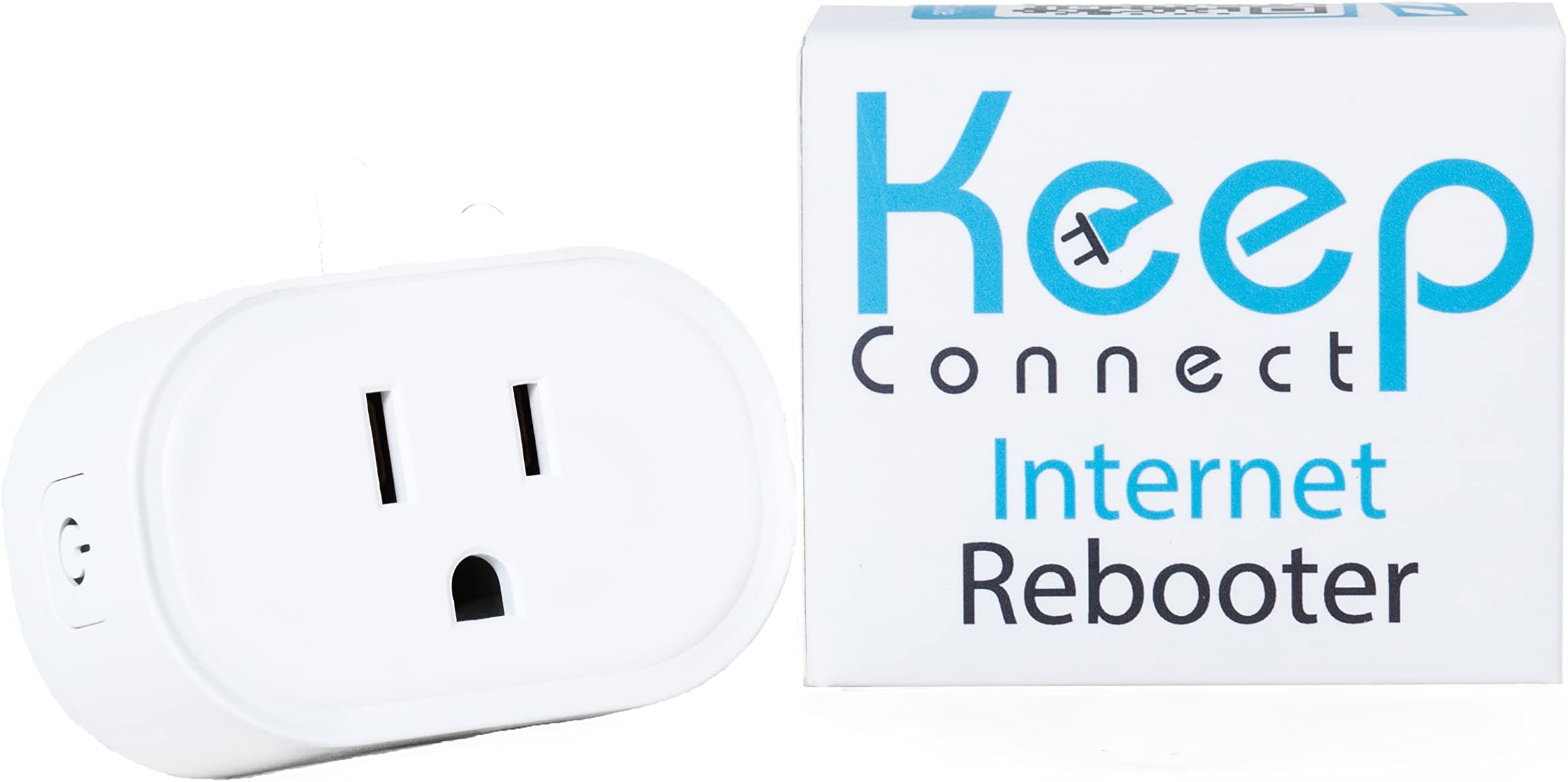
The Router Wi-Fi Reset Device is an automatic rebooter that ensures your internet connection remains stable and reliable. It monitors your network 24/7, rebooting your router or modem as needed, and can send SMS notifications for resets. Its compact design makes it ideal for any living space, while the premium cloud services app allows for remote management of multiple locations. With top-notch customer support, you can trust Keep Connect to keep you online.


| ASIN | B0C6YCQ2ZV |
| Antenna Location | Business, Home |
| Antenna Type | Internal |
| Best Sellers Rank | #3,591 in Computers & Accessories ( See Top 100 in Computers & Accessories ) #154 in Computer Routers |
| Brand | Keep Connect |
| Built-In Media | Keep Connect Wi-Fi Reset Device |
| Compatible Devices | Devices with Wi-Fi connectivity technology, such as personal computers, gaming consoles, smart thermostats, security cameras, printers, televisions, tablets, and smartphones. |
| Connectivity Protocol | Wi-Fi |
| Connectivity Technology | Wi-Fi |
| Control Method | Touch |
| Controller Type | iOS |
| Coverage | 2.4GHz routers |
| Customer Reviews | 4.3 out of 5 stars 164 Reviews |
| Frequency | 2.4 GHz |
| Frequency Band Class | Single-Band |
| Has Internet Connectivity | Yes |
| Has Security Updates | No |
| Is Modem Compatible | Yes |
| LAN Port Bandwidth | 100 Mbps |
| Manufacturer | Keep Connect |
| Maximum Upstream Data Transfer Rate | 100 Megabits Per Second |
| Mfr Part Number | KC11 |
| Model Name | Keep Connect |
| Model Number | KC11 |
| Operating System | Ios |
| Other Special Features of the Product | WPS |
| Router Network Type | 2.4GHz |
| Security Protocol | WPS |
| Special Feature | WPS |
| UPC | 860002944548 |
| Unit Count | 1.0 Count |
| Warranty Description | 1 year |
| Wi-Fi Generation | Wi-Fi 4 |
| Wireless Communication Standard | 2.4 GHz Radio Frequency |
| Wireless Compability | 2.4 GHz Radio Frequency |
Z**Y
Exactly what it says on the tin and then some
I picked up the Keep Connect Automatic Router Rebooter after one too many frustrating fibre dropouts that needed a manual fix and I wish I had done it sooner. Setup took only a few minutes. Plug it in, configure the basics and it is immediately watching over your connection. No fuss, no complicated configuration. The core functionality is exactly what you need it to be. Keep Connect monitors your internet health continuously and triggers an automatic remote reboot the moment it detects an internet connection drop, all without any intervention. No more being tied to the physical location of the router to sort out connectivity issues. The device handles it silently and reliably in the background. The wide rated voltage of 100 to 250V means it works straight out of the box whether you are in North America or anywhere with a standard 220 to 240V supply. The compact form factor tucks neatly into the wall socket without blocking adjacent outlets, a thoughtful design detail that matters in practice. For anyone who manages a property remotely, relies on a smart home setup or simply cannot afford unexpected downtime, this device earns its keep immediately. Solid build, reliable performance and genuine peace of mind. Highly recommended.
A**R
Great device...Good idea
This device works great. Of course I've only had it a few days but I am very impressed. I chose this model because of the size. Pretty small. It hooked up immediately. It has nice settings in it as well. The instructions are a bit confusing so I'll try to help with tips. You don't need to download the APP. Just plug it in. Scan to the Keep Connect WiFi spot on your phone or tablet. (Didn't work on my laptop). Select the Keep Connect. It takes you to a page to make a password. Once you do that it takes you to a setup page. Find your WiFi you want to monitor. Select it and put in your Wifi password (not the password you just made) to connect to your WiFi. Save and it takes over. There are a lot of other settings, but I like the defaults. Default is: Retry up to 3 times then wait if no connection then try again in 4 hours. This protects the unit and your devices. If you want to change the settings. Just press the button on the side while scanning on your phone. Select the Keep Connect SSID again and open the browser. If you happened to catch the IP address it came up on, you can just type in that address. You can change it to a static address. But It's easy enough just to press the button. There is a setting also to once a day and a given time it reboots for those that have a router problem. But I just left this off. There have been times over the years that I was out of town and my WiFi would go down when the power flickered during a storm and I hate to ask my wife or someone to go into my closet of wires.
C**J
a bit confusing to set up but works as promised
so th esser things are always initially confusing and this didnโt disappoint. iโma techie and still get flummoxed but this kind of setup. what was great was the super fast help response with solutions for everything i asked! so - if it confuses you fear not you will get nearly immediate email help!! i wanted this for a mountain cabin where power goes out al the time. and the crappy cell hotspot just stops after a while. god knows why, or does she??? anyway-this sniffs the dns and when it sees outage reboots. works great. i have it auto reboot once a week and the sniffing is delayed so it doesnโt reboot unless 3-4 tries fail. often the outage is temporary. this thing is small! working now for a few weeks - already caught & corrected one outage. it also has a web based status for free and you can manage the thing remotely. good stuff.
M**V
Works as described; very useful
Works as described, and is very useful for a remote situation, like a far-away cottage. I DIY'd something like this years ago, using a Sonoff Sonoff-ESP8266. This Keep Connect device has better features, is easier to setup, and is even smaller. No soldering iron needed!
J**F
KeepConnect does not advertise what it is suppose to do.
The only thing that I liked about this product was the easy setup. Other than that what I piece of garbage. I got this device because periodically (especially during thinderstorms) my router requires to be reset. This was nothing more than a manual reboot. This product was suppose to resolve this issue. After initial setup, KeepConnect identified WIfi issues 13 times within the first 4 days from initial setup. I found this hard to believe because not one of my smart devices detected an outage until KeepConnect did an auto reboot. As soon as that was done, then all my devices reported an outage, followed by confirmation a minute or two later each one was back online. This eventually stopped and I thought all was good. After the 13th reset, all my smart devices were online but my KeepConnect account was not. I did not get the notification that my KeepConnect configuration was offline. A few days later all my smart devices went offline at the same time and because KeepConnect was offline, it couldnโt do what it was suppose to do. I contacted support and they told me that I had to purchase cloud services $29/year to issue the reboot from the cloud services app. When I did that, I got a reply that the reboot command was successful and that expect KeepAccount to be online in 5 minutes. Well that never happened, So I spent $49 for the hardware and then an additional $29 for cloud services for nothing. Iโm in technology and the app is far from intuitive. You have to hunt/peck around just to find out advance settings which in my mind half of the things offered either doesnโt work or requires a premium cloud services account, Do NOT get this! Itโs more headache than whatโs itโs worth.
T**C
Small device but powerful way to restore internet service dropouts.
I give this a conditional 5-star rating at this time because I just completed the setup and it seems to be working just fine. It has not yet encountered the situation where my internet access drops and KeepConnect has had the opportunity to recover my connection to the internet automatically and unattended. I received this item a couple of weeks ago and was dragging my feet plugging in and setting up. I was skeptical that such a small device could handle the job, but so far it looks very good.
P**E
Great for resetting your while away
When I travel my home internet goes out and needs to be rebooted. These will detect if there is a loss of internet connection and will recycle the power. So far it works well to keep my internet connection going and it has rebooted on several occasions. They have a subscription program to help manage your devices. It is not required, but for my needs it is worth it.
V**L
This tiny little router/modem rebooter has a design that justifies the cost.
Despite what some other users have complained about, our experience with this device has been without issue. Although it is small, the ease of installation and quality of the unit justifies the cost. I tested how it would work by unplugging my router. As advertised, it correctly took action and advised over phone message that it had done so. We have experienced no false rebooting or any other issues operationally for weeks now.
P**.
It works well and has several useful options
After trying an Ankuoo auto switch which kept going into a loop as the delay to wait for full reboot was set too short and was not adjustable, making it useless, this unit works perfectly! The setup is simple. If you want to test the unit to see if it works, do NOT change the default settings. If you set a check time other than 5 minutes, it does not work. This minor problem has been solved in the new firmware. My unit came with firmware KeepConnect_KCMINI_4M_V3_Rev2 and I upgraded it to the latest KeepConnectVPN_KCMINI_4M_V4_Rev1. You need to send an email to support to get the link for the new firmware. I tested it several times and it worked each time. You can also have it programmed to reset your modem once a day, every 2nd day, every 3rd day etc... I have not tested that part, as I don't need to do this, but I don't see why it would not work. It is also much smaller than their former model which is a plus. Overall I do recommend this little unit: it does what it is supposed to do!
M**N
Works exactly as expected
Iโve been looking for a device like this for years and it worked exactly as I would hope. I have two properties 325km apart, on occasion I would experience an internet outage, more so lately after switching my home to Bell Fibre. Internet outages would always happen at one place when I was at the other. In the last 2 weeks my home lost internet 5 times, this device reset my Bell modem and everything was up and running in minutes. I no longer have rely on friends and family to reset my modems, when Iโm away. I have one internet rebooter at each location, I now have confidence both location will have a stable internet connection. Great product.
D**E
Works, but now I don't need it
I had trouble setting this up, nothing was appearing on my phone. I contacted support and they said I should be able to connect through my network. I couldn't connect with the IP provided, and it did not appear on my network map. Support wasn't very helpful, but I ended up trying to connect to my tablet and it worked. If the light on the unit is still yellow, it means it is not set up properly, a blue light and it is good to go. After it was set up, was able to connect through my network and make changes, it had a new IP address, and it may be necessary to record it for future changes. After I got this function, I was getting an average of 3 resets a day, and my ISP wasn't able to determine the problem, so I lived with it until I was getting 4 to 5 resets an hour. I contacted my ISP again and explained the function of the Keep Connect, and that I had 25 to 30 dropouts in one day, so they sent a tech to my house. The tech found and fixed a few problems, and I don't have any more dropouts. So, this worked for me, and for the moment, I don't need it anymore, but at least I had proof of my problem and my ISP had to take it seriously. Edit: My internet is still dropping out, so I will keep using my Keep Connect.
N**N
Invaluable !!!
This device has been a life saver resetting my router when it crashes !! Would HIGHLY recommend it for those experiencing crashes. Emails received once it resets allow me to monitor how often my wifi is needing a reset. With an older router (that I need to keep for a number of reasons) it has been invaluable !!
C**T
Wow if you internet crashes this is the answer
My internet crashed at my place which is 200km away daily. The only way to restore it was to unplug the modem. Wifi was important to continually monitor everything. This is Day 5 and it has been resetting my internet flawlessly and always keeping things connected. Bravo to the manufacturers for creating such a great product. I highly recommend this product.
Trustpilot
1 week ago
1 month ago