


Desertcart purchases this item on your behalf and handles shipping, customs, and support to Philippines.
🔒 Elevate your security game with crystal-clear, AI-powered 4K surveillance!
The REOLINK E1 Outdoor Pro is a cutting-edge 4K PTZ security camera featuring 3X optical zoom, advanced AI auto-tracking, and color night vision up to 100ft. Equipped with Wi-Fi 6 dual-band connectivity, it offers seamless, high-speed remote monitoring. Its 355° pan and 50° tilt provide near-complete coverage, while the IP65 waterproof rating ensures reliable outdoor performance. Perfect for professionals seeking smart, subscription-free security with customizable motion zones and instant alerts, backed by a 2-year warranty.



| ASIN | B0C27ZY3R5 |
| Alert Type | Person/Vehicle/Animal/Motion Detection |
| Antenna Location | Indoor Security, Outdoor Security |
| Best Sellers Rank | #51 in Dome Surveillance Cameras |
| Brand | REOLINK |
| Built-In Media | Camera*1; Bracket*1; Power Adapter*1; Quick Start Guide*1 |
| Compatible Devices | Reolink Home Hub, Reolink Home Hub Pro, Reolink PoE NVR, Reolink WiFi NVR |
| Connectivity Protocol | Wi-Fi |
| Connectivity Technology | Wi-Fi 6+2.4/5GHz Wi-Fi |
| Control Method | App |
| Controller Type | Wi Fi |
| Customer Reviews | 4.1 out of 5 stars 704 Reviews |
| Effective Still Resolution | 8 mp |
| Flash Memory Supported Size Maximum | 512 GB |
| Focus Type | Auto Focus |
| Form Factor | Dome |
| Indoor Outdoor Usage | Indoor, Outdoor |
| Indoor/Outdoor Usage | Indoor, Outdoor |
| Installation Type | Screw In |
| Item Dimensions | 4.72 x 3.35 x 4.72 inches |
| Item Highlight | No Subscription Local Storage, Dual-Band Wi-Fi 6, 3X Optical Zoom, Auto Tracking, Smart AI Detection, Color Night Vision |
| Item Weight | 0.46 kg |
| Light Source | Infrared |
| Manufacturer | Reolink Digital |
| Manufacturer Warranty Description | 2-year warranty |
| Mfr Part Number | WCE1PT4K01 |
| Model Name | E1 Outdoor Pro |
| Model Number | E1 Outdoor Pro |
| Mount Type | Wall/Ceiling Mount |
| Night Vision | Night Color |
| Night Vision Range | 40 feet |
| Number of Channels | 1 |
| Number of IR LEDs | 12 |
| Number of Items | 1 |
| Optical Zoom | 3 x |
| Other Special Features of the Product | 355° PTZ Auto Tracking, 3X Optical Zoom, 4K HD Resolution, Night Vision, Wi-Fi 6 New Technology |
| Photo Sensor Resolution | 8 mp |
| Photo Sensor Technology | CMOS |
| Power Source | DC 12V/1A |
| Recommended Uses For Product | Indoor Security, Outdoor Security |
| Room Type | Back Yard, Driveway, Front Door |
| Shape | Dome |
| Special Feature | 355° PTZ Auto Tracking, 3X Optical Zoom, 4K HD Resolution, Night Vision, Wi-Fi 6 New Technology |
| Specific Uses For Product | 360 Degree Coverage, Surveillance |
| Unit Count | 1 Count |
| Video Capture Format | MP4 |
| Video Capture Resolution | 4k |
| Viewing Angle | 355 degrees |
| Voltage | 12 volts |
| Water Resistance Level | Waterproof |
| Waterproof Rating | IP65 |
| Wattage | 8 watts |
| Wireless Technology | Wi-Fi 6+2.4/5GHz Wi-Fi |
| Zoom Ratio | 1:3 |
| Zoom Type | Optical Zoom |
A**R
Great Quality and Wi-Fi setup issues solved
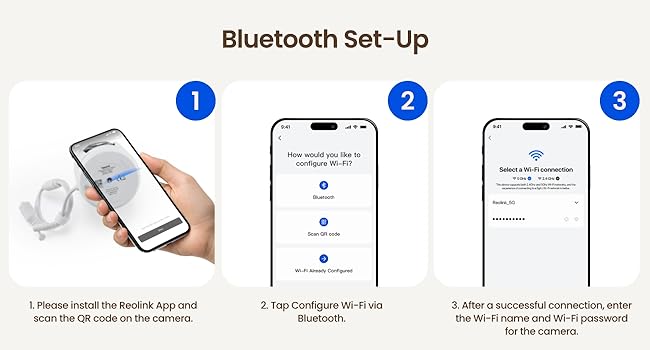
The Pro is definitely an upgrade in clarity from the standard version but still not good enough to read license plates or see faces clearly from my house to the road. Now I wonder if I should have gone for the 16MP version. I’ve seen a bunch of users say it takes forever to get the Wi-Fi connected in initial setup, I was having the same issue. Top Tip: connect the camera via a LAN cable to your network to get it initialized and fully set up, then switch it to Wi-Fi. This works every time for me in a minute or two. The APP isn’t the greatest so I hope they are planning upgrades in the future. Overall, solid cameras. Just do your research on the feature you really want and spend the money one time, than upgrade later at additional cost.
M**Z
Not really sure what other’s problems were
Edit: Two years later and these cameras still work well. I really love the Timelapse feature. See my video. Was looking at something to improve on my ring setup at home. Wanted something with better definition and where I had more control over the video, storage, and overall quality. Not to mention the other cameras I have are really troublesome for connecting to my home network. I got this set up late today, but loving it so far. I coupled it with a 256 Gb Micro SD card and have the settings up at 8MP 4k. I even got it set up on my home FTP server to upload the files there every 10 minutes automatically for a backup. Pros - Price - Great image quality even over Wi-Fi - Adjustable from video settings, to notification settings, to storage settings. - Quick to connect and easy to set up Cons - Doesn’t always respond to pan/tilt commands right away or sometimes needs multiple presses to register, however, this is less of an issue in fluent mode (low bitrate stream view) - I wash the camera was a bit better at getting true-to life video coloration in auto mode - Was also a pro, lots of customizability, so if you want the easiest interface this is not it, however, most things are intuitive and easy to learn inside of a half hour—and you’ll want to play with them. - Only 3x zoom… but at this price point, that is more than fair considering others in this price range have zero optical zoom. Ultimately, I’m very satisfied. I wish I had more money to try some of Reolink’s other products. Maybe one of these days. I would say for the price and quality of the image you get, as well as the ease-of use and setup, it’s hard to imagine a better buy at $105 than this PTZ camera. Also a prior reviewer was using the video arrows for playback of a recorded video not the pan/titl/zoom function which explains why he couldn’t move the camera.
L**S
Omvi 3i
Wish the lower camera had an optical zoom. However really was pleased with the quality. Unfortunately this specific camera did not work out for me due to the dual cameras at the top being set high on the camera and the soffit of the home.
S**R
OSD datetime is always CHINA time.
Rated 5 stars so you will SEE this review. It really rates no stars. This camera will not remember any set time zone other than Bejing+8. NTP time update works fine but camera reverts to china time 2 to 10 minutes after time zone camera setup is changed. No matter if camera setup time zone is changed via app or browser interface. No matter if camera is totally isolated from internet access. No matter if all time parameters are manually entered and saved. No matter if the camera is totally isolated. I have two of these cameras and the problem is the same on both. I use static assigned IP addresses on a wired connection. The camera software still indicates an active WiFi connection even though they have no second MAC address registed on the DNS server. This problem has been detailed via trouble ticket to Reolink. After three rounds of emails they have no solution other than sheepish appologies and offers of more cameras to try. I have hidden the time OSD. Better nothing than Peking time! Dont count on this camera for serious surviellance setups. It is 8MP and may not work with older NVRs; speaker and mic work fine. Alarm and motion sensing untested since this camera could not be used for legal evidence submission. Vendor has no plans to update the firmware only offering two obsolete versions. I am a professional technician. UPDATE 2-1-2026 Latest firmware released today fixes the Peking time issue. Camera now retains local timezone and stays set that way. 5 weeks after initial complaint Reolink came through! 3-19-26 Update. After 3 months use of 3 cameras on two nvr systems I have had zero reboots. All cameras accepted DST changes flawlessly. Excellant video quality. ONVIF interfacing is only average. PTZ works great. Invoking a memorized preset is problematic with most NVRs even tho the reolink app recalls them fine. Setting PTZ presets, exclusion zones, and time sync from NVRs doesn't work. The cameras will not snapshot/email motion alarms via NVR settings and insist on direct internet interface upload even though NVR logs the alarm event. You must use the app for all configuration changes. The browser interface lacks many needed configuation options particularly regarding exclusion zones. The app motion/person exclusion zone configuration language is confusing. The excluded area is defined by the greyed out area and the included area is clear. These cameras are a good value but allow a lot of time to get them configured. Documentation is poor, app is confusing, tech support is terrible.
W**.
Worked well for a few months.. but annoying bugs
Puchased this camera in Dec 2023 and picture quality is definitely better than the E1 Outdoor. 3 main issues on why I gave this a 1. First issue: Has the same problem that the E1 Outdoor had where auto tracking does not return to the original monitoring position. I reported this to Reolink support for my E1 Outdoor and they said it was a known issue. I was hoping it was resolved in this newer model... it's not. The fix was to turn off autotracking which I also did for my E1 Outdoor. Second issue: The overwriting feature stopped working and I only had the camera for approx 4 mths. I have a 128gb microsd installed and when it fills up it will stop recording. I found this out when I needed check for a recording and it wasn't available. This is very disappointing since they got rid of the cloud service. This issue is also happens in the E1 Outdoor camera. Formatting does not fix it... what I needed to do was either restore through the app or reset the camera completely. I also installed a brand new microsd card even though the old sandisk was still working after testing it on my pc. I suspect this is a software issue more so a microsd issue. Third and final issue is their tech support. I reported the issue notifying them that is it occuring on both of my cameras. Their solution was to try a smaller size (64gb) microsd and to reset the camera (which i've done already). This baffled me since the camera is recording but the feature that is suppose to overwrite the recording isn't functioning. Not only that, I live in California and their support is only available early in the morning so it's like email tag.. you will be lucky if you get a response once a day. I've been a customer with Reolink for a long time but this is getting ridiculous. With the cloud service no longer being offered I count on the microsd for recordings. I really don't want to spend more money on an NVR but it looks like I might need to which is a bummer. Overall I don't recommend these camera's (E1 PRO and E1 Outdoor) from my experience with the bugs that they can't fix. I recently bought their doorbell so I may be returning it.
S**N
Good clear pictures
I have this camera in two other areas of my home. It is easy to set up and has a clear picture. I get notifications when someone pulls in my driveway I would highly recommend this camera.
G**D
Software still has a ways to go...
Hello everyone, it is 12/2024 and I really wanted to like this camera but it fell sort of my exceptions. I ended up returning it. The camera itself was okay but the software app was very difficult to use. I also prefer to monitor cameras from my computer. And after a few hours I finally figured out which Reolink Client software to download on the computer and battled with it to get it to see the new camera. What they don't make clear is that the first time you use the camera in the Client software is you MUST connect an ethernet cable to the camera. It can't just be wifi connected. So there goes almost another 2 hours of my life figuring that out. As far as using it that is where the next problem comes in. They let you define activity zones but anything OUTSIDE the zone will NOT get recorded. That is such a miss design. For example if a young child runs on your lawn you will get alerted and it gets recorded. But if a child is walking on the on the side walk (outside the zone) then it will not get recorded. If this is a lost child and you want to help find them then you are unable to help. It should still record ALL events inside or outside zones. The only difference is if you get an alert or not. I ended up returning it and went back to my older NEST cameras which do ZONES correctly and you don't need the client software. You can just view your cameras from any browser and you can see them streaming ALL at once. There are other small issues that I didn't prefer but the zone issue is a big one for me.
R**D
Incredible AI detection, critical Alerts feature is clutch! My review after 6 months of use...
I tried several cameras before deciding on using this version from Reolink. The key features that I was looking for: crystal clear high quality footage, local recordings without a monthly fee, reliably detect motion, and notify me on my iPhone even if I put it in "Do Not Disturb" or silent mode (thanks to the Critical Alerts feature on iOS). This camera not only meets all of my requirements, but it is even BETTER than I hoped! I am VERY impressed that this camera could detect the difference between moving objects in the footage (ALL animals, vehicles and humans) without needing to be connected to a cloud service. This camera can even detect free roaming chickens! Needless to say, the AI detection works very well and gives you the option to track/follow moving objects and tweak the sensitivity/range of detection to your needs. Additionally, there is a PC app available so you can view live and recorded footage and access all configuration settings right from your desktop (Windows 10/11). AND, if you don't want to rely solely on recording video to a micro SD card for local storage, this camera is capable of connecting to your local NVR/DVR via ONVIF! Although I am recording my video locally to a 128gb micro sd card, I also have the camera connected to my main Amcrest NVR system for backup. As far as weaknesses go, I would say that sometimes when playing back footage directly from the micro SD card, the iOS app is laggy, but I believe that might be due to the SD card speed and/or my poor Wi-Fi connection. To remedy this, I may purchase a Reolink Hub to use as my "offline" private cloud, and hopefully they eventually make their entire system Matter-certified so that I can connect everything to my home automation system. After my positive experience with their camera, I feel like this company is very promising, so I hope to add-on more Reolink products to my home in the future!
N**M
Great security camera
It has a very wide viewing area. Images at night are a bit dull. Overall a good camera.
M**N
Great video quality and features - best in class!
Incredible camera and works perfectly within the Reolink ecosystem of products. This “next gen” camera replaces multiple cameras with its range and automated subject tracking. Image quality is fantastic and the wifi is reliable enough to make this a viable alternative to a hardwired installation. I have purchased about 30 Reolink cameras for my home, business, and parent’s place and these new OMVI cameras would have saved me tons of money if they had been out five years ago!
C**2
Great features and price.
The camera is feature full without a need to pay a subscription. Great quality and awesome price.
N**Y
Excellent cameras.
Easy to install provided a power source is within reach. Set up requires a little patience and experimenting, but once completed the results are excellent.
A**.
Feature-Rich and Reliable
An incredibly feature-rich surveillance camera. The more I play with it, the more useful features I discover. My one complaint would be the inconsistency of the Reolink app on different platforms, in my case Windows 11 PC, Android Phone and Android Tablet. Obvious features are missing or present on the app depending on the device I am using. I am forced to try all 3 devices to see which one gives me the feature I need. If I only had the Reolink app on one device, a lot of the rich potential would be lost. Also, please know that the MicroSD card is not included with the camera, and without it, the feature list is very limited, so plan on another $40 or so. Other than that, the best camera I have tried. After a week of usage, I now have to emphasize the inconsistency of the Reolink app across platforms. The Windows app is intuitive and usable. The Android phone app is awkward but usable. The Android tablet app is a bug-ridden abomination. Like many great hardware devices, it is degraded by a crappy, inconsistent app.
Trustpilot
1 week ago
3 weeks ago