


Desertcart purchases this item on your behalf and handles shipping, customs, and support to Philippines.
🚀 Elevate your storage game with ASUS Hyper M.2 Gen5 — where speed meets unstoppable cool.
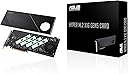
The ASUS Hyper M.2 x16 Gen5 Card is a high-performance PCIe 5.0 expansion card that supports up to four NVMe M.2 SSDs simultaneously, delivering a combined bandwidth of up to 512 Gbps. Designed with server-grade PCB, advanced cooling solutions including a large heatsink and active fan, and cross-platform RAID support, it ensures sustained, reliable, and ultra-fast storage performance for both AMD and Intel systems.
| ASIN | B0CKH9FWRQ |
| Best Sellers Rank | #7 in RAID Controllers |
| Brand | ASUS |
| Compatible Devices | Laptop, Personal Computer |
| Customer Reviews | 4.2 out of 5 stars 132 Reviews |
| Hardware Interface | PCI Express x16 |
| Item Dimensions L x W x H | 4.8"L x 0.5"W x 11"H |
| Item Weight | 1.9 pounds |
| Manufacturer | ASUS |
| Mfr Part Number | HYPER M.2 X16 GEN5 CARD |
| Model Number | HYPER M.2 X16 GEN5 CARD |
| Number of Items | 1 |
| Operating System | Windows, macOS, Linux |
| Product Dimensions | 4.8"L x 0.5"W x 11"H |
| UPC | 197105353282 |
| Unit Count | 1 Count |
| Warranty Description | 3 Years |
E**.
Nice looking card and performance
The ASUS Hyper M.2 x16 Gen5 Card is an excellent option for adding up to four NVMe M.2 SSDs to your PC. One of the main reasons I chose it is its support for both PCIe 5.0 and PCIe 4.0 drives. The massive solid-aluminum backplate and cover act as a giant heatsink, helping keep the SSDs cool while also giving the card a clean, high-quality appearance. The included cooling fan is another nice feature, especially when several high-performance NVMe drives are installed. Performance is excellent, with extremely fast transfer speeds, particularly when multiple drives are configured in RAID. Despite its solid construction, cooling features, and PCIe 5.0 support, it is often priced lower than many comparable four-drive M.2 expansion cards. Before purchasing, make sure your motherboard supports PCIe bifurcation and that your processor and motherboard provide enough available PCIe lanes. To use all four SSD slots, your PCIe x16 slot needs to support a x4/x4/x4/x4 configuration. Without the proper bifurcation settings or sufficient PCIe lanes, the system may detect only one or some of the installed drives. It's important to check your motherboard manual, BIOS options, slot configuration, and any lane-sharing limitations before installation. Overall, this is a well-built, attractive, and high-performance expansion card that offers excellent value for the price, provided your system has the required PCIe support.
D**C
Works well; be aware of limitations
The product does exactly what it says it does -- you can install up to four NVME sticks. It's a full-sized card, with a fan and a heat sink to keep the NVMEs cool. If you need to build a high-performance file server, this would be one way to do it. Be advised, the maximum number of NVME devices depends on how much available PCIe bandwidth your motherboard has. It will not support as many NVME devices if you lack the PCIe bandwidth. You may encounter problems if you add this to a computer that already has a high-performance video card or other accessories that use most of your PCIe bandwidth.
L**L
FAST!
Works great, fast and no issues so far!! I set up a RAID-0 16 terabyte array, the thing is extremely fast and works great especially with my ComfyUi and my other graphic manipulation programs.
G**Y
Works as intended.
Very cool product. But! It is NOT capable of serving all slots through a single x1/x4. So for example if yoy are running in x8 mode you are only going to be able to use 2 slots. This is perfect for a Super NAS storing/caching games music movies on a separate computer.
P**N
Minimal use case
Card works okay for what it is. Does need bifurcation for it to work. I thought I would have a use case for this but I was wrong. I lost the packaging so I'm stuck with this oddball card that I can't really do anything with.
H**L
Surprisingly great
I bought two drives, installed one in this expansion and another on my new motherboard. Only one of them was visible in the BIOS. Spent a couple hours trying to figure out why this card wasn't working... Turns out it WAS, and it was the motherboard that was defective. I guess the point being that implementing a clean install was such an effortless and invisible process I assumed I was running off the board rather than the ASUS card. I'm glad I had it, I was able to get a lot of testing done while waiting for the new board to arrive. Even if you don't need RAID or have excess onboard capacity, you should still consider it because these new PCIe Gen 5 nvme drives are getting exceptionally hot and most boards want to sandwich drives in truly awful locations - like between the video card and the board. In the coming years, you're going to see a lot of heat related drive failures, it's inevitable given the current approach, so save yourself the headache and pick one of these up - it's worth it.
T**H
Need more m.2 slots?, try this!
As someone who needed more super fast storage this was the perfect solution. I had already used up all four m.2 slots on the motherboard and needed to add more storage capacity. So far I have only used two of the slots and it seems to be working great but there have been some reviews saying trying to use all the slots doesn't work as well but I have not had any issues out of it. The speeds are also just as good as the ones directly on the motherboard and it was very easy to install. And being that it is from Asus you can expect a quality product that has good value.
C**M
Can only use 1 or 2 slots on all but server motherboards
FIRST:> Your motherboard must support Bifurcation or splitting of a single PCI-Express slot into multiple lanes. The ONLY boards that support 4-way bifurcation, which would be necessary to use all 4 slots, are server boards that utilize an X299 or newer server chipset, & mostly run on Xeon processors unless you're okay with 4 generation old (X299 support Intel Core CPU's up to 10th gen) system.... I eventually plan to upgrade to a W790 based workstation PC which does support all-4 slots but those boards by themselves cost more than my top end i9-13900KS, motherboard, & 64GB of RAM combined. Unfortunately, I cannot reuse the RAM (DDR4) on any W790 board I've found. SECONDLY:> Are you wanting to add additional drive space, or just run a RAID array? If the latter, make sure your motherboard doesn't natively support RAID first, more than half of the models available do support RAID these days. A large portion of those that do not, also do not support bifurcation and you would only be able to use 1 slot out of the 4... Intel has no plans (at least not in their current pipeline) to increase the number of PCI-E lanes supported in consumer CPU's which would also be necessary for a home PC to support all 4 slots. So in the end, this ends up being a somewhat expensive way to add one or two M.2 slots to your PC. Even without a GPU most home boards only support 2 slots, though there are a few older chipsets that support 3 slots if you're not using an add-in GPU. Operation wise, this runs like a champ. I had a brief opportunity to run two Gen5 nvme drives in RAID on this card, & they were phenomenal, even on my Gen4 PCI-E slot. Only real reason for 3 stars instead of 5 is the extreme lack of motherboard support to run 4 slots. As such, there should be a 2 slot version of the card for the normal home users, along side the 4-slot card for server/workstation users.
J**.
No sirve para 4
La peor compra de mi vida. Utilizando Intel 9 13900K con una tarjeta madre Asus ProArt Z790 wifi creator y no es compatible. La instale en el primer slot, con bifurcacion activada y no aparece 4x4x4x4 sólo 8x8 por lo que sólo lee 1 SSD no 2 ni mucho menos 4, me arrepiento totalmente de esta compra y como pasó el mes ya no pude devolverlo difícilmente volveré a comprar algo de Asus
S**I
Fits well with my b650x ax gigabyte and amd rygen 9 7900
Fits well with my b650x ax gigabyte and amd rygen 9 7900 , birufication is needed to run it , I am using 4 samsung evo 990 Looks premium
R**2
Know your MB PCIe allocation, Read the manual.
I you have a board that supports X4X4 on the 2nd PCIe slot at 5.0 this is a no brainer. I will list reasons for and against. 1. It is slim 2. It fits 4 5.0 M2 drives 3. It has a 4 pin PWM header 4. It is the best solution for cooling 5.0 M2s.. 5. It is built much better than the previous Generation. 6. It works automatically in my As Rock board Cons. 1. It must be a MB that has at least 2 PCIe slots wired to the CPU for more than 1 drive to be recognized by the OS. 2. On X670E and X870 there are only 4 or 5 boards that support this and they are all expensive. 3. It has no on board controller like the WD AN1500. If you know what this is and are tired of the M2 sitting under your GPU adding to the thermal load in the case making the fans spin that much faster? Then this is the solution. I have some Crucials connected and the blaze through operations. It is the fastest drive to download and install Epic Games.
M**E
Future proofing system
Of course this is like the previous generation cards that require PCIe bifurcation on the slot it’s put into. A lot of consumer motherboards these days do 1x8/2x4 in the first/second slot respectively. This means this device can be useful to optimize IO with limited PCIe slots and lanes while still having a graphics card in the first slot. In my case I have a B550 board with only one usable NVMe slot due to having a peripheral on my 3rd PCIe slot. Having this card allows me to make use of the unused second slot to add an additional 2 NVMe drives at full speed. This is nothing special and now there are many cards that do this but what I like about this card is that it is the only one I’ve found so far that supports Gen 5 speeds making it a long term purchase. It is packaged with a few goodies, including extra mounting screws and also foam spacers for single sided drives to get adequate pressure against the front side thermal pads. Another goodie which is very cool (literally) is a connector to motherboard fan headers which would allow software control of the fan speed. Personally I don’t use the fan at all since I’m only using two PCIe 4.0 drives which don’t get that hot compared to 5.0 drives. Finally, I was surprised to see a 6-pin PCIe power header on this board. My two drives seem to work fine without this plugged in but I can see it providing extra power if there were 4x Gen 5 drives running at full power. All in all, I’m happy with this purchase as it should hopefully come useful for a long time so long as I intend to upgrade to PCIe 5.0 components some day.
A**R
Good product
Good product
Trustpilot
1 month ago
5 days ago