⌨️ Elevate your typing game with wireless freedom and ergonomic finesse!
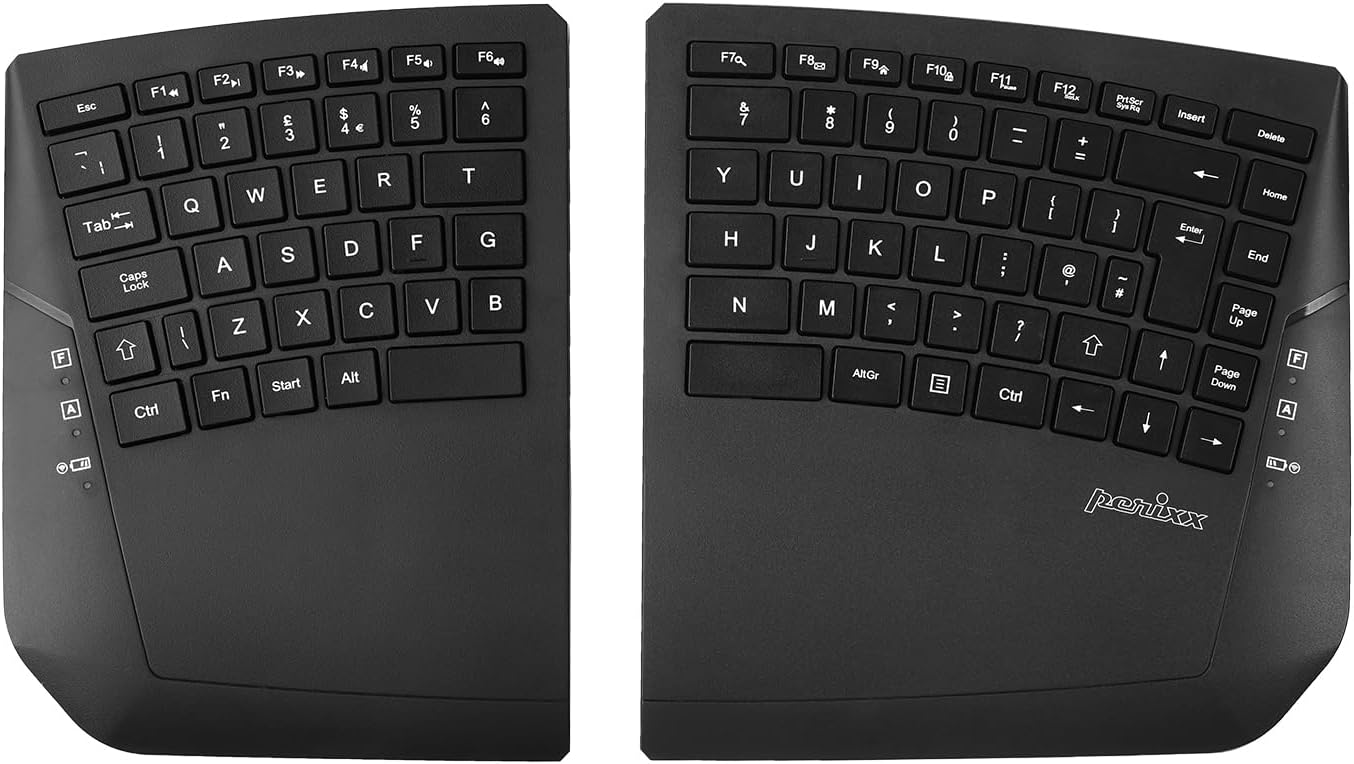
The Perixx PERIBOARD-624B is a wireless, true split ergonomic keyboard featuring two separate halves connected via a single 2.4 GHz nano receiver. Designed for professional and long-duration use, it offers customizable magnetic tilt feet with five angle options and an integrated wrist rest to reduce strain. Powered by 4 AAA batteries, it delivers up to 30 feet of reliable wireless range and includes 12 multimedia function keys for enhanced productivity. Compatible with Windows 7 through 11, this compact keyboard blends comfort, flexibility, and efficiency for the modern workspace.


| ASIN | B0CQCSPWZS |
| Antenna Location | Business, Everyday Use, Personal |
| Best Sellers Rank | 16,693 in Computers & Accessories ( See Top 100 in Computers & Accessories ) 245 in Keyboards (Computers & Accessories) |
| Box Contents | Keyboard and USB dongle |
| Brand | perixx |
| Brand Name | perixx |
| Button Quantity | 19 |
| Colour | Black |
| Compatible Devices | Tablet |
| Compatible devices | Tablet |
| Connectivity Technology | RF |
| Connectivity technology | RF |
| Country of Origin | China |
| Customer Reviews | 3.8 out of 5 stars 42 Reviews |
| Enclosure Material | Plastic |
| Hand Orientation | Ambidextrous |
| Is Electric | Yes |
| Item Dimensions L x W x H | 36.2L x 21.5W x 2.8H centimetres |
| Item Weight | 670 Grams |
| Keyboard Description | Membrane |
| Keyboard Layout | QWERTY |
| Keyboard description | Membrane |
| Manufacturer | Perixx |
| Model Name | PERIBOARD-624 UK B |
| Model Number | 12310 |
| Number of Batteries | 3 |
| Number of Keys | 18 |
| Power Source | Battery Powered |
| Product Features | Uniform, Ergonomic |
| Product Warranty | 12 month limited warranty |
| Recommended uses for product | Business, Everyday Use, Personal |
| Special feature | Uniform, Ergonomic |
| Style Name | Wireless |
| Switch Type | Mechanical |
M**D
Nice split keyboard
So far, so good. I get what people say about the angle of the keys, but since it's in two parts, just move the entire keyboards inwards and it's ok. With these split keyboards, it seems everyone has to compromise something. Others I've seen didn't have separate function keys, or had wires in between the boards, or something else. Barring building a mechanical keyboard from scratch, this is the closest to what I wanted. I also like higher keys with concave surfaces, so I miss them here. But as long as you're aware of what you're buying, you won't be disappointed.
X**X
Great ergo kb for flexibility and price
Great keyboard for the flexibility of setup and price. Magnetic feet are helpful and allowed me to test and adjust it to the correct angle. Plastic feels good, overall makes for a light keyboard (or 2 halves) but still feels solid Nice to have the dongle and a place to store it (*) Batteries last a long time ... approx 4 months so far on the first set - daily usage for wfh coding (**) Keys - feel / sound / travel etc is fine for me. A couple of improvements that would make it a wonderful keyboard: * Add the ability to connect to multiple machines and easily switch between them without reseating the dongle each time. Either Bluetooth or a combination (ie, dongle for 1 machine, BT for the other) ** Replace the batteries with USB-C rechargability.
K**S
Good entry level split tented keyboards, with some niggles
For an entry level rented keyboard it’s great. My intended use was software d deployment and a lot of the “special” keys are far to small for my hands. In all a good option to try split tented keyboards, but due to the small cluster of keys on the right side, use cases are limited (at least for someone with slightly larger than average hands)
A**Y
Good for posture
Good keyboard, better for posture, doesn't drain your batteries too quick either the first sets lasted months so far
T**N
Connectivity lacking!!
I've had this keyboard a year now, and while the premise is great, it is becoming unusable due to the left side just not picking up at the same speed as the right. Meaning frustrating time lost correcting jumbled sentences, or turning the right hand side off and on again, or re-connecting it. It works ok for a few minutes after that, but falls back into awful connectivity immediately after. This has been a problem for a while, but certainly getting worse, and yes, batteries have been changed to make sure it wasn't that! If I could review the right hand side only, it would be 5 starts, and the left would be 0 stars, so together 2 seems appropriate. I would strongly advise against purchasing this keyboard and look for a better quality item which I am now forced to do. P.s. this review took at least 5 minutes longer than it should have done to type, and I turned the keyboard on and off twice in that time...
T**U
An Excellent Ergonomic Split Keyboard
Typing on a split keyboard takes a bit of getting used to. The more experienced you are at typing on a regular keyboard, the stranger it will feel to switch to a split one. But adaptation doesn't take long. I type thousands of words per day and I type at a fast pace, so I did wonder if the two halves of this Perixx split keyboard would accurately transmit the letters I typed in the order I typed them. I also wondered if placement of the two halves might affect this. It doesn't. No matter how quickly I type or where the two halves of the keyboard are placed in relation to my monitor, the letters I type appear on screen in the order I type them, just as they would if I were typing on one solid single keyboard. The main advantage of the split keyboard is its ergonomics. It's ideal for anyone who types a lot and suffers from wrist pain such as repetitive strain injury as a result. The tilt angle of the keyboard can be adjusted to suit the user's preference, and obviously the two halves can be placed in the position of your choice. One thing I wouldn't recommend (and the product video shows this happening) is having a mug of coffee (or any other liquid) directly between the two halves of the keyboard. Take it from me - I've learned through expensive experience that liquids should be kept well away from PC keyboards and laptops. In summary, Perixx's PERIBOARD-624B is an excellent split keyboard. It doesn't have the flashy aesthetics of many other keyboards, but it's not about that. Rather, it's about providing a pain-free, ergonomic typing experience.
P**E
Good quality split keyboard, great foot design
The overall quality of this keyboard is good. The wireless functionality is easy to set up and works very well with the included usb dongle, which has a nice storage hole on the underside, next to one of the battery compartments, for when it is not in use. The design of the magnetic movable feet is excellent and something more keyboards should do, giving great easily changeable variation in keyboard angle options while feeling sturdy and stable. The plastics feel like they'll be durable, and the keyboard body feels well constructed, not as solid as a metal body, but with no noticable flex. The keyboard action is fine for a membrane tile type, not as nice as a short-travel mechanical keyboard like my Logitech G815, or as refined as the older Apple tile keyboard I have, but it's also a fraction of the price of either. The only things I don't like about the keyboard are: - the layout has seen them compromise on some of the key sizes and positions, which results in me finding it difficult to find the shift key at times for instance - hopefully this will improve with familiarity - the keycaps don't have any concavity which again makes it easy to lose track of where your "home" is, and more difficult to find some of the pinky keys especially around the arrow keys
D**M
too many feature faults /shape. / Key placement / size / weight
Where to begin. If you are a touch typer and do not look at the keyboard you will not like this 1 the key arc is inverted true ergonomics bend on the wrist side this beds on finger tip side. … this means thwt the key spacing is off. Meaning you wont hit the keys you know where they are. 2. The the letter B is on the left board, yete nearlly everyone hits B with their right hand, being a middle key it needed to be on both halves. 3. The arc means you need to learn a completly new and custom touch typing style right start again , which will mess with your skill on regular board. 4 ther is no spacer gap between backspace. And the F keys meaning you hit the wrong key in the dark, F12 instead of Back space. Both board feel quite light even with batteries in. Bring back mincrosofts ergo. It was bullet prrof and anger proof ,( would take a punch and cary on working) i cannot say this for this board Pro points .. not many , single filger typists may like it , but then ergonomics are not an issue for these people Nice spit section design with no connecting cable. But these dont make up for the detractions
Trustpilot
2 weeks ago
4 days ago