![[QLED Screen Upgrade] 7" Double Din Car Stereo with Wireless Apple CarPlay and Android Auto, 240W Powerful Sound, 4.2-Channel Audio Output, Bluetooth, MirrorLink, Backup Camera, AM/FM Car Radio](https://m.media-amazon.com/images/I/71dmmWFMGQL._AC_SL3840_.jpg)

Desertcart purchases this item on your behalf and handles shipping, customs, and support to Philippines.
๐ Elevate your drive with next-level tech and sound โ because your car deserves the upgrade!
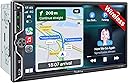
This 7-inch double DIN car stereo features a vibrant QLED HD touchscreen (1280x720) with wireless Apple CarPlay and Android Auto for seamless smartphone integration. It delivers powerful 240W 4.2-channel audio output for immersive sound, includes an HD night vision backup camera for safer parking, and supports steering wheel controls for hands-free operation. Designed for easy installation with most car models, it combines cutting-edge connectivity, superior display, and premium audio to transform your driving experience.


| ASIN | B0CWRM74FR |
| Audio Output Mode | Stereo |
| Audio Output Type | Speakers |
| Best Sellers Rank | #7,069 in Electronics ( See Top 100 in Electronics ) #30 in Car Audio Receivers |
| Brand | SJOYBRING |
| Built-In Media | 7inch double din Head unit, Frames and Brackets, ISO Stereo Harness, Rear camera, Remote control |
| Color | Black W021 |
| Compatible Devices | Smartphone |
| Connectivity Technology | Bluetooth |
| Connector Type | RCA |
| Control Method | Touch |
| Controller Type | Apple Carplay |
| Customer Reviews | 4.2 out of 5 stars 959 Reviews |
| Format | Unknown format |
| Item Dimensions D x W x H | 3.66"D x 7"W x 3.93"H |
| Manufacturer | SJOYBRING |
| Mfr Part Number | JOY-W021 |
| Model Number | JOY-W021 |
| Number of Channels | 4 |
| Number of Items | 1 |
| Other Special Features of the Product | Android Auto, Apple CarPlay, Built-In Bluetooth, DSP, Screen Mirroring |
| Output Power | 240 watts |
| Output Wattage | 240 watts |
| Special Feature | Android Auto, Apple CarPlay, Built-In Bluetooth, DSP, Screen Mirroring |
| Supported Internet Services | Pandora, YouTube, iTunes |
| Surround Sound Channel Configuration | 4.2 |
| Unit Count | 1 Count |
| Video Encoding | MPEG-4, RMVB, DivX, AVI, 1080P, MP3, WMA, JPEG |
| Warranty Description | 1 Year Warranty |
| Wattage | 240 watts |
| Wireless Technology | Bluetooth, Wi-Fi |
A**G
Serious upgrade!
Straightforward to install and a very good fit in the stock radio space of my 2004 Honda Element. I used the stock radio brackets from the original radio and the included microphone chased through the dash and up the front pillar in less than 5 minutes. I bought a Honda wiring harness on Amazon and with 4 wires spliced (wire colors all matched) all other connections were rca or harness type plugs. Speakers all around work - even the subwoofer. Serious upgrade from having no working radio at all! My Galaxy S25 Ultra paired with no trouble and it connects every time car starts. Customer service provided me with an update that changed my boot screen to a factory look logo. Overall a simple and effective install that really made a huge difference for my car. Have not installed the rear camera yet but that is soon. Want to add a front dashcam as well eventually. Screen is easily visible in daylight. Great head unit for the money. No worries here
S**P
KILLER BANG FOR YOUR BUCK!!
I got this stereo on a gamble and it's paid off. I don't normally write reviews, in fact less than 10 over the past decade, but this one deserves it. For starters, the unit is exactly as described. The quality feels better than expected, with a bright/hi resolution display. If I had one suggestion to the manufacturer, it would be to add a metal sleeve that most stereos come with for a universal install... Other than that, it's great. I wanted an affordable option to replace a stereo from 2004 in my Fleetwood RV. Wanting wireless android auto, like the one I have on my $500 Kenwood in my Jeep, but not wanting to spend the money on my RV, I opted for this unit. The unit installs easy and has arguably the easiest to follow install manual I've seen with it being a color step by step, a nice touch for sure! The sound instantly surprised me when I first turned it on.... It's great! Then I connected Android auto and found it to operate fast and smooth, again, better than expected at this price point. Menus are easy to navigate and intuitive. After playing with my stereo for a bit, I decided to contact the company via Facebook messenger for the free software update they offer with a custom startup screen and background I wanted to use. I had a response within 5 minutes with the reply my update would be ready within 10 hours. I received the email earlier than expected, completed the super easy update and they nailed it.... More than I expected.... a full custom stereo that has an appearance and feel of something in a much higher price range. The ONLY other suggestion I may have at this time, would be the ability to use the USB to change/update the background at will without bothering them for an update. I'm super pleased with the outcome, and doubt I'll ever change it, but thought it would be worth mentioning if they read this. This was a killer purchase at this price point, and so long as it holds up, I'll be back for my next double din purchase.
K**O
Very pleased with this purchase
I installed this unit in my 2008 Jeep Wrangler 4dr. Amazon says it won't fit, but it does. A Metra 95-6511 dash kit, Crux SOOCR-26 harness kit and Metra 40-EU10 antenna adapter are required for this application. Installation is not difficult for someone with mechanical experience and a bit of patience to remove the center dash panel. It isn't necessary to completely remove the panel and disconnect all of the climate control switches. Once the panel is loosened by removing two screws at the top and two at the bottom behind the trim panel, it pops out with a little bit of controlled force. I decided to mount the rear camera on top of the license plate holder light fixture. It had to be near the outer end to make room for the LR taillight assembly which must be removed to tap in the power and ground for the camera. Just run the cable behind the holder and through the existing hole in the body into the cavity behind the taillight. The camera cable will be routed up through the rubber grommet under the carpet and then along the edge (also under carpet) past the rear door and front door. Removing the plastic trim panels is required along with replacement plastic clips. Route the cable around behind the brake and accelerator pedals. It is a little difficult to get the camera cable up through the dash into position behind the stereo but I used a flexible fiberglass rod. Once the cable and harness adapter are in place the rest is just connecting the wires as shown in the manual. I used closed end cap connectors then zip tied the bundles together to keep it neat and tucked in. It is recommended that before you go through all of the trouble, first connect just the red and yellow power wire, ground and one speaker (I used green) to make sure the unit is functional and correctly connected to power. If so, you're good to go. After installation, I found that this unit does everything I need it to do. Sound quality is good (I have replaced the Jeep factory speakers with Kicker) and all of the functions work well. Setting up Bluetooth and Android Auto is easy. There are several display settings and everything operates smoothly. Depending upon how you mount the camera, there are settings to change the up/down and L/R orientation. It will probably be necessary to update the firmware after installation. The company website does not have download links for this. You must email them and include a photo of the version screen and a copy of the Amazon invoice and they will send back instructions for the update. A nice added feature is the ability to customize the boot screen with the manufacturer's logo of your car. This is available with the update package. Just tell them what you want. All in all, this appears to be a good choice. Lots of features and a low price point for a vehicle I use as an off-road toy. I've no doubt this unit will do well for a daily driver. Time will tell about the long-term durability but for now, it's all good.
G**A
So far so good
TL/DR Iโm happy with this unit, and itโs def better than what I had. There have been a few glitches but overall works great and sounds great. Customer service was very helpful and install was reasonable. I recommend giving it a shot. The longer version. Installed this in a Nissan Frontier using the Metra wiring harness. Install was pretty easy- itโs the first time Iโve done this. The actual vehicle was more difficult to deal with than the radio. All the colors on the wiring harness matched the radio and I was able to connect an existing backup camera to the system. I used snap down wiring connectors which let me change wiring around without re-crimping. Pros CarPlay is nice- takes a minute to boot. Bluetooth is pretty consistent. Touch screen has a brief delay, so at first I was double tapping and skipping what I wanted to hear. Sound quality is great. The stereo cranks. Rock, jazz, musicals, etc. handled it all. Love the analog volume knob. Tbh itโs one of the reasons I got this unit. Customer service hooked me up with the Nissan logo for the boot screen. That install was pretty simple too. Cons. Not too many, but I think if I try and backup before everything has fully booted, I throw it off. Once CarPlay didnโt connect at all and recently CarPlay went black and I had to hit the analog home button to get to the main screen. Ended up having to turn the car off and on to get it to reset, which it did. Not sure if itโs a software or hardware glitch, but itโs inconvenient. Iโm not impressed with the microphone. I may need to see about installing an aftermarket mic to see if that makes an improvement, otherwise making calls will be limited. All in all, itโs an upgrade from what I had and the price is right. Like others I noticed the two sets of backup lines but I was able to shut off the radioโs native line in setup. Hopefully I can adapt to the glitches I associate with putting it in reverse too quickly and as long as thatโs all it is itโs something I can deal with. So yea! I recommend it! YMMV
G**G
Perfect upgrade for my Xterra
2006 Nissan Xterra (w/Rockford Fosgate system). So let me say that this unit is awesome and just what I was looking for to upgrade the factory head unit. Packaging (5/5) *Everything was nicely packaged and secure. No loose items or damage. All items were in the box and labeled clearly. Quality (5/5) After doing a lot of research and scouring forums, I was a little skeptical like a lot of others buying a fairly inexpensive head unit online. Many folks said just go with the major brands and stay away from off brands. To be honest, reviews say a lot and I took the plunge due to the positive reviews, price range, features, and backing of Amazon. I'm glad I did. I was very pleased to find the screen, finish, connectors, harness, rear camera all seemed top notch and fitment was great. I've only used it for a few weeks so hopefully we'll see on the longevity. Navigating the menus, options, features were a breeze with no issues. Instructions/Installation (5/5) The instructions that came with the unit were very clear and helpful. I will admit that I didn't use one of the harnesses (speaker wires one) due to the fact that I have the optional RF factory amp that powers the speakers and sub. I purchased this harness specifically for this setup (# 70-7551). What I really liked about this unit was the fact that it had the separate SWC harness included. This made it extremely easy to connect my SW to the unit. On my Xterra, there were 3 SWC wires (Red, Blue, Grey) on a 16pin connector (only had 3 cables connected so I knew it was the right one). SWC1 was Red, SWC2 was Grey, and Ground was Blue. I did NOT have to buy one of the adapters or special kits for the SWC to work (PAC or Axxess). This saved time and money. SWC matchup: OEM SWC1 (Red) ---- Headunit (SWC 1 Grey) OEM SWC2 (Grey) ---- Headunit (SWC 2 Green) OEM Ground (Blue) ---- Headunit (SWC Black Ground) I ended up grounding the brown brake detect wire also... RF Specific setup: Everything is simple, just make sure to connect AMP Power (blue/white cable) from the 70-7551 harness to the Blue cable on the harness coming from the unit. **You won't use the Blue only wire from 70-7551) Function (5/5) Haven't gone through all the features but everything works great (love the wireless Android Auto/Carplay), Waze, phone calls (I did purchase a separate MIC for the bluetooth mounted on the A-pillar). haven't really tested out the remote control but a fun bonus. Rear Camera install (4/5) Connections were easy. Every car is different when running the wires. Just take your time and ensure you properly wire to the "reverse" light wires. The camera cable is long but if you have a really large SUV, you may need to get a 4pin extension cable for the last few feet....just for awareness. I actually needed to do that with mine unfortunately which is why the 4 of 5 stars. I wouldn't been nice to have it longer for longer vehicles. Customer Service (5/5) Although you have to reach out to the company as they don't provide the specific firmware upgrades online with instructions, they were extremely quick to response (being a 12 hour difference) and provided all the instructions and files. I asked for the Nissan logo and they were able to provide that which was super cool. Please follow the INSTRUCTIONS exactly (re-read the instructions and take your time). You don't want to brink your device. Overall, very satisfied with the purchase for under $200.
J**H
(does NOT fit 2010 Corolla) I Regret this purchase.
I saw another review with it installed in a 2010ish Corolla and thought it would work in mine. it does not - the instructions say to use the original mounting hardware, but the mounting holes on the be stereo itself do not line up. So although it's hidden, my stereo is mounted with duct tape. But with that disclaimer made... The good: -The screen is nice. Colors are vibrant and resolution is definitely sharp. -included back up camera is fine, although instructions for wiring are not helpful. The bad: -Screen is as responsive as a cheap tablet from 2003. -no matter how your phone is connected, there is a constant 0.5 second delay in everything. This extends into everything you do on the device - when Im parked and waiting and want to watch YouTube, the video is out of sync with the audio. EVERY VIDEO is unwatchable. When I contacted support, their response: "It doesn't seem to affect the use" Wow, thanks. -but the WORST: this thing forces connection through wireless, even when wired. If your phone Bluetooth is on and previously paired to the car and connect through USB, it connects to your Bluetooth. If you turn off your Bluetooth, it FORCES IS BACK ON and connects again. If you unpair and forget the car Bluetooth from your phone, it forces it to pair again. The only way for you to actually connect using a cable is to turn off your wifi and Bluetooth on your phone. At first, I thought this was just buggy. But then it started getting sketchy, and I'm thinking it's because they skimped out on a cheap USB port that can't meet the data speed requirements for Android Auto. Overall, I regret this purchase. I'm sure there's cheaper options that perform just the same, or much better options for a little higher price. But I'm not gonna have spare time to rip this thing out, so I just have to live with this duct taped into my console, hijacking my Bluetooth to play out-of-sync audio. "It doesn't seem to affect the use". I mean can you believe that????
A**R
Reviewed after 1 year
I only review products after I have tested and used the item for 6 months to a year so that any issues will be found and can be put in the review so that its actually helpful to anyone thinking about purchasing. With that being said ill get to my review. This product has been good for what it is and for the price paid for it and I personally have not had or found any serious issues with the unit and I hope it stays that way. Within the last month or two one small issue has started and that is with the volume knob fluctuating down while im turning it to raise the volume which is more irritating than anything else, to bypass that issue I have bought a battery for the included remote that came with the product but unfortunately for me it will not work at all. The remote not working may be user error or it may be defective, that im not certain of so i cant knock the manufacturer on that out of courtesy. The unit is installed in a Chevy express van which will be a nightmare if I ever have to replace it or try to change or add an amp and more speakers because you have to remove the dash and a bunch of other things for my particular vehicle Pros: Connection with phone has been good (Android phone) Screen size and clarity are decent Touch screen works great Easy to navigate menus Cons: Volume knob is having issues as of recently Included remote seems to not work even with brand new battery Settings seem to be lacking compared to my old pioneer unit Screen brightness can be an issue while driving at night(take that with a grain of salt as im just one person) If anything changes I will update this review but I hope this helps anyone thinking of making the purchase
R**R
A MUST BUY๐๐๐๐
5-Star Review Absolutely love this stereo! The 7โ touchscreen is bright and responsive, Apple CarPlay connects easily, and the sound quality is impressive. Installation was straightforward, and the backup camera is a great bonus. Excellent value for the priceโhighly recommend! โญโญโญโญโญ
Trustpilot
1 month ago
3 days ago