

Desert Online General Trading LLC
Dubai, United Arab Emirates
Desert Online General Trading LLC
Dubai, United Arab Emirates


⚡ Elevate your storage game with silent speed and sleek style!
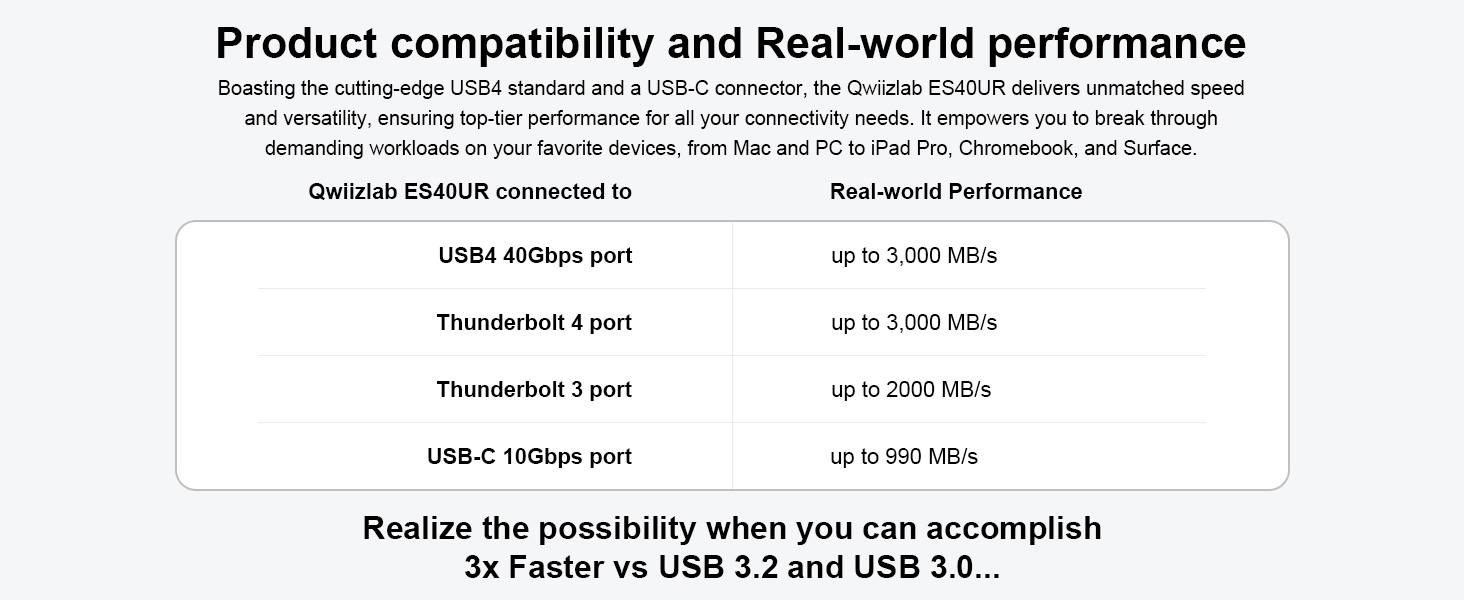
The QwiizlabFanless SSD Enclosure delivers ultra-fast 40Gbps USB4 and Thunderbolt 4/5 data transfer speeds in a fanless, aluminum heat sink chassis. It supports M.2 NVMe PCIe SSDs up to 8TB, compatible with both macOS and Windows, making it the perfect high-performance external storage solution for professionals demanding speed, silence, and style.


| Compatible Devices | Laptop, Gaming Console, Desktop, Tablet, Smartphone |
| Data Transfer Rate | 40 Gigabits Per Second |
| Maximum Number of Supported Devices | 1 |
| Hardware Platform | PC, Mac |
| Memory Storage Capacity | 8 TB |
| Hardware Interface | USB Type C |
| Item Weight | 8.82 Ounces |
| Item Dimensions L x W x H | 4.92"L x 2.55"W x 0.92"H |
| Material | Aluminum |
| Color | Gray |
I**)
Fast and works well. Gets hot but not too not. Overall a good buy!
It was a breeze to install my Samsung 990Pro 2Tb NVME M.2 SSD inside this enclosure. I needed it to expand the memory of my 2025 Mac Studio. They include small screwdrivers needed to open the enclosure (look inside the box, it might be easy to miss the small plastic containing them). For easier installation including how to properly stick the silicone heat absorbing pads on your SSD, I recommend you follow the YouTube video that Qwiizlab posted on their YouTube page. This was my first time setting up my own external SSD and it was a breeze! I’ve attached photos of the speedtest I did using this external SSD enclosure with my CableMatters thunderbolt 5 cable.By the way, it gets hot during use and even when on standby (which is expected with external SSDs) but never too hot to burn or cause blistering when touched.
J**2
Good value for 40gbps
I have this enclosure, and the similar OWC. This is just as fast, and the heat handling seems fine. My Mac mini m4 pro says it is "disconnected" about once a week, so I suspect the controller is not quite as good. However, no performance problems, and the price is fine.
R**D
One of the best bang for the buck TB4 SSD Enclosures! ASM2464PD Controller Chip
I got this to expand the storage on my M4 Mac Mini. Installed with a 2TB WD Black SN770 NVME SSD.I'd wanted to go with the OWC enclosure because of it has the ASM2464PD TB4 controller chip and rave reviews. As fate would have it, the OWC was on back order and the Qwiizlab enclosure (also has ASM2464PD) was in stock and had a coupon code making it much cheaper than the OWC.The enclosure is solid-- metal with passive cooling fins (like OWC) and installing the drive is very straightforward. There is a nice travel pouch in the box, but I have no intention of taking it anywhere.There are a handful of YT videos on how to properly move your Mac's home folder to external storage which I followed. This drive and enclosure work flawlessly. Read/Write speeds average over 3,000 MBs which I believe is on par with or faster than the internal storage of the Mac Mini (I got the 512GB model for only $50 more than the base).I haven't pushed the Mac Mini yet, so I can't speak to how warm the enclosure gets, but currently the Mac Mini is running around 89 degrees F and the enclosure which sits next to it is at 104.Frankly, I think you could go with a slightly slower drive (eg. WD Blue) and save a few bucks as the limitations of the enclosure and interface cap the speed-- which applies to all of these TB4 enclosures. Beyond that, I'm really impressed.
J**Y
Fast and efficient. Short Cable.
I’ve been using this for a few months now. My drive has had fast read/write speeds using thunderbolt post on Mac mini. The heat dissipation is fine since there is no active cooling. The cable is short but since it’s fast data transfer speeds I can live with that.
M**B
Understand the Power Draw
I use Crucial X9 Pro drives as a quick, effective and inexpensive backup strategy. However, like many, I wanted faster performance. What I didn't fully realize was while the X9 Pro might use 1-2W bus power the Qwiizlab 40GB increases Bus Power draw to a whole new level. Fast USB4/TB4 bridges (like ASM2464PD in Qwiizlab) are known to consume more at idle than simpler USB3 bridges. If you don't understand that your MacBook Pro may run out of power much quicker than you expected with this device attached.I looked for an energy efficient high performance NVMe and settled on the Samsung 990 EVO Plus. It's rated at 0.06W while idle, but guess what? The ASM2464PD bridge is drawing way more power while idle:Qwiizlab USB4 + 990 EVO Plus uses 4-5W while idle according to Kill-a-WattQwiizlab USB4 + 990 EVO Plus - measured 8-22W during high activity peaks according to Kill-a-WattI duplicated 35GB of files in a folder on the Qwiizlab/990 EVO Plus combination to reach the 22W peak. It's the fastest copy session of that size, I ever witnessed. But, it also drew more peak power than I would have imagined. What I learned is with speed comes substantial energy draw. I would definitely suggest using a power cord on the MacBook Pro when the Qwiizlab is in use. Personally, I think these enclosures would be better equipped if they included their own power cord. While normal SSD active use is closer to 8W in this case, you can easily double that on peaks. I would not be surprised if power users working on battery power might occasionally experience enclosure disconnect should power needs rise higher than the computer can support.I will use the Qwiizlab USB4 + 990 EVO Plus combo for video editing and large backup operations. I'll always be connected to a power cord and unplug the Qwiizlab when it's no longer required. During these tests, I acquired a new found appreciation for the ultra low power use of my Crucial X9 Pro. While the X9 Pro may be limited to 800-900MB/s on my MacBook Pro its power draw is a small fraction of what the Qwiizlab requires.Everything else about the Qwiizlab 40GB enclosure is fantastic. Easy install, small size, runs cooler than I expected and the Green LED verifying Thunderbolt connection versus White LED if USB3 cable is detected is superb. It looks great and does the job. Just be sure you actually need the higher speed and understand the significantly higher power draw the ASM2464PD design typically demands. My suggestion - unplug Qwiizlab when not in use. :-)
A**R
Great Choice, Easy to use. A+
Works as expected. Put a 4TB chip in it. IT DOES GET HOT, but that is to be expected. Have run with it for 6 months with no problems or hiccups.
B**N
Fantastic
This SSD enclosure provides blazing fast data transfer rates, easy insertion of the SSD module and great heat dissipation with its solid aluminum body. The deep heat fins on the top and groves on the bottom substantially increase the surface area of the aluminum chassis, making it an efficient heat dissipator without using a fan (which can fail or get noisy with time). Even with intense I/O operation, it only gets warm to the touch! Worth every penny to protect my expensive M.2 NVMe PCIe SSD module!
Trustpilot
1 month ago
1 week ago

