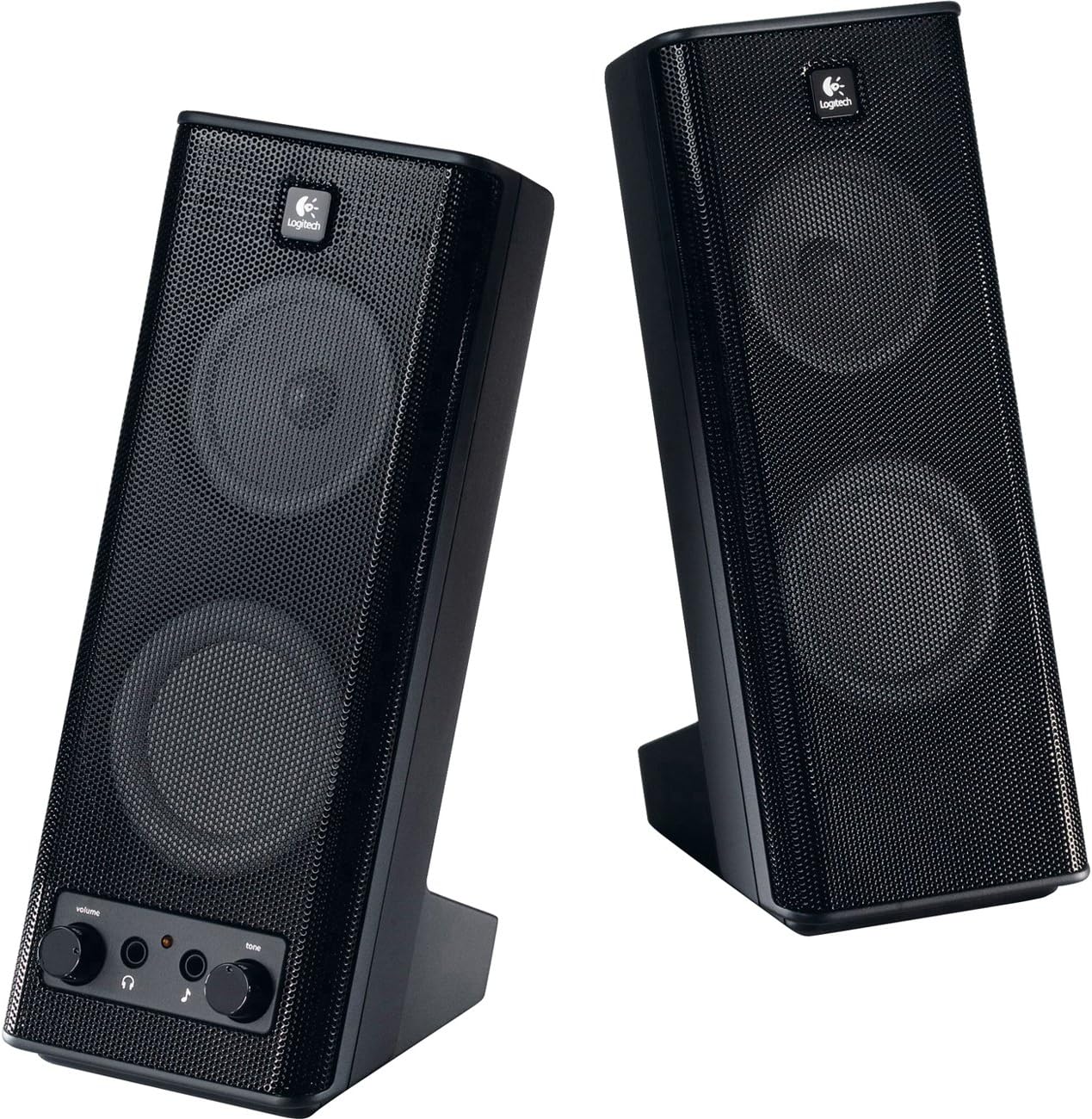
Logitech X-140 2.0 Speakers
Product ID: 6464559
Details
- BrandLogitech
- Speaker Maximum Output Power5 Watts
- Connectivity Technologywired
- Audio Output ModeSurround
- Mounting TypeFloor Standing
🎶Rich Sound Quality
💻PC Compatible
🔊5W RMS Power
🎉 Unleash the Sound of Productivity!
The Logitech X-140 2.0 Speakers deliver an impressive 5 watts of RMS power, providing rich sound quality in a sleek, compact design that seamlessly integrates with your PC setup.
G**N
Just ordered my second pair. . . .
I also just ordered a new i7 computer and was thinking, for speakers, I'd really like the ones on my older Vista machine(X-140). But since I'm not retiring the Vista machine, I'd still have to get another set for either the old PC or the New PC. Trouble is, I couldn't find a pair anywhere in the shops around my town. I sort of assumed that they had been discontinued. I couldn't find the combination of quality and low price I was looking for and turned to Amazon.com.Whoa! I found the X140's on the first page of my first search for computer speakers! I didn't take long to make up my mind, so I snagged a pair. I mean they were what I was comparing the competition against and they were roughly $10 chepaer than what I paid for in a shop. So why not?Why I like them:* Pretty good sound for the size, No, they can't reproduce the concert hall, but I've heard worse, and the 'cheapie' $10 PC speakers just can't cut it for me any more. They do the job for casual computer use and casual music listening. Spending 2X as much for speakers over the cheapies, returns more than 2X's the performance I think.* Small footprint, while they are about 9 inches tall, the base is roughly a 3X4 inch rectangle. They don't take up much desk real estate.* They seem reasonably well built, they don't feel cheap.* They look good. As a photographer I like good looking stuff. They are sleek and elegant, and modern looking without resorting to flashing lights and 'Buck Rogers' visual effects.* An On/Off volume knob with a power on light. I like to know when something is on and sucking power. I also like to control the volume or even choose to go without sound on occasion (I find Civilization III sound and music annoying!). Then too, I'm also of the generation of users who naturally looks for a control knob over looking to the keyboard for this sort of volume control. We are all victims of our upbringing!* A tone control knob. A somewhat narrow range of adjustment, but better than no adjustment at all which is what many speaker sets offer in this price range.* An easy to reach headphone connector and an easy to reach Aux. input connector. How expensive would it be to add this to ALL sound equipment? I would welcome government interference in this one area, make 'em do it! But Logitech would already be covered with this set. (of Course, one could also ask why the computer manufacturers fail to put them on the front of PCs where they belong - but I'll get off my soapbox.)There is nothing negative I can think of regarding these speakers. They are excellent casual duty speakers. They are reliable and inexpensive. You could do worse.
K**T
S220 VS X140
In this price range Logitech has 2 computer speaker systems that are both good products. I received the X140 system about 2 years ago and have enjoyed them thoroughly. For the price and the purpose they were designed for they are an excellent product. Good sound and surprisingly high volume. Infact I can't turn them up all they way and still sit at the computer and have it be enjoyable. But if you want to rock out using your computer while you work somewhere else in a bigger room these can put out a high volume sound and still be clear. Keep in mind the price point, for the price they are great. They also have a head phone jack that an AUX input which is quite nice for Desktop users. You can plug your MP3 right into the speaker and that input will over-ride the input from the computer so that you don't get sound from both sources. I use a laptop so I rarely use this feature for I find it easier just to unplug my laptop and plug in the MP3.The S220 is a nice little system and with the subwoofer does have a little better bass response. A little. Overall I actually like the sound of the X140 system better. The S220 does have a little control module which might be nice for desktop users. The remote module has two plugs for your computer, one is the green audio and the other is the pink microphone. (they are not right and left like another reviewer stated.) If you have an external mic that you only use occasionally this might be nice. Because you can plug a mic into the module when you need it and leave the module plugged in at all times. Once again being a laptop user this is of no use to me as my mic input is just as accessible, plus I don't use external mics. The S220 has good sound and even at max volume doesn't distort. But that is where I was a little disappointed, the S220 doesn't have nearly the volume level of the X140. It's plenty for a room or office, but in an open space or bigger living room, just doesn't have the volume. Very minor issue.Overall I like the X140 better not only because of the sound but because of ease. The S220 has 4 components; 2 speakers, a sub, and the module. While it has it's purposes, for me it's more of a hassle and doesn't really give me any additional features, because I'm a laptop user. The X140 is simple and only has 2 speakers to worry about and provides better overall sound.Recently my younger sister was starting college and wanted a little system for her laptop. After hearing both my Logitech systems she also chose the X140. Both are great but I give the X140 5 stars and the S220 4 stars.
Trustpilot
1 month ago
3 days ago