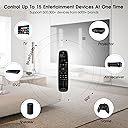
🎯 One Remote to Rule Them All — Simplify, Control, Conquer!
The SofaBaton U2 Universal Remote consolidates control of up to 15 IR and Bluetooth devices using a vast 500,000+ code library. Featuring an ergonomic design, OLED lift-to-wake display, and powerful macro functionality, it streamlines your entertainment setup with effortless app-based customization and long-range infrared performance. Ideal for millennials seeking a sleek, efficient, and future-ready remote that eliminates clutter and maximizes convenience.


| ASIN | B0D9NTS2LX |
| Additional Features | Digital Display, Ergonomic, Lightweight, Pre Programmed, Universal |
| Battery Type | Alkaline |
| Best Sellers Rank | #103,871 in Electronics ( See Top 100 in Electronics ) #6,464 in Remote Controls (Electronics) |
| Brand | SofaBaton |
| Button Quantity | 30 |
| Color | Black |
| Compatible Devices | DVD/Blu-ray Player, Projector, Set Top Box, Stereo System, Television |
| Connectivity Technology | Bluetooth, Infrared |
| Controller Type | Button Control |
| Customer Reviews | 3.5 out of 5 stars 209 Reviews |
| Manufacturer | SofaBaton |
| Max Number of Supported Devices | 15 |
| Maximum Number of Supported Devices | 15 |
| Maximum Range | 35 Meters |
| Model Name | SofaBaton U2 Universal Remote |
| Model Number | U2 |
| Number of Batteries | 2 AA batteries required. (included) |
| Special Feature | Digital Display, Ergonomic, Lightweight, Pre Programmed , Universal |
| UPC | 741421609624 |
| Warranty Description | 1 Year |
B**O
Inexpensive but very capable and functional universal multi-device remote.
Replacing a very old and dated Logitech Harmony remote I wanted something simple setup but still able to handle multiple devices as needed. Stumbled upon this in some forum recommendations and rolled the dice for a $50 controller I was skeptical. It has a simple backlit LCD screen you use a roller wheel to interact with, this selects you various added devices. The overall feel of the controller is sturdy and not cheap in anyway, with batteries it has a decent heft and shaped on the back to sit well in the hand of any user a very agronomical design. The buttons are a firm rubber and feel clicky without being mushy they will hopefully hold up well as the previous remote had peeling/fading keys so you could not ID them by sight anymore. Setup is easy and quick by downloading an app to your phone and pairing the remote via Bluetooth to setup the devices connecting was fast and simple. Most common brands are listed and setup is practically a few clicks, if not you can "learn" buttons from the controller so long as they are transmitted via IR to the device you are using, AppleTV has a button you need for app suspension it is not transmitted via IR so you cannot program this to the remote is why I point this out. I believe I have the general setup going in under 20 minutes, though after you have your devices added you can re-assign and change buttons for everything you need to do with them as well as setup Macros for complex operations like switching devices, turning all devices on, etc. Highly recommend setting up your primary viewing device with the options needed to control all the devices on that setting. For example we watch most content through the AppleTV so our macro is the power button that activates all the devices (TV, Sound bar, etc) then sets AppleTV to home and places the controller on the AppleTV device control. The button setup for the AppleTV is set so Volume controls are for the Sound Bar and various other inputs for TV functions. This way you're "watching TV" but all your functions are set to do so properly. Another catch was when setting a macro to power off the devices some devices may not go off, merely go to the macro and add a few extra 'power off' options set to 0.0 for that device and it will then turn off, apparently some devices require a longer power off signal than others. We've had the controller for about 3 months and so far everyone has had no major issues adjusting or complaints on function. Super happy and would consider other models from this brand in the future for sure!
R**R
Best Bang-for-the-Buck AV/TV System Remote
Purchased the Sofabaton U2 remote about a week ago and have been having fun learning and using all it powerful capabilities. Bottom line: Great price for a remote to replace all your other remotes including both IR and Bluetooth. Probably 4 1/2 stars. If it had a hub, then it would get 5 stars. Details: Out of the box, easily connected to the Sofabaton app and started adding devices. Added DVR, AppleTV, Samsung TV and Audio System. Their code base picked up all my components with all the buttons working as advertised. Because this remote won't look exactly like your other component remotes, it is easily configured/programmed for the specific functions you want to add. If you don't do anything else, this remote can replace all your other remotes. But the real power lies in the macros and other customizable features. For example, turning on entire system to TV or DVR or AppleTV or DVD or ??? Normally you'd have to do each component separately (not just power but the right input and output). Cable companies provide remotes that can do this but are a challenge to program for the novice (most of us). This U2 is visual programming for anyone. After creating a couple of macros using the colored keys at the bottom and a few others, the remote is seamless in function. If you need to change the macro or key or function, again, easy to connect to your Sofabaton app on your phone (iPhone or Android). Really like the direct access number pad for going straight to your preferred TV channel or entering information. Maybe the best part of the great price point for all the value. Only drawback is it is essentially line of sight for IR. If you can use Bluetooth, then line-of-sight is not longer required.
D**E
Terrible Product
This has to be the most unfriendly remote I have ever purchased. The fact that you have to use an app to start the remote is the first red flag. Then the pairing with new products is next to impossible. You can tell it is cheaply made with very little technology added. Very cumbersome to set up. It should be easy to set up and use. That is the point. This product fails miserably on both. And I am well versed in technology and how to use it.
J**J
Not too hard to setup and works very well.
OK. Yes, a little harder to program but overall most folks should be able to do it. Add your devices first. In our case we use a Roku box, Samsung TV and a Sonos soundbar. I just programed a few extra buttons on the Roku button assignments and done. Did a simple macro to power off the TV (Roku and Sonos turn off automatically) using the main power button on the top. Replacing a Harmony that is finally giving up the ghost. I do wish SofaBaton would bring the guided setup like their more exspensive remotes to this version. Not certain why that would be so hard. I do feel like overall a good value and works as intended
J**D
SofaBaton Review
I purchased the Sofabaton because I was tired of having multiple remotes for my TV. It was very easy to set up the SofaBaton so that it would work with my Panasonic TV as well as my Apple TV box. It was a little cumbersome to use when you were switching between devices (you had to remember to change a setting) and fast-forwarding didn't work great. My biggest issue was that it went through batteries pretty quickly (most likely because it turned on and off any time you touched the device.
L**L
Meh! Def NOT a replacement for Logitech 650!!!!
Wow. NOT a great answer. I am replacing a Logitech 650, which is a smart remote. This thing never claims to be smart, and they are correct. I have two BIG issues with it: First, and almost fatal, it DOES NOT HAVE ENOUGH BUTTONS! Yeah, they cover the generic sort of play/pause/forward/rewind and volume stuff. Beyond that, there are only 3 icon labeled buttons at the top (3 lines, home and Info?) and the 4 color coded buttons at the bottom. On most any device I have, that doesn't work out well, and if you look at your original remotes, you will see why! I cannot possibly cover the functions I want with any sort of logic...I am supposed to remember I needed to program "Star" on my Roku remote as "Blue" on this? And if you use an A/V receiver, with all of it's functions, then you are just plain screwed!!!! Second, it does not have much of any "database" of devices, so you are pretty much going to have to have it "learn" every single button on every single one of your remotes!! Hell, this is their business; shouldn't *they* be helping with that? Lastly, the macros thing doesn't help much, if at all. Since it is not "state aware", it doesn't know that you are already watching on Roku, so if you program a button to "Turn on the TV and switch to DVD", it will send the power toggle instruction to the already "on" TV and turn it off, not on! If you have a very simple setup, this is maybe a good one remote solution. But it is lightyears away from the intelligence and adaptability of the Logitech remotes that sadly have been discontinued!
A**R
Replacing Logitech Harmoney with SofaBaton
I was not expecting much from this inexpensive remote. After adding my devices and a short one day learning curb. I found the remote to be a great device and replacement. I always used Logitech Harmony remotes. Although they offer more bells and whistles there price point is very high. The SofaBaton was very simple and easy to use. Button layout is very accessible in your hand. I like the weight of it. Feels very sturdy and looks well made. My wife would never use the Harmony Logitech remote. She always found it confusing. She actually uses the SofaBaton only now. I was able to put all my other remotes away. Great Remotes.. Thanks
K**H
Remote freezes allot but okay replacement for Harmony
An okay replacement for Harmony remote. Can have the remote do a sequence of commands. I like being able to use phone to program. Remote freezes on me at least a couple times a week. Have to pop out batteries to reset.
Trustpilot
1 month ago
3 weeks ago