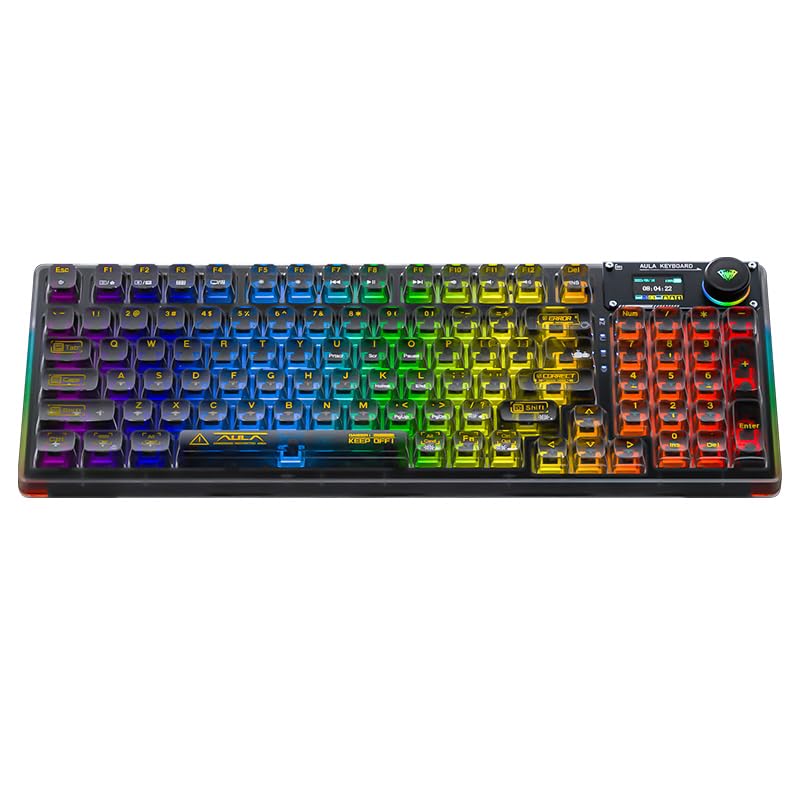
⌨️ Elevate your desk game with the AULA F98 Pro — where style meets pro-level performance!
The AULA F98 Pro is a versatile wireless mechanical keyboard featuring tri-mode connectivity (Bluetooth 5.0, 2.4GHz, USB-C), hot-swappable pre-lubed linear switches, and a gasket-mounted design for enhanced typing comfort. It boasts a vibrant 16.8 million color RGB backlight system, an OLED display, and a programmable knob, making it perfect for professionals and gamers seeking customizable, high-performance peripherals.
| ASIN | B0DPKQZZ5X |
| Are Batteries Included | Yes |
| Batteries | 1 Lithium Ion batteries required. (included) |
| Brand | AULA |
| Color | F98Pro-Black |
| Customer Reviews | 4.5 4.5 out of 5 stars (28) |
| Date First Available | 10 June 2025 |
| Hardware Platform | PC |
| Item Weight | 1.4 Kilograms |
| Item model number | F98 Pro |
| Lithium Battery Energy Content | 14.8 Watt Hours |
| Lithium Battery Packaging | Batteries contained in equipment |
| Manufacturer | AULA |
| Number Of Lithium Ion Cells | 1 |
| Package Dimensions | 42.29 x 17.7 x 5.79 cm; 1.4 kg |
| Power Source | Battery Powered |
| Series | F98 Pro |
R**N
This keyboard is better than expected. Feels nice and heavy. I was unsure if I'd like the keycaps in person but they really help "visualize" the RGB effect. It works with SignalRGB which is a huge win because it is not listed on the compatible devices list. To get it working go to devices - sonix device - forced model - select AK980 Pro and you're good to go! The switches are Leobog Ice Crystal linear. They are really sensitive compared to my last keyboard (cherry reds) which I find perfect for gaming. They come prelubed and sound great on the keyboard. The app is pretty basic but its only needed for customizing the screen. I use SignalRGB for effects. To download the app google "Aula F98 Pro driver", click on the epomaker X aula link and download.
F**.
I love this keyboard. I waited a few months to review it to make sure it was going to keep working. I have had no issues with my keyboard, the keys are smooth. The set up was so easy, the only thing I haven't figured out is how to change the time on it. That doesn't really bother me as my computer tells me what time it is. There are so many different settings you can choose for you lighting options. I was hesitant on buying this keyboard, due to its a little pricey. The issue i had with all my other cheap ones is my keys would rub off. With this keyboard that is not going to be a problem. With this keyboard, it can plugged into my phone, my computer. You can use a cord, it can be Bluetooth. So many options with this keyboard, I absolutely love it.
A**L
Not a terrible keyboard, I'd rate it 3.5 if I could. It's heavy and nice quality. Heavier than I thought actually. 1. Setting of the keyboard was quite a challenge. The instructions are not very clear and even despite typing in my specific keyboard into platforms that have tutorials, I was still struggling to find clear instructions on how to get it to connect to my laptop. Took me a day and half to figure out how to get it connected and another day to figure out the lights. The little display on the keyboard is in another language, the date and time are wrong and it's kind of confusing to understand how to navigate through the settings of the knob. 2. The keyboard sounds really good, but some of the buttons are too easily pressed. Makes it have a slippery feel where I am having a lot of typos because of this. For example the number eight on my keyboard is extremely sensitive. I do not even have to fully depress the key to get it to type the digit. Very light Taps on this button cause the number eight to show up when I'm trying to type other numbers. 3. The number zero is in an odd place from what I'm used to. Where I am in the habit of tapping the number zero on the number pad the right arrow key is. So when I'm typing and trying to enter zero I'm often hitting the right arrow which is annoying along with the number 8 when I'm trying to do work in excel. 4. This is personal preference, but I don't really care for the way the space button sounds. The rest of the buttons on the keyboard sound really nice but for some reason the space bar sounds out of place. 5. I have the clear pink Aula F98, I did read other reviews that mentioned the keys being hard to see. I do know the QWERTY keyboard pretty well so I'm not needing to look down at it very often. However there have been times during work where I need to pause to focus in to make sure that I'm pressing the right button on the keyboard. I've also noticed that you can see some of the symbolism on the buttons easier if the lights are off but if you have continuous lights running it's a little bit more tricky. It's not a big deal especially if you're familiar with the keyboard but it is if you're doing work and need to ensure you're pressing the right buttons. Overall it's a really beautiful and fun keyboard. The lights are extremely vibrant and fun and I can't find any other issues with it but these are minor issues that are hindering my typing and work progress. So this is the reason for my current rating.
K**L
Don’t sleep on Aula F98 Pro, this keyboard is a must have in my opinion. I’m absolutely obsessed with this board and all that it has to offer given the price point. I love all the RGB lighting, plus all the different effects which come preloaded on this keyboard, the little screen I enjoy because you can upload any GIF to play on the screen, the knob is also a nice feature as it also lights up and I like the tactile feel the knob has when it’s turned. It’s very user friendly, the driver is pretty straightforward and I was easily able to program the “F” keys to perform the tasks I wanted without any issues. My only drawbacks to this board is that you cannot change the date and time format. It only displays the time in 24-hour format and the date is shown in only YYYY-MM-DD format. Not a total deal breaker for me, but just kinda on the annoying side if you’re not use to that. Also, with the pink Aula F98 Pro the key legends are in white, unlike the black and clear Aula F98 Pro which are in black. Therefore, it does make it very difficult to read what’s on each key in order to make sure you’re pressing the right ones, if you don’t have the keyboard layout memorized. However, I also purchased shin through keycaps when I purchased this board. So, that wasn’t too much of an issue for me. Just a heads up if you intend to use the board stock. You may wanna reconsider and purchase different keycaps. The shad of blue in the picture I’ve included in my review was what I found to be the “easiest” (not by much) to see the keys. The video is my board after I changed out the stock keycaps to the ones I purchased separately. They make a HUGE difference!! No more squinting or having to hover over the keys to make them out.
A**R
Love this keyboard! Such beautiful colors. Not noisy. Connects well via usb or Bluetooth.
Trustpilot
1 month ago
1 month ago



