Desertcart purchases this item on your behalf and handles shipping, customs, and support to Philippines.
🚀 Elevate your network game with effortless speed and smart control!
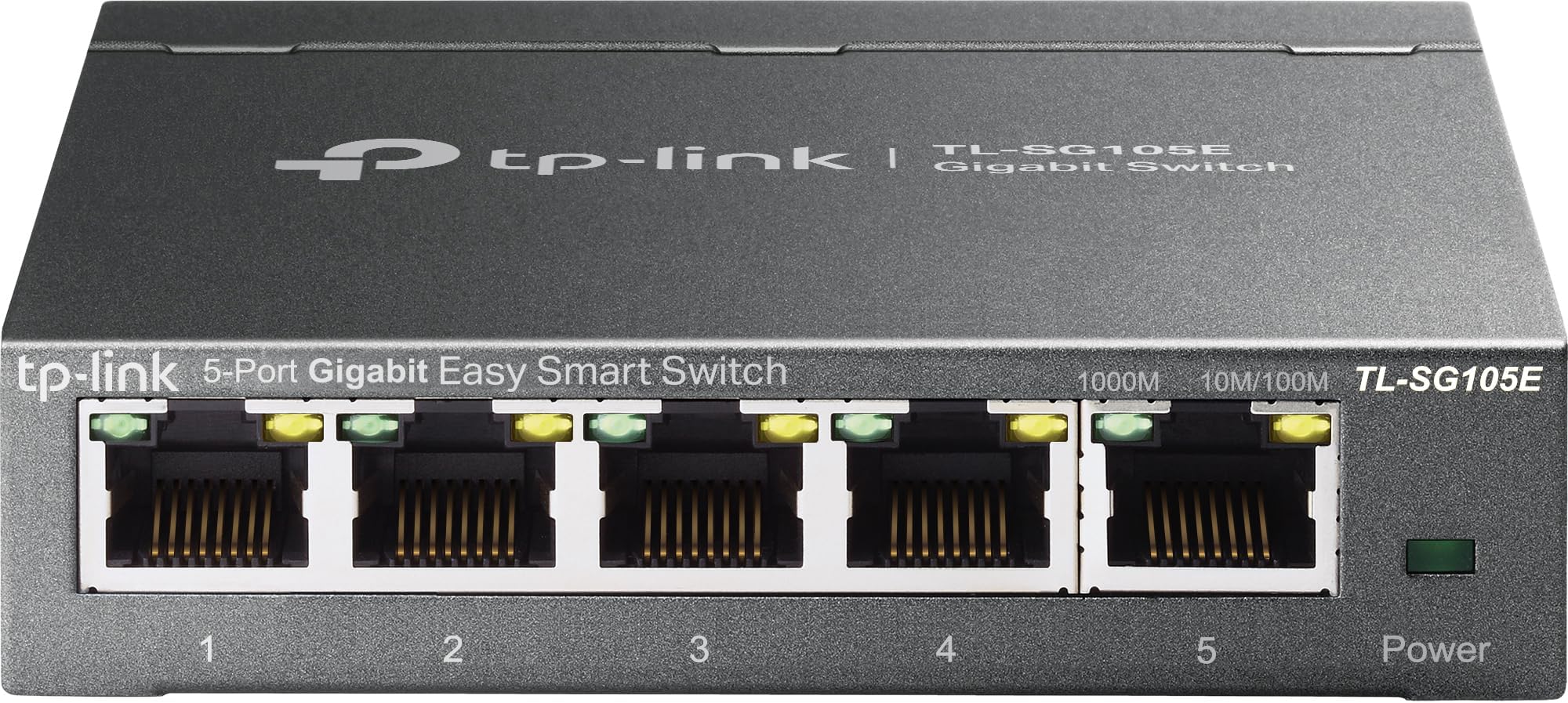
The TP-Link TL-SG105E is a 5-port Gigabit Easy Smart Switch designed for small to medium business networks. It offers plug-and-play setup, advanced traffic management with VLAN and QoS, and energy-efficient technology that reduces power use by up to 75%. Built with a sturdy metal case and shielded ports, it ensures durability and reliable, silent operation. Ideal for professionals seeking a hassle-free, high-performance network upgrade backed by a limited lifetime warranty.


| ASIN | B00N0OHEMA |
| Best Sellers Rank | #14 in Computer Networking Switches |
| Brand | TP-Link |
| Built-In Media | TL-SG105E Power Adapter Installation Guide Rubber Feet |
| Color | Black |
| Compatible Devices | Desktop |
| Current Rating | 1 A |
| Customer Reviews | 4.7 out of 5 stars 13,380 Reviews |
| Data Transfer Rate | 1 gigabits_per_second |
| Global Trade Identification Number | 06935364022037 |
| Interface | 5 10/100/1000Mbps RJ45 PortsAUTO Negotiation/AUTO MDI/MDIX |
| Item Dimensions L x W x H | 3.9"L x 3.9"W x 1"H |
| Item Part Number | 6935364022037, TL-SG105E V2.0 |
| Item Weight | 0.43 kg |
| Manufacturer | TP-Link |
| Mfr Part Number | 2781095 |
| Model Number | TL-SG105E |
| Number of Ports | 1 |
| Platform | No Operating System |
| Product Dimensions | 3.9"L x 3.9"W x 1"H |
| Switch Type | Rotary |
| UPC | 840460604048 |
| Unit Count | 1 Count |
| Upper Temperature Rating | 40 °C |
| Voltage | 220 volts |
| Warranty Description | Limited Lifetime Warranty |
A**E
Does the job
This little switch does the job well, but, it has almost zero features as it is unmanaged. So no security, or anything really. It's basically like have a 1 to 4 ethernet splitter. Anyway, I just needed it to plug in the kids homeschooling computers to a single port on the router. All my security is based on my router and a managed switch I also have and of course on the computers themselves. So, if you don't need any advanced or security features and just need a cheap way to connect upto four devices via ethernet then this little switch is a pretty good choice and solution. It's been running full time 24/7 for about a month and haven't had it lockup or crash or need a reset yet. So it does it's job pretty well. The kids have dropped it off it's perch about 4.5 feet up, a few times and no problems with it. So the durability seems good too. The ports are snug and none seem loose. Cables go in secure and snug. Speed on each pretty is good. Each kid can zoom into class, watch videos in class, and do other demanding things. The switch handles the traffic well. No noticeable errors or drop outs. I'm about to monitor their screens and copy files to and from each computer through the switch without issues. Haven't run into any port issues or blocking issues. I've assigned a reserved local ip address to the switch through the router dhcp server to make life easier. As far as features available in the web interface... Well it's limited but you can set the status (on or off), speed and flow contol on each port individually. You can enable imp snooping do minimal Lag grouping. Port mirroring in a limited state is available if you need that. There is a cable testing feature. And it has loop protection that will block a port of it detects a loop. There are some vlan features as well. Basic vlan where you can put ports into vans (id's 1 to 5). Default is all ports on vlan 1. There is also 802.1Q vlan with id's 1 to 4094 tagged or untagged per port. And you can set the pvid of each port. There is QoS in the form of port based, 802.1P or DSCP/802.1P. There is in and out bandwidth control per port. And finally there is some basic storm control for broadcast messages. Basically, I need almost none of these features for my use and most people won't as they likely just want to connect the switch to a network and use it to be able to plug in multiple devices through a single ethernet port on the network. And right out of the box the switch will do that. You can stop this switch on about 1 min and be up and running with zero configuration. So, I think it's a great price to connect upto 4 computers to my network easily and worry free. Also, for easy setup use port 1 to connect to the router or netwrok then use the other ports for the computers you want to connect. Also note, I use a KVM to remote view and control other computers from my computer on the local netwrok and this switch hasn't given me any issues with that either. Anyway, hope that helps.
M**O
Great product - worth its weight in gold
This switch works amazingly, it is easy to set up, you plug it into the wall, and you are good to go! I have had up to 4 devices connected to it at once, and not a single issue, and it gives off 0 noise. The back of the switch has a mount that can be easily set up. The entire device is built with good quality metal, and looks nice aswell. The singal strength given off is also amazing. I am able to have a video playing on one screen, a game on another, and google open all at the same time without any issues!
C**S
Reliable, compact, and easy to set up
This 5-port switch has been excellent for my home office setup. The port capacity is perfect for my needs, and each port has worked flawlessly with consistent gigabit speeds. Heat level is very low—even after hours of use, the metal casing stays cool to the touch. Port functionality is straightforward, and it handles multiple devices without issues. Connectivity has been rock-solid, and I haven’t seen a single drop or slowdown. Setup was extremely easy—just plug and play—and the compact, sturdy design fits perfectly on my desk without taking up space. A great choice if you want a no-fuss, reliable way to expand your wired connections.
G**D
It works well as a dumb switch, but VLAN operation is lacking.
This was initially bought for use as dumb 5-Port(Er, 4 output ports!!) switch, and worked in that role well. When it was necessary to add VLANs to our network, I was surprised to find out that it in fact supported VLANs, so it was deployed in that role, with the exception that it only supports numbered VLANs(1-5) and using Unifi from the main router, alphanumeric VLANs had been defined. I created a few parallel numbered VLANs to still use this. Unfortunately, I found the Easy Smart software to configure it to be very unstable and lacked some useful configuration options, like, changing the time out. How many times did I login to get something done? But the configuration instability was the bigger concern. I'd make a change and click apply and the thing would something go back to the login screen. Log back in and the change had not happened. Try again and it would work. Ultimately I replaced it with a Ubiquity POE-powered switch for the sake of VLAN naming consistency. The 4 stars are for its use as a dumb switch, where it performed well. Thus, I would buy it again if I needed a dumb switch where it provides good value, but, not to use in a VLAN environment.
T**R
Great Switch Box
Ethernet Connectivity is the way to go. It is faster, more reliable, and just a lot better overall connection as compared to WI-Fi. With all the hype that wireless gets, the connection is only as good as the signal strength and with the latest 5G advancement of wireless the wavelength is much shorter than previous versions 4G and below of which had the longer wavelengths. So as with 5G the short wave it has trouble going through many structures without having a tremendous outlay of many many relay towers to boost the short signal. Ethernet all-though older technology is the way to go, as the connection is always there. I recently had my house wired and purchased StarTech Ethernet Cables of varying lengths for the different connection points and components; such as router to multiple wall connection, computers, game consoles, streaming devices, security systems, exercise equipment. Yes, Exercise Equipment, there are still a few out there with Ethernet connectivity. I called up quite a few asking about Ethernet, but the trend for them is wireless. However; if you read exercise blogs and articles you find the opposite as actual real people would rather have Ethernet connections, stating many times losing wireless connection half way or three quarters of the way though an exercise routine or competition and being kicked out. There were even a few representatives of exercise equipment saying yes Ethernet is the way to go, but the manufacturers do not seem to care or listen. With exercise equipment you already have a power cord coming off the machine, so one more Ethernet cord is not going to hinder anything. I wanted a device for multiple connections in each room so I purchased this TP-Link 5 Port Gigabit Switch Easy Smart Managed,Plug & Play. Using the StarTech 6A Ethernet Patch Cables it has a nice solid connection with no wiggle, as I have experienced with other brands. Overall a well done quality product experience. purchased three so far, will purchase number four when I set up the last room. Great quality product, still have my first TP-Link 5 Port Gigabit Switch purchased years ago. Repeat customer for sure.
P**R
Perfert for a home office/small office setup - Easy to setup and Use
I'm into cybersecurity and best practices (laugh), so, I like the ability to switch off unused ports, and custom configure even a small network. It is a set-and-forget device for most applications. In my setup, a cable modem feeds into a Mesh Network. This device empowers my three home office systems to have hard-wired connectivity, which basically means full utilization of the available bandwidth. The Mesh Network works great for my laptops and smartphones, but the bandwidth isn't quite the same as most wireless networks. I've never used TP-Link products before, and so far, I'm impressed with the quality, functionality and price/value for my temporary 'basement' home office setup (chuckle).
D**K
Plug and Play, XSX, PS5, LG OLED
I’ve actually owned a ton of TP Link stuff. It’s usually a pretty good quality budget brand. My sole complaint about TP Link is their USB ports are too slow. However, this doesn’t have any USB ports, so it’s immune from that criticism. Never had a TP Link router or range extender fail on me, and I’ve probably owned 10 separate devices. I was in the market for a Ethernet splitter. Shopped around a bit, decided on this based on my previous experience with TP Link, the features, and primarily the price. Wanted something with a Gigabit in, since I have 1000 Mb/s fiber up and down. The outputs don’t need to be gigabit and I’m not sure if they are. Currently running 3 devices, an Xbox Series X, a PS5, and an LG C2 OLED TV. Everything works great, better speed, far more reliable than wi-fi, latency significantly improved vs wi-fi for online gaming. PS5 network benchmark scored 756 Mb/s down, 21 up. Not sure how reliable their upload speed is, but on my pc I can get almost 1000 Mb up, on my phone it’s like 400 Mb up. So upload speed might be an issue or maybe that’s just how the PS5 is. Doesn’t matter to me for this application.
C**H
Connection for printer
It’s the best you can buy for the price.It’s excellent and is working great.
A**O
Ottima soluzione basso costo
Non avevo mai acquistato uno switch prima d'ora, e sono stato piacevolmente sorpreso della facilità e del prodotto in ogni suo aspetto. Piccolo, nascosto dietro alla mia scrivania, senza rumori e con una piccola interfaccia gestionale per settare alcuni parametri che per me sono rimasti invariati. Solidità, il prodotto è in metallo, non scalda e si può installare in qualunque posizione data l'assenza di parti in movimento. Poca spesa molta resa. Consigliato!
A**R
حبيته 😍
جهاز جميل جداً فب توزيع اسلاك الكيبل من الراوتر مع ثبات السرعه والمحافظه ع البنق
N**R
my honest review
i was in hurry, thats why forgot to take product pictures, still attached few photos and will try to cover all topics IMPORTANT - when you connect router , you need to know its ip address ,just use app made for switch , you can go to tp link site and download "" easy smart configuration utility"" trust me ,their are other ways too but this one is simplest then, simply login , and do the first think go to ip address setting of switch and turn off dhcp and set static ip of switch , and then delete app ,we dont need anymore, to login just use that ip( like i did, i will also post that ) connectivity - all five port support gigabit speed durability - madeup of metal ,and feels solid , its definitely durable size - very small form factor, i think this is perfect size , because smaller than this will make struggle to manage lan, its heavy enough to remain on flat surface when all port are filled testing - i tested , and this switch always delivered solid performance , i can post photo and video but i dont think its required some doubts 1. managed vs unmanaged i personally feel you should go with managed switch , because managed switch gives full control over each port , and good for future ( like you have 2 connection , then you can combine 2 different connection into 1 ) or you might want one port should have priority 2. is it safe to run 24/7 ?? ofcourse, it designed to run 24/7 , and its not like router in which many hardware use ,in switch most of the work is done by chip and cpu hardly does 1% work, and these chip runs many years 3. expected life since their is not that much in switch , all of the work is habdle by chip , so expect 5+ years lifespan 4. does it heat i have 100 mbps connection, and in my case under heavy stress , switch runs cool pros 1. exceeded my expectations , full of features like vakn,qos,, bandwidth control,strom control,vlan etc 2. solid built , feels very good 3. good and bright led light 4. runs cool 5. value for money cons 1. zero cons this is the first time when i have no cons about any product final conclusion - if you stuck and want to buy a solid performance switch and just want 5 port , then this is for you , dont doubt its performance, its looks small but always deliver solid performance go with managed switch ,it gives you full control over switch just think about number of port you required and and connection limit ,and choose accordingly
T**R
Comes with a European type plug
The managed switch works as intended. The biggest issue is Amazon.ie using European stock which comes with a European plug which is not compatible in Ireland. Amazon Ireland please do better.
H**D
Low price but some great extra features.
Great little switch. On 1Gb/s ports but a $25 five port switch that supports port mirroring? Yes please. Great performance, great value, easy to use. Very happy.
Trustpilot
2 weeks ago
3 days ago