Desertcart purchases this item on your behalf and handles shipping, customs, and support to Philippines.
🚀 Upgrade your connection, dominate your network!
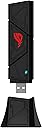
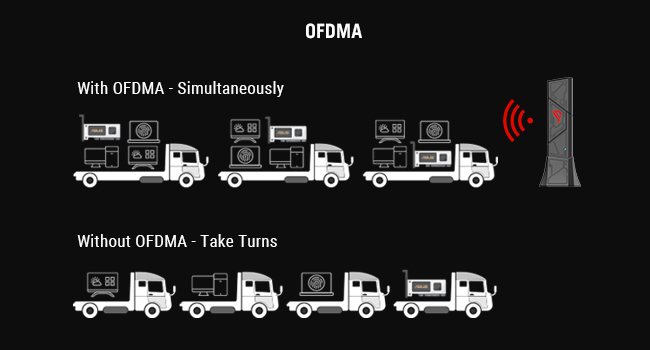
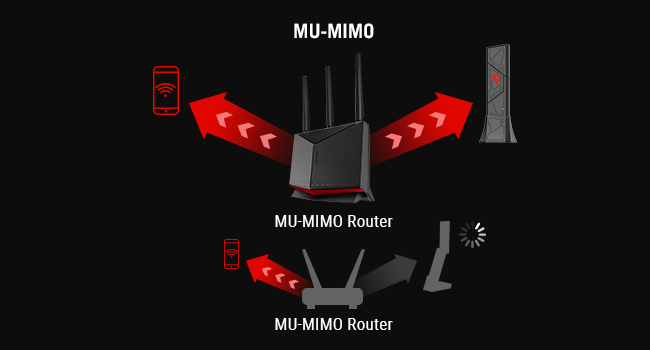
The ASUS ROG USB-BE92 is a cutting-edge WiFi 7 USB adapter delivering up to 6,500 Mbps across tri-band frequencies (2.4, 5, and 6 GHz). Featuring 160MHz channels, 4096-QAM modulation, and Multi-Link Operation (MLO), it ensures ultra-fast, low-latency wireless connectivity. Compatible with both USB Type-A and Type-C ports, it offers plug-and-play ease with broad OS support. Enhanced with WPA3 security and advanced network efficiency technologies like OFDMA and MU-MIMO, this adapter is designed for professionals and gamers demanding top-tier wireless performance and reliability.


| ASIN | B0F7W58JVJ |
| Best Sellers Rank | #51,574 in Computers ( See Top 100 in Computers ) #394 in USB Computer Network Adapters |
| Brand | ASUS |
| Built-In Media | ROG USB-BE92, user manual |
| Color | BLACK |
| Colour | BLACK |
| Compatible Devices | Desktop |
| Compatible Operating System Family | Windows |
| Compatible devices | Desktop |
| Customer Reviews | 4.1 out of 5 stars 87 Reviews |
| Data Link Protocol | Wifi |
| Data Transfer Rate | 6500 Megabits Per Second |
| Data link protocol | Wifi |
| Hardware Interface | USB 3.0 |
| Hardware interface | USB 3.0 |
| Item Dimensions L x W x H | 18L x 30W x 112H millimeters |
| Item Weight | 0.1 Pounds |
| Manufacturer | ASUS |
| Mfr Part Number | ROG USB-BE92 |
| Model Number | ROG USB-BE92 |
| Number of Items | 1 |
| Number of Packs | 1 |
| Product dimensions | 18L x 30W x 112H millimeters |
| UPC | 197105706170 |
| Unit Count | 1.0 Count |
B**B
My Money Was Well Spent.
I bought the Netgear RS300 router with wifi 7. Using this router with my Dell desktop model XPS 8950, I found that I could not connect to the 6ghz band on my router. The wifi adapter card in my Dell was the factory installed Intel Killer wifi AX1675 adapter card. This card has caused the exact same problem in all Dell XPS 8950 computers for many, many owners. So . . . . to make life easy, I just removed the internal wifi card in my dell, and replaced it with the Asus ROG USB-BE92 Tri-Band BE6500 Wifi 7 USB Adapter. AMAZING !! Did not have to install any drivers, my Windows 11 Pro picked it right up and I had much higher speed than the old Intel factory wifi card. Now I have to tell you that my computer is new and is using an I7 12 core processor and Windows 11 pro. It's WICKED FAST. So now that I have a new ASUS USB adapter, things are really NICE. Hope you get the same results. BOB !!
Y**E
An addition to the ROG family
I bought this WiFi 7 adapter for my gaming PC server because the original adapter that came with the system wasn't working well with my ASUS ROG router. I wanted something that would fit into my ecosystem properly, and this turned out to be a great match. The setup was incredibly easy. It connected smoothly to my router right out of the box without any tedious troubleshooting. In terms of performance, the connection has been completely stable for my server needs, and it handles the newer wireless bands without dropping out. Design wise, I really like how it looks alongside my other gear. Another major plus for me is the inclusion of the USB-C plug. Having the option to use either Type-A or Type-C made it a lot more versatile when figuring out my cable management and port availability. The only real downside is that it is a bit bulky, so depending on how your rear is laid out, it might crowd adjacent USB ports if you plug it in directly without an extension. If you are already running an ASUS ROG router and need a reliable, high-speed adapter for a PC setup, this is an amazing choice that works exactly as advertised.
L**S
Funciona como debe, sin cuello de botella
Mi access point es compatible con WiFi 7 a través de la banda 6Ghz y el ancho de banda efectivo es de 2882Mbps. Es importante descargar los drivers desde la página de Asus ROG. Recomiendo que lo conecten a un puerto USB C 3.2 o USB4.
L**G
Capable usb wifi adapter.
Skeptical before buying due to bad experience of usb wifi adapters in the past. However, Extremely consistent connection even if you don't use wifi 7 (only Wifi 6E in my case) , easy setup and so far so good.
J**K
Having problems with Intel Wifi 6e AX11 card? Look at this!
I have the Zephyrus G16 2024 (4090) laptop. For many months, regardless of specific Intel updates, I have been dealing with unstable connections + minor packet losses and most importantly disconnections with the Wi-Fi itself, even with 1G up/down. Because I am playing online FPS titles, I see these problems instantly and it's affected my match quality and performance where that one disconnect from any rank match means heavy penalties. At first, I completely upgraded our Wi-Fi 6 systems thinking it was the Wi-Fi itself, and because the laptop had Wi-Fi 6E card inside, I assumed it would be able to take advantage of having a Wi-Fi 7 router and fix most problems. It did not. Then I typed in the Wi-Fi card again to search for any information, and I found endless threads and complaints on exactly what I was suffering. I had no idea how bad that Intel Wi-Fi card is! I'm so thankful to now be in the know on the actual problem. I saw this USB Wi-Fi 7 adapter from ASUS and everything new that I could take advantage with it. It's genuinely fixed every problem I've had in these games. It really is plug and play. The first screenshot is the Intel Wi-Fi card, the second screenshot is this product, the ROG USB-BE92. The fact I am getting near ethernet levels of download/upload is something I never thought I'd see on Wi-Fi. I am getting NO disconnections and NO instability while gaming. (I am connected to the 6GHz band as I'm only two feet away from my Wi-Fi mesh with no obstructions). My bufferbloat grading was an average C with sometimes a B. With this ROG USB, I am getting consistent A's only. I am so happy to now never be dealing with this problem again. I really encourage everyone who has this problem like me to know it is exclusively that Wi-Fi card! You do not need to download any additional driver firmware if you're not in specifically in the Europe/Asia regions (as they state on the website). Please NOTE you have to have specific USB 3.0+ Type A and/or Type C ports to get the maximum output from this product. It works fine for ports below that, but the older architecture of those ports will limit the download/upload potential.
Trustpilot
2 weeks ago
2 days ago