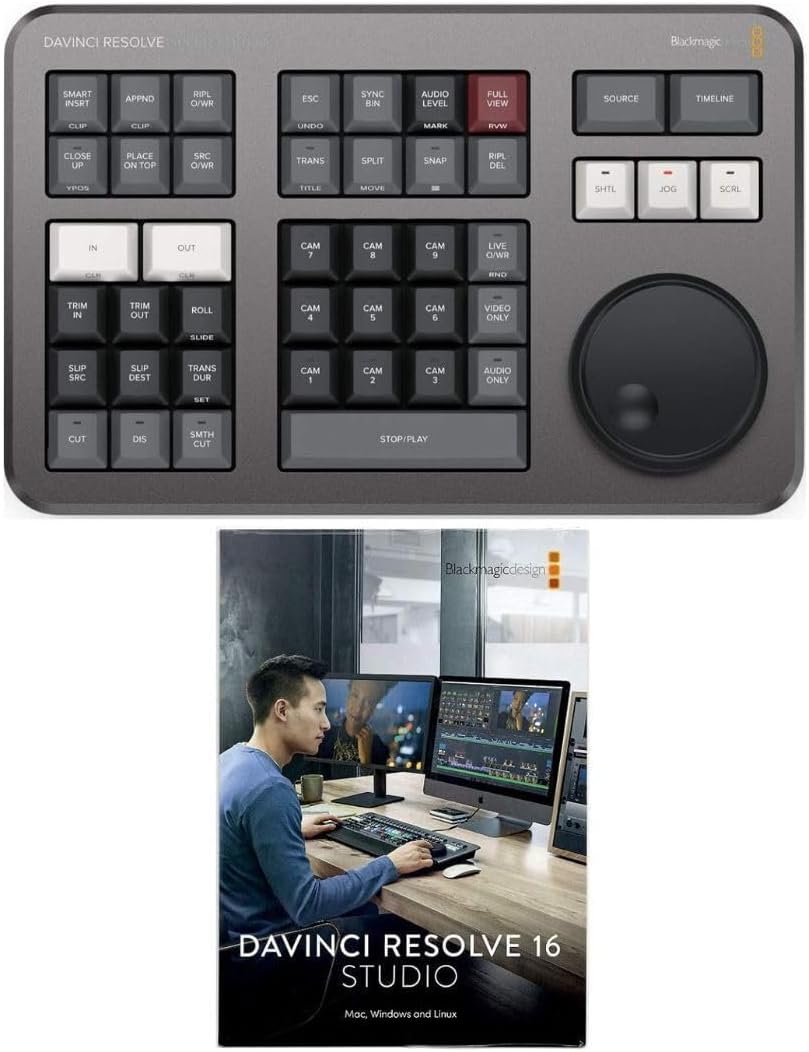
If you are an older editor that began on tape based editing many years ago, this little speed editor should feel familiar to you in that the layout is similar, and that scroll wheel in particular. Back in the tape days, it was strictly a scroll/jog/shuttle wheel for moving back and fourth with tape. In the speed editor, it can do more, often in conjunction with another key to be a modifier. For instance, the audio level button + the scroll wheel, you can now easily, and more precisely adjust the volume on the fly to the audio portion of a clip. Use the split key before hand, and highlight the space in between, you can then control part of a clip as needed using the same audio level +scroll wheel to adjust that smaller section. This is great as I'm finally getting back to a project I had to shelve in 2019 due to technical issues, only to find out later that the camcorder I had was the issue. Camcorder worked fine, but recorded in variable bit rate and most good NLE editors do not like it. So, transcode to make it constant bit rate had to be done. Now that the connection is made, I am now finishing the project to take as a house warming gift to a niece who along with her husband just recently bought a house, and we are celebrating the 4th of July there. In the week since one, I bought the speed editor and 2, upgraded to Davinci Studio (was on free prior to), I've begun to retry to edit this project and using the speed editor makes fixing the audio much easier, one, I now have access to the neural engine that comes with studio, so now I can manipulate the audio fir first isolating voices as one, I only had the built in microphone on a low end consumer grade camcorder, two, the wedding was shot outdoors on the summer solstice in 2019 so a nice, full on sunny and warm day (mid 70's) so the audio varied widely and by using the split key, I can isolate sections of the larger clip and make adjustments in global levels in that section, then isolate etc to where it's easily heard/understood. Will have fine sweetening of the audio at the end, but it's well on it's way as it is, and using the speed editor makes precise work of this kind of correction. This is all being done in the edit page, though early on, it was mostly for the cut page, which came in Davinci Resolve 17 as it will not work on any version earlier than 17. I run DR 20.3.3 and by last year, the speed editor can work more fully in the edit page than before, but still primarily made for the cut page. Part of that is improvements in 20 that did not exist much beyond DR 19, and some of that is the neural engine started to show in DR 19, but not before. However, it will not work well, if at all in the color page, does work, mostly to shuttle through the timeline in Fairlight, not in Fusion, the delivery page but will work in the edit/cut pages and nowhere else outside of Davinci Resolve. So keep that in mind as you will need to use it in conjunction with the standard keyboard and mouse. If space is limited, there is a full keyboard that combines functions of the speed editor and the scroll wheel with a standard QWERTY keyboard, and it can be inset into the desktop of your desk, but it's also more expensive. The speed editor currently runs $479 US. Used to be 295, 5 years ago, and part of that may be the cost of raw materials has gone up. The Speed editor is solid, hefty, but not heavy, just has a nicely weighted feel to it. Although the chassis/top plate is all molded plastic, it's quality plastic and does not flex, or squeak. The scroll wheel is machined, or CNC'ed out of aluminum and anodized with a rubber grip around the circumference. It's smooth, though it does not offer any kind of detent for the shuttle, nor a way to toggle between jog/scroll or shuttle so when you push down, the detent is present, push down again, it's not present for jog/scroll. However, if you need to stop, just hit the stop/play key, the elongated key at the bottom of the middle section to the left of the wheel. This device can run on either bluetooth or off the USB C cable, as I do as I feel the latency will be less with it tethered by cable, and it's 4' long so plenty long and in my case, it's plugged into the back USB C port on my tower desktop and with the desk being a standing desk, I can raise it and the cable is still long enough and it comes in the box. Supposedly, you can also get a longer cable as it does not appear to use anything special, just a USB C at either end, or if you must, go C to A so you can utilize a standard USB A port if needed (or get an adapter to go from C to A on one end). The speed editor allows one to be both precise but fairly quick in editing, however, it does help that one know something about editing, and NLE editing specifically first. Overall, I really like this little edit controller as having cut my early editing teeth on a similar one all those years ago (37 years to be exact), it's nice to edit in a similar fashion with it again. Watching tutorials, either from BMD or on YouTube and one thing that helped tremendously is Creative Editing Tips by Chadwick as he shows us some of the modifier keys and h ow they are used. The speed editor utilizes 3 key presses, the double tap to access some modifiers, a tap/hold and the hold + the scroll wheel, so yes, the scroll wheel now is used for more than shuttling through clips, a nice benefit of NLE editing and with the right modifier, you can use it to adjust your global audio levels in a clip, or a section there of as I've had to do. Nice thing is it is easily setup, just plug in the cable, or pair it, et voila! it's seen by Davinci Resolve No need to do anything else. You can update the firmware, and it's done through Davinci Resolve/help, as long as you have the control panel installed when you installed DR. This is due to how sometimes, the firmware is already out of date due to a recent update while the editor was in the box, unsold. Overall, am glad I got it as editing now is actually fun again.