Buy anything from 5,000+ international stores. One checkout price. No surprise fees. Join 2M+ shoppers on Desertcart.
Desertcart purchases this item on your behalf and handles shipping, customs, and support to Philippines.
โจ๏ธ Elevate your typing game with precision and style โ donโt get left behind!
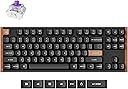
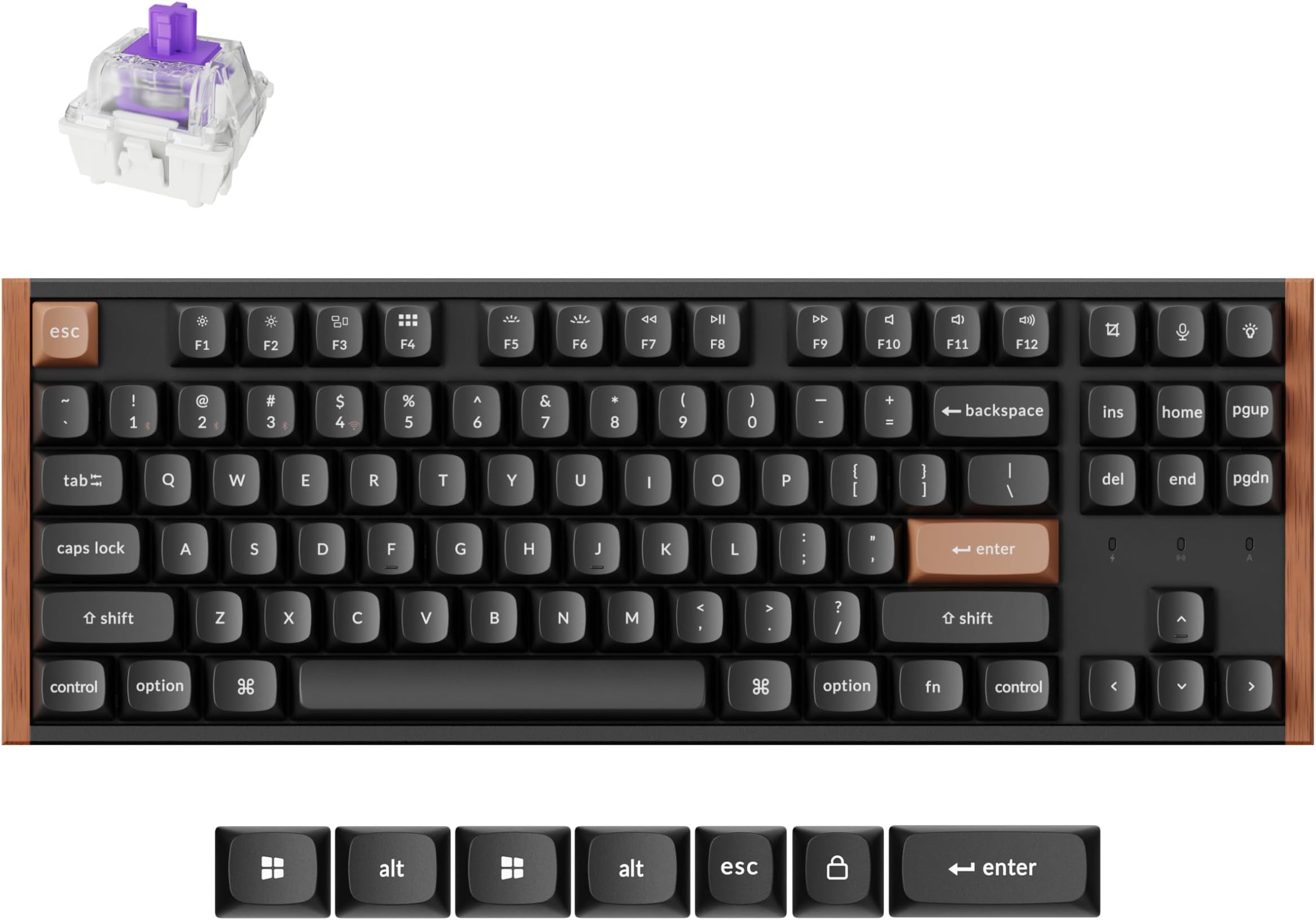
The Keychron K8 HE is a premium wireless mechanical keyboard featuring Hall Effect Gateron Double Rail Magnetic Switches for unmatched durability and responsiveness. It supports dual wireless modes (2.4GHz and Bluetooth 5.2) ensuring seamless connectivity across Mac, Windows, and Linux platforms. With customizable RGB lighting and a sturdy, ergonomic design, itโs built for professionals who demand both performance and style in their workspace.


| ASIN | B0DY1DXBW4 |
| Additional Features | Quick Trigger, QMK, Bluetooth, Wireless, Gateron Dual Rail Magnetic Switch, RGB Backlit, Wooden Frame, Hot-Swappable |
| Antenna Location | Gaming |
| Brand | Keychron |
| Color | Black Special Edition |
| Compatible Devices | Tablet, PC |
| Connectivity Technology | Type-C, Bluetooth 5.2 |
| Customer Reviews | 4.8 4.8 out of 5 stars (32) |
| Enclosure Material | Wood, PBT |
| Hand Orientation | Ambidextrous |
| Keyboard Backlighting Color Support | RGB |
| Keyboard Description | Mechanical |
| Keyboard Layout | QWERTY |
| Language | English |
| Manufacturer | Keychron K8 HE |
| Model Name | Keychron K8 HE US ANSI Layout |
| Model Number | K8 HE |
| Number of Keys | 87 |
| Power Source | Battery Powered |
| Switch Type | Mechanics |
M**E
Insgesamt eine sehr gute Tastatur. Sie hat ordentlich Gewicht und bleibt gut auf dem Tisch liegen, ist dadurch aber nur bedingt transportabel. Der Anschlag ist sehr gut definiert und man kann mehr einstellen als ich brauche. Das es kein deutsches Tastaturlayout ist, geht klar aus der Beschreibung und den Bildern hervor. Ich wollte explizit ein en-US layout und das findet man leider gar nicht sooo einfach, also auch ein Plus. Die Tasten selbst sind nicht durchscheinend! Im Dunkeln, kann man die Buchstaben also nicht gut sehen. Wer das braucht, nimmt wohl lieber die standard Variante ohne das Holzdekor, da sind andere drauf. Mir gefallen sie aber trotzdem, sie laufen etwas schmaler zu, so dass ich nicht immer alle benachbarten Tasten mit drรผcke. Ein wenig eingewรถhnen muss man sich aber schon. Ich kam von einer low profile Tastatur mit wenig Hub. Die Hand ist nun mehr geneigt (Handauflage ggf. hilfreich) und es ist etwas "anstrengender" zu tippen, wegen des lรคngeren Hubs. Fรผr mich kein Problem, wenn ihr Probleme mit der Belastung der Hรคnde habt, evtl. schon. Ich wรผrden sie wieder kaufen,
M**O
Product is great. Delivery was a bit of a mystery when item was actually arriving
S**D
NOTE: This review applies only to the Special Edition (the one with the wood accents) First Impressions: I was excited to get this keyboard and replace the crappy Dell that came with my computer. And it felt great! Great layout, super comfortable keys, very nice thock (not too loud, but you know you're typing). It felt like my typing speed improved 10 WPM just because of the confident key action. The keyboard is heavy, and absolutely will not shift once placed on the desk, even if you pound on it. I had to find a USB extender cable to plug it in to my PC, which sits on the floor to the right of my desk. I switched LED modes to see the glorious RGB and was disappointed to discover that the included keycaps were not shine-through. I tried out the web configurator and found that there were steps required to make that work out of the box. SUMMARY: Great typing experience, but other aspects were less great. I work in fully wired mode, and found the included USB cable to be ridiculously short (especially because it connects to the left end of the keyboard and my computer is on the right side of my workspace). I'm going to have to get a USB extender cable to plug in to the back of my PC. I suppose this wouldn't be such a problem if I only used the cable to recharge the battery and ran in wireless mode. All this said, the included cable is high-quality and has a right-angle USB-C on the keyboard end so it doesn't stick out to the side. Bluetooth worked great, once I read the instructions on how to pair with the keyboard. It actually allows you to pair with 3 different devices, which is cool. And if you hate BT, you can use the included wireless dongle instead. Configuration: I run Ubuntu Linux, and had to do a little finagling to get my computer to recognize the specific make and model of this keyboard when it is plugged in, rather than as a generic HID device. You don't need to worry about that if you're just typing, but it will matter when you try to use the web-based configuration tools. Likewise, the web configurator doesn't work in Firefox web browser so I had to install chrome for a minute. Once the fiddling was done, the configurator worked fine and I was able to customize the key responsiveness, RGB colors, macros, and all the other good stuff. I am still trying to figure out how to swap the function key mode (other Keychron boards have a simple key sequence you hold for 4 seconds to do this. Not on the K8 HE though.) Shine-through stuff: I guess the OSA profile keycaps don't have a shine-through version? Keychron did offer to sell me compatible shine-through keys for $35 plus shipping, but those are Cherry profile (most likely the exact keys from the Standard edition of this keyboard). I ended up buying replacement shine-through caps from Womier for less than half that price. In fact, I bought a black set and a white set. Pros: Best-in-class typing comfort, attractive styling, fairly easy web-based configuration, versatile connection options (bluetooth, wired, wireless), per-key customizable sensitivity. Cons: Expensive, included USB cable is short, included OSA keycaps are not shine-through Meh: Configuration on Linux required some digging around on the internet. Would be nice to find this info on the Keychron website. BOTTOM LINE: If you want a super-comfortable TKL keyboard with the best typing action possible and you don't care about shine-through keys, get this keyboard. If you want to work in a dark office, save $10 and get the standard edition with the Cherry profile shine-though caps. Bonus Linux details: Add this line to /etc/udev/rules.d/99-k8-he-kbd.rules KERNEL=="hidraw*", SUBSYSTEM=="hidraw", ATTRS{idVendor}=="3434" ATTRS{idProduct}=="0e80" MODE="0666", GROUP="users" TAG+="uaccess", TAG+="udev-acl" And then sudo udevadm control --reload-rules ; sudo udevadm trigger Doing this will allow the web-based configurators to see your keyboard as something other than a generic HID device, so that they will then work correctly.
J**T
The keys are extremely smooth and the keyboard typing is very quiet. If that's what you're after them the hardware is perfect for you. Connections to Bluetooth and to the 2.4 dongle work easily regardless of operating system. Needless to say the direct USB connection also works flawlessly. The only drawback is that the customization software is largely a web app which isn't a huge deal if you're not changing things often. There is a downloadable app but I don't think that covers the RGB. It's minor but notable On Linux there's a further issue that the operating system doesn't allow permissions for the customization software. I'm assuming this is true for most keyboard customization softwares. On the bright side it is possible to use a few terminal commands to allow permissions. I have yet to actually try this as there's not really any macro commands I need yet and the RGB presets I have work for my current usages. Tl;dr, excellent keyboard, smooth switches. Not too noisy, just enough for feedback. A few software snags specifically on Linux but they're probably fairly simple fixes if you need them.
A**R
The quality, the sound, the wood accent (removable), everything is perfect. I liked this keyboard so much I bought a second as a backup!
Trustpilot
2 months ago
2 months ago