🔥 Stay cool, stay ahead — build your powerhouse with Versa H21! 🖤
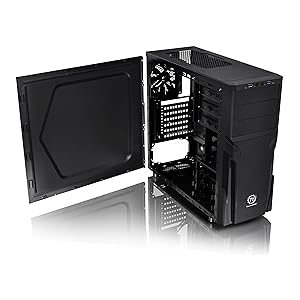
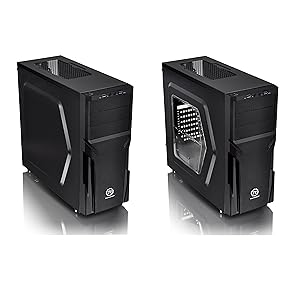
The Thermaltake Versa H21 is a sleek, black SPCC ATX Mid Tower chassis designed for gamers and PC builders seeking robust airflow and easy customization. Featuring perforated mesh panels for superior ventilation, tool-free installation, front USB 3.0/2.0 ports, and support for multiple motherboard sizes and cooling solutions, it balances functionality with affordability. With ample drive bays and expansion slots, it’s perfect for those who demand performance without compromise.


| ASIN | B00J0NZ3Q4 |
| Antenna Location | Gaming |
| Best Sellers Rank | #56 in Computer Cases |
| Brand | Thermaltake |
| Case Type | Mid Tower |
| Color | Black |
| Compatible Devices | [A wide range of computer components and peripherals compatible with Mini ITX, Micro ATX, and ATX motherboards, and expansion standards] |
| Cooling Method | Air |
| Customer Reviews | 4.2 out of 5 stars 734 Reviews |
| Enclosure Material | secc |
| Fan Size | 120 Millimeters |
| Global Trade Identification Number | 00841163054246 |
| Hard Disk Form Factor | 2.5 Inches |
| Internal Bays Quantity | 6 |
| Item Dimensions D x W x H | 18.9"D x 8.23"W x 16.89"H |
| Item Weight | 9.3 Pounds |
| Manufacturer | Thermaltake USA Direct |
| Material | secc |
| Model Name | Versa H21 |
| Motherboard Compatability | ATX |
| Number of Fans | 1 |
| Other Special Features of the Product | Not_Performance_Used |
| Power Supply Mounting Type | Rear Mount |
| Recommended Uses For Product | Gaming |
| Supported Motherboard | ATX |
| Total Expansion Slots Quantity | 7 |
| Total USB 2.0 Ports | 1 |
| Total USB 3.0 Ports | 1 |
| Total Usb Ports | 2 |
| UPC | 350584834813 798813001504 809185333428 841163054246 809385182369 012304358152 863121544286 806293514329 803982760661 513560266910 807034591845 898029635965 846764214570 |
| Unit Count | 1.0 Count |
| Warranty Description | 3 years |
T**W
Great Case
Doesn't break the bank. Up to 3 external bays - cases with those are getting hard to find for a decent price. 2 x 120mm fans snap into the removable front screen behind the front cover. Front cover comes off without any wires attached. Doesn't require any screw in stand-offs, made into the case. Comes with 3 stand-offs in case you have a extra wide motherboard - there are holes for them but it's rare you come across a board that needs them. The other stands are made into the case, but will strip easy if you tend to over tighten mounting screws- but not a big deal. You can always use a differently threaded screw if needed. Can fit 2 120mm fans into the top, but it's tight. Most CPU air coolers fit, as well as most video cards - but a long card might not fit depending on what you have in the external bays. No clear sides or windows if you want a "pretty" hardware installation but great for those that just want a functional case. Might have to get inventive if you want to use water cooling.
P**R
Excellent case with plenty drive bays
I have built quite a few computers over the years. But I tend to gravitate towards inexpensive models because I have lots of left-over used parts. This case is very easy to work with, which will be configured as a NAS/server. So, room for drive bays is extremely important. Offerings nowadays tend to gear towards gaming with few or even no drive bays. For example, my main computer does not have a single drive bay. The need for a NAS is pretty clear. This case does not really have any fancy features. Fit and finish is fine, but do not buy it for look. Anyone with just a little bit of experience in putting together a computer can complete the installation in about an hour or two. The only item that requires some thinking is routing the wires and cables, but that should not take that much time even if you had to redo some. There is plenty of room inside, so air flow is very decent. I have no idea if you install a big/long video card; I am using it as a headless device, so no need for discrete video card. The only complaint I have is that the case only came with one fan in the back. I would have appreciated if a couple more fans are pre-installed on the top. But that is still only a minor issue. Overall, I am satisfied. Then factored in the cost, I think it is a very deal. Highly recommended.
T**S
Great case for the money, lots of nice options
I was pretty happy with this case overall. It was a bit of a tight fit stepping down from a full tower Lian Li case that I was previously using but managed to get all the components to fit after a bit of trial and error. A couple of things to note. The drive bays are a little strange but actually kind of cool once you get used to them. The drives will "snap" into the carriers, thing is you actually put them in so the sata connectors are towards the back of the case. If you put them in toward the front the cables won't fit properly under the side cover as there is very little space there once that cover is on. However it is easy enough to just feed them through the case to the back and you've got a lot more room to work with. Makes for good cable management I guess but it was a bit unexpected so I was scratching my head for a minute or two. This will mount 2 120mm fans up front, on in the rear and two up top of standard size which is a lot of airflow. My setup is a bit different, my CPU uses a water cooling rig with a single 120mm radiator so I mounted that out the back, relocated the 120 mm fan that was there to the top (only room for one in this case, you can't really mount the second fan as the radiator is just a touch too big to allow the fan to go in up top, then I mounted two 120mm fans up front. Works very well, keeps the system quite cool and I'm very happy with thermal management. Hard drive bays are nice, you've got room for 3 x 5.25 and the covers for those slots can be removed and then replaced if you decide to change your setup which is very nice, they just snap in. Internally you have 3 2.5 bays which work great for SSD drives and 3 3.5 inch bays that I used for some 8tb sata drives for a good amount of storage. I did add a fan controller, having all those fans running full blast was a bit noisy and I liked being able to turn them down a bit to quiet the system a tad. But all in all it's a good little case, I liked it because it is just low key and doesn't have all that silly acrylic side panel look at all the LED lights like a lot of other mid tower cases have. I know people love those for gaming rigs but I'm building a computer, not a landing strip for aircraft.. lol. I would purchase this again, for the money it's pretty hard to beat for mid tower cases. I did give it 4 out of 5 stars due to the lack of well written documentation, getting this together was more trial and error than anything else, and the location of the 120mm fan exhaust port on the rear, if they had just moved that down a centimeter or two I would have had room for another fan. I don't need it for cooling you understand up top but it's an OCD thing, I've got one slot with a fan and one without which just looks a little off. But other than that, great case.
C**I
Very nice case.
You have 3 spaces for optical drives. That is hard to find now. The drive bays load fron the side. You don't have to remove your ram or cpu cooler to change a drive.
F**Y
Great value!
I'm very happy with this case. I wanted to rebuild a system I had, which was in a prettier case, in order to get more drive bays. You can easily pay 5x as much for server-oriented cases. This is a budget case and looks like it, but I think the result is something of a "sleeper" -- it can house a better system than you would think, just from looking at it. I did put ARGB fans in it, and that creates a nice, subtle effect, even though there are no glass panels. I made use of the external drive bays to mount an old DVD drive that still works, along with some more USB ports. Another plus is size and weight. It is truly a mid-tower case, but it's a bit smaller and lighter than most. That's a real advantage, if you want to avoid the typical size and weight of most mid-tower cases available today. Here's the biggest down-side I ran into: my full-ATX motherboard fits tightly into the "upper left" corner (when looking at the board). That meant I couldn't pass cables through from that area to behind the board, making the main compartment messier in terms of cable management. The space behind the board is also pretty shallow. Fortunately the side panels are designed with bulges which save the day by making a little more room. Another disappointment was the poor attempt at toolless design for the internal drive bays. I would have much preferred simple bays that require screws on each side, rather than the plastic sleds which fit in somewhat sloppily. One more thing to be aware of: You might think that the radiator of a 240mm AIO could be mounted in the top, even though they don't say so. But that's unlikely to work. An ATX motherboard fits too high in the case for that to fit. Also, the screw hole locations wouldn't permit mounting my 240mm AIO at all. That vented top area is meant for mounting two 120mm fans, and you'll need to do just that, because other options for ventilation are limited. You can mount a single-fan AIO radiator in the back if you want to. I had a large, good-quality tower air cooler laying around, so I just used that. In spite of these negatives, like everyone else has said, it's a very satisfactory compromise between design and (quite low) price!
D**N
Decent mid tower ATX
Full disclosure. Let me start off by saying, I don't like Thermaltake products since after the old ~2005 era Toughpower PSUs - you know the HEAVY ones. I had bought a new Smart 750 from Thermaltake (around 2016) who's SATA connectors destroyed three SATA 2.5" SSDs all at once. Thermaltake's response was more or less a shoulder shrug and an offer to replace my power supply (less than 6 months old). It actually fried the chip (burn marks) inside each of the three SSDs and they couldn't care less. So is my review of this case biased? You'll have to decide. ### CONS First, while the case in the pictures looks sturdy, it's only moderately so. As others before me have suggested, the material is thin. The case can twist a bit if forced. 9x standard ATX motherboard mount points are integrated into the fixed motherboard tray - you don't get to choose if you want them or not. Not that big of a deal, but I prefer the choice. 3x additional motherboard stand-off studs are included in my hardware package (for smaller motherboard screw placement) as well as screws to mount your motherboard (I had only 9 screws in my package for that). There were various other screws (probably for drive mounting, but I didn't use them) Let's start at the front. Nothing remarkable - 1x USB 2.0, 1x USB 3.0 (could have added an extra of each of those for better utility use), and mic/speaker ports are provided at the top front. A power and reset switch are positioned on the top of the case (at the front). The front bezel pops off to reveal a dust screen. The dust screen seems to be okay quality. This is where I ran into my first issue. The case specs said it supported 2x 120x120x25 front fans, but I could not find anywhere to screw them in and the instructions didn't say anything about this at all (only mentions the rear fan). I thought maybe I got a manufactured defective one. Then I read someone's review who said front fans didn't need any tools. That's when I went back and looked and I saw (2) 4x fan hold studs and some plastic clip hold-downs integrated on the dust screen that would fit 2x 120mm fans. I installed one Noctua 120mm fan at the bottom of the dust screen. It was a tight fit with the Noctua rubber corner grommets but it fit snuggly enough and I was able to snap the dust screen back into place, so I was satisfied. The case allows for easy routing of the fan cable through (behind) the hard drive cage. Moving inside. It comes with 3x 2.5" HDD and 3x 3.5" HDD toolless trays - the number of bays is the reason I bought this case over a Fractal Design Focus G. The 5 1/4" bays (3 of them) are also toolless, but I dropped a screw into those just to be safe. Here's where things get a bit tricky. First, if you have an aftermarket cooler that uses some other form of mounting other than the standard Intel/AMD mounting OEM fan solutions, I highly recommend that you install your CPU cooler first and connect the fan(s) now. I am using an ID Cooling SE-207-XT Slim and adding a fan over my RAM sticks (G.skill Ripjaws) causes the fan to stick right up to the 155mm height limit for CPU coolers imposed by this case. Next, if your motherboard 4 or 8 pin CPU connector is in the back, top corner of the motherboard, you really need to install that connector BEFORE you install your motherboard when using a large aftermarket cooler. There are no holes in the case that will facilitate routing the CPU power connector behind the motherboard tray. Once the motherboard is in, you will find it difficult later to install the CPU power connector, especially if you have giant Shrek hands like me and a large CPU cooler. Now here's where it gets interesting. I installed my PSU and the top case fan first. IMO, in order to install your CPU power connector safely, you should install your PSU first so it doesn't fall and yank on the motherboard by accident (that didn't happen to me, but I could see it happening to me sometimes the way I do things). I installed the PSU first and top case fan, then the CPU power connector and CPU fans. However, if you do this, make sure you have not installed any fans on the top of the case (which the case specs don't mention they exist, but you can install 2x 120mm fans on top - I don't think a 120mm or 240mm radiator liquid cooling solution would fit here, so only fans). I did install a single 120mm Noctua fan on top (towards the back of the case) and as a result, my standard ATX motherboard could not be installed because I could not angle/twist the board to get around the top case fan and the PSU with the large CPU cooler installed. What I did was remove the top case fan, then install the motherboard (ASUS B550 Tuff Wifi II). It was still tight, but it made it. Getting the 2x motherboard screws into the holes along the top of the case (by the motherboard shield and CPU cooler) would have been impossible without a screwdriver from iFixit that was magnetic so I could get those screws down in there. A carefully held and rotated screwdriver allowed me to tighten the screws down. Keep in mind, a standard ATX motherboard will fit, but it will be right up against your PSU and the top case fan(s). Then, once in, I had to carefully bend down/angle the 8pin CPU power connector wires, so that I could squeeze and gently force in the 120mm Noctua top fan into place. As others have said, the top fans are not really meant to be installed inside, but I am stubborn, and they were going inside no matter what. I made sure to connect my CPU cooler and CPU fan headers before I installed the motherboard. Make sure the CPU fan wires are not encroaching on the fan's domain. Let's finish up - the sides of the case are whole (not hole). There are no holes, no fan mounts, no windows on the case side panels. For me, that's okay. I'm building a 5700G proxmox server and I don't expect to push this to extremes. Final complaint, the rear included fan is only a 3 pin - could have been a 4 pin. ### PROS I like the hard drive and external drive bays - it was the number I was looking for (needed 3 external). I do like the compactness of it, just not what it takes to work around that. There are holes and cutouts throughout the inside of the case which makes for easy cable management and cable routing for almost all of your cable needs, to keep cables out of the main case cabin to facilitate better airflow and for a more clean look. Also, was very surprised to find generously long USB 3, USB 2, and audio front panel connectors. So many cases skimp on the length of these cables forcing you to run these cables right through your motherboard and GPU area and/or to put a lot of pressure and pull on your motherboard headers which I don't like. The USB 3 connector also was fairly flexible compared to other case USB 3 headers where the cable is VERY stiff and likely to break off of the motherboard header. The packaging also came with a couple of decent length tie straps for cable management. The side panel screws are thumb screws (which means you don't need tools to remove/replace the side panels). I like that. With a standard ATX, an LG DVD/Bluray drive, and a Kingston 3.5/2.5" single bay removable drive bay installs with room for the cables and my cooler. Lastly, the bottom of the case where your PSU goes has a dust screen opening for your PSU if you mount your PSU fan downwards that way. Bottom line, the case does (or will do) what I bought it for. It could be better like better quality it terms of sturdiness, motherboard mount flexibility, better front fan mounting solution, a bit more room on the top (like 1" would be sufficient I think), side window panel and fan mount, but all in all, a decent case for my needs. I would buy the case again for specific non-extreme uses, but exceeding that spec, you may want to look for another case if additional fans or liquid cooler are your preference. The case might be better suited for mini/micro ATX and ITX motherboards, but with patience and the right tools, you should be able to get the job done with a standard ATX.
A**E
Easy going easy done
This case was really thought out. It's a real mid towel case. Meaning Spacious. Easy to navigate in side Installing parts. Compartments snap in place no need for screws. And equip with strong steel structure no flimziness. The price is really affordable for a case of this quality. Yes I recommend with five stars easily.
D**Z
Time has passed it by
I purchased this case because I wanted something cheap, with optical bays, without a glass section to do a new build using Intel's arrow lake. It even has some optional extras that I was not expecting: a dust filter on the bottom for the PSU air intake. And for the most part, the case delivers on those promises. There are some fit and finish problems that could have been avoided: The case is cheaply made - small manufacturing errors with the optical bay covers make it prohibitively difficult to actually slot a drive / some of the built in motherboard standoffs failed on gentle use / the pcie slot covers have to be bent out, and can leave behind razor sharp edges / The drive bays use plastic sleds with a latching mechanism that works based on the plastic deforming. As the plastic ages, snapping will become a concern. The case's design is not the best - the front panel can be removed, but there's no easy way to to remove the clips short of grasping the panel by the bottom and pulling hard. Those clips breaking is a matter of when, not if. / The top of the case, particularly the top left, is hard to get at and would be difficult to work in under the best of circumstances. The case is not exactly what was depicted. Amazon's current pictures for the item show no screw holes in the top grill (which would prevent mounting) and a very large hole below the motherboard tray (which would make cable management easy, if unsightly). Mine arrived with fan mounts, but with a much smaller set of holes for cables. The item depicted might just fit something like the Corsair shift series of psus. The item I received very much will not. All of that was not great, but the true problem is that the case's design philosophy has simply been surpassed by the times. Modern motherboards, with their large heat sinks and shrouds, are incredibly difficult to work on inside this case. If you add an a large cooler or radiator, the problem only compounds. And if you wish to add more fans (to better manage the heat of modern systems) things get worse yet (The cost of even mid-quality fan also destroys the value proposition of the case). Effectively, the build I have done in this case is immutable. Removing the board would require at at a minimum case fans, cooler fans, the cooler, optical bays, and the front panel. And the PSU should probably come out as well just to be safe. To sum up - I personally think there is much to like about the cases like this: simple, durable, and to the point. But the Thermaltake Versa H21 isn't even a particularly good example of its type. It is assembled somewhat poorly from cheap materials, and longevity is a real concern. When one factors in just how difficult it is to do a modern build in a case like this, I simply cannot recommend it. Unless you value your time very, very cheaply; I would steer away from this case.
Trustpilot
2 weeks ago
2 weeks ago