We remain fully operational. Our teams are working around the clock to ensure your deliveries continue safely.

DOWNLOAD THE APP


Customer Services
Copyright © 2025 Desertcart Holdings Limited
DOWNLOAD THE APP

🚀 Elevate your home network—fast, secure, and built for the connected lifestyle.
The TP-Link Archer C6 is a high-performance AC1200 dual-band WiFi router featuring 867 Mbps on 5 GHz and 300 Mbps on 2.4 GHz bands. Equipped with four external antennas and Beamforming technology, it delivers extended, focused coverage ideal for busy smart homes. MU-MIMO ensures smooth simultaneous connections for multiple devices, while WPA3 security and VPN server support protect your network. Easy setup via the TP-Link Tether app and a 3-year warranty make it a reliable, user-friendly choice for professionals seeking robust, fast, and secure internet.


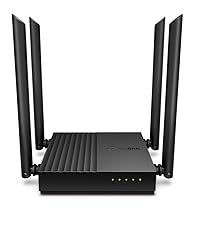

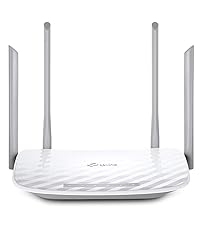

| ASIN | B07L5YRYF4 |
| Antenna Location | Home |
| Antenna Type | Fixed |
| Best Sellers Rank | 214 in Computers & Accessories ( See Top 100 in Computers & Accessories ) 1 in Routers |
| Box Contents | Power Adapter, Quick Installation Guide, RJ45 Ethernet Cable, Wireless Router Archer C6 |
| Brand | TP-Link |
| Brand Name | TP-Link |
| Colour | Black |
| Compatible Devices | Laptop, Personal Computer, Smart Television, Smartphone, Tablet |
| Compatible devices | Laptop, Personal Computer, Smart Television, Smartphone, Tablet |
| Connectivity Protocol | Wi-Fi (802.11ac), Ethernet |
| Connectivity Technology | Ethernet, Wi-Fi |
| Control Method | App |
| Controller Type | Ios |
| Country of Origin | China |
| Coverage | Boosted with Beamforming technology |
| Customer Reviews | 4.5 out of 5 stars 2,064 Reviews |
| Data Transfer Rate | 1200 Megabits Per Second |
| Frequency | 5 GHz |
| Frequency Band Class | Dual-Band |
| Frequency band class | Dual-Band |
| Global Trade Identification Number | 06935364089399 |
| Has Internet Connectivity | Yes |
| Has Security Updates | Yes |
| Is Modem Compatible | Yes |
| Item Dimensions L x W x H | 11.7L x 3.2W x 21.5H centimetres |
| Item Type Name | WiFi Router |
| Item Weight | 775 Grams |
| LAN Port Bandwidth | 1000 Mbps |
| Manufacturer | TP-Link |
| Manufacturer Part Number | ARCHER C6 V3.2 |
| Maximum Upstream Data Transfer Rate | 866.7 Megabits Per Second |
| Model Name | Archer C6 |
| Model Number | Archer C6 |
| Model name | Archer C6 |
| Number of Antennas | 4 |
| Number of Ports | 5 |
| Operating System | Android and IOS |
| Other Special Features of the Product | Beamforming,Parental Control,Access Point Mode |
| Product Warranty | Manufacture's 3-year warranty |
| Router Firewall Security Level | High |
| Router Network Type | WIRELESS |
| Security Protocol | WEP, WPA-PSK, WPA2-PSK |
| Special feature | Beamforming , Parental Control, Access Point Mode |
| Voltage | 230 Volts (AC) |
| Wi-Fi Generation | Wi-Fi 5 |
| Wireless Compability | 802.11ac, 802.11n |
| Wireless communication standard | 802.11ac, 802.11n |
A**S
Rock solid connection, lots of control, and excellent value.
I bought this as my old router, which at the time I bought it was very expensive, was suffering constant dropouts. I wasn't sure if it was the router at fault, so didn't want to spend a fortune on a test replacement. At the same time, if it was the router at fault I wanted the replacement to be reasonably good. This TP-LINK exceeded my expectations across the board. I have a high-speed fibre connection of around 70-80Mps and this router really takes full advantage of my bandwidth. I've had it running for about a month now and in that time I've had zero dropouts. My uptime is from the time I first turned it on. I have some 20-30 internet capable gadgets of various types and they're all solid with this router. No 'not respondings', no ' can't connect'. Absolutely first class. Watching a 4K stream on Netflix while someone else in the house is gaming and this thing doesn't even blink. Set up is pretty easy using the usual webpage interface, with all the handy extras you'd expect. 'Basic' mode hides all the confusing extra settings if you just want a 'make it work' option, while 'advanced' gives you lots of fine control for more superuser types. You can allocate IP addresses, set parental controls to block keywords or access times, and have a guest connection. The phone app is suprisingly useful too, letting you know what's going on on your network without having to fire up a computer. Downsides are, well, it's pretty ugly. Routers seem to be immune from any sort of aesthetic design other than the mad future tech look, and this one is no exception. It's also pretty big physically so it's hard to put somewhere out of sight. The antenna are huge, but this presumably what gives us such a good connection. This is a great router - my old one cost four times the price of this some ten years ago, and the TP-Link blows it out of the water. Great value, highly recommended. (If this review was helpful to you, I'd love it if you let me know with a click below)
C**N
Great boost to wifi.
I was having problems with my Virgin broadband router and the WiFi signal so I did some research and this router was highly rated. Firstly, the router looks great, it looks like it means business and is made to serve a purpose. I placed the virgin broadband into router mode and connect this device. After connecting via the app the whole setup was so simple and easy that even a not so tech savvy person like myself found it a breeze. I positioned the antennas in different positions and connected to the router using the original ID and password from the virgin router. This can be set during set up and is completly customisable. There are many different settings to choose from including 2.4 and 5 ghz and also guest networks. The speed of my WiFi increased drastically once having this plugged in and went from around 190Mbps to 270Mbps and the coverage also greatly improved across the house. I have had no complaints in regards to the router itself, my firesticks found it difficult to connect at first but once I connected using the WPS button they have worked as normal. I would highly recommend this item if your wanting to replace your ISP router. It is so easy to set up and use it is actually a doddle. I have since purchased additional booster for the garage which easily connects through the mesh network and again is so simple to install its virtually fool proof. If you want a new router, this is the one. Ive found it great for daily streaming in a house of 5.
I**E
Works well with VM and is a VERY smart router
I only got this router today so I may revise this review in the future. First of all, let me say that I am a computer technician, so setting up and running network equipment is nothing new to me. I had to read up on some TP-Link specific terms but that was advanced stuff I needed to know about. The initial setup was very easy. I was very impressed that the 5G and 2.5G networks run on completely separate networks, each having it's own SSID. That has not been the case on my previous routers. First of all I wrote down all the passwords SSID's and IP addresses I was going to use. I then reset my VM hub completely by holding in the reset button for 60 seconds while it was switched on. I then put the hub in modem only mode.. After setting the router to a different LAN address and making it so that the WAN gets a DHCP address I rebooted the router and linked it to the hub. It took all of 10 minutes to get it going. I gave 5 stars to tech support because I never needed to use them. I only gave 3 stars to User interface because although the router is fully featured, the colour scheme is not contrasted enough to be easy on the eye. Hovering over links tuns them either Yellow on a white background or white on a yellow background. There is an aquamarine background too. The colour scheme seems like it was designed by a 17 year old with dreamy summer colours in mind and no idea how to make an interface colour scheme add to the usability. I preferred the colour scheme of the TP-Link r600vpn - very easy to navigate and no confusion So far, after messing with the Archer C6 I am over-all quite impressed and may use some css styliser to overcome the colour problems The following has been edited in. I have had the router a few months now and it works excellently I am satisfied this is a great router for the price
N**G
this model doesn’t have VPN client
It is a good product the set up was a learning curve also it is good. Build quality, and Wi-Fi signals good, also nice coverage But this model doesn’t have VPN client feature, so it is not for my use case so
A**F
Reliable Dual-Band Router for Improved Connectivity
This dual-band Wi-Fi router has been a game-changer for my home setup. The speed capabilities of up to 867 Mbps on the 5 GHz band and 300 Mbps on the 2.4 GHz band have significantly improved my internet connectivity, especially since my main modem is quite far from my room. The router's performance has been consistently reliable, providing a strong and stable connection throughout my space. The setup was straightforward, and the coverage has made a noticeable difference in streaming, gaming, and general internet use. Overall, this router is a fantastic solution for extending Wi-Fi range and enhancing network speed. It’s highly effective and a great value for anyone needing to improve their connectivity in a large or multi-story home.
W**R
A great product, has really given a boost to my internet
An amazing product, I was advised by my friend to purchase this item as my Xbox, Computer and Phone were struggling to either detect and connect to my BT broadband or were running very slow. This product has since immensely strengthened my wifi signal and my Xbox gaming experience has been very positive since with no issues of lag, disconnections and no more experiences of not being able to find or connect to the internet. Comes with useful and easy to use and follow instructions of how to install, the mobile app is great too, simple but sometimes simplicity is the best way, app works great, user friendly and has lots of options, tutorials and customisations available for your network.
M**N
Very stable for PCVR with Quest 3
I purchased this as a dedicated access point for playing PCVR games on my Meta Quest 3 over Air Link. I chose this one specifically as it comes well recommended for the Quest, it does seem to be a bit hit and miss with many people reporting issues even when using more expensive WiFi 6 routers. Previously I was using my ISP router (Virgin Superhub 4), and while this generally worked fine it would randomly drop the connection kicking you back to the home screen which was very frustrating. Sometimes it would happen within a few minutes, other times it might last an hour. Since using this C6 I've had no issues at all over many play sessions of varying lengths which has been perfect. Both the C6 and my PC are plugged into the Virgin hub. I experimented with connecting my PC directly to the C6 to remove one extra hop, but there was no discernible difference at all. The benefit of not having the PC going through the C6 means I can leave it turned off when not in use. It only uses around 2W at idle, but it's still a waste when not needed. In terms of location, I have this in a cubby hole on my TV stand in the lounge, and use the headset in the bedroom directly above it. I've got the aerials laid flat to give a stronger signal upstairs, and there's no issues at all with the signal going through this stand and the ceiling/floor. My phone shows the signal strength is around 36-39dB upstairs, so there's certainly no requirement to have the router in the same room as the headset. This is on the 5GHz band, I've disabled the 2.4GHz as it's not needed.
B**E
Good Budget Router with Decent Performance, but Not the Fastest
The TP-Link Archer C6 is a solid budget-friendly router that delivers reliable WiFi coverage for everyday use. Setup is quick and straightforward, and the EasyMesh support makes it a good option if you plan to expand your network later. The Gigabit Ethernet ports are a nice addition for wired connections, and it works well for casual gaming and streaming. However, the speed isn’t the fastest, especially if you have multiple devices connected or are in a large home. While it handles basic browsing, streaming, and light gaming well, heavy online gaming or 4K streaming might push its limits. Overall, it’s a great value router for smaller households or those on a budget, but power users may want something more high-end.
Trustpilot
3 days ago
2 days ago